
Android_(控件)使用Gallery浏览手机上SD卡中图片
运行截图:
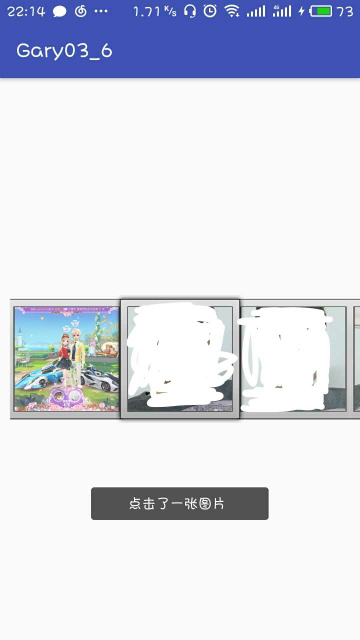
(发现后面两张照片是自己自拍,大写的尴尬对图片进行涂鸦了!!!)
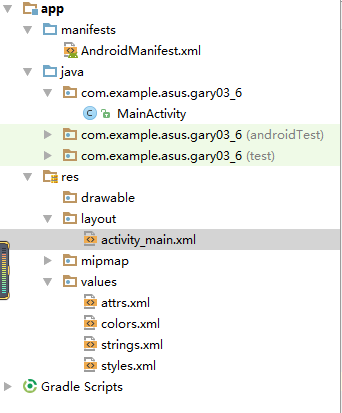
程序结构:
<?xml version="1.0" encoding="utf-8"?>

<manifest xmlns:android="http://schemas.android.com/apk/res/android"

    package="com.example.asus.gary03_6">

    <uses-permission android:name="android.permission.READ_EXTERNAL_STORAGE"/>

    <application

        android:allowBackup="true"

        android:icon="@mipmap/ic_launcher"

        android:label="@string/app_name"

        android:roundIcon="@mipmap/ic_launcher_round"

        android:supportsRtl="true"

        android:theme="@style/AppTheme">

        <activity android:name=".MainActivity">

            <intent-filter>

                <action android:name="android.intent.action.MAIN" />

                <category android:name="android.intent.category.LAUNCHER" />

            </intent-filter>

        </activity>

    </application>

</manifest>
AndroidManifest
<?xml version="1.0" encoding="utf-8"?>

<LinearLayout xmlns:android="http://schemas.android.com/apk/res/android"

    xmlns:app="http://schemas.android.com/apk/res-auto"

    xmlns:tools="http://schemas.android.com/tools"

    android:layout_width="match_parent"

    android:layout_height="match_parent"

    tools:context="com.example.asus.gary03_6.MainActivity">

    <Gallery

        android:id="@+id/mygallery"

        android:layout_width="fill_parent"

        android:layout_height="fill_parent"

        android:layout_alignParentBottom="true"

        android:layout_alignParentLeft="true"

        android:gravity="center_vertical"

        />

</LinearLayout>
activity_main
package com.example.asus.gary03_6;

import android.support.v7.app.AppCompatActivity;

import java.io.File;

import java.util.ArrayList;

import java.util.List;

import android.content.Context;

import android.content.res.TypedArray;

import android.graphics.Bitmap;

import android.graphics.BitmapFactory;

import android.os.Bundle;

import android.util.Log;

import android.view.View;

import android.view.ViewGroup;

import android.widget.AdapterView;

import android.widget.BaseAdapter;

import android.widget.Gallery;

import android.widget.ImageSwitcher;

import android.widget.ImageView;

import android.widget.Toast;

import android.widget.ViewSwitcher;

import android.widget.AdapterView.OnItemClickListener;

import android.widget.Gallery.LayoutParams;

public class MainActivity  extends AppCompatActivity implements

        AdapterView.OnItemSelectedListener, ViewSwitcher.ViewFactory {

    private List<String> ImageList;

    private String []list;

    public void onCreate(Bundle savedInstanceState){

        super.onCreate(savedInstanceState);

        setContentView(R.layout.activity_main);

        ImageList=getSD();

        list = ImageList.toArray(new String[ImageList.size()]);

        Gallery g = (Gallery) findViewById(R.id.mygallery);

        g.setAdapter(new ImageAdapter(this,getSD()));

        g.setOnItemSelectedListener(this);

        g.setOnItemClickListener(new OnItemClickListener()

        {

            public void onItemClick(AdapterView<?> parent,

                                    View v, int position, long id)

            {

                Toast.makeText(MainActivity.this, "点击了一张图片 ", Toast.LENGTH_SHORT).show();

            }

        });

    }

    private List<String> getSD()

    {

        List<String> it=new ArrayList<String>();

        File f=new File("/sdcard/");

        File[] files=f.listFiles();

        for(int i=0;i<files.length;i++)

        {

            File file=files[i];

            if(getImageFile(file.getPath()))

                it.add(file.getPath());

        }

        return it;

    }

    private boolean getImageFile(String fName)

    {

        boolean re;

        String end=fName.substring(fName.lastIndexOf(".")+1,

                fName.length()).toLowerCase();

        if(end.equals("jpg")||end.equals("gif")||end.equals("png")

                ||end.equals("jpeg")||end.equals("bmp"))

        {

            re=true;

        }

        else

        {

            re=false;

        }

        return re;

    }

    public class ImageAdapter extends BaseAdapter

    {

        int mGalleryItemBackground;

        private Context mContext;

        private List<String> lis;

        public ImageAdapter(Context c,List<String> li)

        {

            mContext = c;

            lis=li;

            TypedArray a = obtainStyledAttributes(R.styleable.Gallery);

            mGalleryItemBackground = a.getResourceId(

                    R.styleable.Gallery_android_galleryItemBackground, 0);

            a.recycle();

        }

        public int getCount()

        {

            return lis.size();

        }

        public Object getItem(int position)

        {

            return position;

        }

        public long getItemId(int position)

        {

            return position;

        }

        public View getView(int position, View convertView,

                            ViewGroup parent)

        {

            ImageView i = new ImageView(mContext);

            Bitmap bm = BitmapFactory.decodeFile(lis.

                    get(position).toString());

            i.setImageBitmap(bm);

            i.setScaleType(ImageView.ScaleType.FIT_XY);

            i.setLayoutParams(new Gallery.LayoutParams(400, 400));

            i.setBackgroundResource(mGalleryItemBackground);

            return i;

        }

    }

    public void onItemSelected(AdapterView<?> parent, View view, int position,

                               long id) {

        String photoURL=list[position];

        Log.i("A",String.valueOf(position));

    }

    public void onNothingSelected(AdapterView<?> parent) {

// TODO Auto-generated method stub

    }

    public View makeView() {

        ImageView i = new ImageView(this);

        i.setBackgroundColor(0xFF000000);

        i.setScaleType(ImageView.ScaleType.FIT_CENTER);

        i.setLayoutParams(new ImageSwitcher.LayoutParams(

                LayoutParams.FILL_PARENT,LayoutParams.FILL_PARENT));

        return i;

    }

}
MainActivity
<?xml version="1.0" encoding="utf-8"?>

<resources>

    <declare-styleable name="Gallery">

        <attr name="android:galleryItemBackground" />

    </declare-styleable>

    <declare-styleable name="mygallery">attributes</declare-styleable>

</resources>
attrs.xml
一、获取手机存储卡权限
<uses-permission android:name="android.permission.READ_EXTERNAL_STORAGE"/>
二、界面布局
放置一个Gallery控件
三、实现Gallery控件功能
1、获取SD卡中图片文件
private List<String> getSD()

    {

        List<String> it=new ArrayList<String>();

        File f=new File("/sdcard/");

        File[] files=f.listFiles();

        for(int i=0;i<files.length;i++)

        {

            File file=files[i];

            if(getImageFile(file.getPath()))

                it.add(file.getPath());

        }

        return it;

    }
2、对图片进行筛选
  private boolean getImageFile(String fName)

    {

        boolean re;

        String end=fName.substring(fName.lastIndexOf(".")+1,

                fName.length()).toLowerCase();

        if(end.equals("jpg")||end.equals("gif")||end.equals("png")

                ||end.equals("jpeg")||end.equals("bmp"))

        {

            re=true;

        }

        else

        {

            re=false;

        }

        return re;

    }
定义ImageAdapter类,继承于BaseAdapter类
构造方法:SimpleAdapter(Contextcontext,List>data,intresource,String[]from,int[]to)
context:要使用的上下文环境。
data:是一个List>类型的集合对象,该集合中每个Map对象生成一个列表项。
resource:界面布局文件的ID,对应的布局文件作为列表项的组件。
from:是一个String[]类型的参数,该参数决定提取Map对象中哪些key对应的value来生成列表项。
to:该参数是一个int[]类型的参数,该参数决定填充哪些组件。
SimpleAdapter可以显示图片,文字,选择框等多种需求。SimpleAdapter的数据源只能是List<Map<"键","值">>形式的数据。
public class ImageAdapter extends BaseAdapter

    {

        int mGalleryItemBackground;

        private Context mContext;

        private List<String> lis;

        public ImageAdapter(Context c,List<String> li)

        {

            mContext = c;

            lis=li;

            TypedArray a = obtainStyledAttributes(R.styleable.Gallery);

            mGalleryItemBackground = a.getResourceId(

                    R.styleable.Gallery_android_galleryItemBackground, 0);

            a.recycle();

        }

        public int getCount()

        {

            return lis.size();

        }

        public Object getItem(int position)

        {

            return position;

        }

        public long getItemId(int position)

        {

            return position;

        }

        public View getView(int position, View convertView,

                            ViewGroup parent)

        {

            ImageView i = new ImageView(mContext);

            Bitmap bm = BitmapFactory.decodeFile(lis.

                    get(position).toString());

            i.setImageBitmap(bm);

            i.setScaleType(ImageView.ScaleType.FIT_XY);

            i.setLayoutParams(new Gallery.LayoutParams(400, 400));

            i.setBackgroundResource(mGalleryItemBackground);

            return i;

        }

    }
makeView来显示浏览的图片
    public View makeView() {

        ImageView i = new ImageView(this);

        i.setBackgroundColor(0xFF000000);

        //ImageView.ScaleType可以实现对图片的伸缩

        i.setScaleType(ImageView.ScaleType.FIT_CENTER);

        i.setLayoutParams(new ImageSwitcher.LayoutParams(

                LayoutParams.FILL_PARENT,LayoutParams.FILL_PARENT));

        return i;

    }
注意:
在实现public ImageAdapter(Context c,List<String> li)如何放数据图片文件时候
      /*ImageAdapter的构造符*/

      public ImageAdapter(Context c,List<String> li)

      {

        mContext = c;

        lis=li;

        /* 使用res/values/attrs.xml中的<declare-styleable>定义

        * 的Gallery属性.*/

        TypedArray a = obtainStyledAttributes(R.styleable.Gallery);

        /*取得Gallery属性的Index id*/

        mGalleryItemBackground = a.getResourceId(

            R.styleable.Gallery_android_galleryItemBackground, 0);

        /*让对象的styleable属性能够反复使用*/

        a.recycle();

      }
R.styleable在SDK1.5中已经不再支持,我是把自己工程项目SDK调到1.4解决的
Android中R.styleable 无法解析时候的解决办法:传送门

Android_(控件)使用Gallery浏览手机上SD卡中图片的更多相关文章
- Android_(控件)使用ListView显示Android系统SD卡的文件列表_02
使用ListView显示Android SD卡中的文件列表 父类布局activity_main.xml,子类布局item_filelayout(一个文件的单独存放) 运行截图: 程序结构 <?x ...
- 【Android 界面效果30】Android中ImageSwitcher结合Gallery展示SD卡中的资源图片
本文主要是写关于ImageSwitcher结合Gallery组件如何展示SDCard中的资源图片,相信大家都看过API Demo 中也有关于这个例子的,但API Demo 中的例子是展示工程中Draw ...
- 梦想CAD控件,用于浏览和编辑DWG文件,在脱离AUTOCAD的情况下独立运行,相当于简易CAD
(百度百科连接) 梦想绘图控件5.2 是国内最强,最专业的CAD开发组件(控件),不需要AutoCAD就能独立运行.控件使用VC 2010开发,最早从2007年第一个版本完成,经过多年的累积已经非常 ...
- CAD二次开发控件,dwg控件,网页DWG控件,手机浏览编辑DWG控件
梦想绘图插件5.2(MxDraw5.2) 是国内最强,最专业的CAD开发插件(控件),不需要AutoCAD就能独立运行. 控件使用VC 2010开发,具有30万行代码规模,最早从2007年第一个版本完 ...
- Android_(控件)使用自定义控件在屏幕中绘制一条虚线
在Android屏幕中绘制虚线,最通用的是自定义控件DashedLine,再将自定义控件放入xml布局中 运行截图: 程序结构 package com.example.asus.gary_042; i ...
- Android_(控件)使用ListView显示Android系统中联系人信息
使用ListView显示手机中联系人的姓名和电话号码 父类布局activity_main.xml,子类布局line.xml(一个文件的单独存放) 运行截图: (避免泄露信息对部分地方进行了涂鸦O(∩_ ...
- Android_(控件)使用ImageView简单实现图片翻转
效果图 1)可以把图像的id存放数组中,利用setImageResource()或setImageDrawable()方法(放在数组中便于循环) 2)已经是第一张图像时,再点击“上一页”,应Toast ...
- Android_(控件)动态添加或删除Spinner下拉菜单
使用ArrayList动态数组的依赖性实现动态增减Spinner下拉菜单选项功能. 设置一个EditText输入框,当用户输入了文字并单击[添加]按钮的同时,就会将输入的值添加Spinner至下拉菜单 ...
- layUI中layDate控件兼容性问题(手机端没有效果,不显示)
使用layDate插件发现在PC端无问题,然而在适配移动端时,发现点击input时,laydate渲染出的时间控件有时候没有反应,后发现只需在render里加入trigger: 'click',即可以 ...
随机推荐
- Linux下离线安装Docker最新版本
一.基础环境1.操作系统:CentOS 7.32.Docker版本:18.06.1 官方下载地址(打不开可能需要梯子)3.百度云Docker 18.06.1地址:https://pan.baidu.c ...
- 【原创】大叔经验分享(74)nginx对静态文件加速
通过location配置 location ~ \.html$ { add_header 'Cache-Control' 'no-cache'; } location ~ \.(js|css|gif| ...
- linq to xml运用示例
代码: using System; using System.Collections.Generic; using System.Linq; using System.Web; using Syste ...
- 这周末又参加班里同学生日party,同学父母包场2小时花费大约1000美金左右。
今天班上Claire的生日,邀请了几个小朋友去pump it up.特别特别开心,因为她父母选的时间特别好晚上6-8点小孩子玩疯了以后吃的特别多.
- mybatis如何接收字符串转换为date类型插入数据库
今天遇到一个问题,先描述一下: 后台获取数据,有一个字段是时间字段,后台传过来的是字符串类型的,如:2016/11/16 10:26:17, 将该字符串放在map对象中(持久层用的是mybatis或者 ...
- haproxy实现ssl套接字加密
概述 如果你的应用使用SSL证书,则需要决定如何在负载均衡器上使用它们. 单服务器的简单配置通常是考虑客户端SSL连接如何被接收请求的服务器解码.由于负载均衡器处在客户端和更多服务器之间,SSL连接解 ...
- Nginx作为静态资源web服务之缓存原理
Nginx作为静态资源web服务之缓存原理 大致理一下http浏览器缓存原理: 浏览器第一次请求服务器,此时浏览器肯定没有缓存,则直接调用服务器端,服务器在返回的信息的信息头中添加 ETag和Last ...
- 百度编辑神器ueditor在ajax或form提交内容时候异常
百度编辑神器ueditor在ajax或form提交内容时候异常,一:⑴web.config中<system.web> <httpRuntime requestValidationMo ...
- 第十一章·Filebeat-使用Filebeat收集日志
Filebeat介绍及部署 Filebeat介绍 Filebeat附带预构建的模块,这些模块包含收集.解析.充实和可视化各种日志文件格式数据所需的配置,每个Filebeat模块由一个或多个文件集组成, ...
- centos6.4升级openssh7.4p1
Centos6.4版本yum升级openssh版本最高到5.3,想要升级到更高的版本需要重新编译 一.查看当前openssh版本: [root@localhost ~]# ssh -VOpenSSH_ ...