
Greenwich.SR2版本的Spring Cloud Eureka实例
作为微服务架构中最为核心和基础的服务治理,注册中心提供了微服务实例的自动化注册与发现。而作为一个服务注册中心,eureka的作用与传统的zk、etcd的作用是一样的,同样也支持高可用(集群)。不同之处在于它不是作为一个独立的服务器或者服务器集群存在,而是作为一个组件(或者说服务)存在,它分为服务端组件、客户端组件。可以把服务端组件看成是zk或者etcd(注册中心),其他注册到服务端的组件都可以看成是把客户端组件,比如服务提供方、消费方的微服务等。另外一个明显的特征是eureka是由java代码实现的,因此主要使用对象是JVM兼容的分布式系统。
搭建单例eureka服务端很简单,三板斧即可:
1、pom.xml引入最新版本Greenwich.SR2的spring-cloud-starter-netflix-eureka-server:
<?xml version="1.0" encoding="UTF-8"?>

<project xmlns="http://maven.apache.org/POM/4.0.0" xmlns:xsi="http://www.w3.org/2001/XMLSchema-instance"

    xsi:schemaLocation="http://maven.apache.org/POM/4.0.0 https://maven.apache.org/xsd/maven-4.0.0.xsd">

    <modelVersion>4.0.0</modelVersion>

    <groupId>com.example</groupId>

    <artifactId>eureka-service</artifactId>

    <version>0.0.1-SNAPSHOT</version>

    <packaging>jar</packaging>

    <parent>

        <groupId>org.springframework.boot</groupId>

        <artifactId>spring-boot-starter-parent</artifactId>

        <version>2.1.6.RELEASE</version>

        <relativePath/> <!-- lookup parent from repository -->

    </parent>

    <properties>

        <project.build.sourceEncoding>UTF-8</project.build.sourceEncoding>

        <java.version>1.8</java.version>

    </properties>

    <dependencies>

        <dependency>

            <groupId>org.springframework.cloud</groupId>

            <artifactId>spring-cloud-starter-netflix-eureka-server</artifactId>

        </dependency>

        <dependency>

            <groupId>org.springframework.boot</groupId>

            <artifactId>spring-boot-starter-test</artifactId>

            <scope>test</scope>

        </dependency>

    </dependencies>

    <dependencyManagement>

        <dependencies>

            <dependency>

                <groupId>org.springframework.cloud</groupId>

                <artifactId>spring-cloud-dependencies</artifactId>

                <version>Greenwich.SR2</version>

                <type>pom</type>

                <scope>import</scope>

            </dependency>

        </dependencies>

    </dependencyManagement>

    <build>

        <plugins>

            <plugin>

                <groupId>org.springframework.boot</groupId>

                <artifactId>spring-boot-maven-plugin</artifactId>

            </plugin>

        </plugins>

    </build>

</project>
2、application.properties配置端口、单机的话无需让注册中心注册自己、也无需去注册中心查询服务(集群时需要):
#本机端口

server.port=8888

#是否向注册中心注册自己

eureka.client.register-with-eureka=false

#是否从注册中心查询服务

eureka.client.fetch-registry=false

#注册中心地址

eureka.client.service-url.defaultZone=http://localhost:8888/eureka/
3、最后写一个主类,只要加上@EnableEurekaServer证明它是注册中心:
package hello;

import org.springframework.boot.SpringApplication;

import org.springframework.boot.autoconfigure.SpringBootApplication;

import org.springframework.cloud.netflix.eureka.server.EnableEurekaServer;

@EnableEurekaServer

@SpringBootApplication

public class EurekaServiceApplication {

    public static void main(String[] args) {

        SpringApplication.run(EurekaServiceApplication.class, args);

    }

}
客户端分服务提供方、服务消费方,先看服务提供方,还是三板斧:
1、pom需要把eureka客户端jar引入spring-cloud-starter-netflix-eureka-client:
<?xml version="1.0" encoding="UTF-8"?>

<project xmlns="http://maven.apache.org/POM/4.0.0" xmlns:xsi="http://www.w3.org/2001/XMLSchema-instance"

    xsi:schemaLocation="http://maven.apache.org/POM/4.0.0 https://maven.apache.org/xsd/maven-4.0.0.xsd">

    <modelVersion>4.0.0</modelVersion>

    <groupId>com.example</groupId>

    <artifactId>eureka-client-service-provider</artifactId>

    <version>0.0.1-SNAPSHOT</version>

    <packaging>jar</packaging>

    <parent>

        <groupId>org.springframework.boot</groupId>

        <artifactId>spring-boot-starter-parent</artifactId>

        <version>2.1.6.RELEASE</version>

        <relativePath/> <!-- lookup parent from repository -->

    </parent>

    <properties>

        <project.build.sourceEncoding>UTF-8</project.build.sourceEncoding>

        <java.version>1.8</java.version>

    </properties>

    <dependencies>

        <dependency>

            <groupId>org.springframework.cloud</groupId>

            <artifactId>spring-cloud-starter-netflix-eureka-client</artifactId>

        </dependency>

        <dependency>

            <groupId>org.springframework.boot</groupId>

            <artifactId>spring-boot-starter-web</artifactId>

        </dependency>

        <dependency>

            <groupId>org.springframework.boot</groupId>

            <artifactId>spring-boot-starter-test</artifactId>

            <scope>test</scope>

        </dependency>

        <dependency>

            <groupId>org.springframework.cloud</groupId>

            <artifactId>spring-cloud-starter-netflix-eureka-server</artifactId>

            <scope>test</scope>

        </dependency>

    </dependencies>

    <dependencyManagement>

        <dependencies>

            <dependency>

                <groupId>org.springframework.cloud</groupId>

                <artifactId>spring-cloud-dependencies</artifactId>

                <version>Greenwich.SR2</version>

                <type>pom</type>

                <scope>import</scope>

            </dependency>

        </dependencies>

    </dependencyManagement>

    <build>

        <plugins>

            <plugin>

                <groupId>org.springframework.boot</groupId>

                <artifactId>spring-boot-maven-plugin</artifactId>

            </plugin>

        </plugins>

    </build>

</project>
2、application配置:
#本机端口

server.port=8762
#本机服务名
spring.application.name=a-bootiful-client
#注册中心地址

eureka.client.service-url.defaultZone=http://localhost:8888/eureka/
3、主类加上注解@EnableDiscoveryClient用于服务发现:
package hello;

import org.springframework.beans.factory.annotation.Autowired;

import org.springframework.beans.factory.annotation.Value;

import org.springframework.boot.SpringApplication;

import org.springframework.boot.autoconfigure.SpringBootApplication;

import org.springframework.cloud.client.ServiceInstance;

import org.springframework.cloud.client.discovery.DiscoveryClient;

import org.springframework.cloud.client.discovery.EnableDiscoveryClient;

import org.springframework.web.bind.annotation.*;

import java.util.List;

@EnableDiscoveryClient

@SpringBootApplication

public class EurekaClientServiceProviderApplication {

    public static void main(String[] args) {

        SpringApplication.run(EurekaClientServiceProviderApplication.class, args);

    }

}

@RestController

class ServiceInstanceRestController {

    @Value("${server.port}")

    private String port;

    @Autowired

    private DiscoveryClient discoveryClient;

    @RequestMapping("/service-instances/{applicationName}")

    public List<ServiceInstance> serviceInstancesByApplicationName(

            @PathVariable String applicationName) {

        return this.discoveryClient.getInstances(applicationName);

    }

    @RequestMapping("/hello")

    public String hello(@RequestParam(value = "name", defaultValue = "World") String name) {

        return "Hello, " + name + "---------port: " + port;

    }

}
服务消费方还是老套路:
1、pom.xml
<?xml version="1.0" encoding="UTF-8"?>

<project xmlns="http://maven.apache.org/POM/4.0.0" xmlns:xsi="http://www.w3.org/2001/XMLSchema-instance"

         xsi:schemaLocation="http://maven.apache.org/POM/4.0.0 https://maven.apache.org/xsd/maven-4.0.0.xsd">

    <modelVersion>4.0.0</modelVersion>

    <groupId>com.example</groupId>

    <artifactId>eureka-client-service-client</artifactId>

    <version>0.0.1-SNAPSHOT</version>

    <packaging>jar</packaging>

    <parent>

        <groupId>org.springframework.boot</groupId>

        <artifactId>spring-boot-starter-parent</artifactId>

        <version>2.1.6.RELEASE</version>

        <relativePath/> <!-- lookup parent from repository -->

    </parent>

    <properties>

        <project.build.sourceEncoding>UTF-8</project.build.sourceEncoding>

        <java.version>1.8</java.version>

    </properties>

    <dependencies>

        <dependency>

            <groupId>org.springframework.cloud</groupId>

            <artifactId>spring-cloud-starter-netflix-eureka-client</artifactId>

        </dependency>

        <dependency>

            <groupId>org.springframework.cloud</groupId>

            <artifactId>spring-cloud-starter-netflix-ribbon</artifactId>

        </dependency>

        <dependency>

            <groupId>org.springframework.boot</groupId>

            <artifactId>spring-boot-starter-web</artifactId>

        </dependency>

        <dependency>

            <groupId>org.springframework.boot</groupId>

            <artifactId>spring-boot-starter-test</artifactId>

            <scope>test</scope>

        </dependency>

        <dependency>

            <groupId>org.springframework.cloud</groupId>

            <artifactId>spring-cloud-starter-netflix-eureka-server</artifactId>

            <scope>test</scope>

        </dependency>

    </dependencies>

    <dependencyManagement>

        <dependencies>

            <dependency>

                <groupId>org.springframework.cloud</groupId>

                <artifactId>spring-cloud-dependencies</artifactId>

                <version>Greenwich.SR2</version>

                <type>pom</type>

                <scope>import</scope>

            </dependency>

        </dependencies>

    </dependencyManagement>

    <build>

        <plugins>

            <plugin>

                <groupId>org.springframework.boot</groupId>

                <artifactId>spring-boot-maven-plugin</artifactId>

            </plugin>

        </plugins>

    </build>

</project>
2、application,这里配置了app.service.url是服务方实例名,方便调用时指定,当然你也可以在调用服务提供方的代码里硬编码指定:
#本机端口

server.port=8763
#本机服务名
spring.application.name=a-beautiful-client
#注册中心地址

eureka.client.service-url.defaultZone=http://localhost:8888/eureka/

#服务提供者实例名称

app.service.url=http://A-BOOTIFUL-CLIENT/
3、主类同样需要加上:
package hello;

import hello.service.ConsumerService;

import org.springframework.beans.factory.annotation.Autowired;

import org.springframework.boot.SpringApplication;

import org.springframework.boot.autoconfigure.SpringBootApplication;

import org.springframework.cloud.client.ServiceInstance;import org.springframework.cloud.client.discovery.DiscoveryClient;

import org.springframework.cloud.client.discovery.EnableDiscoveryClient;

import org.springframework.cloud.client.loadbalancer.LoadBalanced;import org.springframework.context.annotation.Bean;

import org.springframework.web.bind.annotation.*;

import org.springframework.web.client.RestTemplate;

import java.util.List;

@EnableDiscoveryClient

@SpringBootApplication

public class EurekaClientServiceClientApplication {

    @LoadBalanced

    @Bean

    public RestTemplate restTemplate() {

        return new RestTemplate();

    }

    public static void main(String[] args) {

        SpringApplication.run(EurekaClientServiceClientApplication.class, args);

    }

}

@RestController

class ServiceInstanceRestController {

    @Autowired

    private ConsumerService consumerService;

    @Autowired

    private DiscoveryClient discoveryClient;

    @RequestMapping("/sayHello")

    public String sayHello(@RequestParam(value = "name", defaultValue = "Spring Cloud") String name) {

        return consumerService.call(name);

    }

    @RequestMapping("/service-instances/{applicationName}")

    public List<ServiceInstance> serviceInstancesByApplicationName(

            @PathVariable String applicationName) {

        return this.discoveryClient.getInstances(applicationName);

    }

}
ConsumerService类:
package hello.service;

public interface ConsumerService {

    String call(String name);

}
ConusmerServiceImpl类:
package hello.service.impl;

import hello.service.ConsumerService;

import org.springframework.beans.factory.annotation.Autowired;

import org.springframework.beans.factory.annotation.Value;

import org.springframework.http.ResponseEntity;

import org.springframework.stereotype.Service;

import org.springframework.web.client.RestTemplate;

@Service

public class ConusmerServiceImpl implements ConsumerService {

    @Value("${app.service.url}")

    private String appServiceUrl;

    @Autowired

    private RestTemplate restTemplate;

    @Override

    public String call(String name) {

        ResponseEntity resultResponseEntity = restTemplate.postForEntity(appServiceUrl + "hello?name=" + name, null, String.class);

        if (resultResponseEntity != null && resultResponseEntity.getBody() != null) {

            return name + " says: " + resultResponseEntity.getBody().toString();

        }

        return null;

    }

}
好了,接下来依次启动注册中心、服务提供方、服务消费方,浏览器上输入http://localhost:8763/sayHello?name=world,可以看到消费方通过注册中心发现了提供方,然后消费方调用了提供方的/hello:

直接调提供方:

这个是注册中心:
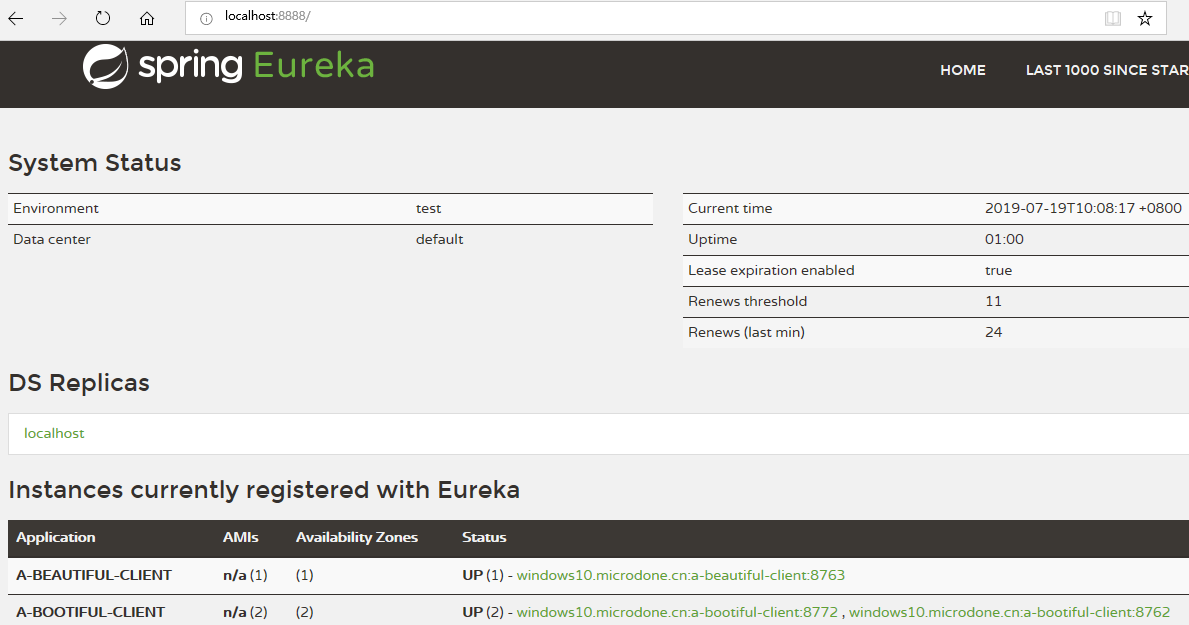
如图,服务端(a-bootiful-client)可以看到有两个实例,为何起两个呢?用来测试ribbon的负载均衡,这块内容详见Greenwich.SR2版本的Spring Cloud Ribbon实例。
Greenwich.SR2版本的Spring Cloud Eureka实例的更多相关文章
- Greenwich.SR2版本的Spring Cloud Feign实例
前面我们了解了Spring Cloud Ribbon和Hystrix,在使用上它们基本上会成队出现,那么是不是可以把它们组合起来使用?而且我们发现,在服务消费方a-beautiful-client里通 ...
- Greenwich.SR2版本的Spring Cloud Hystrix实例
之前我们在eureka(参见Greenwich.SR2版本的Spring Cloud Eureka实例)中,服务消费方a-beautiful-client调用服务提供方a-bootiful-clien ...
- Greenwich.SR2版本的Spring Cloud Ribbon实例
上次我们了解了eureka(参见Greenwich.SR2版本的Spring Cloud Eureka实例),里面的服务消费方(服务实例a-beautiful-client)我们其实已经用到了ribb ...
- Greenwich.SR2版本的Spring Cloud Zuul实例
网关作为对外服务,在微服务架构中是一个很重要的组件,主要体现在动态路由和接入鉴权这两个功能上.现在我们通过Spring Cloud Zuul来实现对之前a-feign-client(参见Greenwi ...
- Greenwich.SR2版本的Spring Cloud Zipkin实例
调用链跟踪是微服务架构中的基础能力,Spring Cloud Zipkin+Sleuth为我们提供了该能力.首先我们先建立Zipkin服务端,它需要集成Eureka,用于发现服务提供方和消费方,进行数 ...
- Greenwich.SR2版本的Spring Cloud Config+BUS实例
Spring Cloud Config统一的配置中心同注册中心Eureka一样,也分服务端和客户端.服务端用来保存配置信息,客户端用来读取.它的优势是基于Git仓库,支持多环境.多分支配置.动态刷新. ...
- Spring Cloud Eureka集群部署到Linux环境
还是三板斧:先改配置文件,支持集群,然后出包,上传到linux环境(3个节点),最后启动jar包跑起来. 1.在原eureka服务端代码(参见Greenwich.SR2版本的Spring Cloud ...
- Spring Cloud Eureka集群配置及注意事项(Greenwich版本)
Spring Cloud Eureka集群配置及注意事项(Greenwich版本) 一·概述 Spring Cloud Netflix Eureka 是一个提供服务注册与发现的套件.服务提供者只需要将 ...
- 0.9.0.RELEASE版本的spring cloud alibaba nacos+feign实例
这里的feign依然是原来的feign,只不过将注册中心由eureka换成了nacos.服务提供方参见0.9.0.RELEASE版本的spring cloud alibaba nacos实例,消费方跟 ...
随机推荐
- Vim热键总结
最近学习linux环境,总结一下Vim的常用热键~~~
- SATB的标记问题解决之道与G1垃圾收集模式系统详解及最佳实践
继续接着上一次https://www.cnblogs.com/webor2006/p/11148282.html的理论学习,上一次学习到了这: 接着继续: SATB详解: 对于三色算法在concurr ...
- 微服务学习及.net core入门教程
https://www.cnblogs.com/jackyfei/p/12067708.html https://www.cnblogs.com/jesse2013/ http://video.jes ...
- python_面向对象——反射
1.反射 四个方法:getattr() 获取 class Person(): def __init__(self,name,age): self.name = name self.age = age ...
- 沙箱模式以及其使用到的IIFE
//沙箱 //与外界隔绝的一个环境,外界无法修改该环境内任何信息,沙箱内的东西单独属于一个世界 //360沙箱模式 //将软件和操作系统进行隔离,以达到安全的目的 //苹果手的app使用的就是沙箱模式 ...
- VueRouter基础
安装 直接下载(官方CDN) https://unpkg.com/vue-router/...通过页面script标签引入,如下: <script src='https://unpkg.com/ ...
- 如何学好java?
忻州seo:如何学好java?想必对于任何一个在学习java的朋友们,都会在学习过程中遇到一些问题.例如:Java反射机制是什么?小编也是学习java编程的,现在给大家简单介绍一下:Java反射机制就 ...
- POJ-2065-SETI(高斯消元)
链接: https://vjudge.net/problem/POJ-2065 题意: For some years, quite a lot of work has been put into li ...
- 洛谷 P3956 棋盘 题解
每日一题 day5 打卡 Analysis 深搜+剪枝+瞎jb判断 1.越界 2.这个点无色 3.当前的价值已经比答案大 三种情况要剪枝 我搜索里判断要不要施法的时候没判断上一次有没有施法,白调了0. ...
- PostgreSQL 慢查询SQL语句跟踪
示例:启用 SQL 跟踪PostgreSQL 日志支持的输出格式有 stderr(默认), csvlog , syslog 一般的错误跟踪,只需在配置文件 [postgresql.conf]简单设置几 ...