
Greenwich.SR2版本的Spring Cloud Zuul实例
网关作为对外服务,在微服务架构中是一个很重要的组件,主要体现在动态路由和接入鉴权这两个功能上。现在我们通过Spring Cloud Zuul来实现对之前a-feign-client(参见Greenwich.SR2版本的Spring Cloud Feign实例)调用的路由映射,并对外部请求做一个简单的鉴权。三板斧祭出:
1、pom里引入spring-cloud-starter-netflix-zuul:
<?xml version="1.0" encoding="UTF-8"?>

<project xmlns="http://maven.apache.org/POM/4.0.0" xmlns:xsi="http://www.w3.org/2001/XMLSchema-instance"

  xsi:schemaLocation="http://maven.apache.org/POM/4.0.0 https://maven.apache.org/xsd/maven-4.0.0.xsd">

  <modelVersion>4.0.0</modelVersion>

  <groupId>com.example</groupId>

  <artifactId>gateway</artifactId>

  <version>0.0.1-SNAPSHOT</version>

  <packaging>jar</packaging>

  <parent>

    <groupId>org.springframework.boot</groupId>

    <artifactId>spring-boot-starter-parent</artifactId>

    <version>2.1.6.RELEASE</version>

    <relativePath/> <!-- lookup parent from repository -->

  </parent>

  <properties>

    <project.build.sourceEncoding>UTF-8</project.build.sourceEncoding>

    <java.version>1.8</java.version>

  </properties>

  <dependencies>

    <dependency>

      <groupId>org.springframework.cloud</groupId>

      <artifactId>spring-cloud-starter-netflix-zuul</artifactId>

    </dependency>

    <dependency>

      <groupId>org.springframework.cloud</groupId>

      <artifactId>spring-cloud-starter-netflix-eureka-server</artifactId>

    </dependency>

    <dependency>

      <groupId>org.springframework.boot</groupId>

      <artifactId>spring-boot-starter-web</artifactId>

    </dependency>

    <dependency>

      <groupId>org.springframework.boot</groupId>

      <artifactId>spring-boot-starter-test</artifactId>

      <scope>test</scope>

    </dependency>

  <dependencyManagement>

    <dependencies>

      <dependency>

        <groupId>org.springframework.cloud</groupId>

        <artifactId>spring-cloud-dependencies</artifactId>

        <version>Greenwich.SR2</version>

        <type>pom</type>

        <scope>import</scope>

      </dependency>

    </dependencies>

  </dependencyManagement>

  <build>

    <plugins>

      <plugin>

        <groupId>org.springframework.boot</groupId>

        <artifactId>spring-boot-maven-plugin</artifactId>

      </plugin>

    </plugins>

  </build>

</project>
2、application:
#本机端口

server.port=8765

#服务名

spring.application.name=api-gateway

#注册中心地址

eureka.client.service-url.defaultZone=http://localhost:8888/eureka/

#路由规则

zuul.routes.hello.path=/hello/**

#路由映射

zuul.routes.hello.service-id=a-feign-client
3、主类通过@EnableZuulProxy启动网关服务,新增一个过滤器SimpleFilter:
package hello;

import org.springframework.boot.SpringApplication;

import org.springframework.boot.autoconfigure.SpringBootApplication;

import org.springframework.cloud.netflix.zuul.EnableZuulProxy;

import org.springframework.context.annotation.Bean;

import hello.filters.pre.SimpleFilter;

@EnableZuulProxy

@SpringBootApplication

public class GatewayApplication {

  public static void main(String[] args) {

    SpringApplication.run(GatewayApplication.class, args);

  }

  @Bean

  public SimpleFilter simpleFilter() {

    return new SimpleFilter();

  }

}
package hello.filters.pre;

import javax.servlet.http.HttpServletRequest;

import com.netflix.zuul.context.RequestContext;

import com.netflix.zuul.ZuulFilter;

import org.slf4j.Logger;

import org.slf4j.LoggerFactory;

public class SimpleFilter extends ZuulFilter {

    private static Logger log = LoggerFactory.getLogger(SimpleFilter.class);

    @Override

    public String filterType() {

        return "pre";

    }

    @Override

    public int filterOrder() {

        return 1;

    }

    @Override

    public boolean shouldFilter() {

        return true;

    }

    @Override

    public Object run() {

        RequestContext ctx = RequestContext.getCurrentContext();

        HttpServletRequest request = ctx.getRequest();

        log.info(String.format("%s request to %s", request.getMethod(), request.getRequestURL().toString()));

        Object accessToken = request.getParameter("accessToken");

        if (accessToken == null) {

            log.warn("access token is empty");

            ctx.setSendZuulResponse(false);

            ctx.setResponseStatusCode(401);

            ctx.setResponseBody("{\"result\":\"accessToken为空!\"}");

            ctx.getResponse().setContentType("text/html;charset=UTF-8");

            return null;

        }

        log.info("access token ok");

        return null;

    }

}
OK,我们在浏览器请求http://localhost:8765/hello/consumer/sayHi?name=world看看:
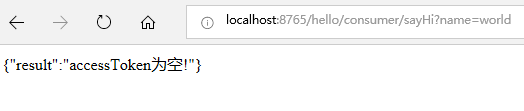
加上accessToken参数(参数值随便填一个)再请求一次:
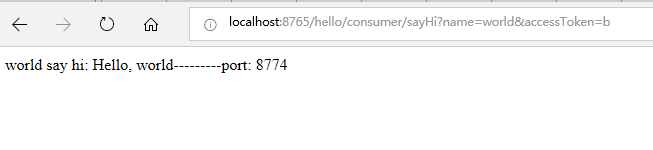
我们看到路由和鉴权都实现了。
Greenwich.SR2版本的Spring Cloud Zuul实例的更多相关文章
- Greenwich.SR2版本的Spring Cloud Feign实例
前面我们了解了Spring Cloud Ribbon和Hystrix,在使用上它们基本上会成队出现,那么是不是可以把它们组合起来使用?而且我们发现,在服务消费方a-beautiful-client里通 ...
- Greenwich.SR2版本的Spring Cloud Hystrix实例
之前我们在eureka(参见Greenwich.SR2版本的Spring Cloud Eureka实例)中,服务消费方a-beautiful-client调用服务提供方a-bootiful-clien ...
- Greenwich.SR2版本的Spring Cloud Ribbon实例
上次我们了解了eureka(参见Greenwich.SR2版本的Spring Cloud Eureka实例),里面的服务消费方(服务实例a-beautiful-client)我们其实已经用到了ribb ...
- Greenwich.SR2版本的Spring Cloud Eureka实例
作为微服务架构中最为核心和基础的服务治理,注册中心提供了微服务实例的自动化注册与发现.而作为一个服务注册中心,eureka的作用与传统的zk.etcd的作用是一样的,同样也支持高可用(集群).不同之处 ...
- Greenwich.SR2版本的Spring Cloud Zipkin实例
调用链跟踪是微服务架构中的基础能力,Spring Cloud Zipkin+Sleuth为我们提供了该能力.首先我们先建立Zipkin服务端,它需要集成Eureka,用于发现服务提供方和消费方,进行数 ...
- Greenwich.SR2版本的Spring Cloud Config+BUS实例
Spring Cloud Config统一的配置中心同注册中心Eureka一样,也分服务端和客户端.服务端用来保存配置信息,客户端用来读取.它的优势是基于Git仓库,支持多环境.多分支配置.动态刷新. ...
- 0.9.0.RELEASE版本的spring cloud alibaba nacos+gateway网关实例
gateway就是用来替换zuul的,功能都差不多,我们看下它怎么来跟nacos一起玩.老套路,三板斧: 1.pom: <?xml version="1.0" encodin ...
- 0.9.0.RELEASE版本的spring cloud alibaba nacos+feign实例
这里的feign依然是原来的feign,只不过将注册中心由eureka换成了nacos.服务提供方参见0.9.0.RELEASE版本的spring cloud alibaba nacos实例,消费方跟 ...
- 0.9.0.RELEASE版本的spring cloud alibaba nacos实例
简而言之,nacos与eureka的不同之处有三:后台老板.部署方式.功能.nacos是阿里的,eureka是奈飞的:nacos有自己的安装包,需要独立部署,eureka仅作为一个服务组件,引入jar ...
随机推荐
- python自动化
自动化测试一些问题 什么是自动化测试? 自动化测试,顾名思义,自动完成测试工作.通过一些自动化测试工具或自己造轮子实现模拟之前人工点点/写写的工作并验证其结果完成整个测试过程,这样的测试过程,便是自动 ...
- 数据结构(python)
列表 list 在头部进行插入是个相当耗时的操作(需要把后边的元素一个一个挪个位置).假如你需要频繁在数组两头增删,list 就不太合适.数组是最常用到的一种线性结构,其实 python 内置了一个 ...
- 安装Android Studio开发环境
下载安装包 中文社区官网 http://android-studio.org/ 目前最新的是2.3.3版本 安装Android Studio 双击安装 等待安装包自动解压 下一步 选择安装Androi ...
- css、js文件后的后缀作用是什么?
文章转自:https://blog.csdn.net/yelbosh/article/details/47303247 <link rel="stylesheet" type ...
- CSS float详解
前言:在我们写CSS样式的时候,float,position,display,overflow这几个关键字用得比较多. 弄清楚他们之间的原理,我们可以更高效的写出我们想要的布局. 作者:Ry-yuan ...
- 2019-2020-1 20199312《Linux内核原理与分析》第二周作业
c语言代码 // main.c int g(int x) { return x + 4; } int f(int x) { return g(x); } int main(void) { return ...
- 15 Vue计算属性和侦听器
计算属性 模板内的表达式非常便利,但是设计它们的初衷是用于简单运算的. 在模板中放入太多的逻辑会让模板过重且难以维护.例如: split = 字符中间空格分割, reverse= 反转 join('' ...
- linux mint 19.1安装搜狗输入法
1.到搜狗拼音输入法官网下载Linux版. 2.使用dpkg命令安装deb软件包: $ sudo dpkg -i sogoupinyin_2.2.0.0108_amd64.deb 3.安装成功;也有可 ...
- LaTex编译时出错:PK font *** could not be created
参考https://blog.csdn.net/dancing11/article/details/60978642 在用TeXworks (Miktex) 编译OSA投稿模板时,遇到错误PK fon ...
- 前端开发规范:命名规范、HTML 规范、CSS 规范、JavaScript 规范
一个好的程序员肯定是要能书写可维护的代码,而不是一次性的代码,怎么能让团队当中其他人甚至一段时间时候你再看你某个时候写的代码也能看懂呢,这就需要规范你的代码了.我是有一点强迫症的人,上周我们后端给我了 ...