
Greenwich.SR2版本的Spring Cloud Config+BUS实例
Spring Cloud Config统一的配置中心同注册中心Eureka一样,也分服务端和客户端。服务端用来保存配置信息,客户端用来读取。它的优势是基于Git仓库,支持多环境、多分支配置、动态刷新。我们把服务网关Zuul(参见Greenwich.SR2版本的Spring Cloud Zuul实例)看成Config的客户端,它的路由配置(zuul.routes开头配置项)我们从Git上配置,如此一来我们直接修改本地Git上的路由配置再push到远程仓库后,调用/bus/refresh即可生效,达到动态路由的目的。同理,其他微服务组件也可以作为Config客户端读取业务配置。
至于如何实现配置信息支持动态更新,那就需要另外一个组件的出手了:Spring Cloud BUS,消息总线。原理是Git上配置更新后,通过调用/bus/refresh接口,基于消息中间件推送给所有Config客户端。这里的消息中间件用Kafka。Config服务端也支持集群,为了让Config客户端调用Config服务端集群方便,我们集成Eureka来发现Config服务端。
先看Config服务端,三板斧:
1、pom:
<?xml version="1.0" encoding="UTF-8"?>

<project xmlns="http://maven.apache.org/POM/4.0.0" xmlns:xsi="http://www.w3.org/2001/XMLSchema-instance"

    xsi:schemaLocation="http://maven.apache.org/POM/4.0.0 https://maven.apache.org/xsd/maven-4.0.0.xsd">

    <modelVersion>4.0.0</modelVersion>

    <groupId>com.example</groupId>

    <artifactId>configuration-service</artifactId>

    <version>0.0.1-SNAPSHOT</version>

    <packaging>jar</packaging>

    <parent>

        <groupId>org.springframework.boot</groupId>

        <artifactId>spring-boot-starter-parent</artifactId>

        <version>2.1.6.RELEASE</version>

        <relativePath /> <!-- lookup parent from repository -->

    </parent>

    <properties>

        <project.build.sourceEncoding>UTF-8</project.build.sourceEncoding>

        <java.version>1.8</java.version>

    </properties>

    <dependencies>

        <dependency>

            <groupId>org.springframework.cloud</groupId>

            <artifactId>spring-cloud-config-server</artifactId>

        </dependency>

        <dependency>

            <groupId>org.springframework.boot</groupId>

            <artifactId>spring-boot-starter-test</artifactId>

            <scope>test</scope>

        </dependency>

        <dependency>

            <groupId>org.springframework.cloud</groupId>

            <artifactId>spring-cloud-starter-netflix-eureka-client</artifactId>

        </dependency>

        <dependency>

            <groupId>org.springframework.cloud</groupId>

            <artifactId>spring-cloud-starter-bus-kafka</artifactId>

        </dependency>

        <dependency>

            <groupId>org.springframework.cloud</groupId>

            <artifactId>spring-cloud-starter-stream-kafka</artifactId>

        </dependency>

        <dependency>

            <groupId>org.springframework.cloud</groupId>

            <artifactId>spring-cloud-bus</artifactId>

        </dependency>

        <dependency>

            <groupId>org.springframework.boot</groupId>

            <artifactId>spring-boot-starter-actuator</artifactId>

        </dependency>

    </dependencies>

    <dependencyManagement>

        <dependencies>

            <dependency>

                <groupId>org.springframework.cloud</groupId>

                <artifactId>spring-cloud-dependencies</artifactId>

                <version>Greenwich.SR2</version>

                <type>pom</type>

                <scope>import</scope>

            </dependency>

        </dependencies>

    </dependencyManagement>

    <build>

        <plugins>

            <plugin>

                <groupId>org.springframework.boot</groupId>

                <artifactId>spring-boot-maven-plugin</artifactId>

            </plugin>

        </plugins>

    </build>

</project>
2、application:
#本机端口

server.port=8766

#本机服务名

spring.application.name=config-server

#注册中心地址

eureka.client.service-url.defaultZone=http://localhost:8888/eureka/

#Git仓库地址

spring.cloud.config.server.git.uri=https://github.com/wuxun1997/spring-cloud-demo

#Git仓库路径下搜索路径

spring.cloud.config.server.git.search-paths=config

#支持动态刷新

spring.cloud.bus.refresh.enabled=true

management.endpoints.web.exposure.include=bus-refresh

#配置BUS使用的消息中间件Kafka

spring.kafka.bootstrap-servers=127.0.0.1:9092
3、主类通过@EnableConfigServer启动配置中心:
package hello;

import org.springframework.boot.SpringApplication;

import org.springframework.boot.autoconfigure.SpringBootApplication;

import org.springframework.cloud.client.discovery.EnableDiscoveryClient;

import org.springframework.cloud.config.server.EnableConfigServer;

@EnableConfigServer

@EnableDiscoveryClient

@SpringBootApplication

public class ConfigServiceApplication {

    public static void main(String[] args) {

        SpringApplication.run(ConfigServiceApplication.class, args);

    }

}
启动Config服务端前需要启动本地Kafka,否则它会一直提示连接失败。如果连不上你的git仓库,在application.properties中加上用户名、密码配置:
#Git仓库用户、密码

spring.cloud.config.server.git.username=你的Git仓库用户名XXX

spring.cloud.config.server.git.password=你的Git仓库密码XXX
现在我们在git仓库创建两个配置文件:
hello.properties:
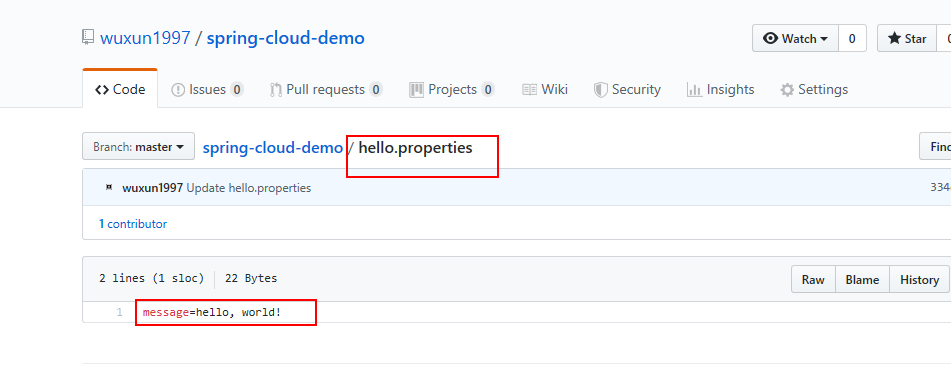
config/configclient-test.properties:
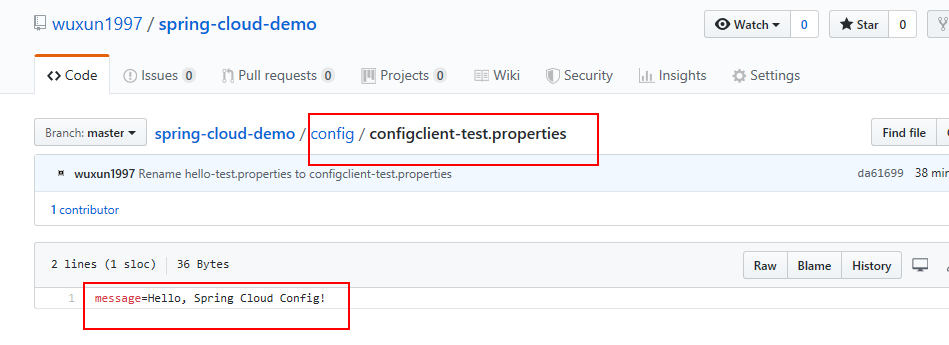
我们可以直接对Config服务端请求:

接着我们新建项目来看看Config客户端。再来三板斧:
1、pom:
<?xml version="1.0" encoding="UTF-8"?>

<project xmlns="http://maven.apache.org/POM/4.0.0" xmlns:xsi="http://www.w3.org/2001/XMLSchema-instance"

    xsi:schemaLocation="http://maven.apache.org/POM/4.0.0 https://maven.apache.org/xsd/maven-4.0.0.xsd">

    <modelVersion>4.0.0</modelVersion>

    <groupId>com.example</groupId>

    <artifactId>configuration-client</artifactId>

    <version>0.0.1-SNAPSHOT</version>

    <packaging>jar</packaging>

    <parent>

        <groupId>org.springframework.boot</groupId>

        <artifactId>spring-boot-starter-parent</artifactId>

        <version>2.1.6.RELEASE</version>

        <relativePath/> <!-- lookup parent from repository -->

    </parent>

    <properties>

        <project.build.sourceEncoding>UTF-8</project.build.sourceEncoding>

        <java.version>1.8</java.version>

    </properties>

    <dependencies>

        <dependency>

            <groupId>org.springframework.cloud</groupId>

            <artifactId>spring-cloud-starter-config</artifactId>

        </dependency>

        <dependency>

            <groupId>org.springframework.boot</groupId>

            <artifactId>spring-boot-starter-web</artifactId>

        </dependency>

        <dependency>

            <groupId>org.springframework.boot</groupId>

            <artifactId>spring-boot-starter-test</artifactId>

            <scope>test</scope>

        </dependency>

        <dependency>

            <groupId>org.springframework.cloud</groupId>

            <artifactId>spring-cloud-starter-netflix-eureka-client</artifactId>

        </dependency>

        <dependency>

            <groupId>org.springframework.cloud</groupId>

            <artifactId>spring-cloud-starter-bus-kafka</artifactId>

        </dependency>

        <dependency>

            <groupId>org.springframework.cloud</groupId>

            <artifactId>spring-cloud-starter-stream-kafka</artifactId>

        </dependency>

        <dependency>

            <groupId>org.springframework.cloud</groupId>

            <artifactId>spring-cloud-bus</artifactId>

        </dependency>

    </dependencies>

    <dependencyManagement>

        <dependencies>

            <dependency>

                <groupId>org.springframework.cloud</groupId>

                <artifactId>spring-cloud-dependencies</artifactId>

                <version>Greenwich.SR2</version>

                <type>pom</type>

                <scope>import</scope>

            </dependency>

        </dependencies>

    </dependencyManagement>

    <build>

        <plugins>

            <plugin>

                <groupId>org.springframework.boot</groupId>

                <artifactId>spring-boot-maven-plugin</artifactId>

            </plugin>

        </plugins>

    </build>

</project>
2、bootstrap:
#本机端口

server.port=8778

#本机服务名

spring.application.name=configClient

#注册中心地址

eureka.client.service-url.defaultZone=http://localhost:8888/eureka/

#支持注册中心访问Config服务端

spring.cloud.config.discovery.enabled=true

#Config服务端服务名

spring.cloud.config.discovery.service-id=config-server

#git仓库配置文件分支(默认即为master)

spring.cloud.config.label=master

#git仓库配置文件环境信息

spring.cloud.config.profile=test
3、主类通过@RefreshScope支持动态获取Config最新配置:
package hello;

import org.springframework.beans.factory.annotation.Value;

import org.springframework.boot.SpringApplication;

import org.springframework.boot.autoconfigure.SpringBootApplication;

import org.springframework.cloud.client.discovery.EnableDiscoveryClient;

import org.springframework.cloud.context.config.annotation.RefreshScope;

import org.springframework.web.bind.annotation.RequestMapping;

import org.springframework.web.bind.annotation.RestController;

@EnableDiscoveryClient

@SpringBootApplication

public class ConfigClientApplication {

    public static void main(String[] args) {

        SpringApplication.run(ConfigClientApplication.class, args);

    }

}

@RefreshScope

@RestController

class MessageRestController {

    @Value("${message:Hello default}")

    private String message;

    @RequestMapping("/message")

    String getMessage() {

        return this.message;

    }

}
现在我们先通过Config客户端获取到Git仓库的master分支下config目录下的configClient(默认拿Config客户端的服务名作为properties文件名)-test(环境)的配置项:

接下来我们动态刷新,直接去Git仓库上编辑message的值好了:

提交后我们直接看Config服务端,也自动更新了:
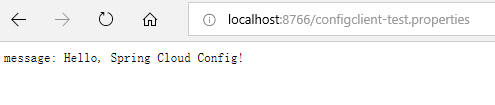
但是这是客户端并未更新,需要我们调用/bus-refresh接口去刷新一下服务端:
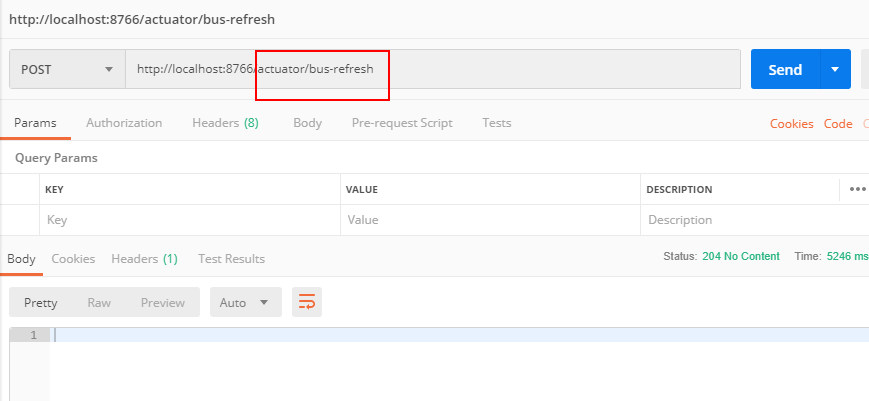
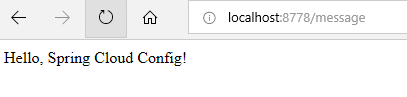
这会儿再调用客户端就能获取最新配置了:
Greenwich.SR2版本的Spring Cloud Config+BUS实例的更多相关文章
- Greenwich.SR2版本的Spring Cloud Zuul实例
网关作为对外服务,在微服务架构中是一个很重要的组件,主要体现在动态路由和接入鉴权这两个功能上.现在我们通过Spring Cloud Zuul来实现对之前a-feign-client(参见Greenwi ...
- Greenwich.SR2版本的Spring Cloud Feign实例
前面我们了解了Spring Cloud Ribbon和Hystrix,在使用上它们基本上会成队出现,那么是不是可以把它们组合起来使用?而且我们发现,在服务消费方a-beautiful-client里通 ...
- Greenwich.SR2版本的Spring Cloud Hystrix实例
之前我们在eureka(参见Greenwich.SR2版本的Spring Cloud Eureka实例)中,服务消费方a-beautiful-client调用服务提供方a-bootiful-clien ...
- Greenwich.SR2版本的Spring Cloud Ribbon实例
上次我们了解了eureka(参见Greenwich.SR2版本的Spring Cloud Eureka实例),里面的服务消费方(服务实例a-beautiful-client)我们其实已经用到了ribb ...
- Greenwich.SR2版本的Spring Cloud Eureka实例
作为微服务架构中最为核心和基础的服务治理,注册中心提供了微服务实例的自动化注册与发现.而作为一个服务注册中心,eureka的作用与传统的zk.etcd的作用是一样的,同样也支持高可用(集群).不同之处 ...
- Greenwich.SR2版本的Spring Cloud Zipkin实例
调用链跟踪是微服务架构中的基础能力,Spring Cloud Zipkin+Sleuth为我们提供了该能力.首先我们先建立Zipkin服务端,它需要集成Eureka,用于发现服务提供方和消费方,进行数 ...
- 0.9.0.RELEASE版本的spring cloud alibaba sentinel实例
sentinel即哨兵,相比hystrix断路器而言,它的功能更丰富.hystrix仅支持熔断,当服务消费方调用提供方发现异常后,进入熔断:sentinel不仅支持异常熔断,也支持响应超时熔断,另外还 ...
- 关于spring cloud “Finchley.RC2”版本在spring cloud config中的ArrayIndexOutOfBoundsException
原文 https://www.cnblogs.com/Little-tree/p/9166382.html 在学spring cloud config的时候遇到一个ArrayIndexOutOfBou ...
- 0.9.0.RELEASE版本的spring cloud alibaba nacos实例
简而言之,nacos与eureka的不同之处有三:后台老板.部署方式.功能.nacos是阿里的,eureka是奈飞的:nacos有自己的安装包,需要独立部署,eureka仅作为一个服务组件,引入jar ...
随机推荐
- 二进制部署kubernetes集群(下篇)
1.k8S核心资源管理方法 1.1.陈述式资源管理方法 1.1.1.管理名称空间资源 1.1.1.1.查看名称空间 [root@hdss7-21 ~]# kubectl get namespace N ...
- TCP/IP结构图
IP: TCP: UDP:
- 虚拟dom应用
vdom如何应用,核心api是什么 1.介绍snabbdom(开源社区用的多,vue2用的是他) 首先回顾下之前的vdom格式 真实的dom <body> <ul id=" ...
- MyBatis3_[tp_38~]_动态sql_if_判断&OGNL_where标签_
笔记要点出错分析与总结 /** 笔记: * 查询的时候,如果某些条件,没带可能SQL拼装会有问题; * 1.-->给where 后面加上 1=1, 以后的条件都and XXX * 2. < ...
- Spring MVC 学习笔记(一)
• 1.SpringMVC概述 • 2.SpringMVC的HelloWorld • 3.使用@RequestMapping映射请求 • 4.映射请求参数&请求头 • 5.处理模型数据 • 6 ...
- 在virtualenv中使用不同的Python版本
来源:百度SEO公司 我有一个目前使用python 2.5.4运行的Debian系统. 我正确安装了virtualenv,一切正常. 我是否可以将virtualenv与其他版本的Python一起使 ...
- 在Vue中加入国际化(i18n)中英文功能
1.npm安装方法 npm install vue-i18n --save 2.在src资源文件下创建文件夹i18n,i18n下面创建index.js文件,引入VueI18n和导入语言包(按开发需求可 ...
- openssl制作双向认证经过验证可行
openssl制作双向认证经过验证可行 http://www.360doc.com/content/12/0524/15/2150778_213390447.shtml 2012-05-24 履历馆 ...
- The Boot Process at a Glance x86/x64系统启动过程解析
哥又来干体力活了.人肉翻译一下: The Boot Process at a Glance This section explains the boot process in sufficient d ...
- Java常用工具类之数据库操作辅助类DBUtil.java
package com.qushida.util; import java.beans.BeanInfo; import java.beans.Introspector; import java.be ...