
WCF寄宿windows服务二
如果有很多WCF服务需要寄宿,需要额外做一些工作:
总体思路是:先把这些WCF服务的程序集打包,然后利用反射加载各个WCF服务的程序集,按顺序一个一个寄宿。
先来看看我们需要寄宿的WCF服务: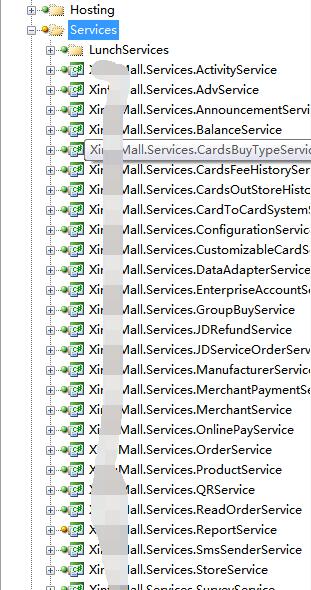
实现步骤:
1、配置文件中打包这些WCF程序集信息。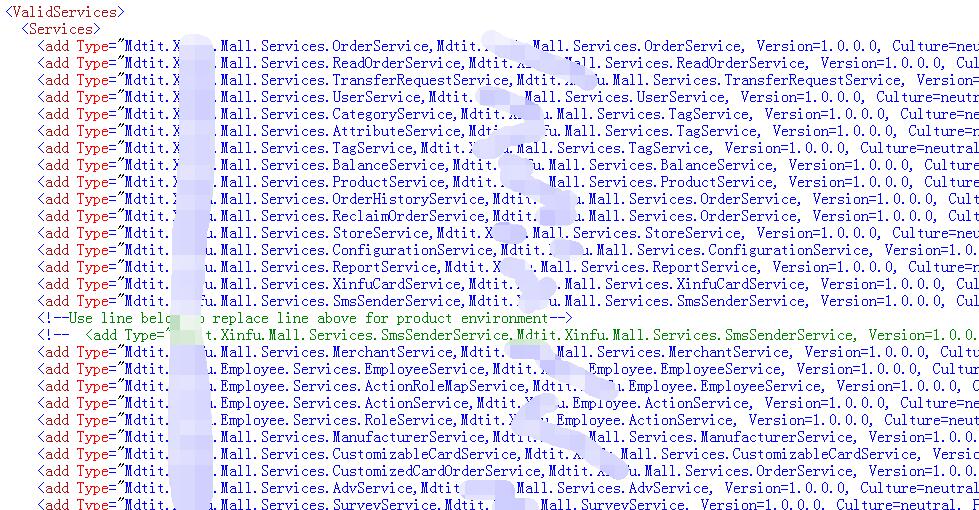
2、需要自定义配置节点以及实现读取自定义配置节点的方法。
在configSections节点增加配置:
 <section name="ValidServices"

             type="Mdtit.XXX.Mall.Hosting.ValidServicesSection, Mdtit.XXX.Mall.Hosting" />
配置处理类实现如下:
using System;

using System.Collections.Generic;

using System.Reflection;

using System.Configuration;

using System.ServiceModel.Configuration;

using System.ServiceModel;

using System.Xml;

using System.Xml.Serialization;

using System.IO;

using System.ServiceModel.Description;

using System.Text;

using Mdtit.XXX.Mall.Common;

namespace Mdtit.XXX.Mall.Hosting

{

    /// <summary>

    /// Custom configuration section for valid service setting

    /// </summary>

    internal class ValidServicesSection : ConfigurationSection

    {

        [ConfigurationProperty("Services")]

        public ValidServiceCollection ValidServices

        {

            get { return this["Services"] as ValidServiceCollection; }

        }

    }

    /// <summary>

    /// Custom configuration element collection for valid service setting

    /// </summary>

    internal class ValidServiceCollection : ConfigurationElementCollection

    {

        protected override ConfigurationElement CreateNewElement()

        {

            return new ValidService();

        }

        protected override object GetElementKey(ConfigurationElement element)

        {

            return ((ValidService)element).Type;

        }

    }

    /// <summary>

    /// Custom configuration element for valid service setting

    /// </summary>

    internal class ValidService : ConfigurationElement

    {

        [ConfigurationProperty("Type")]

        public string Type

        {

            get

            {

                return (string)this["Type"];

            }

        }

    }

}
3、windows服务的Main函数
static class Program

{

	/// <summary>

	/// The main entry point for the application.

	/// </summary>

	static void Main()

	{

		ServiceBase[] ServicesToRun;

		ServicesToRun = new ServiceBase[]

		{

			new XXXService()

		};

		ServiceBase.Run(ServicesToRun);

	}

}
4、windows服务类:XXXService
using System;

using System.Collections.Generic;

using System.ComponentModel;

using System.Data;

using System.Diagnostics;

using System.Linq;

using System.ServiceProcess;

using System.Text;

using Mdtit.XXX.Mall.Hosting;

using Mdtit.XXX.Mall.Common;

using System.ServiceModel;

namespace Mdtit.XXX.Mall.Hosting.Service

{

    public partial class XXXService : ServiceBase

    {

        /// <summary>

        /// All avalilable services.

        /// </summary>

        static List<ServiceHost> _allHosts = new List<ServiceHost>();

        public XXXService()

        {

            InitializeComponent();

        }

        protected override void OnStart(string[] args)

        {

            try

            {

                ServiceManager.StartAllValidServices();

                LogHelper.LogInformation("All WCF services started.");

            }

            catch (ApplicationException ex)

            {

                LogHelper.LogInformation(ex.Message);

            }

        }

        protected override void OnStop()

        {

            try

            {

                ServiceManager.CloseAllServices();

                LogHelper.LogInformation("All WCF services stopped.");

            }

            catch (ApplicationException ex)

            {

                LogHelper.LogInformation(ex.Message);

            }

        }

    }

}
其中,ServiceManager.StartAllValidServices() 和 ServiceManager.CloseAllServices()是用来批量处理WCF服务的。
5、ServiceManager类实现如下:
using System;

using System.Collections.Generic;

using System.Configuration;

using System.Linq;

using System.Reflection;

using System.ServiceModel;

using System.ServiceModel.Description;

using System.Text;

using Mdtit.XXX.Mall.Common;

namespace Mdtit.XXX.Mall.Hosting

{

    /// <summary>

    /// Helper class to start/stop services

    /// </summary>

    internal class ServiceManager

    {

        /// <summary>

        /// Container for all valid services

        /// </summary>

        static List<ServiceHost> _AllHosts = new List<ServiceHost>();

        /// <summary>

        /// Start all valid services.

        /// </summary>

        public static void StartAllValidServices()

        {

            string entryLocation = Assembly.GetEntryAssembly().Location;

            Configuration conf = ConfigurationManager.OpenExeConfiguration(entryLocation);

            ValidServicesSection validServiceSettings

                = ConfigurationManager.GetSection("ValidServices") as ValidServicesSection;

            if (validServiceSettings != null)

            {

                foreach (ValidService validService in validServiceSettings.ValidServices)

                {

                    string typeToLoad = validService.Type;

                    // Load the assembly dynamic

                    string assemblyName = typeToLoad.Substring(typeToLoad.IndexOf(',') + 1);

                    Assembly.Load(assemblyName);

                    Type svcType = Type.GetType(typeToLoad);

                    if (svcType == null)

                    {

                        string errInfo = string.Format("Invalid Service Type \"{0}\" in configuration file.",

                            typeToLoad);

                        LogHelper.LogError(errInfo);

                        throw new ApplicationException(errInfo);

                    }

                    else

                    {

                        OpenHost(svcType);

                    }

                }

            }

            else

            {

                throw new ApplicationException("Application configuration for WCF services not found!");

            }

        }

        /// <summary>

        /// Create a host for a specified wcf service;

        /// </summary>

        /// <param name="t"></param>

        private static void OpenHost(Type t)

        {

            ServiceHost host = new ServiceHost(t);

            host.Opened += new EventHandler(hostOpened);

            host.Closed += new EventHandler(hostClosed);

            host.Open();

            _AllHosts.Add(host);

        }

        /// <summary>

        /// Close all services

        /// </summary>

        public static void CloseAllServices()

        {

            foreach (ServiceHost host in _AllHosts)

            {

                if (host.State != CommunicationState.Closed)

                {

                    host.Close();

                }

            }

        }

        /// <summary>

        /// Event handler for host opened

        /// </summary>

        /// <param name="sender"></param>

        /// <param name="e"></param>

        private static void hostOpened(object sender, EventArgs e)

        {

            ServiceDescription svcDesc = ((ServiceHost)sender).Description;

            string svcName = svcDesc.Name;

            StringBuilder allUri = new StringBuilder();

            foreach (ServiceEndpoint endPoint in svcDesc.Endpoints)

            {

                allUri.Append(endPoint.ListenUri.ToString());

            }

            LogHelper.LogInformation(string.Format("Service \"{0}\" started with url: {1}",

                svcName, allUri.ToString()));

        }

        /// <summary>

        /// Event handler for host closed

        /// </summary>

        /// <param name="sender"></param>

        /// <param name="e"></param>

        private static void hostClosed(object sender, EventArgs e)

        {

            ServiceDescription svcDesc = ((ServiceHost)sender).Description;

            string svcName = svcDesc.Name;

            LogHelper.LogInformation(string.Format("Service \"{0}\" stopped.", svcName));

        }

    }

}
6、开始寄宿
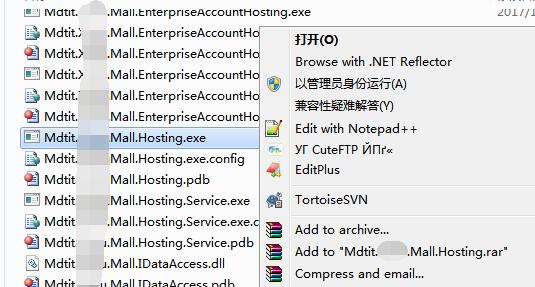
以管理员身份运行我们前面写好的windows服务程序:
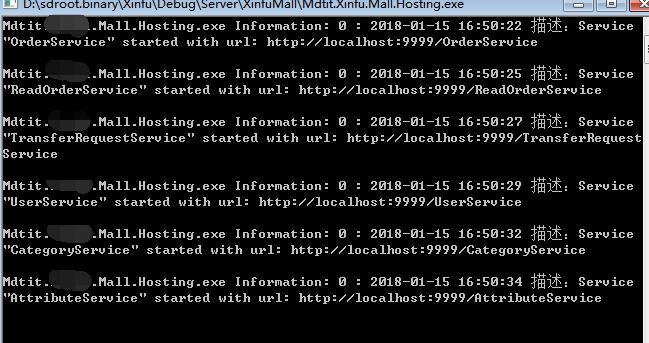
结果:
WCF寄宿windows服务二的更多相关文章
- WCF寄宿windows服务一
如果只是寄宿单个wcf服务,方法很简单,步骤:1.创建好一个windows服务.关于windows服务内容见:http://www.cnblogs.com/zhaow/p/7866916.html2. ...
- WCF 寄宿Windows以及控制台启动
一:添加windows服务 二:修改XXXInstaller1的StartType=Automatic,修改ProcessInstaller1的Account=LocalSystem 三:在progr ...
- 微软 WCF的几种寄宿方式,寄宿IIS、寄宿winform、寄宿控制台、寄宿Windows服务
WCF寄宿方式是一种非常灵活的操作,可以在IIS服务.Windows服务.Winform程序.控制台程序中进行寄宿,从而实现WCF服务的运行,为调用者方便.高效提供服务调用.本文分别对这几种方式进行详 ...
- WCF服务自我寄宿 Windows服务
WCF寄宿有自我寄宿跟IIS寄宿 服务代码: [ServiceContract] ---服务契约 public interface ICustomerService { [OperationContr ...
- Windows服务二:测试新建的服务、调试Windows服务
一.测试Windows服务 为了使Windows服务程序能够正常运行,我们需要像创建一般应用程序那样为它创建一个程序的入口点.像其他应用程序一样,Windows服务也是在Program.cs的Main ...
- WCF安装Windows服务
安装图解: 安装命令: 1. 开始 ->运行 ->cmd2. cd到C:\WINDOWS\Microsoft.NET\Framework\v4.0.30319(Framework版本号按I ...
- C#创建windows服务(二:创建和卸载windows服务)
引用地址: https://docs.microsoft.com/zh-cn/dotnet/framework/windows-services/how-to-create-windows-servi ...
- WCF服务寄宿Windows
windows服务的介绍 Windows服务应用程序是一种需要长期运行的应用程序,它对于服务器环境特别适合.它没有用户界面,并且也不会产生任何可视输出.任何用户消息都会被写进Windows事件日志.计 ...
- C#.NET 操作Windows服务承载WCF
Windows服务的制作.安装可以参考这篇: C#.NET 操作Windows服务(安装.卸载) - runliuv - 博客园 (cnblogs.com) 本篇会在这个解决方案基础上,继续修改. 一 ...
随机推荐
- nginx 的使用
nginx 反向代理,并拥有其高效的性能,并发效果好,是解决跨域最好的选择 nginx 的使用 1. 下载:在官网上下载 window 系统的 nginx 网址:http://nginx.org/en ...
- 使用 usb 调试的时候,连接上电脑没反应
使用 usb 调试的时候,连接上电脑没反应 原因: 手机上没有信任本计算机的授权,请在手机上信任该授权 解决方法: 原因就是手机上会有一个弹话框,让我们信任该计算机,我们才可以进行 usb调试 我们的 ...
- [Mysql]一对多关系是如何发挥作用的?
一个孩子只有一个妈妈,而一个妈妈可以有多个孩子,这是典型的一对多的关系,这里采用navicat图形化界面建立二者的关系. 第一步:创建mother表,如下图: 第二步:创建children表,在ch ...
- Qt编写自定义控件16-魔法老鼠
前言 五一期间一直忙着大屏电子看板软件的开发,没有再去整理控件,今天已经将大屏电子看板的所有子窗口都实现了任意停靠和双击独立再次双击最大化等功能,过阵子有空再写一篇文章介绍其中的技术点.魔法老鼠控件, ...
- Elasticsearch 空值过滤
参考:https://blog.csdn.net/zhang862520682/article/details/80333196 参考:https://www.jianshu.com/p/7a5d70 ...
- SQL server中获取语句执行时间
在写代码的时候,有时候实现一个功能会有好多个方法,有时候会做一下方法的耗时对比,综合下时间复杂度与空间复杂度,写出最好的代码: 同样,在写一些SQL查询,SQL代码的时候,也希望能写出一个高效一点的查 ...
- iOS实现页面既显示WebView,WebView下显示TableView,动态计算WebView内容高度
实现效果如下: 忽略底部的评论视图,太丑了,待完善...... 实现思路: 1>页面布局采用TableView实现,顶部"关注"模块的View是TableView的table ...
- playbook部署flanneld
定义playbook的主机组 说明: 1.playbook的主机组和ansible的主机组不一样, 2.playbook的主机组文件必须要和playbook文件在同一个目录下否则会报如下错误: [ro ...
- SpringBoot: 6.文件上传(转)
1.编写页面uploadFile.html <!DOCTYPE html> <html lang="en"> <head> <meta c ...
- HADOOP依赖
<?xml version="1.0" encoding="UTF-8"?> <project xmlns="http://mave ...