
RTSP客户端接收存储数据(live555库中的testRTSPClient实例)
1、testRTSPClient简介
testRTSPClient是个简单的客户端实例,这个实例对rtsp数据交互作了详细的描述,其中涉及到rtsp会话的两个概念Source和Sink.
Source是生产数据,Sink是消费数据.
testRTSPClient非常简洁,除了接收服务端发送过来的数据,什么都没干,所以我们很方便在这个基础上改造,做我们自己的项目.
2、testRTSPClient编译,运行
在linux下编译运行更方便,鉴于我的电脑太渣,虚拟机跑起来费劲,就转到windows下来折腾.
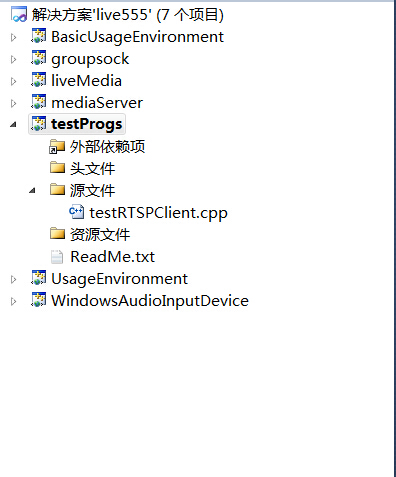
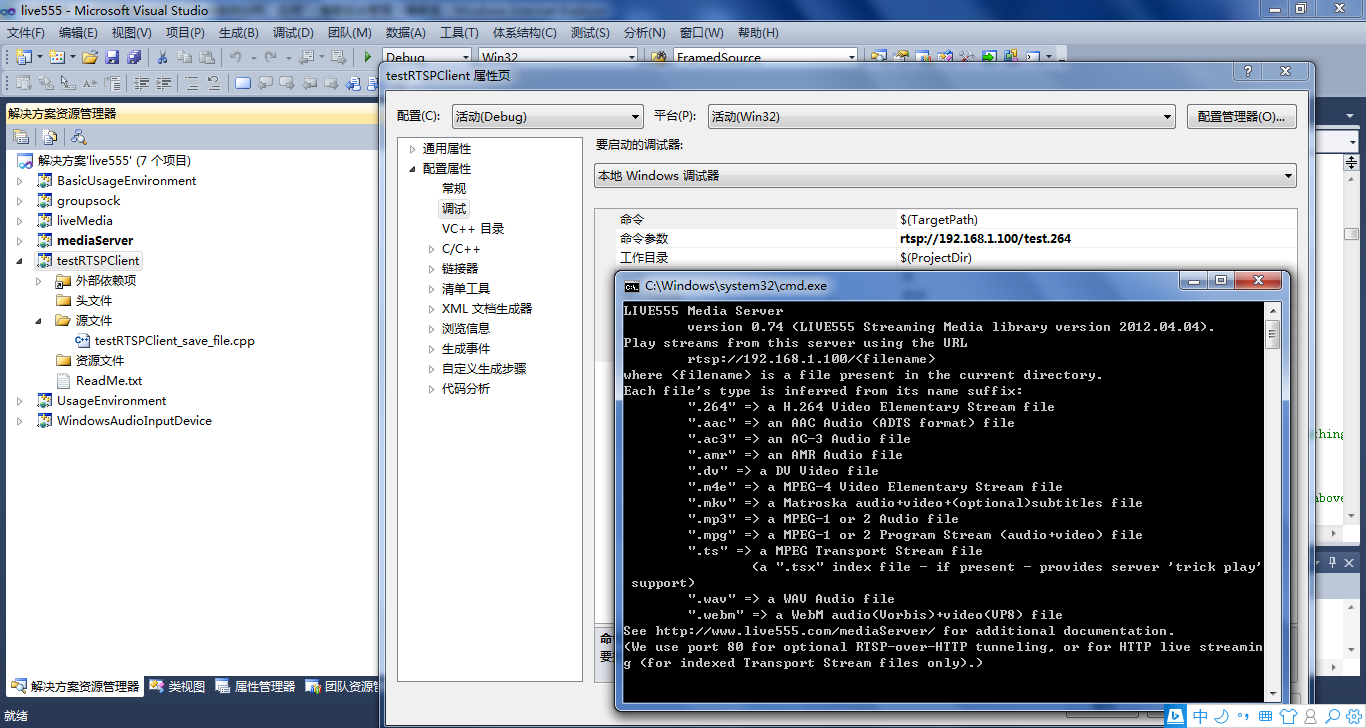
在windows下只需要加载这一个文件就可以编译,我们以mediaServer为服务端,以testRTSPClient为客户端。
当然也可以用支持rtsp协议的摄像机或其他实体设备作为服务端。

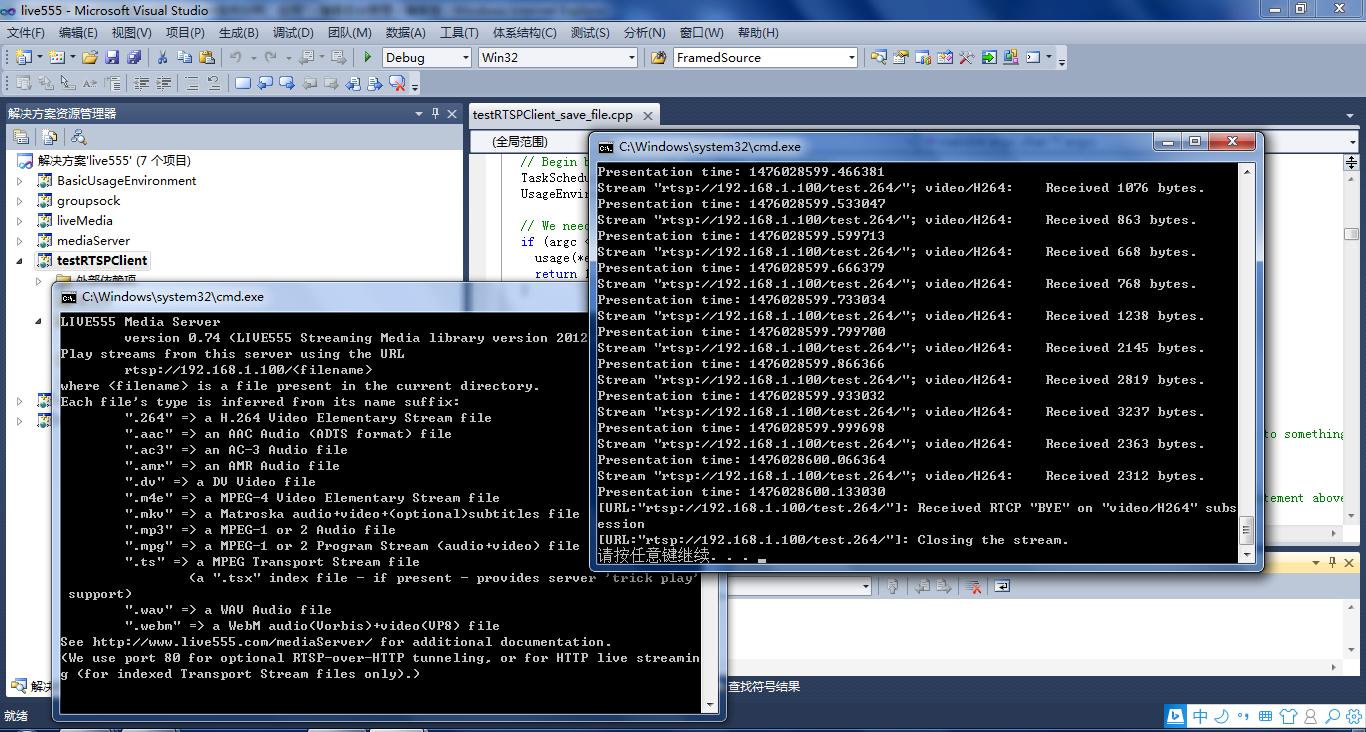
先启动mediaServer,然后在testRTSPClient项目的命令菜单里填入mediaServer 提示的IP, 再启动testRTSPClient即可。
3、testRTSPClient核心代码解读
1)看代码之前可以大致浏览一下总体的框架,这位博主画了个流程图http://blog.csdn.net/smilestone_322/article/details/17297817
void DummySink::afterGettingFrame(unsigned frameSize, unsigned numTruncatedBytes,

                  struct timeval presentationTime, unsigned /*durationInMicroseconds*/) {

  // We've just received a frame of data.  (Optionally) print out information about it:

#ifdef DEBUG_PRINT_EACH_RECEIVED_FRAME

  if (fStreamId != NULL) envir() << "Stream \"" << fStreamId << "\"; ";

  envir() << fSubsession.mediumName() << "/" << fSubsession.codecName() << ":\tReceived " << frameSize << " bytes";

  if (numTruncatedBytes > 0) envir() << " (with " << numTruncatedBytes << " bytes truncated)";

  char uSecsStr[6+1]; // used to output the 'microseconds' part of the presentation time

  sprintf(uSecsStr, "%06u", (unsigned)presentationTime.tv_usec);

  envir() << ".\tPresentation time: " << (unsigned)presentationTime.tv_sec << "." << uSecsStr;

  if (fSubsession.rtpSource() != NULL && !fSubsession.rtpSource()->hasBeenSynchronizedUsingRTCP()) {

    envir() << "!"; // mark the debugging output to indicate that this presentation time is not RTCP-synchronized

  }

  envir() << "\n";

#endif

  // Then continue, to request the next frame of data:

  continuePlaying();

}

Boolean DummySink::continuePlaying() {

  if (fSource == NULL) return False; // sanity check (should not happen)

  // Request the next frame of data from our input source.  "afterGettingFrame()" will get called later, when it arrives:

  fSource->getNextFrame(fReceiveBuffer, DUMMY_SINK_RECEIVE_BUFFER_SIZE,

                        afterGettingFrame, this,

                        onSourceClosure, this);

  return True;

}
2)有网友在testRTSPClient基础上,把接收的数据写成h264文件了http://blog.csdn.net/occupy8/article/details/36426821
void DummySink::afterGettingFrame(void* clientData, unsigned frameSize, unsigned numTruncatedBytes,

                  struct timeval presentationTime, unsigned durationInMicroseconds) {

  DummySink* sink = (DummySink*)clientData;

  sink->afterGettingFrame(frameSize, numTruncatedBytes, presentationTime, durationInMicroseconds);

}

// If you don't want to see debugging output for each received frame, then comment out the following line:

#define DEBUG_PRINT_EACH_RECEIVED_FRAME 1

void DummySink::afterGettingFrame(unsigned frameSize, unsigned numTruncatedBytes,

 struct timeval presentationTime, unsigned /*durationInMicroseconds*/) {

  // We've just received a frame of data.  (Optionally) print out information about it:

#ifdef DEBUG_PRINT_EACH_RECEIVED_FRAME

  if (fStreamId != NULL) envir() << "Stream \"" << fStreamId << "\"; ";

  envir() << fSubsession.mediumName() << "/" << fSubsession.codecName() << ":\tReceived " << frameSize << " bytes";

  if (numTruncatedBytes > 0) envir() << " (with " << numTruncatedBytes << " bytes truncated)";

  char uSecsStr[6+1]; // used to output the 'microseconds' part of the presentation time

  sprintf(uSecsStr, "%06u", (unsigned)presentationTime.tv_usec);

  envir() << ".\tPresentation time: " << (unsigned)presentationTime.tv_sec << "." << uSecsStr;

  if (fSubsession.rtpSource() != NULL && !fSubsession.rtpSource()->hasBeenSynchronizedUsingRTCP()) {

    envir() << "!"; // mark the debugging output to indicate that this presentation time is not RTCP-synchronized

  }

  envir() << "\n";

#endif

  //todo one frame

  //save to file

  if(!strcmp(fSubsession.mediumName(), "video"))

  {

     if(firstFrame)

     {

         unsigned int num;

         SPropRecord *sps = parseSPropParameterSets(fSubsession.fmtp_spropparametersets(), num);

         // For H.264 video stream, we use a special sink that insert start_codes:

         struct timeval tv= {0,0};

         unsigned char start_code[4] = {0x00, 0x00, 0x00, 0x01};

         FILE *fp = fopen("test.264", "a+b");

         if(fp)

         {

             fwrite(start_code, 4, 1, fp);

             fwrite(sps[0].sPropBytes, sps[0].sPropLength, 1, fp);

             fwrite(start_code, 4, 1, fp);

             fwrite(sps[1].sPropBytes, sps[1].sPropLength, 1, fp);

             fclose(fp);

             fp = NULL;

         }

         delete [] sps;

         firstFrame = False;

     }

     char *pbuf = (char *)fReceiveBuffer;

     char head[4] = {0x00, 0x00, 0x00, 0x01};

     FILE *fp = fopen("test.264", "a+b");

     if(fp)

     {

         fwrite(head, 4, 1, fp);

         fwrite(fReceiveBuffer, frameSize, 1, fp);

         fclose(fp);

         fp = NULL;

     }

  }

  // Then continue, to request the next frame of data:

  continuePlaying();

}

Boolean DummySink::continuePlaying() {

  if (fSource == NULL) return False; // sanity check (should not happen)

  // Request the next frame of data from our input source.  "afterGettingFrame()" will get called later, when it arrives:

  fSource->getNextFrame(fReceiveBuffer, DUMMY_SINK_RECEIVE_BUFFER_SIZE,

                        afterGettingFrame, this,

                        onSourceClosure, this);

  return True;

}
testRTSPClient接收的fReceiveBuffer缓存没有起始码,start_code[4] = {0x00, 0x00, 0x00, 0x01}; 写成文件或者播放都需要自行加上。
3)testRTSPClient这个实例还支持多路录放,网上搜到有人已经实现了,搬过来.
http://blog.chinaunix.net/uid-15063109-id-4482932.html
——缺什么补什么
RTSP客户端接收存储数据(live555库中的testRTSPClient实例)的更多相关文章
- RTSP客户端接收存储数据(live555库中的openRTSP实例)
一.openRTSP编译运行 a)windows下编译运行 还是以mediaServer作为服务端,openRTSP作为客户端 b)Linux下编译运行 转自http://kuafu80.blog.1 ...
- live555库中的testRTSPClient实例
1.testRTSPClient简介 testRTSPClient是个简单的客户端实例,这个实例对rtsp数据交互作了详细的描述,其中涉及到rtsp会话的两个概念Source和Sink. Source ...
- live555库中的openRTSP实例
一.openRTSP编译运行 a)windows下编译运行 还是以mediaServer作为服务端,openRTSP作为客户端 b)Linux下编译运行 转自http://kuafu80.blog.1 ...
- live555库中的testH264VideoStreamer实例
1.h264文件的推送 testH264VideoStreamer.cpp文件的开头就定义了 char const* inputFileName = "test.264"; 后面接 ...
- JVM存储位置分配——java中局部变量、实例变量和静态变量在方法区、栈内存、堆内存中的分配
Java中的变量根据不同的标准可以分为两类,以其引用的数据类型的不同来划分可分为“原始数据类型变量和引用数据类型变量”,以其作用范围的不同来区分可分为“局部变量,实例变量和静态变量”. 根据“Java ...
- RTSP服务端转发服务(live555库中的testH264VideoStreamer.cpp和testOnDemandRTSPServer.cpp实例)
1.h264文件的推送 testH264VideoStreamer.cpp文件的开头就定义了 char const* inputFileName = "test.264"; 后面接 ...
- 【JAVA】使用 jedis操作redis——连接、存储数据、切库等
本篇运用Java调用jedis包(jedis在线文档API ),做简单操作实例. 安装jedis 1. 2.9.0 jar 版本下载: jedis-2.9.0.jar 2. 新建项目,添加该驱动包 连 ...
- 转 RTSP客户端模拟器(TCP方式,Python实现)
转自: http://www.cnblogs.com/MikeZhang/archive/2012/10/29/rtspTcpClient_DSS_20121029.html 由于某种需求,工作中需要 ...
- Netty 如何高效接收网络数据?一文聊透 ByteBuffer 动态自适应扩缩容机制
本系列Netty源码解析文章基于 4.1.56.Final版本,公众号:bin的技术小屋 前文回顾 在前边的系列文章中,我们从内核如何收发网络数据开始以一个C10K的问题作为主线详细从内核角度阐述了网 ...
随机推荐
- Illegal mix of collations (latin1_swedish_ci,IMPLICIT) and (utf8_general_ci,COERCIBLE) for operation '=' 解决方法
1. 代码 SHOW VARIABLES LIKE 'character_set_%'; 查看一下 显示 +--------------------------+------------------- ...
- oracle instant client,tnsping,tnsnames.ora和ORACLE_HOME
前段时间要远程连接oracle数据库,可是又不想在自己电脑上完整安装oracleclient,于是到oracle官网下载了轻量级clientinstant client. 这玩意没有图形界面,全靠sq ...
- 新版期货数据交换(FTD)协议报文分析
因为需要开发模拟CTP后台服务,实现一键切换CTP,所以我们需要分析CTP报文.(基于FTD协议2004版改进) 网上公开的只能找到04年老版本,和现前报文格式出入较大.参考:http://www ...
- shell常用的判断条件
.判断文件夹是否存在 if [ -d /home/q/www ];then echo "true"; else echo "false" ;fi (系统内存在文 ...
- Storm实战
需求: spout输出一些手机品牌小写名称,第一个bolt将手机名称转成大写,第二个bolt在手机名称的后面再追加上时间. 项目目录: 导入相关的jar包. RandomWordSpout.java: ...
- nginx中,$request_uri和$uri的区别
nginx中,$request_uri和$uri的区别 $request_uri This variable is equal to the *original* request URI as r ...
- php+mysqli实现批量执行插入、更新及删除数据的方法
本文实例讲述了php+mysqli实现批量执行插入.更新及删除数据的方法.分享给大家供大家参考.具体如下: mysqli批量执行插入/更新/删除数据,函数为 multi_query(). 下面的代码只 ...
- bash脚本IFS=',' read的意思
IFS is the Input Field Separator, which means the string read will be split based on the characters ...
- datagrid使用要点
table自适应: (fit:true(设置table)) 列自动撑开:fitColumns: true,注意给列的width属性赋值
- CentOS7 minion安装图形化界面&远程桌面
单用户管理 1.1 实验环境 [root@15b883 ~]# cat /etc/redhat-release CentOS Linux release (Core) [root@15b883 ~]# ...