
Maven(二)-- 搭建私服,上传jar
一、在setting中配置 私服的镜像,在mirrors标签中加上:
<!--第一步  配置私服的镜像-->

<mirror>

     <!--此处配置所有的构建均从私有仓库中下载 *代表所有,也可以写central -->

     <id>nexus</id>

     <mirrorOf>*</mirrorOf>

     <!-- url对应发私服的 Public Repositories -->

     <url>http://localhost:8081/nexus/content/groups/public/</url>

</mirror>
二、nexus工厂的配置,在profiles标签中加上:
<profile>

  <id>nexus</id>

    <!--所有请求均通过镜像 -->

    <repositories>

         <repository>

            <id>central</id>

            <url>http://central</url>

            <releases><enabled>true</enabled></releases>

            <snapshots><enabled>true</enabled></snapshots>

         </repository>

    </repositories>

    <pluginRepositories>

          <pluginRepository>

             <id>central</id>

             <url>http://central</url>

             <releases><enabled>true</enabled></releases>

             <snapshots><enabled>true</enabled></snapshots>

          </pluginRepository>

     </pluginRepositories>

</profile>
三、激活profile配置
<!--第三步  激活profile配置 -->

  <activeProfiles>

     <!--make the profile active all the time -->

     <activeProfile>nexus</activeProfile>

  </activeProfiles>
四、在pom.xml中配置
<repositories>

     <repository>

         <id>central</id>

         <url>http://localhost:8081/nexus/content/groups/public/</url>

         <releases><enabled>true</enabled></releases>

         <snapshots><enabled>true</enabled></snapshots>

     </repository>

</repositories>

<pluginRepositories>

     <pluginRepository>

         <id>central</id>

         <url>http://localhost:8081/nexus/content/groups/public/</url>

         <releases><enabled>true</enabled></releases>

         <snapshots><enabled>true</enabled></snapshots>

      </pluginRepository>

 </pluginRepositories>
前四步 maven私服已经搭建成功,后面步骤 是将 jar 上传到 私服
五、在nexus中配置权限
1.新建仓库,便于管理

2.在Nexus中新建权限
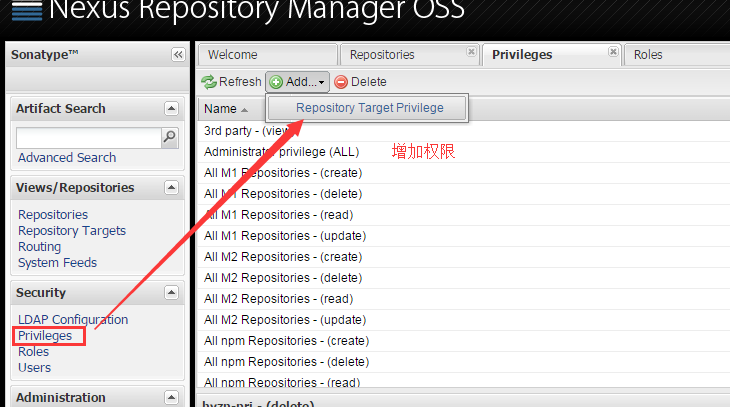
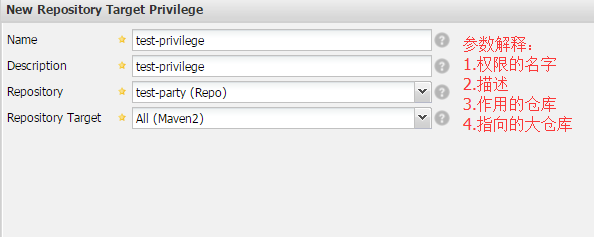
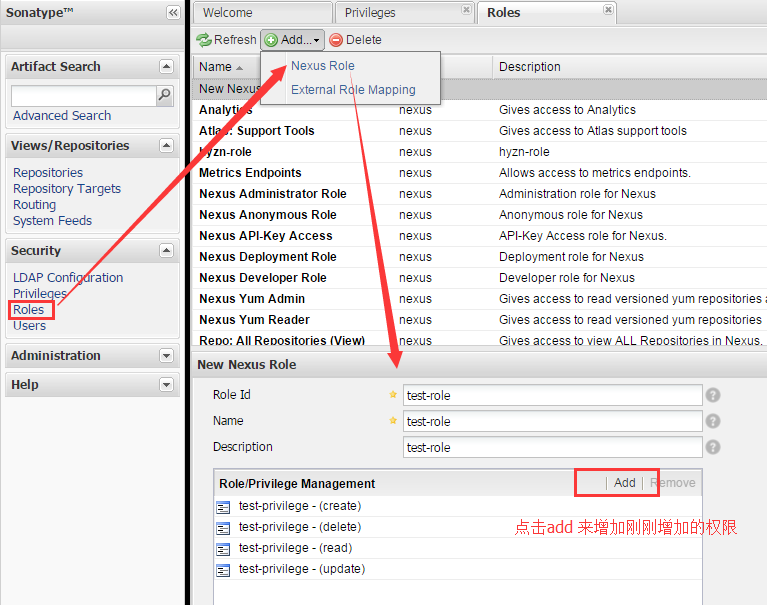
3.添加角色,并给角色授予权限
4.添加用户,并给用户授予角色
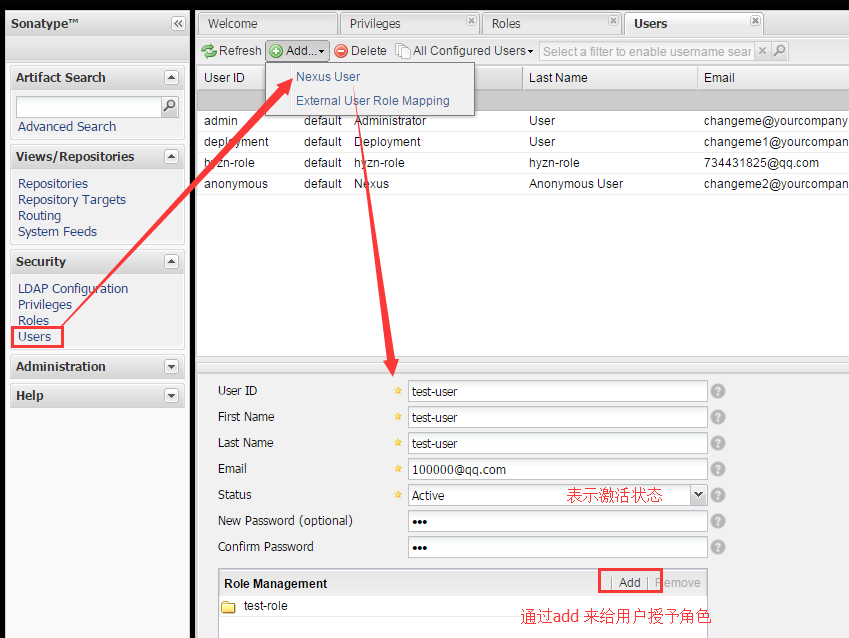
六、配置上传到私服,在pom中:
<distributionManagement>

    <repository>

        <id>test-party</id>

        <name>test-user</name>

        <url>http://localhost:8081/nexus/content/repositories/test-party</url>

    </repository>

</distributionManagement>
id 对应刚刚 新建的maven库的id,url对应刚刚新建的maven库的url,如下:

name对应刚刚新建的用户名:test-user
七、在pom.xml的servers标签中加上:
<server>

    <id>test-party</id>

  <username>test-user</username>

  <password>xbq</password>

</server>
八、执行deploy,发布到私服
选中项目,run as -- maven build ... ,在Goals中输入 deploy ,其他的不需要填写,执行Run,当看到控制台上 出现 BUILD SUCCESS,则成功!
九、在nexus中查看是否发布上去
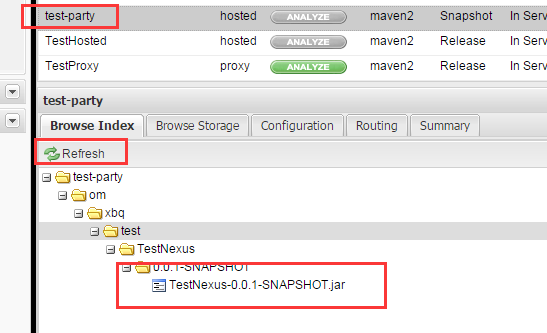
注意:更新jar遇到错误:
was cached in the local repository, resolution will not be reattempted until the update interval of nexus has elapsed or updates are forced
解决办法:去自己的.m2 文件夹下把 xxx.lastUpdated 文件全部删掉,重新运行maven,ok!
新建的maven工程默认是jdk1.5,怎么换成jdk1.7呢?
在profiles标签中加入:
    <profile>

        <id>jdk-1.7</id>

        <activation>

          <activeByDefault>true</activeByDefault>

          <jdk>1.7</jdk>

        </activation>

        <properties>

            <maven.compiler.source>1.7</maven.compiler.source>

            <maven.compiler.target>1.7</maven.compiler.target>

            <maven.compiler.compilerVersion>1.7</maven.compiler.compilerVersion>

        </properties>

    </profile>
Maven(二)-- 搭建私服,上传jar的更多相关文章
- Nexus3.0搭建私服上传JAR包 Windows10
背景 近期换了一个项目组,用的是公司自研产品,涉及到很多内部JAR包引用,版本号很多,每次更新都是产品部给出jar包,项目组成员各自复制一套本地替换,来了新人各种安装配置,复杂度太高,这不,我一来,又 ...
- maven命令学习-发布上传jar包-deploy
Maven学习六之利用mvn deploy命令上传包 转http://blog.csdn.net/woshixuye/article/details/8133050 mvn:deploy在整合或者发布 ...
- maven私服上传jar包
将一下脚本保存在.bat文件执行,红色部分按实际情况修改: @echo off set groupId=com.xxxset artifactId=xxxset version=0.0.1set ja ...
- 【转】上传jar包到nexus私服
原文:https://my.oschina.net/lujianing/blog/297128 1通过网页上传 这种方法只是上传了jar包.通过maven引用当前jar,不能取得jar的依赖 from ...
- Maven第四篇【私有仓库、上传jar包、引用私服jar包、上传本地项目到私服】
搭建私有服务器 前面已经说过了,我们使用Maven的使用,如果需要导入相对应的jar包,Maven首先会在我们的本地仓库中寻找->私有仓库->中心仓库- 然而,我们的本地仓库常常没有想要的 ...
- maven上传jar包到nexus私服后的存放路径 以及 使用IDEA上传jar包的步骤
maven上传jar包到nexus私服的方法,网上大神详解很多,那么上传后的jar包存放到哪里了呢? 在下使用nexus3.2.1版本,在本地搭建了私服,使用maven上传jar包.最后结果如下: 点 ...
- 实测Maven上传jar包到私服的方法归纳
Hello,各位小伙伴大家好,我是小栈君.好久不见,最近因为工作的缘故,导致了更新变慢,但是小栈君也在积极的做素材的规划,毕竟学习知识点的归纳和提炼需要一定的时间. 所以还请大家多多见谅,下一期的分享 ...
- Maven上传jar包到私服
1.认证,在M2_HOME/conf/settings.xml配置用户名密码 <server> <id>releases</id> <username> ...
- (转)上传jar包到nexus私服
场景:在使用私服Nexus时候经常需要上传jar包,但是对上传jar包的方式不是很熟悉,所以很有必要学习下. 1 通过网页上传 GAV Definition:选择GAV Parameters 输入JA ...
- 通过maven 上传jar 到nexus3,cong nexus3下载jar
nexus是一种常见的maven私服软件. 网上介绍的都是nexus2的使用,下面是最新版nexus3的使用方式. 首先需要从官网下载nexus3的包,很卡. 下载好以后解压会有两个文件夹:nexus ...
随机推荐
- java 多线程6: 中断机制 优雅的终止java线程
前文 java 多线程5: java 终止线程及中断机制 (stop().interrupt() .interrupted().isInterrupted()) 使用 interrupt() 和 in ...
- Linux基础之 ---目录结构
类Unix系统目录结构ubuntu没有盘符这个概念,只有一个根目录/,所有文件都在它下面/ 根目录bin //系统可执行程序,如命令boot //内核和启动程序,所有和启动相关的文件都保存在这里gru ...
- JFinal概述
JFinal概述 JFinal 是基于Java 语言的极速 web 开发框架,其核心设计目标是开发迅速.代码量少.学习简单.功能强大.轻量级.易扩展.Restful.在拥有Java语言所有优势的同时再 ...
- javascript mediator pattern
定义 定义一个对象,它封装一组相互作用的对象.中介者促使对象之间保持通讯但是又松耦合,你可以很独立的改变他们的相互作用. 提要 中介者提供一个权威中心,用来控制一组对象之间的相互作用.这种模式在这种情 ...
- 分享一款基于jquery的圆形动画按钮
之前为大家介绍过一款纯css3实现的圆形旋转分享按钮.今天要给大家带来一款基于jquery的圆形动画按钮.这款按钮鼠标经过的时候以边框转圈,然后逐渐消息,在实例中给出了四种颜色的demo.效果图如下: ...
- js实现分页的几个源码,看完基本就懂了
第一种: <!DOCTYPE HTML PUBLIC "-//W3C//DTD HTML 4.01 Transitional//EN"> <html> ...
- Qt 4.8.5 icpc: Command not found
icpc: Command not found 交叉编译Qt4.8.5的时候出现
- 配置TOMCAT 修改默认ROOT路径
本文转载http://xxs673076773.iteye.com/blog/1134805 最合适的) 最直接的办法是,删掉tomcat下原有Root文件夹,将自己的项目更名为Root. 我在$to ...
- Jenkins+ Xcode+ 蒲公英 实现IOS自动化打包和分发
Jenkins+ Xcode+ 蒲公英 实现IOS自动化打包和分发 直接入正题: Screen Shot 2015-09-18 at 16.56.20.png Mac上安装Jekins jekins下 ...
- CDH离线安装
1. 安装准备 系统:Centos 6 Cloudera Manager分配如下: 安装版本:CDH-5.8.0 所需安装文件 CDH相关 CDH-5.8.0-1.cdh5.8.0.p0.42-el6 ...