
小试牛刀——爬topit.me的图片,附github简易上传教程
接触了scrapy ,发现爬虫效率高了许多,借鉴大神们的文章,做了一个爬虫练练手:
我的环境是:Ubuntu14.04 + python 2.7 + scrapy 0.24
目标 topit.me
一、创建project
scrapy startproject topit
二、定义Item
import scrapy

class TopitItem(scrapy.Item):

    # define the fields for your item here like:

    # name = scrapy.Field()

    url = scrapy.Field()
三、在spider 文件夹中创建 topit_spider.py
# -*- coding: utf-8 -*-

#!/usr/bin/env python

#File name :topit_spider.py

#Author:Mellcap

from scrapy.contrib.spiders import CrawlSpider,Rule

from scrapy.contrib.linkextractors.sgml import SgmlLinkExtractor

from topit.items import TopitItem

import re

from scrapy.http import Request

from scrapy.selector import Selector

class TopitSpider(CrawlSpider):

    name = "topit"

    allowed_domains = ["topit.me"]

    start_urls=["http://www.topit.me/"]

    rules = (Rule(SgmlLinkExtractor(allow=('/item/\d*')),  callback = 'parse_img', follow=True),)

    def parse_img(self, response):

        urlItem = TopitItem()

        sel = Selector(response)

        for divs in sel.xpath('//a[@rel="lightbox"]'):

            img_url=divs.xpath('.//img/@src').extract()[0]

            urlItem['url'] = img_url

            yield urlItem
四、定义pipelines
# -*- coding: utf-8 -*-

# Define your item pipelines here

#

# Don't forget to add your pipeline to the ITEM_PIPELINES setting

# See: http://doc.scrapy.org/en/latest/topics/item-pipeline.html

from topit.items import TopitItem

class TopitPipeline(object):

    def __init__(self):

        self.mfile = open('test_topit.html', 'w')

    def process_item(self, item, spider):

        text = '<img src="' + item['url'] + '" alt = "" />'

        self.mfile.writelines(text)

    def close_spider(self, spider):

        self.mfile.close()
五、设置一下 setting.py
在后面加入一行:
ITEM_PIPELINES={'topit.pipelines.TopitPipeline': 1,}
保存后就大功告成了/
接着打开终端
运行:
cd topit

scrapy crawl topit
然后会在topit文件夹中发现test_topit 文件
打开之后在浏览器就可以看到图片了

接下来传到Github上:
爬虫已经做好了,在远程建立一个空库
一、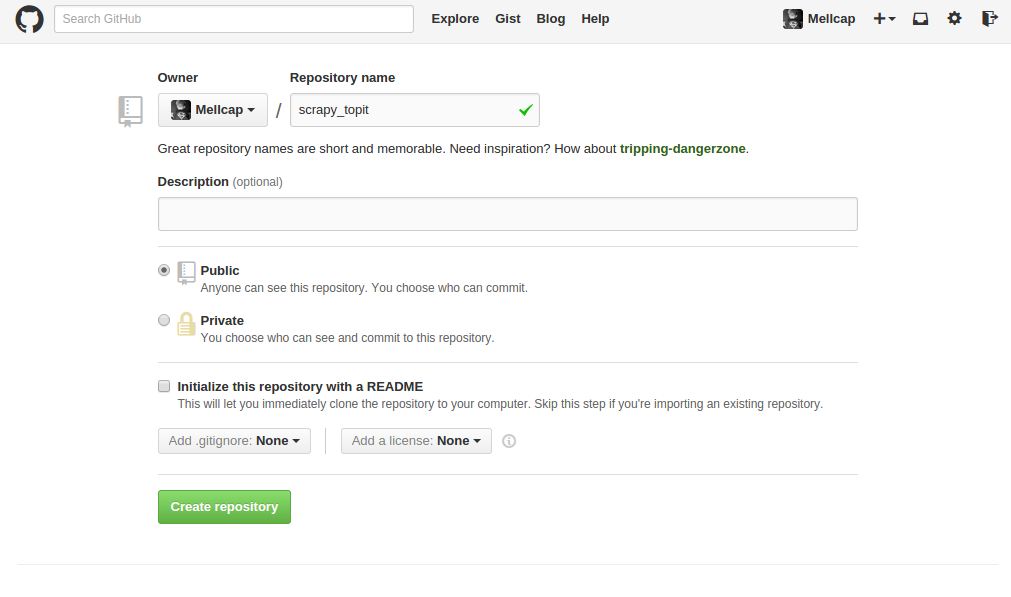
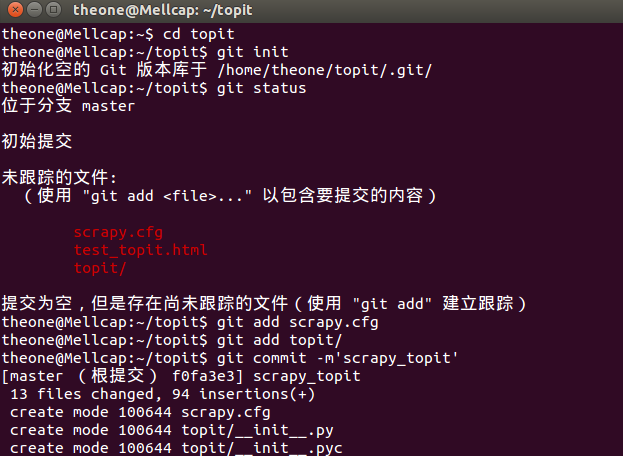
二、在本地建立版本库
theone@Mellcap:~$ cd topit

theone@Mellcap:~/topit$ git init

初始化空的 Git 版本库于 /home/theone/topit/.git/

theone@Mellcap:~/topit$ git status

位于分支 master

初始提交

未跟踪的文件:

  (使用 "git add <file>..." 以包含要提交的内容)

    scrapy.cfg

    test_topit.html

    topit/

提交为空,但是存在尚未跟踪的文件(使用 "git add" 建立跟踪)

theone@Mellcap:~/topit$ git add scrapy.cfg

theone@Mellcap:~/topit$ git add topit/

theone@Mellcap:~/topit$ git commit -m'scrapy_topit'
三、跟远程库建立连接
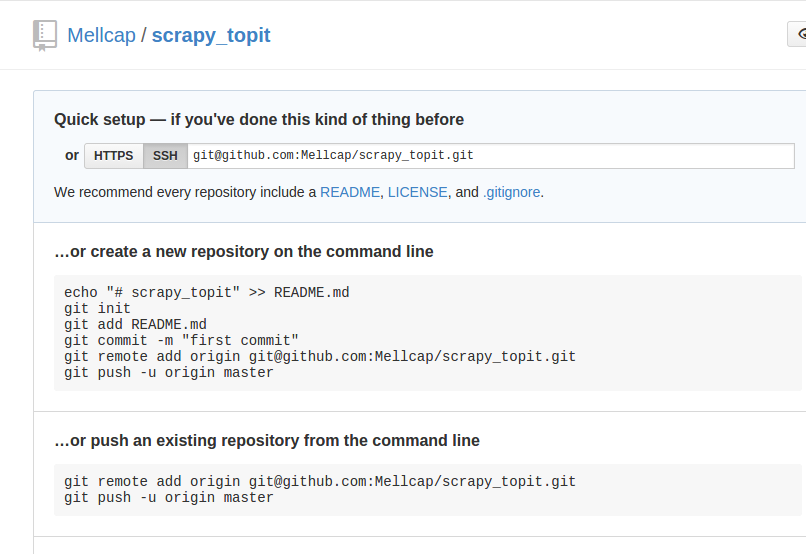
theone@Mellcap:~/topit$ git remote add origin git@github.com:Mellcap/scrapy_topit.git

theone@Mellcap:~/topit$ git push -u origin master
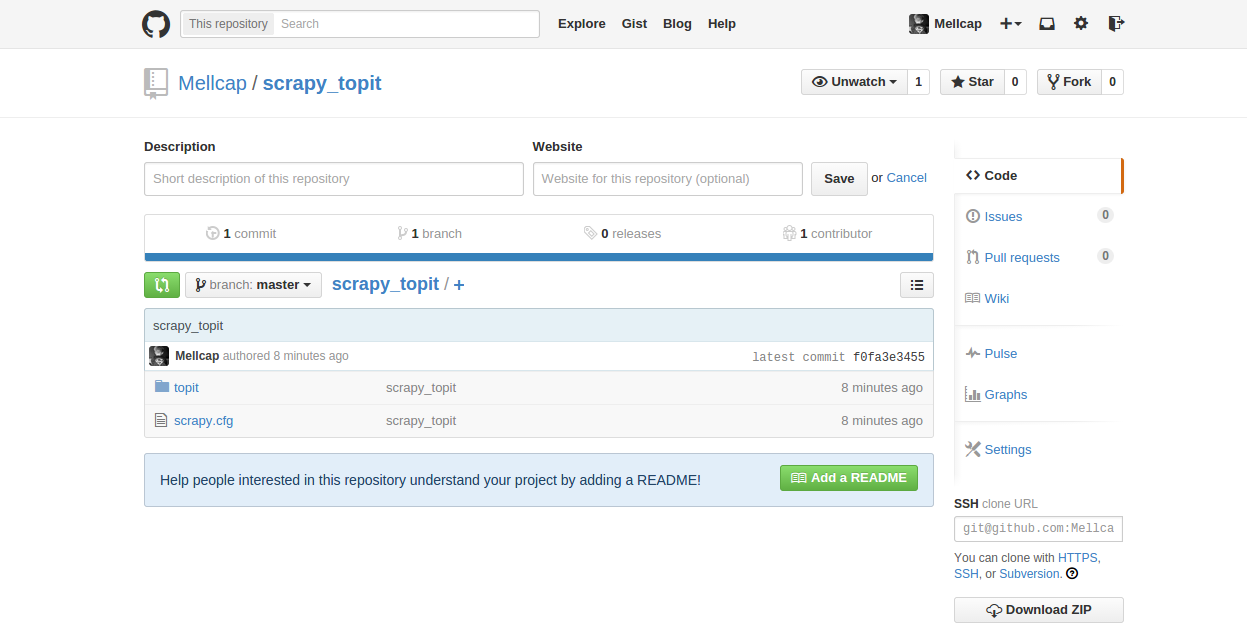
四、完成
在github上看到了自己的爬虫了。
小试牛刀——爬topit.me的图片,附github简易上传教程的更多相关文章
- github代码上传教程
github 上传代码步骤 一.git以及Github Git是个正快速成长的版本控制系统,它由GitHub维护. 优势: 1.支持离线开发,离线Repository. 2.强大的分支功能,适合多个独 ...
- 【Android实战】----基于Retrofit实现多图片/文件、图文上传
本文代码详见:https://github.com/honghailiang/RetrofitUpLoadImage 一.再次膜拜下Retrofit Retrofit不管从性能还是使用方便性上都非常屌 ...
- 使用html5 FileReader获取图片,并异步上传到服务器(不使用iframe)
使用html5 FileReader获取图片,并异步上传到服务器(不使用iframe) 原理: 1.使用FileReader 读取图片的base64编码 2.使用ajax,把图片的base64编码 ...
- #添加图片,最多只能上传9张.md
#添加图片,最多只能上传9张.md 前端页面: ```javascript <form id="imgForm" enctype="multipart/form-d ...
- 适应各浏览器图片裁剪无刷新上传jQuery插件(转)
看到一篇兼容性很强的图片无刷新裁剪上传的帖子,感觉很棒.分享下!~ 废话不多说,上效果图. 一.首先建立如下的一个page <!DOCTYPE html> <html xmlns=& ...
- puzz: 图片和表单上传的不一致问题
1. 方向1 用户提交表单, 图片和表单同步上传.(由同一服务器处理, 服务器压力大. 没有分离) 2. 方向2 图片和表单分开上传. 如图片访问ftp,表单提交后台(图片和后台分离) 2 ...
- [IDEA_3] IDEA 配置 GitHub 并上传项目
0. 说明 参考 Git & GitHub 的安装配置 IDEA 配置 GitHub 并上传项目 1. 安装配置 Git & GitHub 参照 Git & GitHub 的安 ...
- 本地项目通过github客户端上传到github网站上
一.github客户端上传步骤 一.github客户端上传步骤1.百度搜索关键字: GitHub 离线安装包 ==> Github_3.3.4.0版本链接:https://pan.baidu.c ...
- github客户端上传代码
在window下安装github客户端上传代码 第一步:创建Github新账户 第二步:新建仓库 第三步:安装Github shell程序,地址:http://windows.github.com/ ...
随机推荐
- 本原串(HDU 2197 快速幂)
本原串 Time Limit: 1000/1000 MS (Java/Others) Memory Limit: 32768/32768 K (Java/Others)Total Submiss ...
- MySQL性能分析脚本
#!/usr/bin/python #!coding:utf-8 import mysql.connector as connector import json """ ...
- C语言里面关于数组的一个容易忽视的小细节
ginobili@VM_44_28_sles10sp1:~/code> cat test3.cpp #include <stdio.h> int main(){ char a[5] ...
- PYTHON线程知识再研习B
使用threading.Thread模块,也有两种使用方法,可以用类,也可以在实例化对象中传入函数或类实例. #!/usr/bin/env python # -*- coding: utf-8 -*- ...
- POJ 1225 Substrings
http://poj.org/problem?id=1226 题意:给定n个串.求一个最长的串,使得这个串或者其反串在每个串中都出现过? 思路:先在大串里面加入正反串,然后二分,判定即可. #incl ...
- Logstash 介绍
Logstash 介绍: Logstash 是一个开源的数据收集引擎具有实时管道能力, Logstash 可以动态的统一数据从不同的来源和使数据规范化到你选择的目的地. 当Logstash 起初驾驭创 ...
- hdu5014:number sequence对称思想
题目链接: http://acm.hdu.edu.cn/showproblem.php?pid=5014 题目大意:给定数组 a[]={0,1,2......n} 求一个数组b[] 元素也为0.... ...
- 【POJ1338】Ugly Numbers(暴力打表)
打表大军是一股邪恶势力→_→ #include <iostream> #include <cstring> #include <cstdlib> #include ...
- Activity小结
Log日志类的五种级别 1.由高到低分别是:v.i.d.w.e 2.生命周期有七种状态: onCreate:创建 onStart:启动 onResume:显示(可以与用户交互) onPause:暂停 ...
- hdu 5178 pairs (线性探查问题)
Problem Description John has n points on the X axis, and their coordinates are (x[i],),(i=,,,…,n−). ...