
17--Box2D使用(三、触摸交互)
Box2D引擎与触摸的交互通过创建鼠标关节以及碰撞检测来得到触摸点下面的刚体,在根据触摸操作完成相应的功能。首先添加触摸响应函数声明
    virtual void ccTouchesBegan(cocos2d::CCSet* touches, cocos2d::CCEvent* event);

    virtual void ccTouchesMoved(cocos2d::CCSet* touches, cocos2d::CCEvent* event);

    virtual void ccTouchesEnded(cocos2d::CCSet* touches, cocos2d::CCEvent* event);
声明一个鼠标关节变量
     b2World* world;

    b2Body* wallBody ;

    float32 wallLineOffset ;

    b2MouseJoint* m_MouseJoint;  //鼠标关节

    GLESDebugDraw* m_debugDraw;  //调试物理世界绘制对象
在init中打开触摸功能
    m_MouseJoint = NULL;

    this->setTouchEnabled(true);
创建一个碰撞查询回调类
class QueryCallback : public b2QueryCallback

{

public:

    QueryCallback(const b2Vec2& point)

    {

        m_point = point;

        m_fixture = NULL;

    }

    bool ReportFixture(b2Fixture* fixture)

    {

        b2Body* body = fixture->GetBody();

        if (body->GetType() == b2_dynamicBody)

        {

            bool inside = fixture->TestPoint(m_point);

            if (inside)

            {

                m_fixture = fixture;

                // We are done, terminate the query.

                return false;

            }

        }

        // Continue the query.

        return true;

    }

    b2Vec2 m_point;

    b2Fixture* m_fixture;

};
实现触摸函数
void HelloWorld::ccTouchesBegan(CCSet* touches, CCEvent* event){

    CCSetIterator it;

    CCTouch* touch;

    for( it = touches->begin(); it != touches->end(); it++)

    {

        touch = (CCTouch*)(*it);

        if(!touch)

            break;

        CCPoint location = touch->getLocation();

        if (m_MouseJoint != NULL)

            return ;

        // 根据触摸点创建一个很小的碰撞检测矩形

        b2AABB aabb;

        b2Vec2 d;

        b2Vec2 p = b2Vec2(location.x/PIXEL_TO_METER,location.y/PIXEL_TO_METER);

        d.Set(0.001f, 0.001f);

        aabb.lowerBound = p - d;

        aabb.upperBound = p + d;

        // 查询物理世界中的碰撞的刚体,回调对象(QueryCallback)中已经过滤的非动态物体

        QueryCallback callback(p);

        world->QueryAABB(&callback, aabb);

        if (callback.m_fixture)

        {

            b2Body* body = callback.m_fixture->GetBody();

            //为获取到的刚体创建一个鼠标关节

            b2MouseJointDef md;

            md.bodyA = wallBody;

            md.bodyB = body;

            md.target = p;

            md.maxForce = 1000.0f * body->GetMass();

            m_MouseJoint = (b2MouseJoint*)world->CreateJoint(&md);

            body->SetAwake(true);    //唤醒刚体

        }

    }

}

void HelloWorld::ccTouchesMoved(CCSet* touches, CCEvent* event){

    CCSetIterator it;

    CCTouch* touch;

    for( it = touches->begin(); it != touches->end(); it++)

    {

        touch = (CCTouch*)(*it);

        if(!touch)

            break;

        CCPoint location = touch->getLocation();

        if (m_MouseJoint)

        {

            //更新刚体的位置

            m_MouseJoint->SetTarget(b2Vec2(location.x/PIXEL_TO_METER,location.y/PIXEL_TO_METER));

        }

    }

}

void HelloWorld::ccTouchesEnded(CCSet* touches, CCEvent* event)

{

    if (m_MouseJoint)

    {

        //触摸结算销毁鼠标关节

        world->DestroyJoint(m_MouseJoint);

        m_MouseJoint = NULL;

    }

}
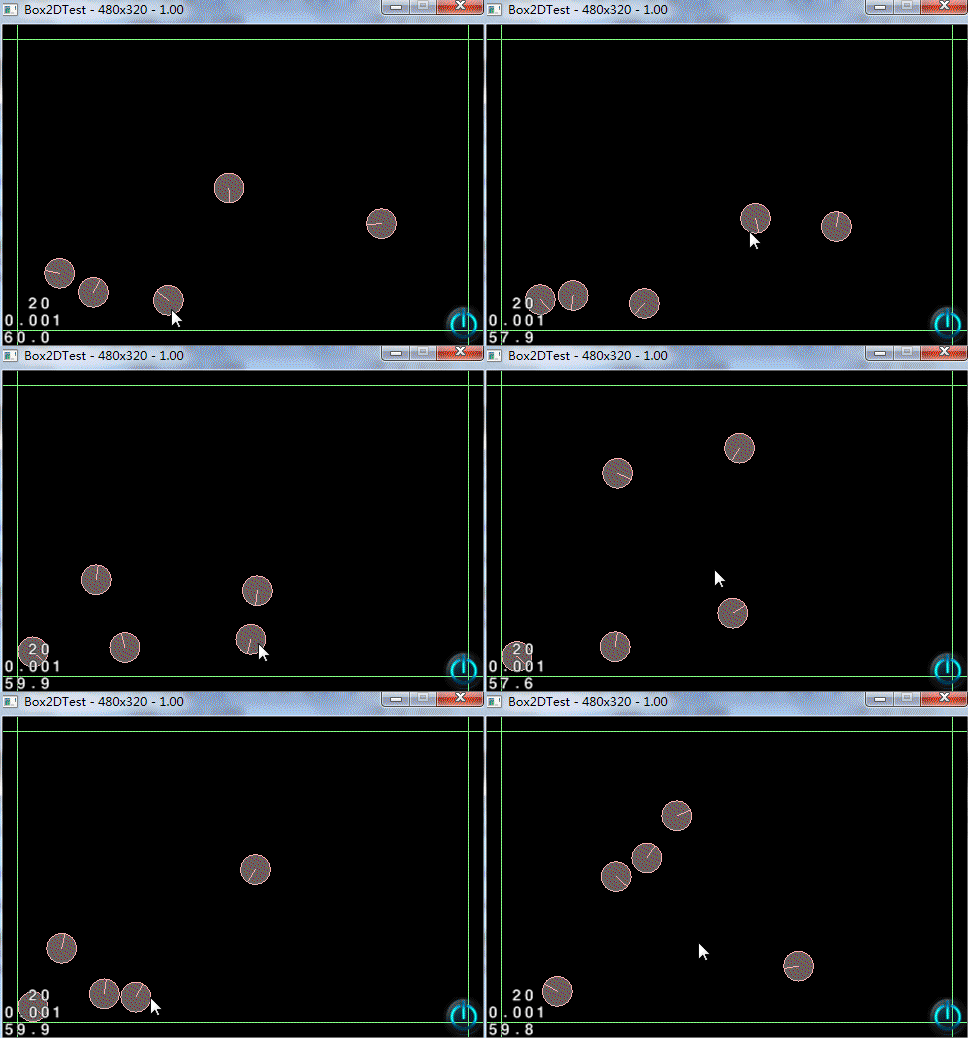
最后看看运行效果
17--Box2D使用(三、触摸交互)的更多相关文章
- Win8交互UX——用于 Windows 的触摸交互
用于 Windows 的触摸交互 Windows 8.1 提供一组在整个系统中使用的简单触摸交互功能.一致地应用此触摸语言可让用户对你的应用感觉已经很熟悉.通过让你的应用更容易学习和使用,可提高用 ...
- Legolas工业自动化平台入门(三)交互事件响应动作
在上一篇Legolas工业自动化平台入门(二)数据响应动作 一文中,我们介绍了"动作"相关内容,了解到"动作"分为多种,各种动作的添加方式相同,但是应用方式各自 ...
- ECharts.js学习(三)交互组件
ECharts.js 交互组件 ECharts.js有很多的交互组件,一般经常用到的组件有这些: title:标题组件,包含主标题和副标题. legend:图例组件,展现了不同系列的标记(symbol ...
- __x__(17)0906第三天__块元素block_内联元素inline_行内块元素inline-block
1. 块元素block 独占一行的元素 一般使用块元素包含内联元素,用作页面布局 <a> 标签可以包含任何除了a标签以外的元素 <p> 标签不能包含块元素 h1... ...h ...
- Win8交互UX——触摸板交互
针对触摸输入优化 Window 应用商店应用设计,并在默认情况下获得触摸板支持. 设计用户可以通过触摸板交互的 Windows 应用商店应用. 触摸板结合间接的多点触控输入和指针设备(如鼠标)的精确输 ...
- 【转载】Quick 中的触摸事件
原文地址 http://cn.cocos2d-x.org/article/index?type=quick_doc&url=/doc/cocos-docs-master/manual/fram ...
- [转]starling教程-触摸事件(Touch Events)(四)
在前面提到过,Starling是Sparrow的姊妹篇,正因为这样,Starling里的touch事件的机制其实是为移动设备的触摸交互设计的,所以当你使用它进行使用鼠标交互的桌面应用开发时,第一眼会感 ...
- 在子线程中使用runloop,正确操作NSTimer计时的注意点 三种可选方法
一直想写一篇关于runloop学习有所得的文章,总是没有很好的例子.游戏中有一个计时功能在主线程中调用: 1 + (NSTimer *)scheduledTimerWithTimeInterval:( ...
- iphone的手势与触摸编程学习笔记
一.基本概念与理解:Cocoa Touch将触摸事件发送到正在处理的视图.触摸传达的信息包括: 触摸发生的位置 (当前位置.最近的历史位置) 触摸的阶段 (按下.移动.弹起) 轻击数量 (tapCou ...
随机推荐
- common常用方法和部分算法
var commonindex = function() {}; commonindex.prototype = { ajaxRequest: function(request) { $.ajax({ ...
- jdk8永久代从方法区移除的验证
/*** 测试使用jdk8中是否仍然可以使用永久代* jvm options * -Xms20m -Xmx20m -Xmn10m -XX:PermSize=10m -XX:MaxPermSize=10 ...
- web UI
Semantic不错的UI,代码非常详细
- ural 1207 Median on the Plane
极角排序 #include <cstdio> #include <cstring> #include <algorithm> #include <cmath& ...
- Altium Designer 里面怎么画等长线
(1)一般是将走线布完后,新建一个class. Design -> Classes 如上图添加完后可以点击close. (2)快捷键 T + R: 或者 点击Tools 下拉中的Interact ...
- Windows开发中一些常用的辅助工具
经常有人问如何快速的定位和解决问题,很多时候答案就是借助工具, 记录个人Windows开发中个人常用的一些辅助工具. (1) Spy++ 相信windows开发中应该没人不知道这个工具, 我们常用 ...
- bzoj2244[SDOI2011]拦截导弹
http://www.lydsy.com/JudgeOnline/problem.php?id=2244 第$i$个导弹看成一个三元组$(i,h_i,v_i)$ 其实就是最长上升子序列的问题. 我们分 ...
- openfire连接登陆优化方案
client登陆openfire,大概总共须要9个来回才完毕登录. 在2G情况下.就表现为client登录特别慢,所以,为解决问题,对openfire进行了例如以下优化 openfire的连接.登陆过 ...
- 開始学习swift开发
近期要開始学习swift开发了,接下来的日子,会记录学习swift的历程.
- .net对文件的操作之文件读写
读写文件的步骤一般需要5步: 创建文件流 创建读写器 执行读或写的操作 关闭读写器 关闭文件流 需要引用:System.IO这个命名空间 代码演示: string path = @"F:\a ...