
gRPC用法
什么是 gRPC?
A high performance, open-source universal RPC framework
RPC : Remote Procedure Call
在gRPC中,客户端应用程序可以直接在其他计算机上的服务器应用程序上调用方法,就好像它是本地对象一样,这使您更轻松地创建分布式应用程序和服务。 与许多RPC系统一样,gRPC围绕定义服务的思想,指定可通过其参数和返回类型远程调用的方法。 在服务器端,服务器实现此接口并运行gRPC服务器以处理客户端调用。 在客户端,客户端具有一个存根(在某些语言中仅称为客户端),提供与服务器相同的方法。
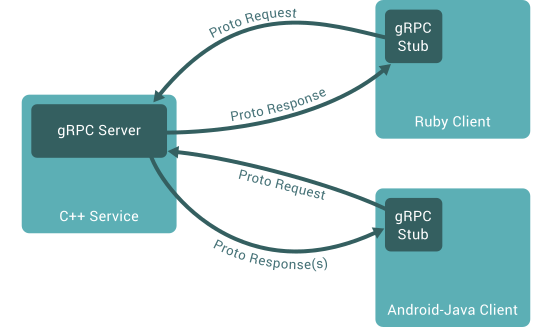
如何工作?
在默认情况下 gRPC 使用 protocol bufers 进行序列化结构化数据(serializing structured data),当然也可以使用其他数据格式,比如JSON。建议将proto3与gRPC一起使用
工作步骤:(默认使用protobuf的情况下)
- 在
helloworld.proto文件中定义gRPC服务,将RPC方法参数和返回类型指定为protobuf消息,像下面这样:
// The greeter service definition.

service Greeter {

  // Sends a greeting

  rpc SayHello (HelloRequest) returns (HelloReply) {}

}

// The request message containing the user's name.

message HelloRequest {

  string name = 1;

}

// The response message containing the greetings

message HelloReply {

  string message = 1;

}
- 生成代码,
gRPC使用protoc工具以及gRPC的插件来生成代码
安装和使用
首先先安装protobuf的protoc(见前置技能链接)以及对应语言的支持
对于不同的语言,需要为protoc安装对应的gRPC插件
c++
$ # 克隆仓库,-c选项是添加代理,可以不用

$ git -c http.proxy=socks5://192.168.0.103:1080 clone -b $(curl -L https://grpc.io/release) https://github.com/grpc/grpc

$ cd grpc

$ git -c http.proxy=socks5://192.168.0.103:1080 submodule update --init

$ mkdir build && cd build

$ cmake ..

$ make -j4

$ sudo make install
仓库目录grpc/examples/cpp/helloworld下有示例源码
仓库目录grpc/examples/protos下有.proto文件,包括helloworld.proto
生成代码的命令是:
$ protoc -I . --grpc_out=. --plugin=protoc-gen-grpc=`which grpc_cpp_plugin` helloworld.proto
go
$ export https_proxy=socks5://127.0.0.1:1080  # 这个是我自己代理

$ go get -u google.golang.org/grpc
然后应可以在$GOPATH/src/google.golang.org/grpc/examples/helloworld目录找到示例
生成代码的命令$ protoc -I. ./helloworld.proto --go_out=plugins=grpc:.
将在当前目录生成helloworld.pb.go文件
使用:
// server 端

package main

import (

	"context"

	"log"

	"net"

	"google.golang.org/grpc"

	pb "google.golang.org/grpc/examples/helloworld/helloworld"

)

const (

	port = ":50051"

)

// server is used to implement helloworld.GreeterServer.

type server struct {

	pb.UnimplementedGreeterServer

}

// SayHello implements helloworld.GreeterServer

func (s *server) SayHello(ctx context.Context, in *pb.HelloRequest) (*pb.HelloReply, error) {

	log.Printf("Received: %v", in.GetName())

	return &pb.HelloReply{Message: "Hello " + in.GetName()}, nil

}

func main() {

	lis, err := net.Listen("tcp", port)

	if err != nil {

		log.Fatalf("failed to listen: %v", err)

	}

	s := grpc.NewServer()

	pb.RegisterGreeterServer(s, &server{})

	if err := s.Serve(lis); err != nil {

		log.Fatalf("failed to serve: %v", err)

	}

}

// client 端

package main

import (

	"context"

	"log"

	"os"

	"time"

	"google.golang.org/grpc"

	pb "google.golang.org/grpc/examples/helloworld/helloworld"

)

const (

	address     = "localhost:50051"

	defaultName = "world"

)

func main() {

	// Set up a connection to the server.

	conn, err := grpc.Dial(address, grpc.WithInsecure(), grpc.WithBlock())

	if err != nil {

		log.Fatalf("did not connect: %v", err)

	}

	defer conn.Close()

	c := pb.NewGreeterClient(conn)

	// Contact the server and print out its response.

	name := defaultName

	if len(os.Args) > 1 {

		name = os.Args[1]

	}

	ctx, cancel := context.WithTimeout(context.Background(), time.Second)

	defer cancel()

	r, err := c.SayHello(ctx, &pb.HelloRequest{Name: name})

	if err != nil {

		log.Fatalf("could not greet: %v", err)

	}

	log.Printf("Greeting: %s", r.GetMessage())

}
gRPC用法的更多相关文章
- Java 开发 gRPC 服务和客户端
新建一个普通的Maven项目: 配置pom文件,导入gRPC的依赖和插件 pom 中增加外部依赖 <dependency> <groupId>io.grpc</g ...
- grpc介绍
grpc入门(一) 一.什么是grpc grpc是谷歌开源的一款高性能的rpc框架 (https://grpc.io),可以使用protocol buffers作为IDL(Interface Defi ...
- 入门干货之Grpc的.Net实现-MagicOnion
此文章简单残暴,学习成本较低,你可以跟着我一起撸代码,一起吐槽,一起砸键盘.以下操作均为 core2.0 环境. 0x01.Grpc 1.介绍 Google主导开发的RPC框架,使用HTTP/2协议 ...
- google的grpc在golang中的使用
GRPC是google开源的一个高性能.跨语言的RPC框架,基于HTTP2协议,基于protobuf 3.x,基于Netty 4.x. 前面写过一篇golang标准库的rpc包的用法,这篇文章接着讲一 ...
- gRPC源码分析(c++)
首先需要按照grpc官网上说的办法从github上下载源码,编译,然后跑一跑对应的测试代码.我分析的代码版本为v1.20.0. 在cpp的helloworld例子中,client端,第一个函数是创建c ...
- protobuffer、gRPC、restful gRPC的相互转化
转自:https://studygolang.com/articles/12510 文档 grpc中文文档 grpc-gateway,restful和grpc转换库 protobuf 官网 proto ...
- gRPC初探——概念介绍以及如何构建一个简单的gRPC服务
目录 引言 1. gRPC简介 2. 使用Protocol Buffers进行服务定义 2.1 定义消息 2.2 定义服务接口 3.构建简单的gRPC服务 3.1 编写proto文件,定义消息和接口 ...
- 带入gRPC:gRPC Deadlines
带入gRPC:gRPC Deadlines 原文地址:带入gRPC:gRPC Deadlines项目地址:https://github.com/EDDYCJY/go... 前言 在前面的章节中,已经介 ...
- Gonet2 游戏server框架解析之gRPC提高(5)
上一篇blog是关于gRPC框架的基本使用,假设说gRPC仅仅是远程发几个參数,那和一个普通的http请求也没多大区别了. 所以今天我就来学习一下gRPC高级一点的用法. 流! 流能够依据用法,分为单 ...
随机推荐
- [ Python入门教程 ] Python中日期时间datetime模块使用实例
Python中datetime模块提供强大易用的日期处理功能,用于记录程序操作或修改时间.时间计算.日志时间显示等功能.datatime模块重新封装了time模块,提供的类包括date.time.da ...
- Java容器解析系列(16) android内存优化之SparseArray
HashMap的缺点: 自动装箱导致的性能损失; 使用拉链法来解决hash冲突,如果hash冲突较多,需要遍历链表,导致性能下降,在Java 8 中,如果链表长度>8,会使用红黑树来代替链表; ...
- OGG主从表结构不同步,出现OGG-01296错误
一.Cause ogg的err日志出现以下报错 2019-09-10 16:36:55 WARNING OGG-01003 Oracle GoldenGate Delivery for Oracle, ...
- ajax 后台java代码执行完毕 前端报404错误
一个ajax请求,到java后台代码,后台成功接受并执行相应处理,但是返回的时候,success却没进去,前端报404错误. 因为是由于Controller忘记写spring的@Responsebod ...
- .net core3.1 web api中使用newtonsoft替换掉默认的json序列化组件
在微软的文档中,有着较为详细的替换教程 https://docs.microsoft.com/zh-cn/aspnet/core/web-api/advanced/formatting?view=as ...
- TCP UDP协议的三次握手
接触网络协议栈TCP/IP的人,就一定绕不开的一个话题就是TCP的三次握手.下面我将简单介绍一下. 三次握手流程的本质,可以这么理解:TCP的三次握手其实是双方各一次握手,各一次确认,只是其中一次握手 ...
- 龙良曲pytorch学习笔记_03
import torch from torch import nn from torch.nn import functional as F from torch import optim impor ...
- C++对于C故有问题的改进
C++继承了所有的C特性,并且提供了更丰富的语法和特性(OOP支持.模板支持等),并且拥有和C语言同样出色的运行效率.针对C语言的固有问题,C++做出了如下的升级: 所有变量都可以在需要使用时再定义( ...
- 源码级别gdb远程调试(实现OS简单内核)
最近在学着编写一个操作系统的简单内核,需要debug工具,我们这里使用gdb来进行调试,由于虚拟机运行和本机是两个部分,所以使用 gdb 的远程调试技术,这里对 gdb 常见调试以及远程调试方式做一个 ...
- C++静态成员函数小结
类中的静态成员真是个让人爱恨交加的特性.我决定好好总结一下静态类成员的知识点,以便自己在以后面试中,在此类问题上不在被动. 静态类成员包括静态数据成员和静态函数成员两部分. 一 静态数据成员: ...