
springsecurity 认证,授权,注销,动态菜单,记住我和首页定制
搭建环境:
1.在创建springboot时选择组件web,thymeleaf,spring-security
2.导入静态资源,导入后测试一下环境
认证和授权:
继承类WebSecurityConfigurerAdapter,重写方法configure
若遇到报错:
java.lang.IllegalArgumentException: There is no PasswordEncoder mapped for the id "null"
at org.springframework.security.crypto.password.DelegatingPasswordEncoder$UnmappedIdPasswordEncoder.matches(DelegatingPasswordEncoder.java:289) ~[spring-security-crypto-5.7.8.jar:5.7.8]
at org.springframework.security.crypto.password.DelegatingPasswordEncoder.matches(DelegatingPasswordEncoder.java:237) ~[spring-security-crypto-5.7.8.jar:5.7.8]
at org.springframework.security.config.annotation.web.configuration.WebSecurityConfigurerAdapter$LazyPasswordEncoder.matches(WebSecurityConfigurerAdapter.java:616) ~[spring-security-config-5.7.8.jar:5.7.8]
at org.springframework.security.authentication.dao.DaoAuthenticationProvider.additionalAuthenticationChecks(DaoAuthenticationProvider.java:77) ~[spring-security-core-5.7.8.jar:5.7.8]
at org.springframework.security.authentication.dao.AbstractUserDetailsAuthenticationProvider.authenticate(AbstractUserDetailsAuthenticationProvider.java:147) ~[spring-security-core-5.7.8.jar:5.7.8]
at org.springframework.security.authentication.ProviderManager.authenticate(ProviderManager.java:182) ~[spring-security-core-5.7.8.jar:5.7.8]
at org.springframework.security.authentication.ProviderManager.authenticate(ProviderManager.java:201) ~[spring-security-core-5.7.8.jar:5.7.8]
at org.springframework.security.web.authentication.UsernamePasswordAuthenticationFilter.attemptAuthentication(
是因为设置的密码没有加密啊,springsecurity5.0+要求对密码加密,因为不加密很容易被反编译,造成信息泄露
代码:
@EnableWebSecurity

public class SecurityConfig  extends WebSecurityConfigurerAdapter {

    protected void configure(HttpSecurity http) throws Exception {

        //首页all可以访问,功能页对应vip能访问

        http.authorizeRequests()

                .antMatchers("/").permitAll()

                .antMatchers("/level1/**").hasRole("vip1")

                .antMatchers("/level2/**").hasRole("vip2")

                .antMatchers("/level3/**").hasRole("vip3");

        //没有权限默认跳到登录页面,默认开启登录的页面

        http.formLogin();

    }

    protected void configure(AuthenticationManagerBuilder auth) throws Exception {

       auth.inMemoryAuthentication().passwordEncoder(new BCryptPasswordEncoder())

               .withUser("kuangshen").password(new BCryptPasswordEncoder().encode("123")).roles("vip2","vip3")

               .and()

               .withUser("ROOT").password(new BCryptPasswordEncoder().encode("123456")).roles("vip1","vip2","vip3")

               .and()

               .withUser("GUEST").password(new BCryptPasswordEncoder().encode("12")).roles("vip3");

    }

}
注销
要求实现:未登录:只显示登录按钮,登录时 显示登陆角色和注销按钮
前端代码要做的事情是验证,需要导入整合thymeleaf和springsecurity的依赖
<dependency>
    <groupId>org.thymeleaf.extras</groupId>
    <artifactId>thymeleaf-extras-springsecurity5</artifactId>
</dependency>
前端代码:
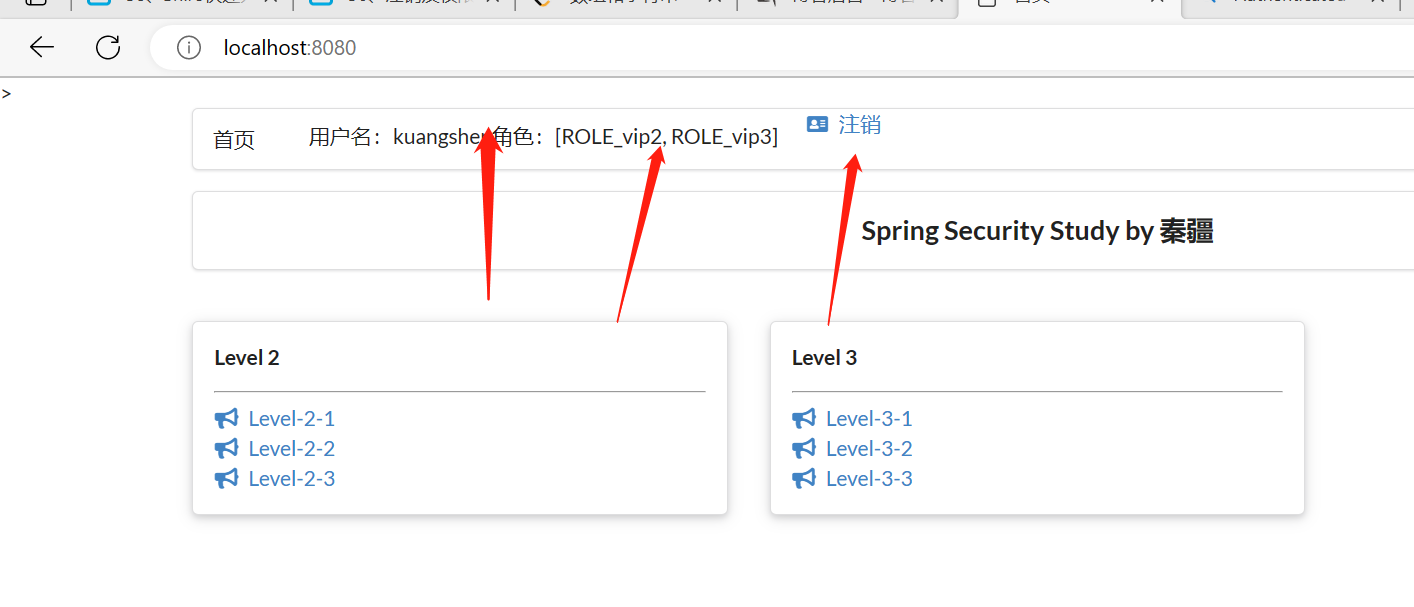
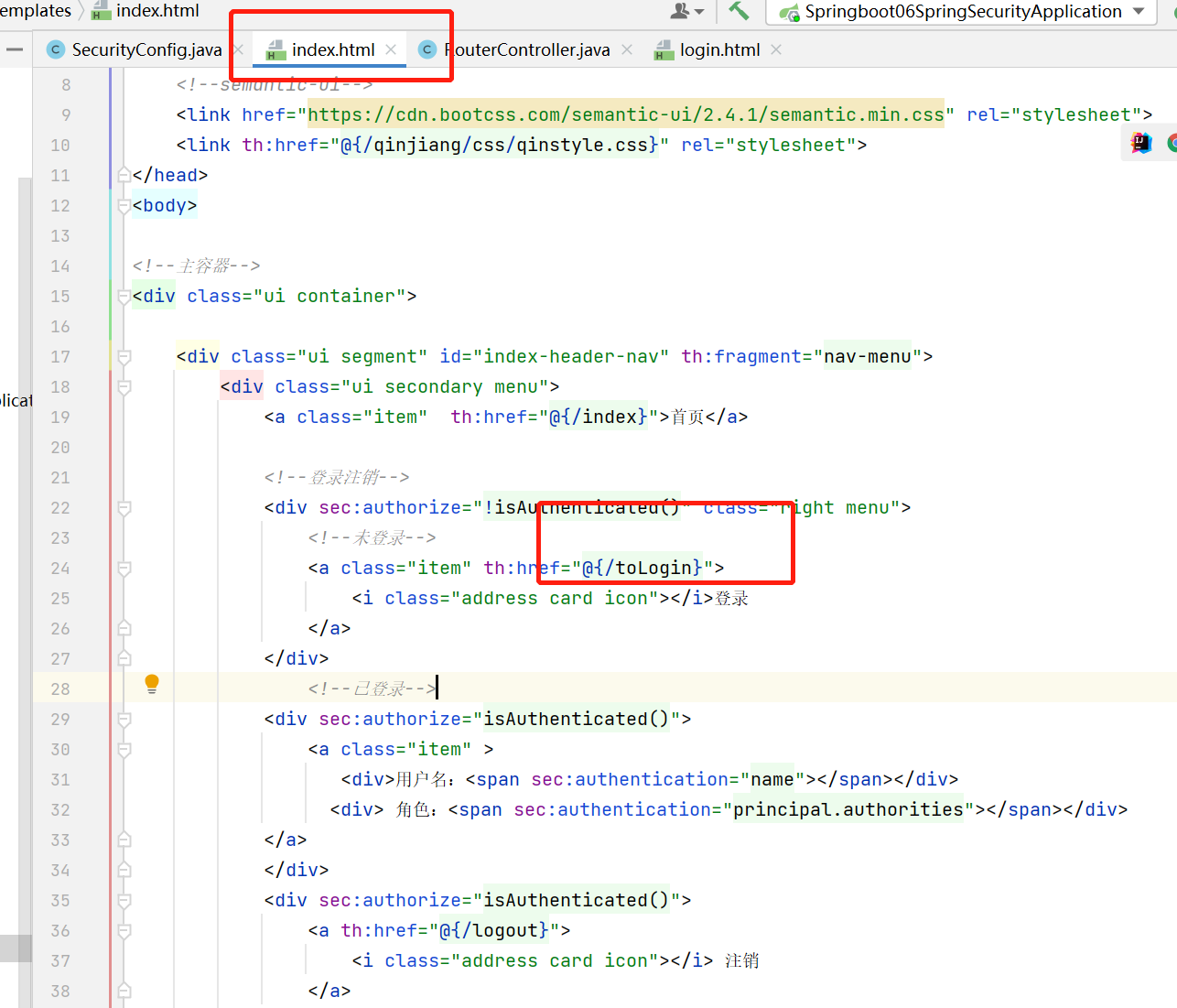
前端判断:如果用户未登录(!isAuthenticated()),那要跳到登录页面,如果用户是登录的,定制首页要展示出用户的角色(vip1?vip2?vip3?),和注销图标
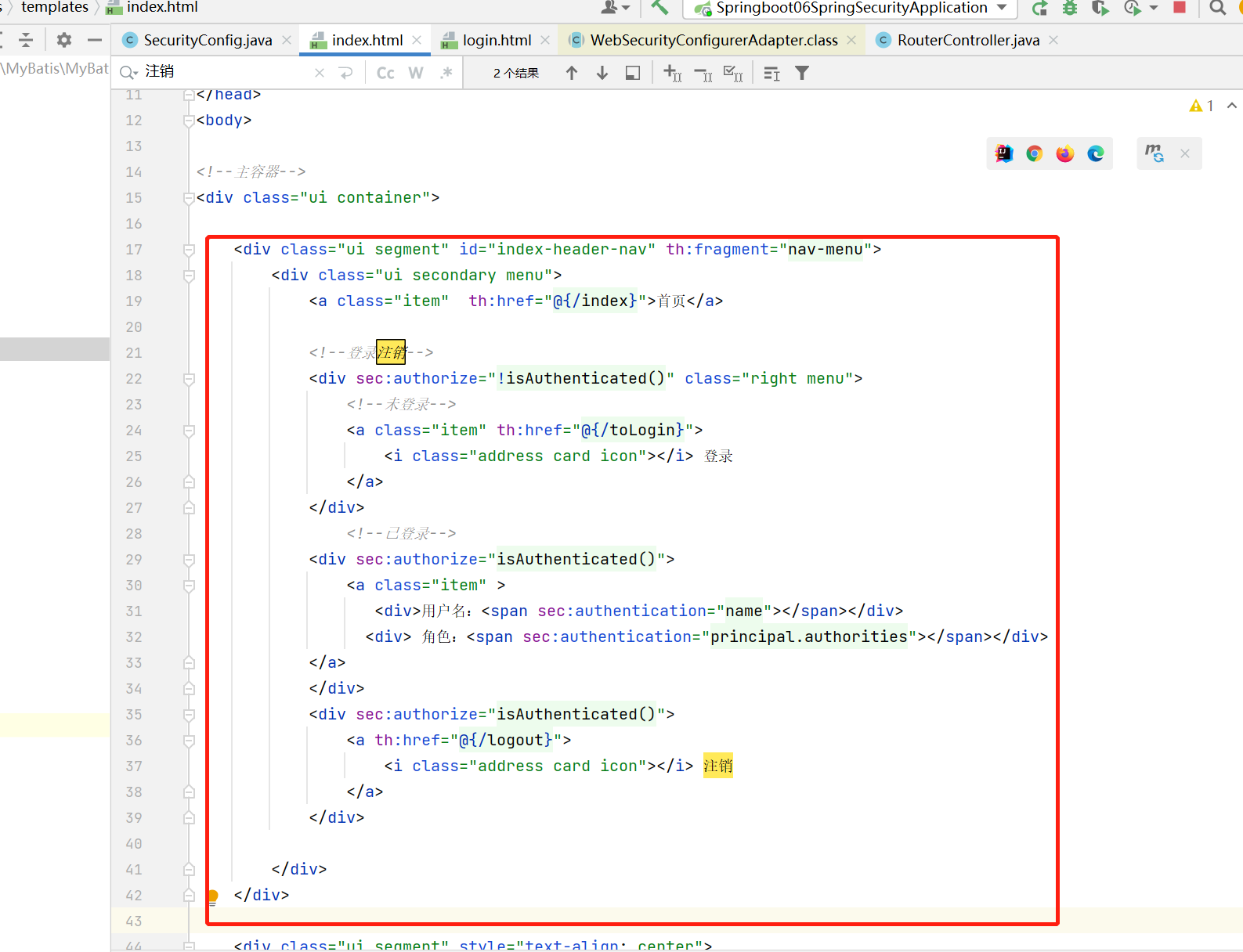
运行结果:
动态菜单
动态菜单:不同角色登录看到的内容不同
前端代码:
只需要在每个功能模块前面添加判断是什么角色
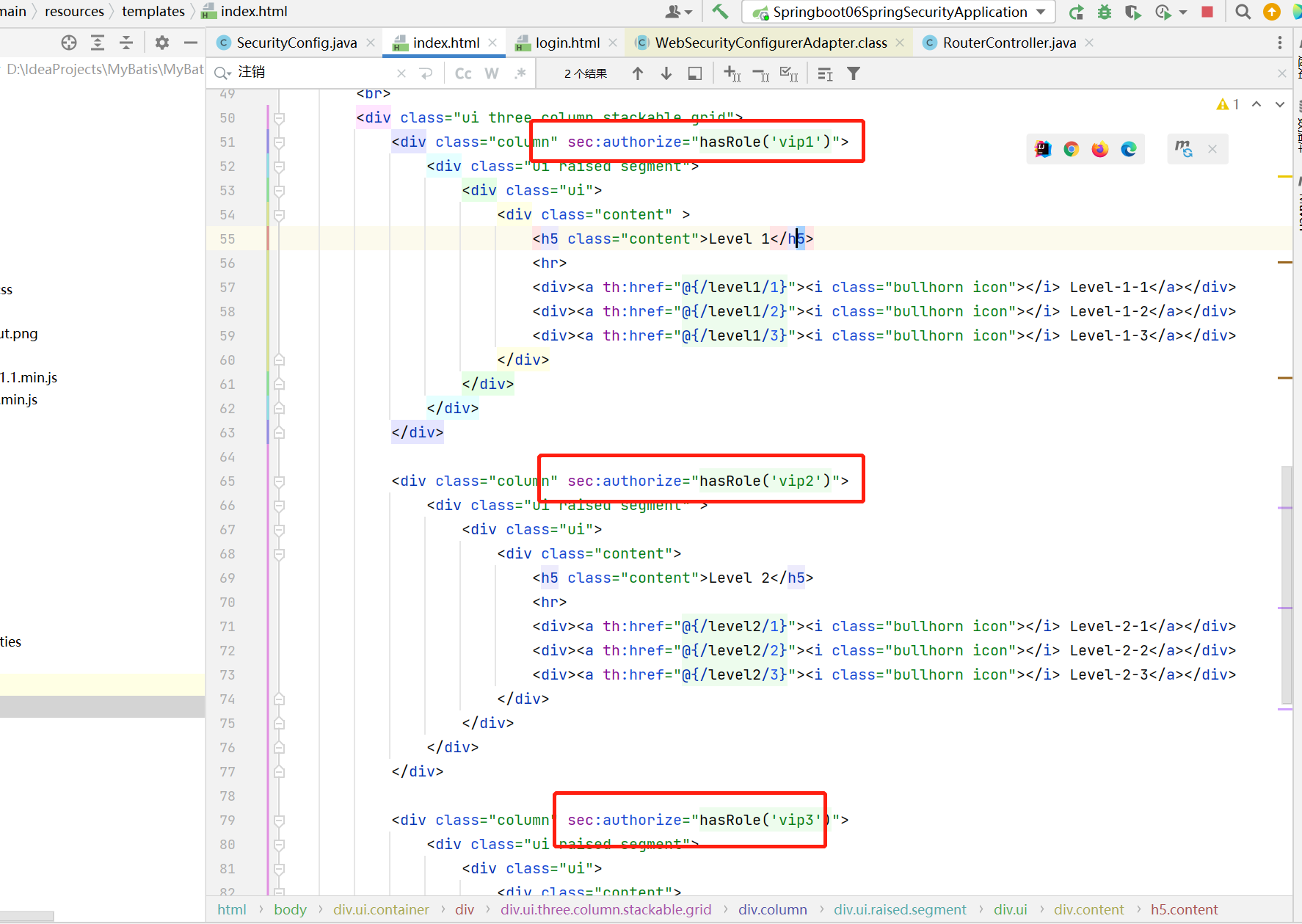
运行结果:
可以看到用户kuangshen角色是vip2和vip3,因此可以看到对应的两个功能模块Level2和Level3
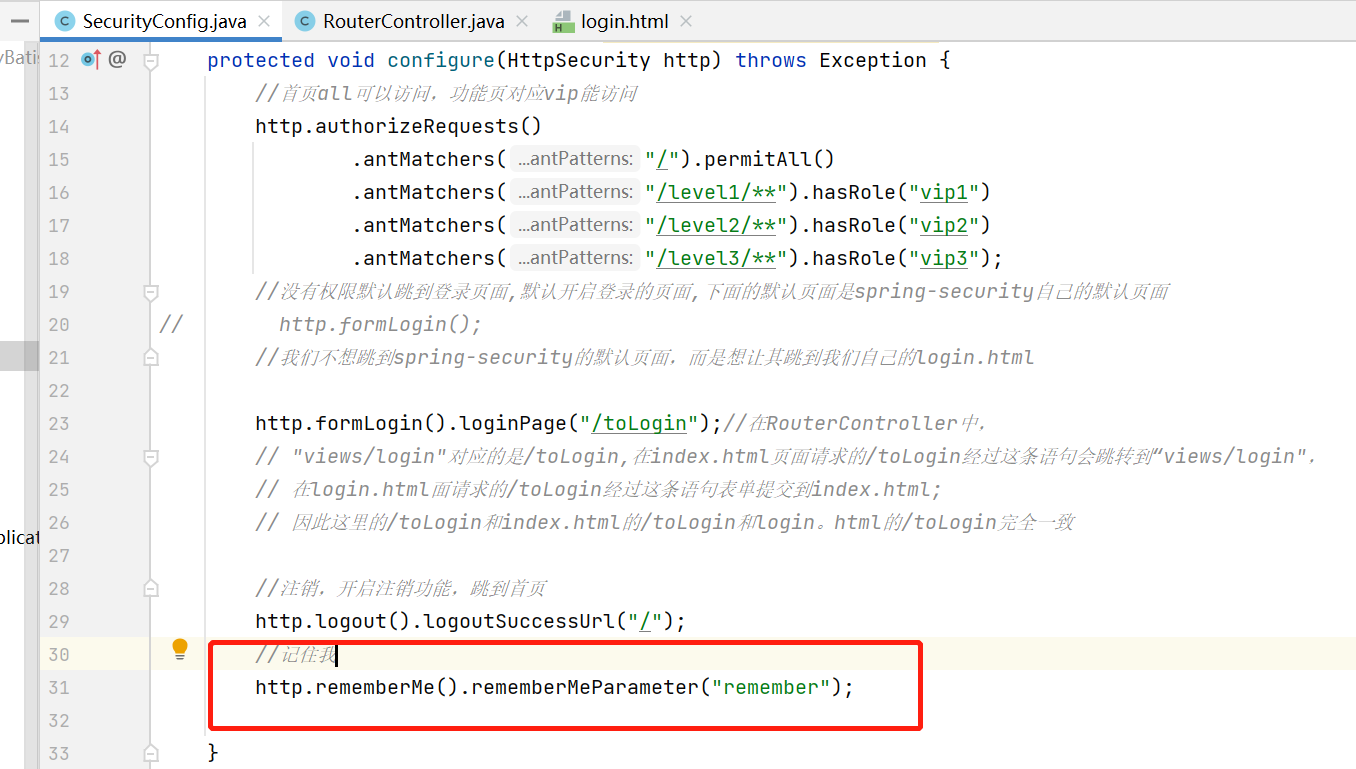
记住我
记住我的本质是在用户访问时增加cookie
在前端添加:
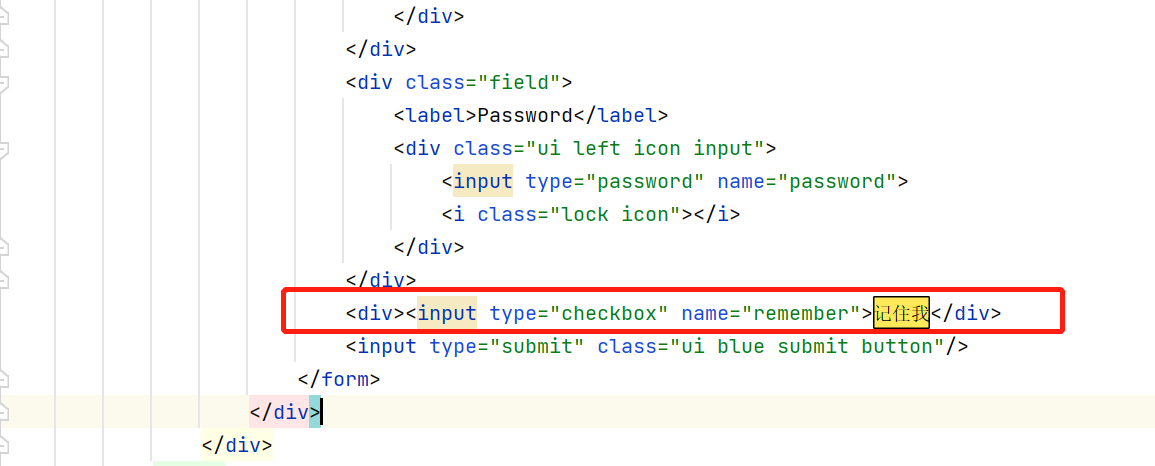
在secruityconfig开启:
首页定制
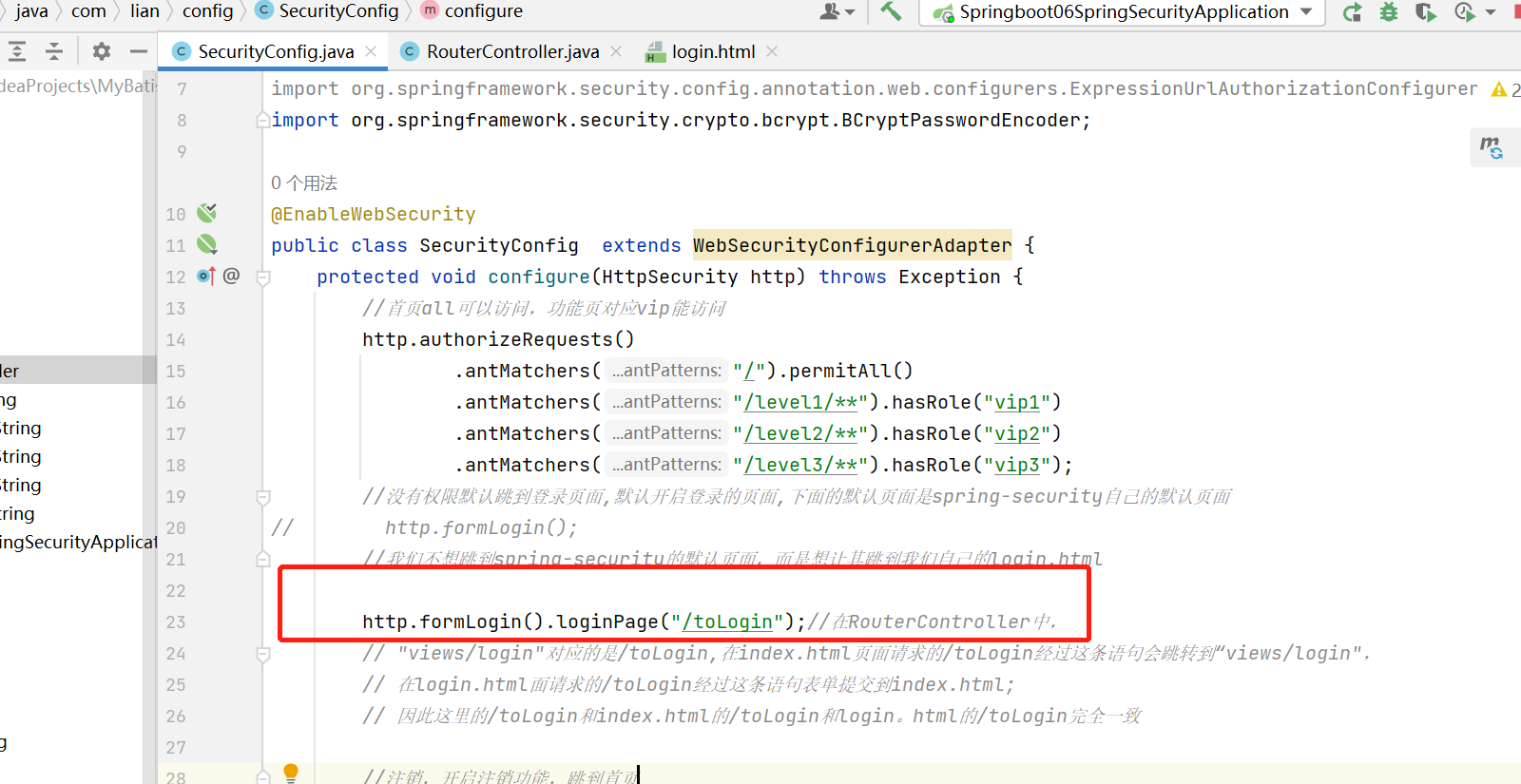
我们不想继续使用springsecurity5提供的登录页面了,因此我们自定义了一个login.html,我们希望之后按登录按钮时跳转到自己定制的登录页面
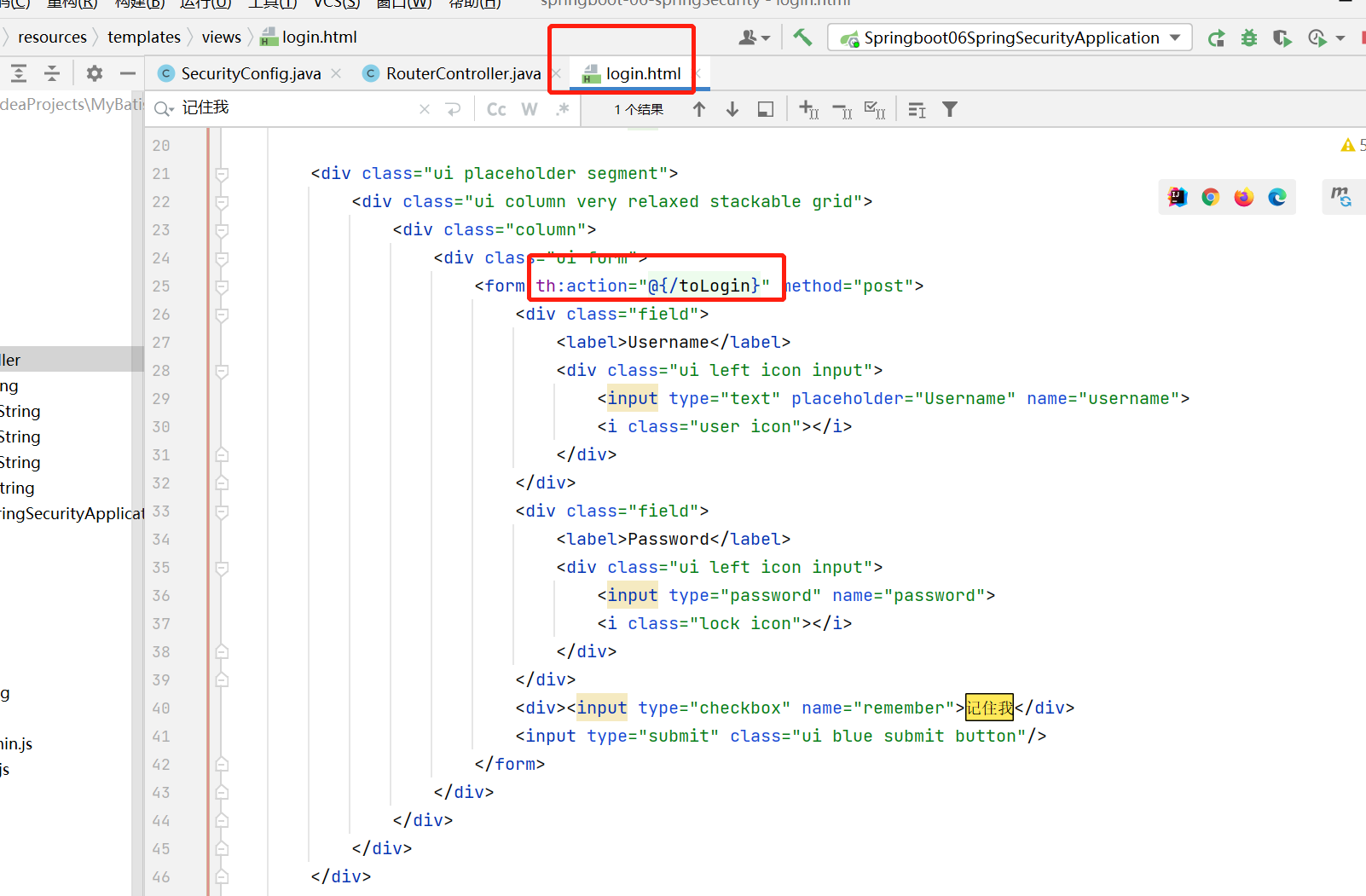
在RouterController中,"views/login"对应的是/toLogin,在index.html页面请求的/toLogin经过这条语句会跳转到“views/login",在login.html面请求的/toLogin经过这条语句表单提交到index.html; 因此这里的/toLogin和index.html的/toLogin和login。html的/toLogin要完全一致,不然会报404
login.html
index.html
springsecurity 认证,授权,注销,动态菜单,记住我和首页定制的更多相关文章
- 【NET CORE微服务一条龙应用】第三章 认证授权与动态权限配置
介绍 系列目录:[NET CORE微服务一条龙应用]开始篇与目录 在微服务的应用中,统一的认证授权是必不可少的组件,本文将介绍微服务中网关和子服务如何使用统一的权限认证 主要介绍内容为: 1.子服务如 ...
- Spring Cloud实战 | 最终篇:Spring Cloud Gateway+Spring Security OAuth2集成统一认证授权平台下实现注销使JWT失效方案
一. 前言 在上一篇文章介绍 youlai-mall 项目中,通过整合Spring Cloud Gateway.Spring Security OAuth2.JWT等技术实现了微服务下统一认证授权平台 ...
- 使用SpringSecurity搭建授权认证服务(1) -- 基本demo认证原理
使用SpringSecurity搭建授权认证服务(1) -- 基本demo 登录认证是做后台开发的最基本的能力,初学就知道一个interceptor或者filter拦截所有请求,然后判断参数是否合理, ...
- 业务逻辑:五、完成认证用户的动态授权功能 六、完成Shiro整合Ehcache缓存权限数据
一. 完成认证用户的动态授权功能 提示:根据当前认证用户查询数据库,获取其对应的权限,为其授权 操作步骤: 在realm的授权方法中通过使用principals对象获取到当前登录用户 创建一个授权信息 ...
- SpringBoot--- 使用SpringSecurity进行授权认证
SpringBoot--- 使用SpringSecurity进行授权认证 前言 在未接触 SpringSecurity .Shiro 等安全认证框架之前,如果有页面权限需求需要满足,通常可以用拦截器, ...
- SpringSecurity(1)---认证+授权代码实现
认证+授权代码实现 Spring Security是 一种基于 Spring AOP 和 Servlet 过滤器的安全框架.它提供全面的安全性解决方案,同时在 Web 请求级和方法调用级处理身份确认和 ...
- SpringCloud微服务实战——搭建企业级开发框架(二十三):Gateway+OAuth2+JWT实现微服务统一认证授权
OAuth2是一个关于授权的开放标准,核心思路是通过各类认证手段(具体什么手段OAuth2不关心)认证用户身份,并颁发token(令牌),使得第三方应用可以使用该token(令牌)在限定时间.限定 ...
- [Spring Cloud实战 | 第六篇:Spring Cloud Gateway+Spring Security OAuth2+JWT实现微服务统一认证授权
一. 前言 本篇实战案例基于 youlai-mall 项目.项目使用的是当前主流和最新版本的技术和解决方案,自己不会太多华丽的言辞去描述,只希望能勾起大家对编程的一点喜欢.所以有兴趣的朋友可以进入 g ...
- 【Spring Cloud & Alibaba 实战 | 总结篇】Spring Cloud Gateway + Spring Security OAuth2 + JWT 实现微服务统一认证授权和鉴权
一. 前言 hi,大家好~ 好久没更文了,期间主要致力于项目的功能升级和问题修复中,经过一年时间的打磨,[有来]终于迎来v2.0版本,相较于v1.x版本主要完善了OAuth2认证授权.鉴权的逻辑,结合 ...
- [认证授权] 3.基于OAuth2的认证(译)
OAuth 2.0 规范定义了一个授权(delegation)协议,对于使用Web的应用程序和API在网络上传递授权决策非常有用.OAuth被用在各钟各样的应用程序中,包括提供用户认证的机制.这导致许 ...
随机推荐
- 如何建设私有云原生 Serverless 平台
随着云计算的普及,越来越多的企业开始将业务应用迁移到云上.然而,如何构建一套完整的云原生 Serverless 平台,依然是一个需要考虑的问题. Serverless的发展趋势 云计算行业从 IaaS ...
- Vue前端框架的基础学习,为之后打个基础
Vue 首先,在使用vue之前,我们需要先下载好一个vue.js文件,才能继续进行vue的学习,下载教程如下: 1.进入官网:https://v2.vuejs.org/ 2.选择页面中的Learn,再 ...
- 【读书笔记】组合计数-Tilings-正文 学一半的笔记
Tilings-正文部分 目录 9.2 转移函数方法 例子 补充 9.3 其余的方法 9.3.1 the path method 9.3.2 The permanent-determinant and ...
- Spring AOP面向切面编程案例 (注解驱动开发)
AOP(动态代理):指在程序运行期间动态的将某段代码切入到指定方法指定位置进行运行的编程方式:[1]导入 aop 模块:Spring AOP:(spring-aspects):[2]定义一个业务逻辑类 ...
- 基于el-input实现数字区间输入框(已发布npm/github)
项目地址:https://github.com/heyu3913/InputNumberRange (求star) input-number-range tips:更多定制化需求请联系: 13102 ...
- 中心极限定理的模拟—R实现
中心极限定理,是指概率论中讨论随机变量序列部分和分布渐近于正态分布的一类定理.这组定理是数理统计学和误差分析的理论基础,指出了大量随机变量近似服从正态分布的条件.它是概率论中最重要的一类定理,有广泛的 ...
- [操作系统]记一次未尽的三星 Galaxy A6s(SM-G6200)刷机过程
给女王大人刷机,第一次刷机,很遗憾,遇到了三星的"锁三键"问题,没有搞成.记录一下这个过程所涉猎的一些刷机基本知识,不妨当作一次学习过程. 1 刷机过程 Step1 查看手机基本信 ...
- [ElasticSearch]#Search Guard#sgadmin参数说明
sgadmin.sh/sgadmin.bat是Elastic Search的开源安全组件Search Guard内的可执行脚本. 在修改SG组件的用户角色.权限.密码时,需使用到此脚本. 在修改完Se ...
- CSS样式中颜色与颜色值的应用
使用CSS描绘页面样式时,颜色是其中不可或缺的,无论是对文本.背景还是边框.阴影,我们都写过无数代码用来增添颜色.而为了让网页的色彩表现更出色,我们很有必要完整梳理下CSS中的色彩. 要讲清楚CSS中 ...
- 如何使用Redis做缓存
如何使用Redis做缓存 我们都知道Redis作为NoSql数据库的代表之一,通常会用来作为缓存使用.也是我在工作中通常使用的缓存之一. 1.我们什么时候缓存需要用到Redis? 我认为,缓存可以分为 ...