
springsecurity 认证,授权,注销,动态菜单,记住我和首页定制
搭建环境:
1.在创建springboot时选择组件web,thymeleaf,spring-security
2.导入静态资源,导入后测试一下环境
认证和授权:
继承类WebSecurityConfigurerAdapter,重写方法configure
若遇到报错:
java.lang.IllegalArgumentException: There is no PasswordEncoder mapped for the id "null"
at org.springframework.security.crypto.password.DelegatingPasswordEncoder$UnmappedIdPasswordEncoder.matches(DelegatingPasswordEncoder.java:289) ~[spring-security-crypto-5.7.8.jar:5.7.8]
at org.springframework.security.crypto.password.DelegatingPasswordEncoder.matches(DelegatingPasswordEncoder.java:237) ~[spring-security-crypto-5.7.8.jar:5.7.8]
at org.springframework.security.config.annotation.web.configuration.WebSecurityConfigurerAdapter$LazyPasswordEncoder.matches(WebSecurityConfigurerAdapter.java:616) ~[spring-security-config-5.7.8.jar:5.7.8]
at org.springframework.security.authentication.dao.DaoAuthenticationProvider.additionalAuthenticationChecks(DaoAuthenticationProvider.java:77) ~[spring-security-core-5.7.8.jar:5.7.8]
at org.springframework.security.authentication.dao.AbstractUserDetailsAuthenticationProvider.authenticate(AbstractUserDetailsAuthenticationProvider.java:147) ~[spring-security-core-5.7.8.jar:5.7.8]
at org.springframework.security.authentication.ProviderManager.authenticate(ProviderManager.java:182) ~[spring-security-core-5.7.8.jar:5.7.8]
at org.springframework.security.authentication.ProviderManager.authenticate(ProviderManager.java:201) ~[spring-security-core-5.7.8.jar:5.7.8]
at org.springframework.security.web.authentication.UsernamePasswordAuthenticationFilter.attemptAuthentication(
是因为设置的密码没有加密啊,springsecurity5.0+要求对密码加密,因为不加密很容易被反编译,造成信息泄露
代码:
@EnableWebSecurity

public class SecurityConfig  extends WebSecurityConfigurerAdapter {

    protected void configure(HttpSecurity http) throws Exception {

        //首页all可以访问,功能页对应vip能访问

        http.authorizeRequests()

                .antMatchers("/").permitAll()

                .antMatchers("/level1/**").hasRole("vip1")

                .antMatchers("/level2/**").hasRole("vip2")

                .antMatchers("/level3/**").hasRole("vip3");

        //没有权限默认跳到登录页面,默认开启登录的页面

        http.formLogin();

    }

    protected void configure(AuthenticationManagerBuilder auth) throws Exception {

       auth.inMemoryAuthentication().passwordEncoder(new BCryptPasswordEncoder())

               .withUser("kuangshen").password(new BCryptPasswordEncoder().encode("123")).roles("vip2","vip3")

               .and()

               .withUser("ROOT").password(new BCryptPasswordEncoder().encode("123456")).roles("vip1","vip2","vip3")

               .and()

               .withUser("GUEST").password(new BCryptPasswordEncoder().encode("12")).roles("vip3");

    }

}
注销
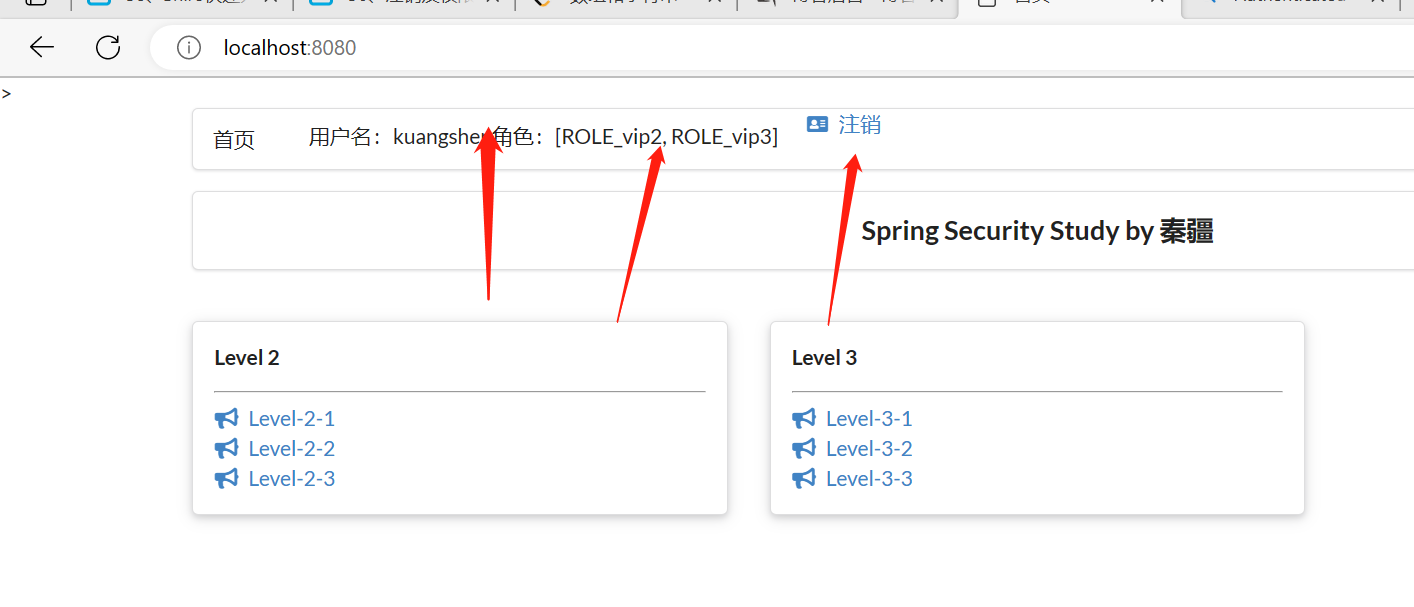
要求实现:未登录:只显示登录按钮,登录时 显示登陆角色和注销按钮
前端代码要做的事情是验证,需要导入整合thymeleaf和springsecurity的依赖
<dependency>
    <groupId>org.thymeleaf.extras</groupId>
    <artifactId>thymeleaf-extras-springsecurity5</artifactId>
</dependency>
前端代码:
前端判断:如果用户未登录(!isAuthenticated()),那要跳到登录页面,如果用户是登录的,定制首页要展示出用户的角色(vip1?vip2?vip3?),和注销图标
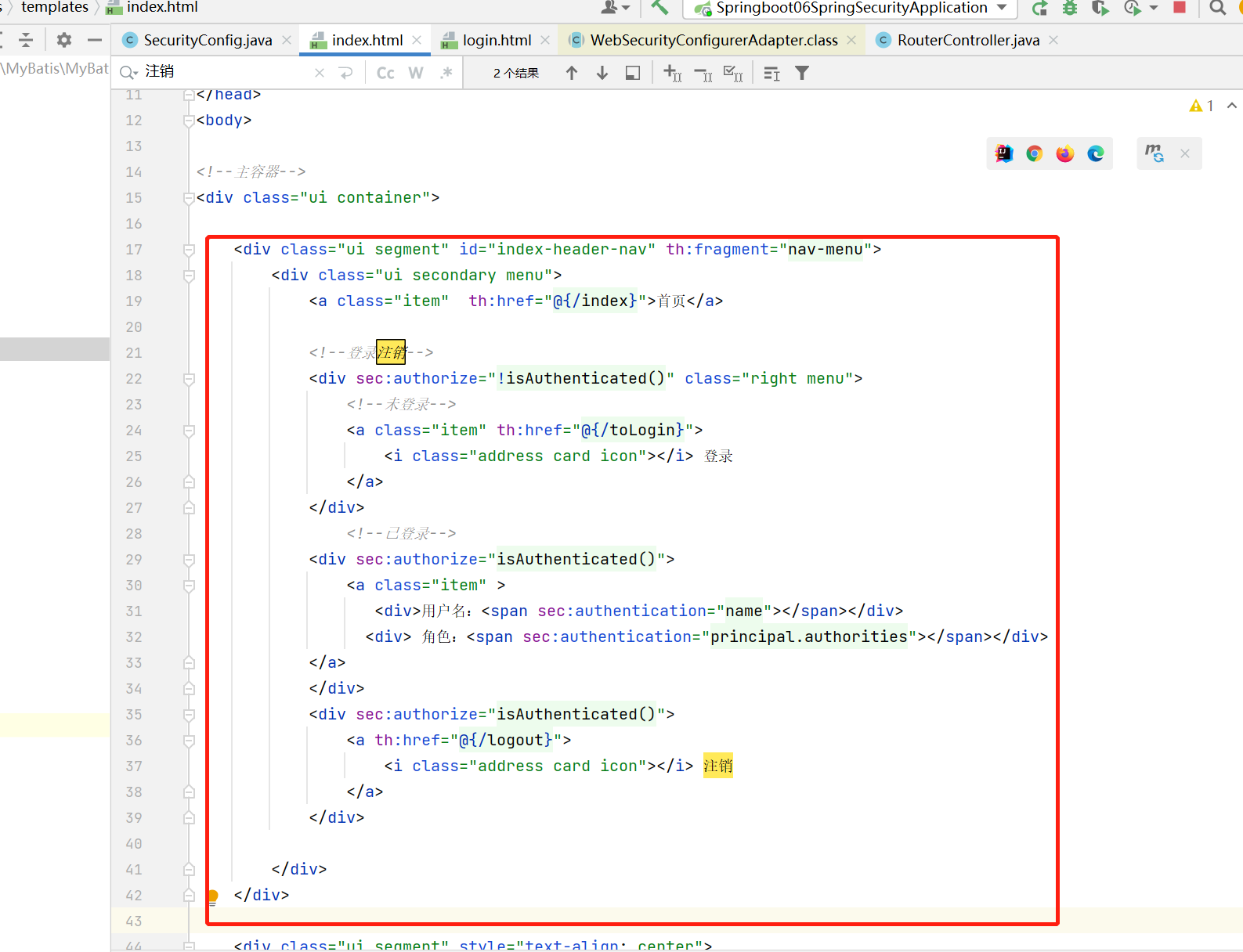
运行结果:
动态菜单
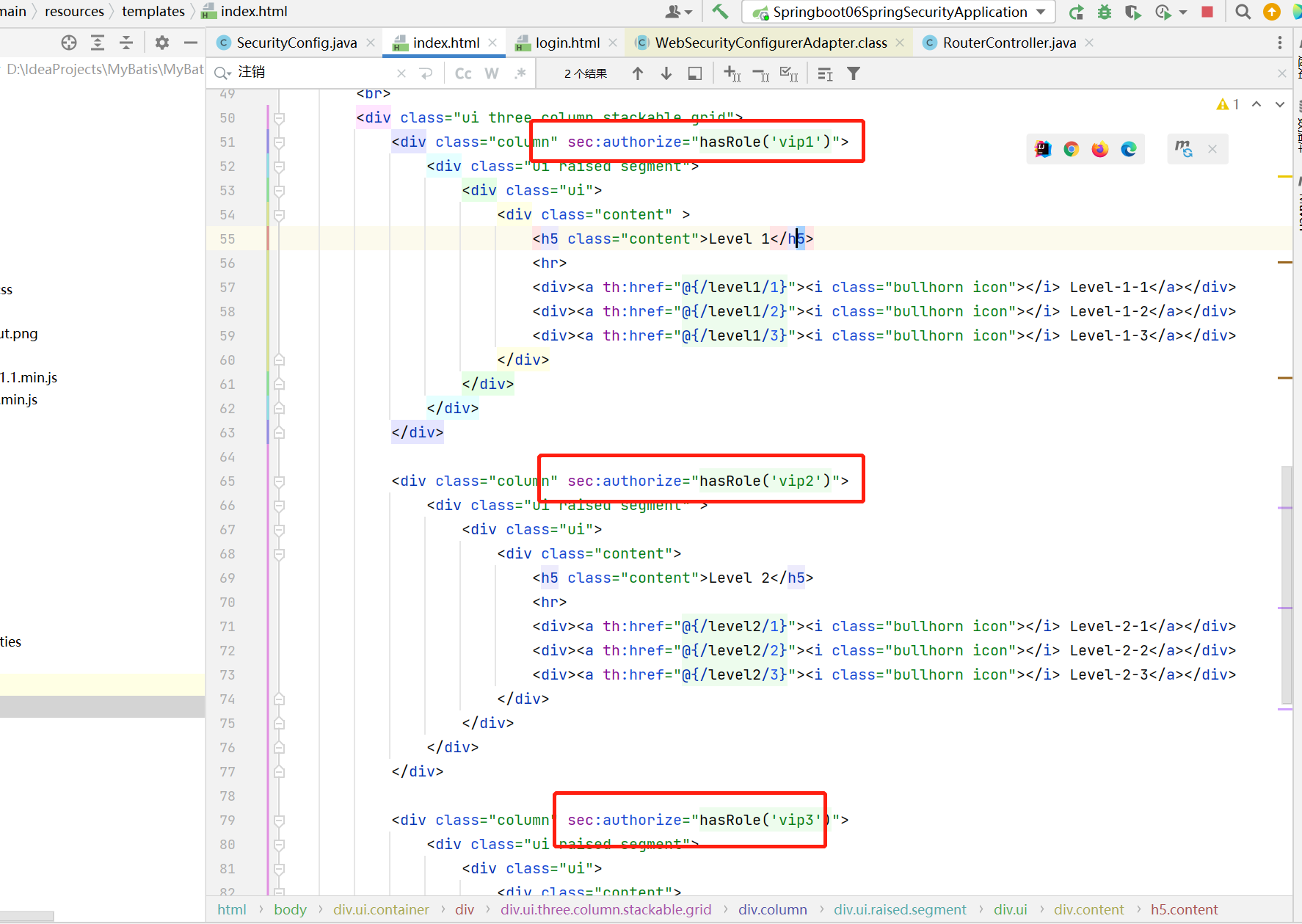
动态菜单:不同角色登录看到的内容不同
前端代码:
只需要在每个功能模块前面添加判断是什么角色
运行结果:
可以看到用户kuangshen角色是vip2和vip3,因此可以看到对应的两个功能模块Level2和Level3
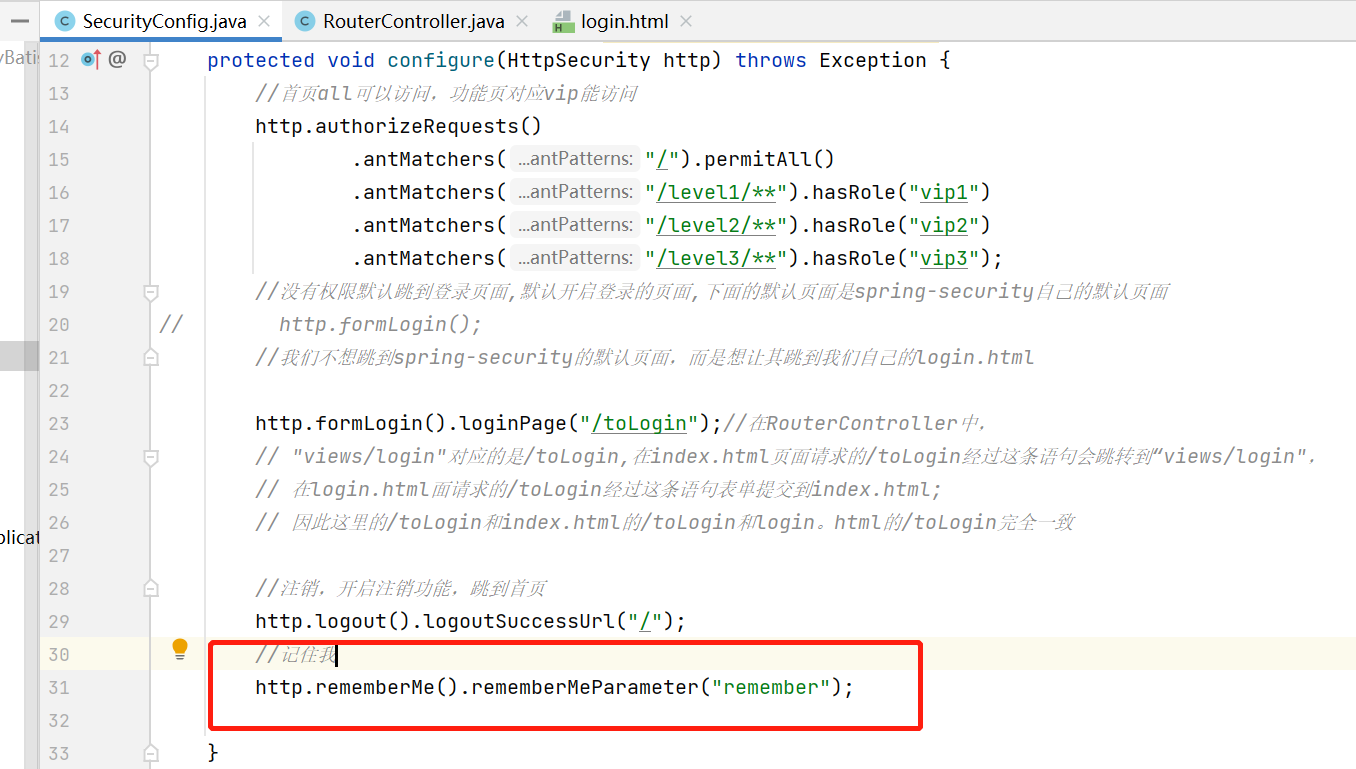
记住我
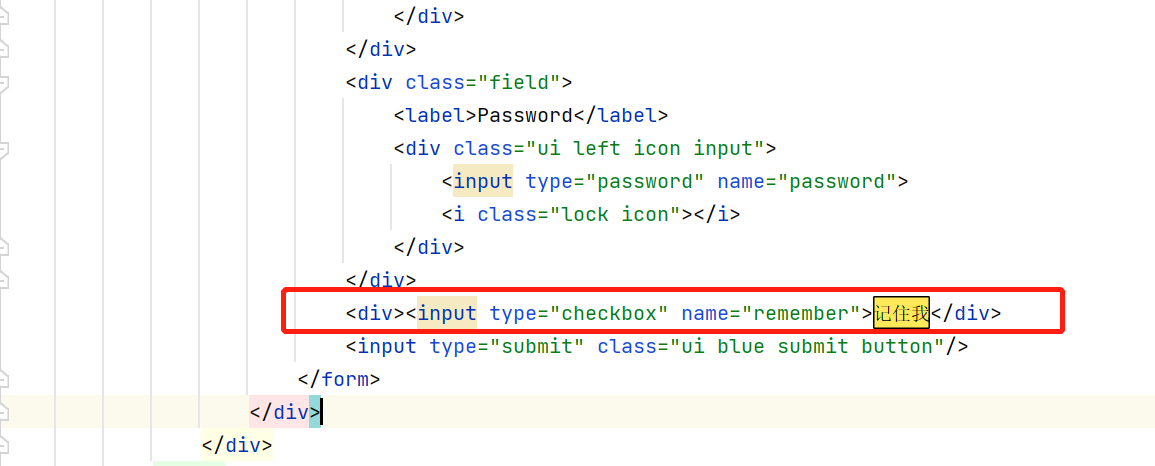
记住我的本质是在用户访问时增加cookie
在前端添加:
在secruityconfig开启:
首页定制
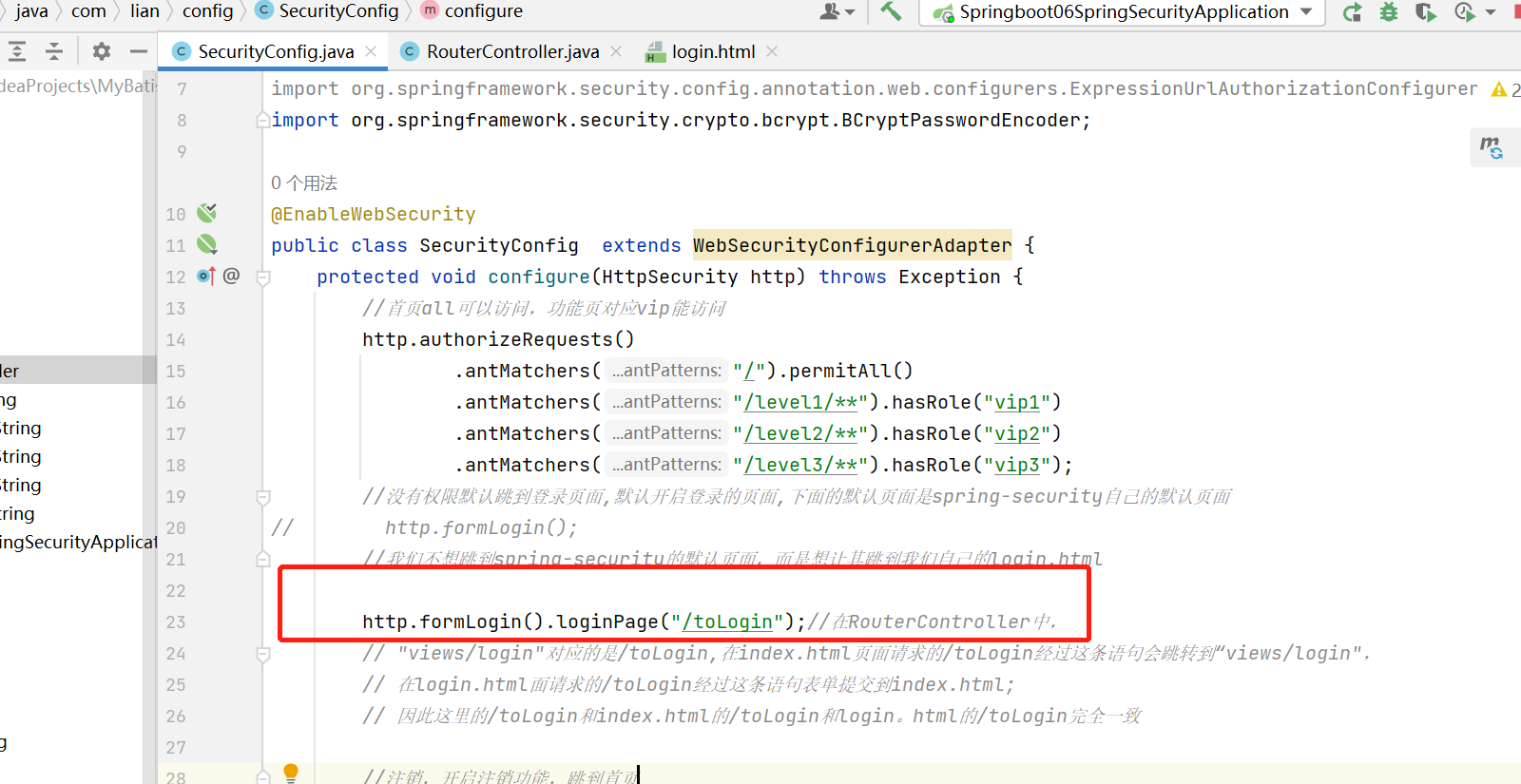
我们不想继续使用springsecurity5提供的登录页面了,因此我们自定义了一个login.html,我们希望之后按登录按钮时跳转到自己定制的登录页面
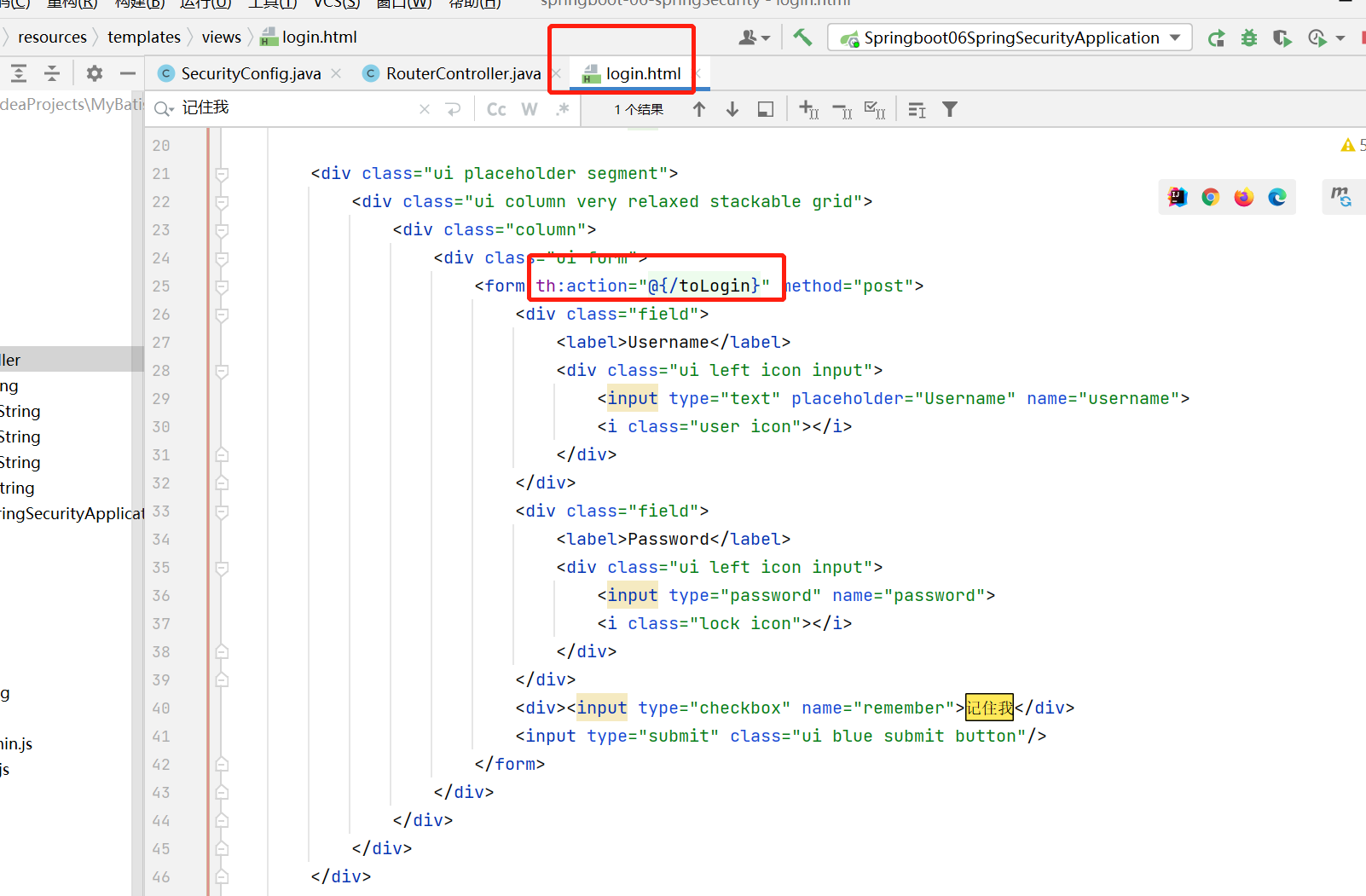
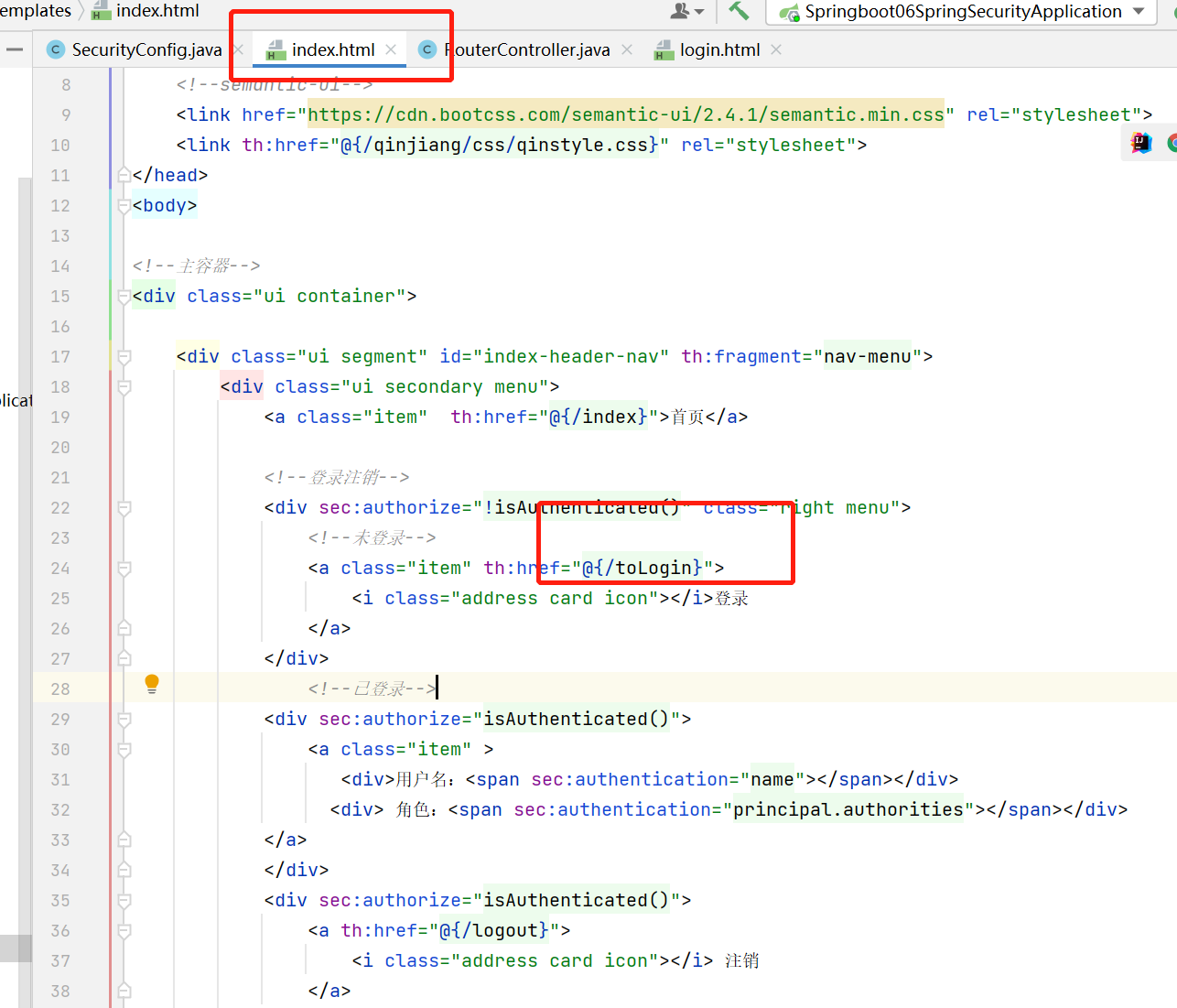
在RouterController中,"views/login"对应的是/toLogin,在index.html页面请求的/toLogin经过这条语句会跳转到“views/login",在login.html面请求的/toLogin经过这条语句表单提交到index.html; 因此这里的/toLogin和index.html的/toLogin和login。html的/toLogin要完全一致,不然会报404
login.html
index.html
springsecurity 认证,授权,注销,动态菜单,记住我和首页定制的更多相关文章
- 【NET CORE微服务一条龙应用】第三章 认证授权与动态权限配置
介绍 系列目录:[NET CORE微服务一条龙应用]开始篇与目录 在微服务的应用中,统一的认证授权是必不可少的组件,本文将介绍微服务中网关和子服务如何使用统一的权限认证 主要介绍内容为: 1.子服务如 ...
- Spring Cloud实战 | 最终篇:Spring Cloud Gateway+Spring Security OAuth2集成统一认证授权平台下实现注销使JWT失效方案
一. 前言 在上一篇文章介绍 youlai-mall 项目中,通过整合Spring Cloud Gateway.Spring Security OAuth2.JWT等技术实现了微服务下统一认证授权平台 ...
- 使用SpringSecurity搭建授权认证服务(1) -- 基本demo认证原理
使用SpringSecurity搭建授权认证服务(1) -- 基本demo 登录认证是做后台开发的最基本的能力,初学就知道一个interceptor或者filter拦截所有请求,然后判断参数是否合理, ...
- 业务逻辑:五、完成认证用户的动态授权功能 六、完成Shiro整合Ehcache缓存权限数据
一. 完成认证用户的动态授权功能 提示:根据当前认证用户查询数据库,获取其对应的权限,为其授权 操作步骤: 在realm的授权方法中通过使用principals对象获取到当前登录用户 创建一个授权信息 ...
- SpringBoot--- 使用SpringSecurity进行授权认证
SpringBoot--- 使用SpringSecurity进行授权认证 前言 在未接触 SpringSecurity .Shiro 等安全认证框架之前,如果有页面权限需求需要满足,通常可以用拦截器, ...
- SpringSecurity(1)---认证+授权代码实现
认证+授权代码实现 Spring Security是 一种基于 Spring AOP 和 Servlet 过滤器的安全框架.它提供全面的安全性解决方案,同时在 Web 请求级和方法调用级处理身份确认和 ...
- SpringCloud微服务实战——搭建企业级开发框架(二十三):Gateway+OAuth2+JWT实现微服务统一认证授权
OAuth2是一个关于授权的开放标准,核心思路是通过各类认证手段(具体什么手段OAuth2不关心)认证用户身份,并颁发token(令牌),使得第三方应用可以使用该token(令牌)在限定时间.限定 ...
- [Spring Cloud实战 | 第六篇:Spring Cloud Gateway+Spring Security OAuth2+JWT实现微服务统一认证授权
一. 前言 本篇实战案例基于 youlai-mall 项目.项目使用的是当前主流和最新版本的技术和解决方案,自己不会太多华丽的言辞去描述,只希望能勾起大家对编程的一点喜欢.所以有兴趣的朋友可以进入 g ...
- 【Spring Cloud & Alibaba 实战 | 总结篇】Spring Cloud Gateway + Spring Security OAuth2 + JWT 实现微服务统一认证授权和鉴权
一. 前言 hi,大家好~ 好久没更文了,期间主要致力于项目的功能升级和问题修复中,经过一年时间的打磨,[有来]终于迎来v2.0版本,相较于v1.x版本主要完善了OAuth2认证授权.鉴权的逻辑,结合 ...
- [认证授权] 3.基于OAuth2的认证(译)
OAuth 2.0 规范定义了一个授权(delegation)协议,对于使用Web的应用程序和API在网络上传递授权决策非常有用.OAuth被用在各钟各样的应用程序中,包括提供用户认证的机制.这导致许 ...
随机推荐
- 微软NewBing真是Niubility
这是本人2012年的拙作: 晨兮,闻风雨,后而雷鸣电闪.迟不可再三,若故无食.然何如耶?雨大风狂,单车奈何?公交卡空,恐时不予我也.不免叹也,天亦不予我! 而后出, ...
- 微软出品自动化神器【Playwright+Java】系列(十二)测试框架的设计与开发
一.前言 大家好,我是六哥! 又有好长一段时间没更文了,不是我懒,而是确实在更文上,没有以前积极了,这里是该自我检讨的. 其实不是我不积极,而是相对更文学习来说,优先级不是最高. 对我而言,目前最重要 ...
- 【2019CCPC秦皇岛:A】Angle Beats 分类讨论 (unordered_map 加 hash)
题意:n个给定点,q个询问点,每次询问给出一个坐标A,问从n中选定两个点B,C,有多少种方案使得ABC是个直角三角形. 思路:直角三角形能想的就那几个,枚举边,枚举顶点,这个题都行,写的枚举顶点的,A ...
- [ARC152D] Halftree题解
很好的一道题,即使是我这种菜鸡也感到心潮澎湃. 直觉有余,证明不足.思路有余,推导不足. 无论是什么比赛,对拍都是最有效的查错方式. 本篇题解里的所有图片采用 graph_editor 制作. 题意简 ...
- Python——基础知识(一)
1. 那么多编程语言,为什么学python 易于学习,是所有编程语言当中最容易学习的 没有最好的语言,只有最合适的语言 2. 反复执行的用例如何提升效率 测试流程回归(回顾) 很多测试用例在不同的测试 ...
- DES算法流程
初始置换IP 表格的使用方法: 将输入的64bit的明文从1开始标号,依次放入到IP初始置换表中数字对应的位置.填充完毕后,按照行优先的顺序从第1行开始依次读取获得输出. 16轮轮结构 整体结构 因为 ...
- js函数防抖节流
// 3.1 函数防抖: // 当持续触发事件时,一定时间段内没有再次触发事件,事件处理函数才会执行一次,如果设定时间到来之前,又触发了事件,就重新开始延时.// 也就是说当一个用户一直触发这个函数, ...
- H5 visibilityChange事件 --- 监听页面的显示或者隐藏 新开一个webview
mounted() { document.addEventListener('visibilityChange', 事件处理函数) }, destoryed() { document.removeEv ...
- 提供一款局域网聊天小工具,对接了chatGPT3.5
账号.密码随便填,只要自己能记住就可以,网络地址如效果图(本机IP地址+8080端口),效果图如下 服务地址用本机IP,端口可以随便用一个,如8888,填完记得点击按钮开启: 通讯地址如果你有其他人的 ...
- 计网学习笔记五 wireless && mobile networks
老师把无线网络用一节课一遍过了-感觉没能学透,便课后自己总结,看书,找资料补充,把无线网络大概摸了个七七八八.虽然不算精细,但还能看!内容包括WLAN总概,WiFi-WLAN的实现,802.11规定的 ...