
Linux Git服务器安装
服务端 centos7 客户端 windows10
①服务端:linux 下yum 更新下,yum -y install git 安装。git --version 检查版本。
客户端:下载 Git for Windows,地址:https://git-for-windows.github.io/ 安装完之后,可以使用 Git Bash 作为命令行客户端。安装完之后,查看Git 版本。
②Linux服务端创建git用户和密码:
useradd git passwd git
③设置 /home/data/git/gittest.git 为 Git 仓库
然后把 Git 仓库的 owner 修改为 git
[root@localhost home]# mkdir -p data/git/gittest.git

[root@localhost home]# git init --bare data/git/gittest.git

Initialized empty Git repository in /home/data/git/gittest.git/

[root@localhost home]# cd data/git/

[root@localhost git]# chown -R git:git gittest.git/
④ 客户端(Win10) clone 远程仓库
进入 Git Bash 命令行客户端,创建项目地址(设置在 d:/wamp64/www/gittest_gitbash)并进入:
从 Linux Git 服务器上 clone 项目:
xw509@DESKTOP-6IJ9SIE MINGW64 /e

$ mkdir -p wamp64/www/gittest_gitbash

xw509@DESKTOP-6IJ9SIE MINGW64 /e

$ cd wamp64/www/gittest_gitbash/

xw509@DESKTOP-6IJ9SIE MINGW64 /e/wamp64/www/gittest_gitbash

$ ls

xw509@DESKTOP-6IJ9SIE MINGW64 /e/wamp64/www/gittest_gitbash

$ git clone git@192.168.5.100:/home/data/git/gittest.git

Cloning into 'gittest'...

The authenticity of host '192.168.5.100 (192.168.5.100)' can't be established.

ECDSA key fingerprint is SHA256:oZh+82JEWNUU6V0jdwcCKSefraZ9FIz/k0JXMMNIHvc.

Are you sure you want to continue connecting (yes/no)? yes

Warning: Permanently added '192.168.5.100' (ECDSA) to the list of known hosts.

git@192.168.5.100's password:

warning: You appear to have cloned an empty repository.

xw509@DESKTOP-6IJ9SIE MINGW64 /e/wamp64/www/gittest_gitbash

$ ls

gittest/
如果SSH用的不是默认的22端口,则需要使用以下的命令(假设SSH端口号是7700):
$ git clone ssh://git@192.168.56.101:7700/home/data/gittest.git
当第一次连接到目标 Git 服务器时会得到一个提示:
The authenticity of host '192.168.56.101 (192.168.56.101)' can't be established.

RSA key fingerprint is SHA256:Ve6WV/SCA059EqoUOzbFoZdfmMh3B259nigfmvdadqQ.

Are you sure you want to continue connecting (yes/no)?
选择 yes:
Warning: Permanently added '192.168.56.101' (RSA) to the list of known hosts.
此时 C:\Users\用户名\.ssh (隐藏目录),下会多出一个文件 known_hosts,以后在这台电脑上再次连接目标 Git 服务器时不会再提示上面的语句。
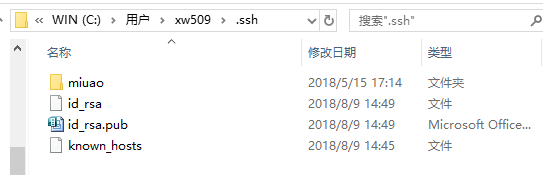
⑤ 客户端创建 SSH 公钥和私钥
$ ssh-keygen -t rsa -C "邮箱"
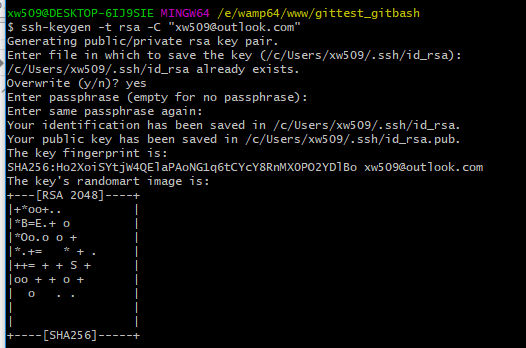
此时 C:\Users\用户名\.ssh 下会多出两个文件 id_rsa 和 id_rsa.pub
id_rsa 是私钥
id_rsa.pub 是公钥
⑥ 服务器端 Git 打开 RSA 认证
进入 /etc/ssh 目录,编辑 sshd_config,打开以下三个配置的注释:
RSAAuthentication yes

PubkeyAuthentication yes

AuthorizedKeysFile .ssh/authorized_keys
保存并重启 sshd 服务:
[root@localhost ssh]# systemctl restart sshd.service
由 AuthorizedKeysFile 得知公钥的存放路径是 .ssh/authorized_keys,实际上是 $Home/.ssh/authorized_keys,由于管理 Git 服务的用户是 git,所以实际存放公钥的路径是 /home/git/.ssh/authorized_keys
在 /home/git/ 下创建目录 .ssh
[root@localhost git]# pwd

/home/git
[root@localhost git]# mkdir .ssh
[root@localhost git]# ls -a
. .. .bash_logout .bash_profile .bashrc .gnome2 .mozilla .ssh
然后把 .ssh 文件夹的 owner 修改为 git
[root@localhost git]# chown -R git:git .ssh

[root@localhost git]# ll -a

总用量 32

drwx------. 5 git  git  4096 8月  28 20:04 .

drwxr-xr-x. 8 root root 4096 8月  28 19:32 ..

-rw-r--r--. 1 git  git    18 10月 16 2014 .bash_logout

-rw-r--r--. 1 git  git   176 10月 16 2014 .bash_profile

-rw-r--r--. 1 git  git   124 10月 16 2014 .bashrc

drwxr-xr-x. 2 git  git  4096 11月 12 2010 .gnome2

drwxr-xr-x. 4 git  git  4096 5月   8 12:22 .mozilla

drwxr-xr-x. 2 git  git  4096 8月  28 20:08 .ssh
⑦ 将客户端公钥导入服务器端 /home/git/.ssh/authorized_keys 文件
回到 Git Bash 下,导入文件:
$ ssh git@192.168.56.101 'cat >> .ssh/authorized_keys' < ~/.ssh/id_rsa.pub
需要输入服务器端 git 用户的密码

回到服务器端,查看 .ssh 下是否存在 authorized_keys 文件:
[root@localhost git]# cd .ssh

[root@localhost .ssh]# ll

总用量 4

-rw-rw-r--. 1 git git 398 8月  28 20:08 authorized_keys
可以查看一下是否是客户端生成的公钥。
重要:
修改 .ssh 目录的权限为 700
修改 .ssh/authorized_keys 文件的权限为 600
[root@localhost git]# chmod 700 .ssh

[root@localhost git]# cd .ssh

[root@localhost .ssh]# chmod 600 authorized_keys
⑧ 客户端再次 clone 远程仓库
$ git clone git@192.168.56.101:/home/data/git/gittest.git
如果出现下图错误

删除仓库文件重新clone

查看客户端项目目录:
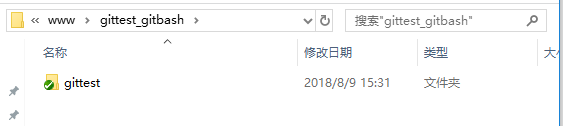
项目已经 clone 了。
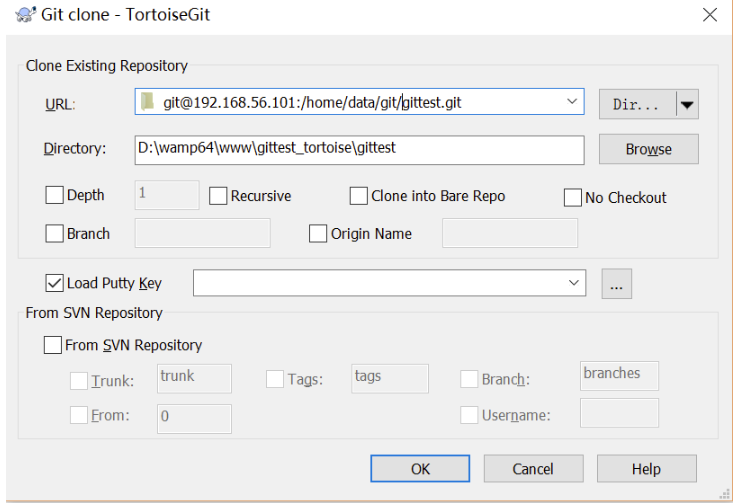
也可以使用 tortoiseGit 客户端来管理项目
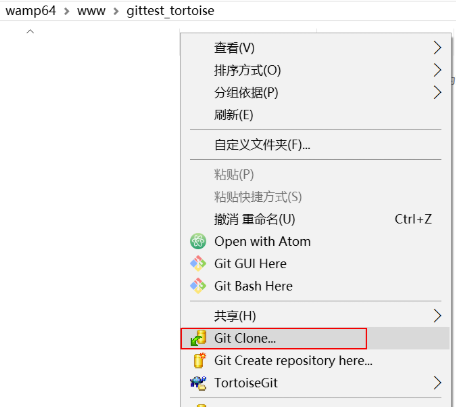
clone
⑨ 禁止 git 用户 ssh 登录服务器
之前在服务器端创建的 git 用户不允许 ssh 登录服务器
编辑 /etc/passwd
找到:
git:x:502:504::/home/git:/bin/bash
修改为
git:x:502:504::/home/git:/bin/git-shell
此时 git 用户可以正常通过 ssh 使用 git,但无法通过 ssh 登录系统。
Linux Git服务器安装的更多相关文章
- linux git 推送空文件夹
/********************************************************************************* * linux git 推送空文件 ...
- Linux git 在自己的服务器上建立 git 仓库(repository)
Linux git 在自己的服务器上建立 git 仓库(repository) 服务器端: 在这里使用 ssh 方式登陆: ssh [username]@server_address(建议用超级用户登 ...
- [转载]Ubuntu下Git服务器安装与配置
原文地址:Ubuntu下Git服务器安装与配置作者:F民抄 1. 安装 1.1 安装Git-Core: sudo apt-get install git-core 1.2 安装 Gitosis sud ...
- delphi xe 10.3 利用Git组群开发,Git服务器安装,Git 拉取,提交,推送相关设置操作
1. Git服务器安装, 参考 https://blog.csdn.net/u012842630/article/details/97175397 Git服务器官方网站,要FQ. 2. 工具软件 gi ...
- linux下git服务器安装
git服务器配置http://www.cnblogs.com/dee0912/p/5815267.html git教程https://www.liaoxuefeng.com/wiki/00137395 ...
- Linux GIT服务器配置
Linux下安装git插件 1. 下载git网址: https://github.com/git/git/releases 2. 放入usr/src/下 3. tar -zxvf git-** ...
- Git服务器安装详解及安装遇到问题解决方案
git是一个不错的版本管理的工具.现在自己在搞一个简单的应用程序开发,想使用git来进行管理.在Google了配置文档后,还是受了N多的挫折.某些文档质量不高,浪费了好多时间...... 好,切入正题 ...
- git 服务器安装流程
参考:https://git-scm.com/book/zh/v2/%E6%9C%8D%E5%8A%A1%E5%99%A8%E4%B8%8A%E7%9A%84-Git-%E5%9C%A8%E6%9C% ...
- linux git 安装方法
最早Git是在Linux上开发的,很长一段时间内,Git也只能在Linux和Unix系统上跑.不过,慢慢地有人把它移植到了Windows上.现在,Git可以在Linux.Unix.Mac和Window ...
随机推荐
- SecureCRT工具
技巧收集: 文本文件内容 复制该行内容yy,p粘贴 2+yy复制两行 dd 删除该行 文件内容搜索 非编辑状态/+查找内容 查找指定行 :+行号
- 以下哪个Hibernate主键生成策略是实现主键按数值顺序递增的?
A.increment B.identity C.sequence D.native 解答:A
- e668. 在一组像素中创建缓冲图像
This example demonstrates how to convert a byte array of pixel values that are indices to a color ta ...
- 一、Open CV3.0.0 与 VS2012配置
原创:博乐Bar,转载请注明出处. 第一步,准备软件及开发环境 1.OpenCV 3.0.0 下载地址:http://www.opencv.org.cn/index.php/Download ,下载最 ...
- zabbix-agent 自动注册
1. 概述 上一篇内容<zabbix自动发现配置>,大概内容是zabbix server去扫描一个网段,把在线的主机添加到Host列表中.我们本篇内容与上篇相反,这次是Active age ...
- navicat上如何导出视图,函数等
如何导出视图,函数,一般通过linux命令行,如果简单点就用navicat把. image.png 这样函数,视图都可以导出来后续更新.....
- [转]JVM运行时内存结构
[转]http://www.cnblogs.com/dolphin0520/p/3783345.html 目录[-] 1.为什么会有年轻代 2.年轻代中的GC 3.一个对象的这一辈子 4.有关年轻代的 ...
- ReSharper插件功能介绍
ReSharper是一款功能非常强悍的Visual Studio的辅助插件,这款插件可用于C#,VB.net,XML,Asp.net,XAML,和构建脚本.ReSharper 9.1版本大改进对 Ja ...
- Sprite与屏幕之间的关系
锚点这东西挺怀念的,N年前我在做J2ME手游的时候.屏幕整体的坐标是左上角是00点.X轴向右递增,Y轴向下递增.所有的image也是这个原理.只是unity的触摸屏坐标不是左上角,而是左下角. 所以这 ...
- Java集合----List集合
List List 代表一个元素有序.且可重复的集合,集合中的每个元素都有其对应的顺序索引List 允许使用重复元素,可以通过索引来访问指定位置的集合元素.List 默认按元素的添加顺序设置元素的索引 ...