
SpringBoot实战(五)之Thymeleaf
Thymeleaf同jsp、volocity、freemarker等共同的职能是MVC模式中的视图展示层,即View。
当然了,SpringBoot中也可以用jsp,不过不推荐这种用法,比较推崇的就是使用Thymeleaf。
关于Thymeleaf学习,建议参考官方文档:https://www.thymeleaf.org/documentation.html
官方文档例子,应有尽有。
之前接触过Thymeleaf是因为公司项目初建期间用过它搭建过测试环境,后来根据领导的指示,需要快速开发,而且当时对于Thymeleaf不是十分了解,当时对于它的了解认识只是展示前端数据的,同jsp职能一样,当然这也是它们的共性。比较详细的深入了解和使用,是帮助一位学妹解决毕业论文的项目问题。那时帮助她写了好十几个类代码和对应的十几个html代码。当时感触比较深的是,Thymeleaf是如此的好用,比jsp还好用,jsp要遍历之类,要么加<%%>,或者引用jstl标签库进行数据遍历等。而Thymeleat就不需要。简洁直观,我比较推崇Thymeleaf,特别是在前后端分离的项目,有的时候不用jsp,光纯html+js的确有点吃力,即便使用了vue.js或者angular.js、react.js等虽然增加了便利性,但是了,如果一个项目前端语言不是十分统一的话,对于将来维护成本方面会大大提高,不易维护。
Thymeleaf对于前后端分离,我认为还是不错的。
下面进入demo例子讲解:
一、导入maven依赖
<?xml version="1.0" encoding="UTF-8"?>

<project xmlns="http://maven.apache.org/POM/4.0.0" xmlns:xsi="http://www.w3.org/2001/XMLSchema-instance"

         xsi:schemaLocation="http://maven.apache.org/POM/4.0.0 http://maven.apache.org/xsd/maven-4.0.0.xsd">

    <modelVersion>4.0.0</modelVersion>

    <groupId>org.springframework</groupId>

    <artifactId>gs-uploading-files</artifactId>

    <version>0.1.0</version>

    <parent>

        <groupId>org.springframework.boot</groupId>

        <artifactId>spring-boot-starter-parent</artifactId>

        <version>1.5.8.RELEASE</version>

    </parent>

    <properties>

        <java.version>1.8</java.version>

    </properties>

    <dependencies>

        <dependency>

            <groupId>org.springframework.boot</groupId>

            <artifactId>spring-boot-starter-web</artifactId>

        </dependency>

        <dependency>

            <groupId>org.springframework.boot</groupId>

            <artifactId>spring-boot-starter-thymeleaf</artifactId>

        </dependency>

        <dependency>

            <groupId>org.springframework.boot</groupId>

            <artifactId>spring-boot-starter-test</artifactId>

            <scope>test</scope>

        </dependency>

    </dependencies>

    <build>

        <plugins>

            <plugin>

                <groupId>org.springframework.boot</groupId>

                <artifactId>spring-boot-maven-plugin</artifactId>

            </plugin>

        </plugins>

    </build>

</project>
二、编写实体
package hello;

public class User {

    private Integer id;

    private String name;

    public Integer getId() {

        return id;

    }

    public void setId(Integer id) {

        this.id = id;

    }

    public String getName() {

        return name;

    }

    public void setName(String name) {

        this.name = name;

    }

}
三、编写Controller
package hello;

import java.util.ArrayList;

import java.util.List;

import org.springframework.stereotype.Controller;

import org.springframework.ui.Model;

import org.springframework.web.bind.annotation.GetMapping;

@Controller

public class TestController {

    @GetMapping(value="/test")

    public String test(Model model) {

          List<User> userList = new ArrayList<User>();

            for (int i = 0; i <10; i++) {

                User user =new User();

                user.setId(1);

                user.setName("张三");

                userList.add(user);

            }

            model.addAttribute("users", userList);

        return "test";

    }

}
四、编写配置文件,将其放置在/src/main/resources下
application.properties
server.port=8080

spring.thymeleaf.cache=false

spring.thymeleaf.prefix=classpath:/templates/

spring.thymeleaf.check-template-location=true

spring.thymeleaf.suffix=.html

spring.thymeleaf.encoding=UTF-8

spring.thymeleaf.content-type=text/html

spring.thymeleaf.mode=HTML5
五、在src/main/resources目录下新建templates目录并新建html文件
test.htm
<html xmlns:th="http://www.thymeleaf.org">

<body>

<h2>用户列表</h2>

  <div>

     <ul>

         <li  th:each="user:${users}">

              <span th:text="${user.id}"></span>-

             <span th:text="${user.name}"></span>-

         </li>

     </ul>

   </div>

</body>

</html>
六、编写启动类
package hello;

import org.springframework.boot.SpringApplication;

import org.springframework.boot.autoconfigure.SpringBootApplication;

@SpringBootApplication

public class Application {

    public static void main(String[] args) {

        SpringApplication.run(Application.class, args);

    }

}
最后结果如下图所示:
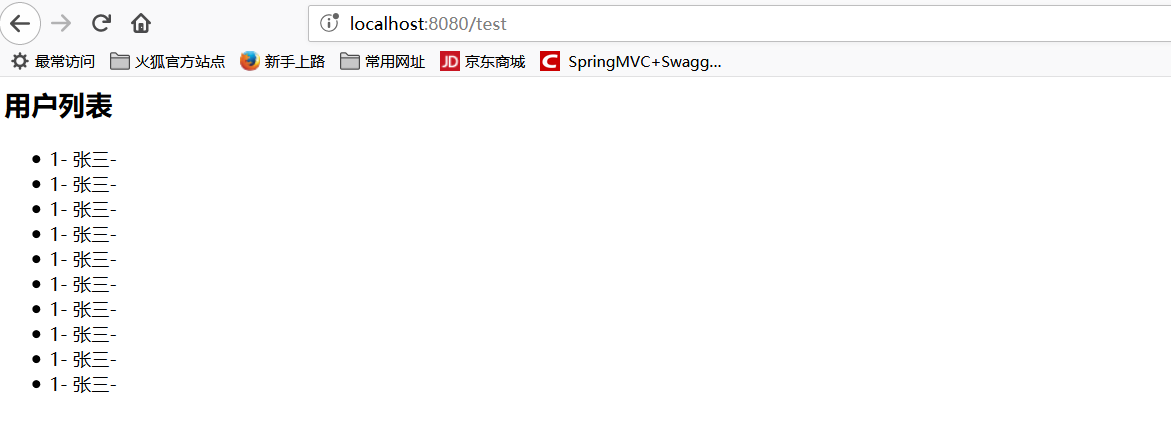
这里没有加入mysql或者其他数据相关的,如果要引用数据库,引用对应数据库的依赖和配置对应的数据库连接池即可。
这里可以参考我的关于Springboot+MyBatis+Thymeleaf
示例地址为:https://github.com/youcong1996/springboot-mybatis-demo
SpringBoot实战(五)之Thymeleaf的更多相关文章
- 千锋很火的SpringBoot实战开发教程视频
springboot是什么? Spring Boot是由Pivotal团队提供的全新框架,其设计目的是用来简化新Spring应用的初始搭建以及开发过程.该框架使用了特定的方式来进行配置,从而使开发人员 ...
- [原创].NET 分布式架构开发实战五 Framework改进篇
原文:[原创].NET 分布式架构开发实战五 Framework改进篇 .NET 分布式架构开发实战五 Framework改进篇 前言:本来打算这篇文章来写DAL的重构的,现在计划有点改变.之前的文章 ...
- SpringBoot实战 之 异常处理篇
在互联网时代,我们所开发的应用大多是直面用户的,程序中的任何一点小疏忽都可能导致用户的流失,而程序出现异常往往又是不可避免的,那该如何减少程序异常对用户体验的影响呢?其实方法很简单,对异常进行捕获,然 ...
- SpringBoot整合Jsp和Thymeleaf (附工程)
前言 本篇文章主要讲述SpringBoot整合Jsp以及SpringBoot整合Thymeleaf,实现一个简单的用户增删改查示例工程.事先说明,有三个项目,两个是单独整合的,一个是将它们整合在一起的 ...
- SpringCloud---熔断降级理解、Hystrix实战(五)
SpringCloud---熔断降级理解.Hystrix实战(五) https://www.cnblogs.com/qdhxhz/p/9581440.html https://blog.csdn.ne ...
- apollo客户端springboot实战(四)
1. apollo客户端springboot实战(四) 1.1. 前言 经过前几张入门学习,基本已经完成了apollo环境的搭建和简单客户端例子,但我们现在流行的通常是springboot的客户端 ...
- java框架之SpringBoot(4)-资源映射&thymeleaf
资源映射 静态资源映射 查看 SpringMVC 的自动配置类,里面有一个配置静态资源映射的方法: @Override public void addResourceHandlers(Resource ...
- SpringBoot Web开发(4) Thymeleaf模板与freemaker
SpringBoot Web开发(4) Thymeleaf模板与freemaker 一.模板引擎 常用得模板引擎有JSP.Velocity.Freemarker.Thymeleaf SpringBoo ...
- Python爬虫实战五之模拟登录淘宝并获取所有订单
经过多次尝试,模拟登录淘宝终于成功了,实在是不容易,淘宝的登录加密和验证太复杂了,煞费苦心,在此写出来和大家一起分享,希望大家支持. 温馨提示 更新时间,2016-02-01,现在淘宝换成了滑块验证了 ...
随机推荐
- Class类文件结构简介
Java跨平台的基础 各种不同平台的虚拟机与所有平台都统一使用的程序存储格式——字节码(ByteCode)是构成平台无关性的基石,也是语言无关性的基础.Java虚拟机不和包括Java在内的任何语言绑定 ...
- CenOs7安装oracle图文详细过程(02)
原创作品,转载请在文章头部(显眼位置)注明出处:https://www.cnblogs.com/sunshine5683/p/10011574.html 8.修改用户限制 vim /etc/secur ...
- python 实现websocket
python中websocket需要我们自己实现握手代码,流程是这样:服务端启动websocket服务,并监听.当客户端连接过来时,(需要我们自己实现)服务端就接收客户端的请求数据,拿到请求头,根据请 ...
- JDBC处理事务
一.什么是事务? 在人员管理系统中,你删除一个人员,你即需要删除人员的基本资料,也要删除和该人员相关的信息,如信箱,文章等等,这样,这些数据库操作语句就构成一个事务! 二.事务是必须满足4个条件(AC ...
- C#学习笔记-代理模式
题目:A追B,但是羞于表示,所以A通过C给B一直送礼物以讨得欢心. 分析: 根据就分为三个类,SchoolGirl一个类,这个类只需要获得名字就好了:Pursuit一个类,这个类需要实现送礼物这个方法 ...
- 使用WICleanup清理Windows Installer 冗余文件
使用WICleanup清理Windows Installer 冗余文件 | 浏览:816 | 更新:2015-11-02 10:43 | 标签:Win7 Win10 1 2 3 4 5 6 7 分步阅 ...
- 怎样修复grub开机引导(grub rescue)
很多时候,特别是在linux调整分区后,开机重启时会出现 error : unknow filesystem grub rescue> 的字样,系 ...
- Android内存管理-OnTrimMemory
Application中有两个与内存管理相关的方法:onLowMemory()和 onTrimMemory(int level),源码如下 @CallSuper public void onLowMe ...
- web测试流程的总结及关注点
项目的测试流程大只包含的几个阶段:立项.需求评审.用例评审.测试执行.测试报告文档 一.立项后测试需要拿到的文档 1.需求说明书 2.原型图(及UI图) 3.接口文档 4.数据库字典(表的数量.缓存机 ...
- CentOS 安装 OpenResty
方案一 1.在 CentOS 系统中添加 openresty 资源库sudo yum-config-manager --add-repo https://openresty.org/yum/cn/ce ...