
springcloud11----turbine
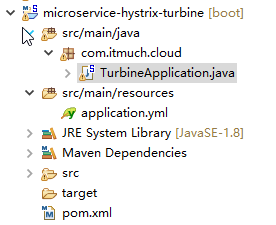
package com.itmuch.cloud;

import org.springframework.boot.SpringApplication;

import org.springframework.boot.autoconfigure.SpringBootApplication;

import org.springframework.cloud.netflix.turbine.EnableTurbine;

//一个turbine server就写完了

//turbine是监控整个集群的,

@EnableTurbine

@SpringBootApplication

public class TurbineApplication {

  public static void main(String[] args) {

    SpringApplication.run(TurbineApplication.class, args);

  }

}
server:

  port: 8031

  #http://localhost:8031/turbine.stream

spring:

  application:

    name: microservice-hystrix-turbine

#turbine加入eureka

eureka:

  client:

    serviceUrl:

      defaultZone: http://user:password123@localhost:8761/eureka

  instance:

    prefer-ip-address: true

  #turbine加入eureka

turbine:

  aggregator:

    clusterConfig: default

  #监控ribbon-with-hystrix集群(多个端口)和feign-with-hystrix集群(多个状态)

  appConfig: microservice-consumer-movie-ribbon-with-hystrix2,microservice-consumer-movie-feign-with-hystrix

  clusterNameExpression: "'default'"
<project xmlns="http://maven.apache.org/POM/4.0.0" xmlns:xsi="http://www.w3.org/2001/XMLSchema-instance"

    xsi:schemaLocation="http://maven.apache.org/POM/4.0.0 http://maven.apache.org/xsd/maven-4.0.0.xsd">

    <modelVersion>4.0.0</modelVersion>

    <parent>

        <groupId>com.itmuch.cloud</groupId>

        <artifactId>microservice-spring-cloud</artifactId>

        <version>0.0.1-SNAPSHOT</version>

    </parent>

    <artifactId>microservice-hystrix-turbine</artifactId>

    <packaging>jar</packaging>

    <properties>

        <project.build.sourceEncoding>UTF-8</project.build.sourceEncoding>

    </properties>

    <!-- turbine的依赖 -->

    <dependencies>

        <dependency>

            <groupId>org.springframework.cloud</groupId>

            <artifactId>spring-cloud-starter-turbine</artifactId>

        </dependency>

    </dependencies>

</project>
turbine2的yml文件
server:

  port: 8031

spring:

  application:

    name: microservice-hystrix-turbine

eureka:

  client:

    serviceUrl:

      defaultZone: http://user:password123@localhost:8761/eureka

  instance:

    prefer-ip-address: true

turbine:

  aggregator:

    clusterConfig: MICROSERVICE-CONSUMER-MOVIE-RIBBON-WITH-HYSTRIX2

  appConfig: microservice-consumer-movie-ribbon-with-hystrix2

turbine.instanceUrlSuffix.MICROSERVICE-CONSUMER-MOVIE-RIBBON-WITH-HYSTRIX2: /ribbon/hystrix.stream

logging:

  level:

    root: INFO

    com.netflix.turbine.monitor: DEBUG
turbine3的yml文件
server:

  port: 8031

spring:

  application:

    name: microservice-hystrix-turbine

eureka:

  client:

    serviceUrl:

      defaultZone: http://user:password123@localhost:8761/eureka

  instance:

    prefer-ip-address: true

turbine:

  aggregator:

    clusterConfig: MICROSERVICE-CONSUMER-MOVIE-RIBBON-WITH-HYSTRIX3

  appConfig: microservice-consumer-movie-ribbon-with-hystrix3

logging:

  level:

    root: INFO

    com.netflix.turbine.monitor: DEBUG
microservice-consumer-movie-ribbon-with-hystrix2的yml文件
spring:

  application:

    name: microservice-consumer-movie-ribbon-with-hystrix2

server:

  port: 8010

  context-path: /ribbon   #url的前缀

eureka:

  client:

    healthcheck:

      enabled: true

    serviceUrl:

      defaultZone: http://user:password123@localhost:8761/eureka

  instance:

    prefer-ip-address: true

    home-page-url-path: /ribbon

hystrix.command.default.execution.isolation.thread.timeoutInMilliseconds: 5000

#http://localhost:8761/eureka/apps/microservice-consumer-movie-ribbon-with-hystrix2
microservice-consumer-movie-ribbon-with-hystrix3的yml文件
#一个应用有2个端口,一个管理端口一个访问端口

management: # spring-boot-starter-acturator管理端口

  port: 8081

spring:

  application:

    name: microservice-consumer-movie-ribbon-with-hystrix3

server:

  port: 8010 #访问端口

  context-path: /ribbon

eureka:

  client:

    healthcheck:

      enabled: true

    serviceUrl:

      defaultZone: http://user:password123@localhost:8761/eureka

  instance:

    prefer-ip-address: true

    metadata-map:

      management.port: 8081

hystrix.command.default.execution.isolation.thread.timeoutInMilliseconds: 5000
springcloud11----turbine的更多相关文章
- 第二十六章 hystrix-dashboard + turbine
一.使用turbine的意义 引入多个hystrix stream: 1.使用hystrix-dashboard的可以添加多个stream的功能 图中添加的两个stream会在真正monitor的时候 ...
- 附7 turbine
一.作用 聚集同一个微服务的相同的commandKey.Threadpool.commandGroupKey数据进行聚合 二.配置 1.集群(cluster)(turbine聚集数据的粒度) turb ...
- apache开源项目-- Turbine
1.缘起 Jetspeed是Apache Jakarta小组的开放源码门户系统.它使得最终用户可以通过WAP手机.浏览器.PDA等各种设备来使用各种各样的网络资源(比如应用程序.数据以及这之外的任何网 ...
- springcloud(五):熔断监控Hystrix Dashboard和Turbine
Hystrix-dashboard是一款针对Hystrix进行实时监控的工具,通过Hystrix Dashboard我们可以在直观地看到各Hystrix Command的请求响应时间, 请求成功率等数 ...
- spring cloud熔断监控Hystrix Dashboard和Turbine
参考: http://blog.csdn.net/ityouknow/article/details/72625646 完整pom <?xml version="1.0" e ...
- 改造断路器集群监控Hystrix Turbine实现自动注册消费者、实时监控多个服务
在上一篇文章中,我们搭建了Hystrix Dashoard,对指定接口进行监控.但是只能对一个接口进行监听,功能比较局限: Turbine:汇总系统内多个服务的数据并显示到 Hystrix Dashb ...
- spring cloud(五)熔断监控Hystrix Dashboard和Turbine
Hystrix-dashboard是一款针对Hystrix进行实时监控的工具,通过Hystrix Dashboard我们可以在直观地看到各Hystrix Command的请求响应时间, 请求成功率等数 ...
- Spring Cloud Turbine微服务集群实时监控
本文代码下载地址: https://gitlab.com/mySpringCloud/turbine SpringBoot版本:1.5.9.RELEASE (稳定版) SpringCloud版本:Ed ...
- SpringCloud系列七:Hystrix 熔断机制(Hystrix基本配置、服务降级、HystrixDashboard服务监控、Turbine聚合监控)
1.概念:Hystrix 熔断机制 2.具体内容 所谓的熔断机制和日常生活中见到电路保险丝是非常相似的,当出现了问题之后,保险丝会自动烧断,以保护我们的电器, 那么如果换到了程序之中呢? 当现在服务的 ...
- Spring Cloud 入门教程(八): 断路器指标数据监控Hystrix Dashboard 和 Turbine
1. Hystrix Dashboard (断路器:hystrix 仪表盘) Hystrix一个很重要的功能是,可以通过HystrixCommand收集相关数据指标. Hystrix Dashboa ...
随机推荐
- final,finally,finalize的区别
1.final用于声明属性.方法和类,分别表示属性不可变.方法不可覆盖,类不可继承: 2.finally是异常处理语句结构的一部分,表示总是执行代码块: 3.finalize是Object类的一个方法 ...
- linux IP 设置
修改ip地址即时生效:# ifconfig eth0 192.168.1.102 netmask 255.255.255.0启动生效:修改/etc/sysconfig/network-scripts/ ...
- 【PHP】 判断是否微信内置浏览器
PHP 判断是手机端还是PC端 function isMobile() { // 如果有HTTP_X_WAP_PROFILE则一定是移动设备 if (isset($_SERVER['HTTP_X_WA ...
- mouseover&mouseout和mouseenter&mouseleave
mouseenter&mouseleave: 进入被选元素触发,进入被选元素的子元素不会重复触发. mouseover&mouseout: 进入被选元素触发,从被选元素进入其子元素会再 ...
- js的字符串charAt()方法
//字符中的字符从左向右进行索引,由0开始,字符串中的空格也算在内 var string = "charAt find word position"; document.write ...
- C# 计算当前时间距离今晚00:00:00还有多少分多少秒
.net 计算当前时间距离今晚00:00:00还有多少分多少秒 string dateDiff = null;//获取当前时间 DateTime DateTime1 = DateTime.Now; / ...
- Activity工作流入门之HelloWorld
Activity的在线安装地址为:http://www.activiti.org/designer/update/ 打开Eclipse -> Help -> Install New Sof ...
- java jar命令及补丁方法
用法: jar {ctxui}[vfmn0PMe] [jar-file] [manifest-file] [entry-point] [-C dir] files ...选项: -c 创建新档案 -t ...
- 详解Go语言中的屏蔽现象
在刚开始学习Go语言的过程中,难免会遇到一些问题,尤其是从其他语言转向Go开发的人员,面对语法及其内部实现的差异,在使用Go开发时也避免不了会踩"坑".本文主要针对Go设计中的屏蔽 ...
- 三维凸包求内部一点到表面的最近距离(HDU4266)
http://acm.hdu.edu.cn/showproblem.php?pid=4266 The Worm in the Apple Time Limit: 50000/20000 MS (Jav ...