
Spring Cloud 入门教程(八): 断路器指标数据监控Hystrix Dashboard 和 Turbine
1. Hystrix Dashboard (断路器:hystrix 仪表盘)
Hystrix一个很重要的功能是,可以通过HystrixCommand收集相关数据指标. Hystrix Dashboard可以很高效的现实每个断路器的健康状况。
1). 在Ribbon服务g和Feign服务的Maven工程的pom.xml中都加入依赖
1 <dependency>

2     <groupId>org.springframework.boot</groupId>

3     <artifactId>spring-boot-starter-actuator</artifactId>

4  </dependency>

5 <dependency>

6     <groupId>org.springframework.cloud</groupId>

7     <artifactId>spring-cloud-starter-hystrix-dashboard</artifactId>

8 </dependency>
spring-boot-starter-actuator用于手机metric, 支持hystrix.stream。spring-cloud-starter-hystrix-dashboard支持dashboard的UI
2)在Spring Boot启动类上用@EnableHystrixDashboard注解和@EnableCircuitBreaker注解。需要特别注意的是我们之前的Feign服务由于内置断路器支持, 所以没有@EnableCircuitBreaker注解,但要使用Dashboard则必须加,如果不加,Dashboard无法接收到来自Feign内部断路器的监控数据,会报“Unable to connect to Command Metric Stream”错误
 1 @SpringBootApplication

 2 @EnableDiscoveryClient

 3 @EnableFeignClients

 4 @EnableCircuitBreaker

 5 @EnableHystrixDashboard

 6 public class ServiceFeignApplication {

 7

 8     public static void main(String[] args) {

 9         SpringApplication.run(ServiceFeignApplication.class, args);

10     }

11 }
3)然后就可以访问/hystrix,这个URL将dashboard指向定义在Hystrix客户端应用中的/hystrix.stream
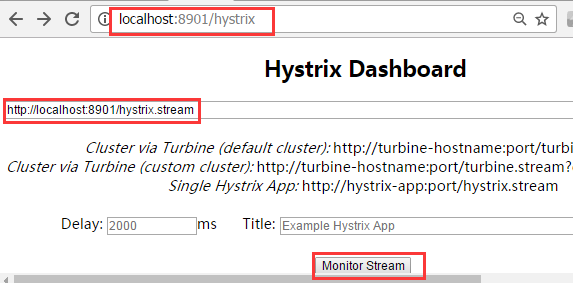
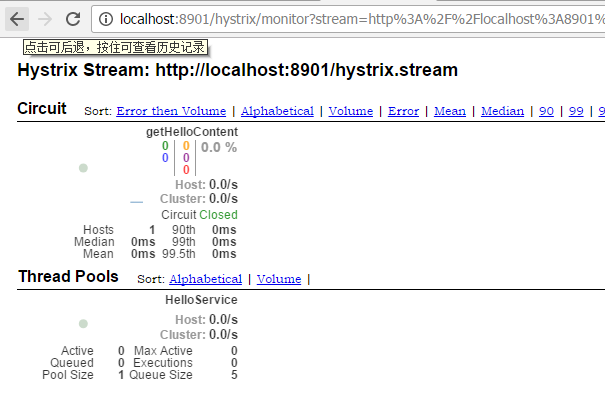
在dashboard中输入服务的URL:点击 monitor后进入监控界面,访问我们之前创建的Ribbon服务localhost:8901/, 或者Feign服务localhost:8902/可以看到监控UI动态变化
2. 利用Turbine在一个Dashboard上监控多个流
以上例子只能监控一个,要同时监控多个流怎么办? 答案是, 可以单独做一个Turbine服务,专门监控所有断路器状态,从而掌握整个系统中所有微服务的状态。下面我们就来创建一个Turbine服务,来监控我们之前做的Feign服务和Ribbon服务
1). 创建一个maven工程, 在pox.xml添加以下依赖
         <dependency>

             <groupId>org.springframework.cloud</groupId>

             <artifactId>spring-cloud-starter-turbine</artifactId>

         </dependency>

         <dependency>

             <groupId>org.springframework.cloud</groupId>

             <artifactId>spring-cloud-netflix-turbine</artifactId>

         </dependency>

         <dependency>

             <groupId>org.springframework.boot</groupId>

             <artifactId>spring-boot-starter-actuator</artifactId>

         </dependency>

         <dependency>

             <groupId>org.springframework.cloud</groupId>

             <artifactId>spring-cloud-starter-hystrix-dashboard</artifactId>

         </dependency>
整个个pox.xml文件如下:
 <?xml version="1.0" encoding="UTF-8"?>

 <project xmlns="http://maven.apache.org/POM/4.0.0"

          xmlns:xsi="http://www.w3.org/2001/XMLSchema-instance"

          xsi:schemaLocation="http://maven.apache.org/POM/4.0.0 http://maven.apache.org/xsd/maven-4.0.0.xsd">

     <modelVersion>4.0.0</modelVersion>

     <groupId>cm.chry</groupId>

     <artifactId>spring.helloworld.turbine.service</artifactId>

     <version>0.0.1-SNAPSHOT</version>

     <name>spring.helloworld.turbine.service</name>

     <description>Turbine service demo</description>

     <parent>

         <groupId>org.springframework.boot</groupId>

         <artifactId>spring-boot-starter-parent</artifactId>

         <version>1.5.3.RELEASE</version>

         <relativePath/> <!-- lookup parent from repository -->

     </parent>

     <properties>

         <project.build.sourceEncoding>UTF-8</project.build.sourceEncoding>

         <project.reporting.outputEncoding>UTF-8</project.reporting.outputEncoding>

         <java.version>1.8</java.version>

     </properties>

     <dependencies>

         <dependency>

             <groupId>org.springframework.cloud</groupId>

             <artifactId>spring-cloud-starter-eureka</artifactId>

         </dependency>

         <dependency>

             <groupId>org.springframework.boot</groupId>

             <artifactId>spring-boot-starter-web</artifactId>

         </dependency>

         <dependency>

             <groupId>org.springframework.cloud</groupId>

             <artifactId>spring-cloud-starter-turbine</artifactId>

         </dependency>

         <dependency>

             <groupId>org.springframework.cloud</groupId>

             <artifactId>spring-cloud-netflix-turbine</artifactId>

         </dependency>

         <dependency>

             <groupId>org.springframework.boot</groupId>

             <artifactId>spring-boot-starter-actuator</artifactId>

         </dependency>

         <dependency>

             <groupId>org.springframework.cloud</groupId>

             <artifactId>spring-cloud-starter-hystrix-dashboard</artifactId>

         </dependency>

         <dependency>

             <groupId>org.springframework.boot</groupId>

             <artifactId>spring-boot-starter-test</artifactId>

             <scope>test</scope>

         </dependency>

     </dependencies>

     <dependencyManagement>

         <dependencies>

             <dependency>

                 <groupId>org.springframework.cloud</groupId>

                 <artifactId>spring-cloud-dependencies</artifactId>

                 <version>Dalston.RC1</version>

                 <type>pom</type>

                 <scope>import</scope>

             </dependency>

         </dependencies>

     </dependencyManagement>

     <build>

         <plugins>

             <plugin>

                 <groupId>org.springframework.boot</groupId>

                 <artifactId>spring-boot-maven-plugin</artifactId>

             </plugin>

         </plugins>

     </build>

     <repositories>

         <repository>

             <id>spring-milestones</id>

             <name>Spring Milestones</name>

             <url>https://repo.spring.io/milestone</url>

             <snapshots>

                 <enabled>false</enabled>

             </snapshots>

         </repository>

     </repositories>

 </project>
pom.xml
2). 创建Turbine Dashboard启动类:
用@EnableHystrixDashboard和@EnableTurbine修饰主类, 分别用于支持Hystrix Dashboard和Turbine
 package spring.helloworld.turbine.service;

 import org.springframework.boot.SpringApplication;

 import org.springframework.boot.autoconfigure.SpringBootApplication;

 import org.springframework.cloud.netflix.hystrix.dashboard.EnableHystrixDashboard;

 import org.springframework.cloud.netflix.turbine.EnableTurbine;

 @SpringBootApplication

 @EnableHystrixDashboard

 @EnableTurbine

 public class DashboardApplication {

     public static void main(String[] args) {

         SpringApplication.run(DashboardApplication.class, args);

     }

 }
3). 在application.yml中配置turbine参数
 eureka:

     client:

         serviceUrl:

             defaultZone: http://localhost:8761/eureka/

 server:

     port: 8903

 spring:

     application:

         name: hystrix-dashboard-turbine

 turbine:

     appConfig: service-feign, service-ribbon

     aggregator:

         clusterConfig: default

     clusterNameExpression: new String("default")
turbine.appConfig定义了要监控的服务,这里是我们在前面章节创建的service-feign和sercice-ribbon; aggregator.clusterConfig定义了聚合方式, 此处为default.
turbine.appConfig :配置Eureka中的serviceId列表,表明监控哪些服务
turbine.aggregator.clusterConfig :指定聚合哪些集群,多个使用”,”分割,默认为default。可使用http://.../turbine.stream?cluster={clusterConfig之一}访问
turbine.clusterNameExpression :指定集群名称,可以是三种类型的值
- 默认表达式为appName;此时turbine.aggregator.clusterConfig需要配置想要监控的应用名称;
- 当为default时,turbine.aggregator.clusterConfig可以不写,因为默认就是default;
- 当为metadata[‘cluster’]时,假设想要监控的应用配置了eureka.instance.metadata-map.cluster: ABC,则需要配置,同时turbine.aggregator.clusterConfig: ABC
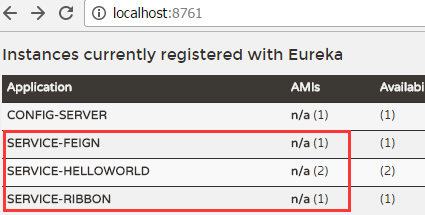
4). 依次启动eureka服务, 2个Helloworld服务, Feign服务,ribbon服务和刚创建turbine服务。从eureka服务中我们可以看到
5)通过Turbine服务访问HystrixDashborad, http:localhost:8903/hystrix
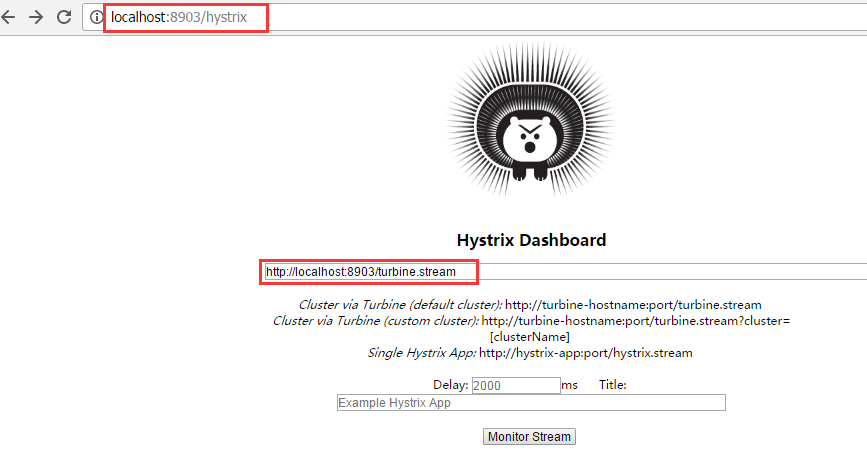
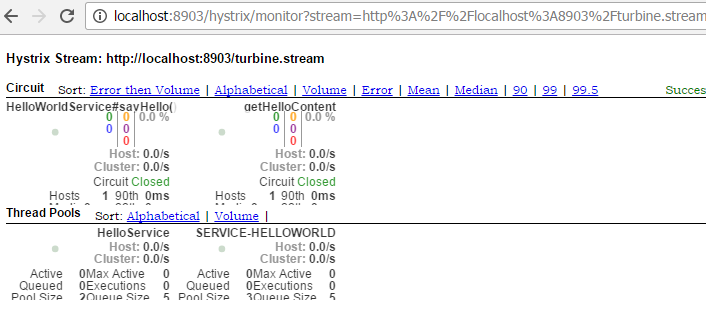
监控流的URL填http://localhost:8903/turbine.stream, 点击monitor stream, 进入监控页面, 随便刷新下feign和ribbon服务(http://localhost:8902/hello和http://localhost:8901), 可以看到监控页面的变化。如下图, 两个服务的监控都会显示在dashboard上
下一篇:Spring Cloud 入门教程(九): 路由网关zuul
参考: http://projects.spring.io/spring-cloud/spring-cloud.html#_circuit_breaker_hystrix_dashboard
http://blog.csdn.net/ityouknow/article/details/72625646
Spring Cloud 入门教程(八): 断路器指标数据监控Hystrix Dashboard 和 Turbine的更多相关文章
- [Spring cloud 一步步实现广告系统] 19. 监控Hystrix Dashboard
在之前的18次文章中,我们实现了广告系统的广告投放,广告检索业务功能,中间使用到了 服务发现Eureka,服务调用Feign,网关路由Zuul以及错误熔断Hystrix等Spring Cloud组件. ...
- Spring Cloud 入门教程(九): 路由网关zuul
在微服务架构中,需要几个关键的组件,服务注册与发现.服务消费.负载均衡.断路器.智能路由.配置管理等,由这几个组件可以组建一个简单的微服务架构.客户端的请求首先经过负载均衡(zuul.Ngnix),再 ...
- Spring Cloud 入门教程(七): 熔断机制 -- 断路器
对断路器模式不太清楚的话,可以参看另一篇博文:断路器(Curcuit Breaker)模式,下面直接介绍Spring Cloud的断路器如何使用. SpringCloud Netflix实现了断路器库 ...
- Spring Cloud 入门教程(六): 用声明式REST客户端Feign调用远端HTTP服务
首先简单解释一下什么是声明式实现? 要做一件事, 需要知道三个要素,where, what, how.即在哪里( where)用什么办法(how)做什么(what).什么时候做(when)我们纳入ho ...
- Spring Cloud 入门教程(一): 服务注册
1. 什么是Spring Cloud? Spring提供了一系列工具,可以帮助开发人员迅速搭建分布式系统中的公共组件(比如:配置管理,服务发现,断路器,智能路由,微代理,控制总线,一次性令牌,全局锁 ...
- Spring Cloud 入门教程 - 搭建配置中心服务
简介 Spring Cloud 提供了一个部署微服务的平台,包括了微服务中常见的组件:配置中心服务, API网关,断路器,服务注册与发现,分布式追溯,OAuth2,消费者驱动合约等.我们不必先知道每个 ...
- Spring Cloud 入门教程(十):和RabbitMQ的整合 -- 消息总线Spring Cloud Netflix Bus
在本教程第三讲Spring Cloud 入门教程(三): 配置自动刷新中,通过POST方式向客户端发送/refresh请求, 可以让客户端获取到配置的最新变化.但试想一下, 在分布式系统中,如果存在很 ...
- Spring Cloud 入门教程(五): Ribbon实现客户端的负载均衡
接上节,假如我们的Hello world服务的访问量剧增,用一个服务已经无法承载, 我们可以把Hello World服务做成一个集群. 很简单,我们只需要复制Hello world服务,同时将原来的端 ...
- Spring Cloud 入门教程(二): 配置管理
使用Config Server,您可以在所有环境中管理应用程序的外部属性.客户端和服务器上的概念映射与Spring Environment和PropertySource抽象相同,因此它们与Spring ...
随机推荐
- Android在程序崩溃或者捕获异常之后重新启动app
在Android应用开发中,偶尔会因为测试的不充分导致一些异常没有被捕获,这时应用会出现异常并强制关闭,这样会导致很不好的用户体验,为了解决这个问题,我们需要捕获相关的异常并做处理. 首先捕获程序崩溃 ...
- Android为TV端助力 自定义activity
今天公司有个需要需要自动弹出界面,而dialog又不符合要求,所以自定义的一个activity的样式 首先在androidmainfest.xml上注册你的activity <activity ...
- Python3 jupyter notebook 服务器搭建
1. jupyter notebook 安装 创建 jupyter 目录 mkdir jupyter cd jupyter/ 创建独立的 Python3 运行环境,并激活进入该环境 virtualen ...
- Android内存优化(四)LeakCanary使用详解
LeakCanary是检测App内存泄露的工具, 内存泄露是Android开发中常见的问题, 使用程序的稳定性下降. LeakCanary 的机制如下: RefWatcher.watch() 会以监控 ...
- java方法中把对象置null,到底能不能加速垃圾回收
今天逛脉脉,看见匿名区有人说java中把对做置null,这种做法很菜,不能加速垃圾回收,但是我看到就觉得呵呵了,我是觉得可以加速置null对象回收的. 测试的过程中,费劲的是要指定一个合理的测试堆大小 ...
- (后端)SpringMVC提交数组时不能超过256个值(转)
项目遇到了这个错误,spring mvc 竟然还有这个漏洞. org.springframework.beans.InvalidPropertyException: Invalid property ...
- python base64 decode incorrect padding错误解决方法
个人觉得原因应该是不同的语言/base64库编码规则不太统一的问题. python中base64串的长度需为4的整数倍,故对长度不为4整数倍的base64串需要用"='补足 如下代码: da ...
- 获取spring applicationcontext数据连接connection
ApplicationContext context = new ClassPathXmlApplicationContext("applicationContext.xml"); ...
- SQL2008无法附加数据库,提示“无法显示请求的对话框”(nColIndex实际值是-1)图文解决方法
SQL2008无法附加数据库,提示“无法显示请求的对话框”(nColIndex实际值是-1)图文解决方法 SQL2008无法附加数据库,提示“无法显示请求的对话框”(nColIndex实际值是-1)图 ...
- 通过linkserver不能调远程表值函数
Question: 通过linkserver调远程表值函数报错如下 Solution: 注意:查询语句中的[SDS_NONEDI].[DBO].ddddd(),不能加server名[sdsc2-1]. ...