
Android UI系列-----RelativeLayout的相关属性
本篇随笔将主要记录一些RelatieLayout的相关属性,并将猜拳游戏通过RelativeLayout实现出来
RelativeLayout的几组属性
第一组属性:android:layout_below, android:layout_above, android:layout_toLeftOf, android:layout_toRightOf
这四个属性是用在RelativeLayout上的,例如android:layout_below就是将目标控件的上边缘与引用控件的下边缘对齐,android:layout_toRightOf就是将目标控件的左边缘与引用控件的右边缘对齐。
第二组属性:android:layout_alignTop, android:layout_alignBottom, android:layout_alignLeft, android:layout_alignRight, android:layout_alignBaseLine
顾名思义,android:layout_alignTop就表示目标控件和引用控件的上边缘对齐,android:layout_alignLeft则表示目标控件与引用控件的左边缘对齐,android:layout_alignBaseLine是基于基准线对其,基准线就是我们写英文字母那4行线的第三条
第三组属性:layout_alignParentRight, layout_alignParentLeft, layout_alignParentTop, layout_alignParentBottom
这组属性的值是 true 或者 false,因为每个控件的直接父控件只有一个,所以用true/false来表示是否与父控件的边缘对齐
第四组属性:layout_centerInParent, layout_centerVertical, layout_centerHorizontal
这组属性取值也是true 或者 false,layout_centerInParent表示与父控件在水平方向和垂直方向都对齐,处于正中央,layout_centerVertical表示与父控件在垂直方向上对其,layout_centerHorizontal表示与父控件在水平方向上对齐
第五组属性:layout_alignStart, layout_alignStop, layout_alignParentStart, layout_alignParentStop
layout_alignStart, layout_alignStop是引用其他控件,表示与控件的开始位置、结束位置对齐,layout_alignParentStart, layout_alignParentStop取值为true、false,表示与父控件的开始,结束位置对齐
我们来看几个例子,来综合使用一下上面的几组属性:
①
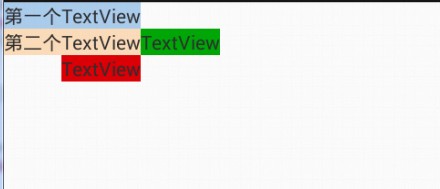
<RelativeLayout xmlns:android="http://schemas.android.com/apk/res/android"

    xmlns:tools="http://schemas.android.com/tools"

    android:layout_width="match_parent"

    android:layout_height="match_parent"

    tools:context=".MainActivity" >

    <TextView

        android:id="@+id/firstView"

        android:layout_width="wrap_content"

        android:layout_height="wrap_content"

        android:background="#ABCDEF"

        android:text="第一个TextView" />

    <TextView

        android:id="@+id/secondView"

        android:layout_width="wrap_content"

        android:layout_height="wrap_content"

        android:layout_below="@id/firstView"

        android:background="#FEDCBA"

        android:text="第二个TextView"/>

    <TextView

        android:layout_width="wrap_content"

        android:layout_height="wrap_content"

        android:layout_below="@+id/secondView"

        android:layout_alignRight="@id/secondView"

        android:background="#DC000E"

        android:text="TextView" />

    <TextView

        android:layout_width="wrap_content"

        android:layout_height="wrap_content"

        android:layout_toRightOf="@+id/secondView"

        android:layout_alignTop="@id/secondView"

        android:background="#00AB0E"

        android:text="TextView" />

</RelativeLayout>
②

<RelativeLayout xmlns:android="http://schemas.android.com/apk/res/android"

    xmlns:tools="http://schemas.android.com/tools"

    android:layout_width="match_parent"

    android:layout_height="match_parent">

    <RelativeLayout

        android:layout_width="match_parent"

        android:layout_height="300dp"

        android:background="#00FF00">

        <TextView

            android:id="@+id/textView"

            android:layout_width="wrap_content"

            android:layout_height="wrap_content"

            android:background="#ABCDEF"

            android:textSize="30sp"

            android:text="Hello" />

        <TextView

            android:layout_width="wrap_content"

            android:layout_height="wrap_content"

            android:background="#EF9087"

            android:layout_toRightOf="@id/textView"

            android:layout_alignBaseline="@id/textView"

            android:text="android"/>

        <TextView

            android:layout_width="wrap_content"

            android:layout_height="wrap_content"

            android:background="#AA0088"

            android:layout_alignParentRight="true"

            android:layout_alignParentBottom="true"

            android:text="java"/>

        <TextView

            android:layout_width="wrap_content"

            android:layout_height="wrap_content"

            android:layout_centerVertical="true"

            android:background="#993300"

            android:text="world"/>

    </RelativeLayout>

</RelativeLayout>
③猜拳游戏的RelativeLayout实现
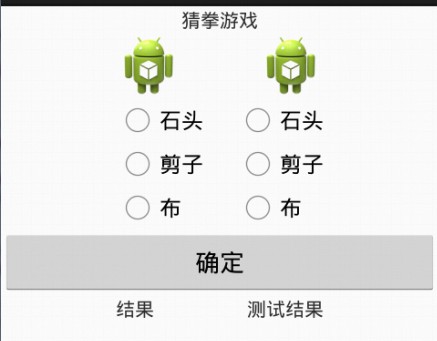
<?xml version="1.0" encoding="utf-8"?>

<RelativeLayout xmlns:android="http://schemas.android.com/apk/res/android"

    android:layout_width="match_parent"

    android:layout_height="match_parent" >

    <TextView

        android:id="@+id/textId1"

        android:layout_width="wrap_content"

        android:layout_height="wrap_content"

        android:layout_centerHorizontal="true"

        android:text="猜拳游戏" />

    <ImageView

        android:id="@+id/imageId1"

        android:layout_width="wrap_content"

        android:layout_height="wrap_content"

        android:src="@drawable/ic_launcher"

        android:scaleType="centerCrop"

        android:layout_below="@id/textId1"

        android:layout_toLeftOf="@id/textId1"/>

    <ImageView

        android:id="@+id/imageId2"

        android:layout_width="wrap_content"

        android:layout_height="wrap_content"

        android:layout_below="@+id/textId1"

        android:layout_toRightOf="@+id/textId1"

        android:scaleType="centerCrop"

        android:src="@drawable/ic_launcher" />

    <RadioGroup

        android:id="@+id/groupId1"

        android:layout_width="wrap_content"

        android:layout_height="wrap_content"

        android:orientation="vertical"

        android:layout_below="@id/imageId1"

        android:layout_alignLeft="@id/imageId1">

        <RadioButton

            android:layout_width="wrap_content"

            android:layout_height="wrap_content"

            android:text="石头"/>

        <RadioButton

            android:layout_width="wrap_content"

            android:layout_height="wrap_content"

            android:text="剪子"/>

        <RadioButton

            android:layout_width="wrap_content"

            android:layout_height="wrap_content"

            android:text="布"/>

    </RadioGroup>

    <RadioGroup

        android:id="@+id/groupId2"

        android:layout_width="wrap_content"

        android:layout_height="wrap_content"

        android:orientation="vertical"

        android:layout_below="@id/imageId2"

        android:layout_alignRight="@id/imageId2">

        <RadioButton

            android:layout_width="wrap_content"

            android:layout_height="wrap_content"

            android:text="石头"/>

        <RadioButton

            android:layout_width="wrap_content"

            android:layout_height="wrap_content"

            android:text="剪子"/>

        <RadioButton

            android:layout_width="wrap_content"

            android:layout_height="wrap_content"

            android:text="布"/>

    </RadioGroup>

    <Button

        android:id="@+id/button"

        android:layout_width="match_parent"

        android:layout_height="wrap_content"

        android:layout_alignParentLeft="true"

        android:layout_below="@id/groupId1"

        android:text="确定"/>

    <TextView

        android:id="@+id/textId2"

        android:layout_width="wrap_content"

        android:layout_height="wrap_content"

        android:layout_below="@id/button"

        android:layout_alignLeft="@id/groupId1"

        android:text="结果"/>

    <TextView

        android:id="@+id/textId3"

        android:layout_width="wrap_content"

        android:layout_height="wrap_content"

        android:layout_alignTop="@id/textId2"

        android:layout_alignRight="@id/groupId2"

        android:text="测试结果"/>

</RelativeLayout>
④简单的登陆界面
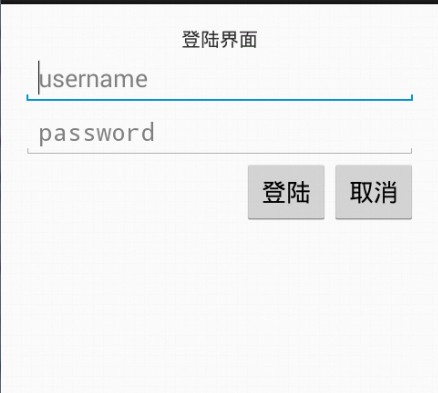
<RelativeLayout xmlns:android="http://schemas.android.com/apk/res/android"

    xmlns:tools="http://schemas.android.com/tools"

    android:layout_width="match_parent"

    android:layout_height="match_parent"

    android:padding="15dp">

    <TextView

        android:id="@+id/loginId"

        android:layout_width="wrap_content"

        android:layout_height="wrap_content"

        android:layout_centerHorizontal="true"

        android:text="登陆界面" />

    <EditText

        android:id="@+id/usernameId"

        android:layout_width="match_parent"

        android:layout_height="wrap_content"

        android:layout_below="@id/loginId"

        android:hint="username"/>

    <EditText

        android:id="@+id/passwordId"

        android:layout_width="wrap_content"

        android:layout_height="wrap_content"

        android:layout_alignLeft="@id/usernameId"

        android:layout_alignRight="@id/usernameId"

        android:layout_below="@id/usernameId"

        android:hint="password"

        android:inputType="textPassword"/>

    <Button

        android:id="@+id/cancelId"

        android:layout_width="wrap_content"

        android:layout_height="wrap_content"

        android:layout_alignRight="@id/passwordId"

        android:layout_below="@id/passwordId"

        android:text="取消" />

    <Button

        android:layout_width="wrap_content"

        android:layout_height="wrap_content"

        android:layout_toLeftOf="@id/cancelId"

        android:layout_below="@id/passwordId"

        android:text="登陆"/>

</RelativeLayout>
Android UI系列-----RelativeLayout的相关属性的更多相关文章
- Android UI系列-----ImageView的scaleType属性
这篇随笔将会简单的记录下ImageView这个控件的一些使用方法,以及其最重要的一个属性: scaleType ImageView这个控件是用来显示图片用的,例如我们可以通过下面这段xml配置来声明显 ...
- Android UI系列-----时间、日期、Toasts和进度条Dialog
您可以通过点击 右下角 的按钮 来对文章内容作出评价, 也可以通过左下方的 关注按钮 来关注我的博客的最新动态. 如果文章内容对您有帮助, 不要忘记点击右下角的 推荐按钮 来支持一下哦 如果您对文章内 ...
- 【转】Android UI系列-----时间、日期、Toasts和进度条Dialog
原文网址:http://www.cnblogs.com/xiaoluo501395377/p/3421727.html 您可以通过点击 右下角 的按钮 来对文章内容作出评价, 也可以通过左下方的 关注 ...
- Android UI系列-----Dialog对话框
您可以通过点击 右下角 的按钮 来对文章内容作出评价, 也可以通过左下方的 关注按钮 来关注我的博客的最新动态. 如果文章内容对您有帮助, 不要忘记点击右下角的 推荐按钮 来支持一下哦 如果您对文章内 ...
- Android UI系列-----EditText和AutoCompleteTextView
在这篇随笔里将主要讲解一下EditText和AutoCompleteTextView这个控件 1.EditText 首先我们先简单来说说EditText这个控件,这个就相当于我们平常web开发中的文本 ...
- Android UI 之TextView控件属性列表
在网上收集到了TextView 的属性,在开发过程中还是挺有用的. android:autoLink 设置是否当文本为URL链接/email/电话号码/map时,文本显示为可点击的链接.可选值(non ...
- Android UI系列-----LinearLayout的综合使用
这里将会对LinearLayout的布局方式进行一个综合的使用,通过一个例子来看看LinearLayout的嵌套布局方式,在这之前首先介绍三个属性: 1.①android:layout_weigth: ...
- Android UI系列-----长度单位和内外边距
这篇随笔将会记录一下在控件布局时,设定距离的三种长度单位:px.dp.sp以及内外边距的属性 1.三种长度单位 ①px:px是我们常见的一种距离单位,它表示的是一个单位像素,我们经常说我们手机或者电脑 ...
- Android UI系列-----ScrollView和HorizontalScrollView
本篇随笔将讲解一下Android当中比较常用的两个布局容器--ScrollView和HorizontalScrollView,从字面意义上来看也是非常的简单的,ScrollView就是一个可以滚动的V ...
随机推荐
- python全栈开发day48-jqurey自定义动画,jQuery属性操作,jQuery的文档操作,jQuery中的ajax
一.昨日内容回顾 1.jQuery初识 1).使用jQuery而非JS的六大理由 2).jQuery对象和js对象转换 3).jQuery的两大特点 4).jQuery的入口函数三大写法 5).jQu ...
- 谈谈java多线程(一)
其实很早就想写一些java多线程方面的文章,只是奈何这东西看着简单,但要真要理解和正确使用可能还需要花费一定的精力,虽然平时的工作中会用到这方面的知识,可是更多的只是为了完成工作,至于详细的东西,也没 ...
- Codeforces 1041F Ray in the tube (看题解)
Ray in the tube 感觉是套路题.. 如果确定一个差值x我们如何取确定答案呢, 我们把a[ i ] -> a[ i ] % (2 * x), 把b[ i ] -> (b[ i ...
- ajax请求案例
let url="loginToIndex"; $.ajax({ url:url,//请求的url type:"POST",//请求方式 async:false ...
- 详解php中serialize()和unserialize()函数
php的serialize()函数和unserialize()函数 适用情境:serialize()返回字符串,此字符串包含了表示value的字节流,可以存储于任何地方.这有利于存储或传递 PHP 的 ...
- set 集合的知识
1. 定义: 2. 集合的交集,并集,差集: 3. 集合添加add(无序): 4. 添加可迭代对象(字符串,列表,元组)update: 字符串实例: 5. 删除元素( pop , remove ): ...
- poj 1579 Function Run Fun 【记忆化递归】
<题目链接> 题目大意: 给出一些递归式,直接套用这些递归式计算. 解题分析: 递归式已经由题目明确说明了,但是无脑递归铁定超时,所以此时,我们需要加上记忆化,对于那些已经算过的,就没有必 ...
- 解决Ubuntu无法进行SSH连接的问题(以及如何使用SSH)
我们在VM中安装好Ubuntu 虚拟机后,经常需要使用Xshell.ssh等工具进行远程连接,方便我们在两个操作系统中进行文件的复制与移动,但是有时候会出现无法连接的问题,原因可能是Ubuntu中默认 ...
- 动态规划_线性dp
https://www.cnblogs.com/31415926535x/p/10415694.html 线性dp是很基础的一种动态规划,,经典题和他的变种有很多,比如两个串的LCS,LIS,最大子序 ...
- PHP7和PHP5在安全上的区别[更新]
0X01 前言 本篇文章大多为转载,但是修正了一些不正确的说法,对某些功能点的变更指出具体是哪个版本变更,加入了一些小更新. (原文地址:https://www.freebuf.com/article ...