
How to Install Tomcat 8.0.27 on CentOS/RHEL and Ubuntu【转】
https://tecadmin.net/install-tomcat-8-on-centos-rhel-and-ubuntu/
Apache Tomcat is an opensource web hosting server for Java based web application. Tomcat is licensed under Apache License version 2. Apache has released stable version of Tomcat 8 on June 25, 2014. Which is available for download on its official site. Apache tomcat 8 has upgraded some features. Below are few details about Tomcat 8.
- Tomcat 8 requires JAVA 7 or Higher to work.
- Tomcat 8 supports Java Servlet 3.1
- Tomcat 8 supports JavaServer Pages 2.3
- Tomcat 8 supports Java Unified Expression Language 3.0
- Tomcat 8 supports Java WebSocket 1.0
This article will help you to Install Tomcat 8 on your CentOS/RHEL and Ubuntu systems. Tomcat 8 stable release is available for download. To install other version of tomcat visit Install Tomcat 7 on CentOS/RHEL or Install Tomcat 7 on Ubuntu as per your operating system used.
Step 1 – Verify JAVA
JAVA is the first requirement of Tomcat installation. Use following command to check if you have java installed already on your system.
# java -version

java version "1.8.0_60"

Java(TM) SE Runtime Environment (build 1.8.0_60-b27)

Java HotSpot(TM) 64-Bit Server VM (build 25.60-b23, mixed mode)
Tomcat 8 is designed to run on Java SE 7 and later. So make sure you have installed correct version on your system. If you don’t have Java installed on your system or installed lower version, use one of following link to install Java first.
Step 2 – Downloading Tomcat Archive
Download Apache Tomcat 8 archive file using following commands or you can visit Tomcat 8official download page for download most recent available version. After downloading extract archive file in /opt directory. You may change this location as per your setup.
# cd /opt

# wget http://www.us.apache.org/dist/tomcat/tomcat-8/v8.0.27/bin/apache-tomcat-8.0.27.tar.gz

# tar xzf apache-tomcat-8.0.27.tar.gz
Step 3 – Configure Environment Variables
Before starting Tomcat, configure CATALINA_HOME environment variable in your system using following commands.
# echo "export CATALINA_HOME="/opt/apache-tomcat-8.0.27"" >> ~/.bashrc

# source ~/.bashrc
Step 4 – Starting Tomcat
Tomcat is very easy to use, There are no need to compile its source. You simple extract the archive and start the tomcat server. Tomcat by default start on port 8080, So make sure no other application using the same port.
# cd /opt/apache-tomcat-8.0.27

# ./bin/startup.sh
[Sample Output]
Using CATALINA_BASE:   /opt/apache-tomcat-8.0.27

Using CATALINA_HOME:   /opt/apache-tomcat-8.0.27

Using CATALINA_TMPDIR: /opt/apache-tomcat-8.0.27/temp

Using JRE_HOME:        /opt/jdk1.8.0_60

Using CLASSPATH:       /opt/apache-tomcat-8.0.27/bin/bootstrap.jar:/opt/apache-tomcat-8.0.27/bin/tomcat-juli.jar

Tomcat started.
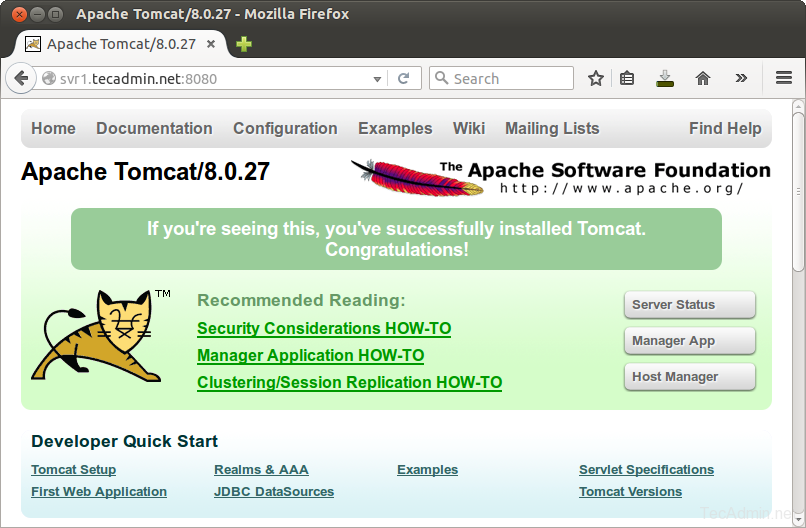
Step 5 – Access Tomcat in Browser
Tomcat server works on port 8080 default. Access tomcat on web browser by connecting your server on port 8080.
http://svr1.tecadmin.net:8080
Step 6 – Setup User Accounts
Finally we need to create user accounts to secure and access admin/manager pages. Editconf/tomcat-users.xml file in your editor and paste inside <tomcat-users> </tomcat-users> tags.
<!-- user manager can access only manager section -->

<role rolename="manager-gui" />

<user username="manager" password="_SECRET_PASSWORD_" roles="manager-gui" />

<!-- user admin can access manager and admin section both -->

<role rolename="admin-gui" />

<user username="admin" password="_SECRET_PASSWORD_" roles="manager-gui,admin-gui" />
How to Install Tomcat 8.0.27 on CentOS/RHEL and Ubuntu【转】的更多相关文章
- Install OpenCV 3.0 and Python 2.7+ on Ubuntu
为了防止原文消失或者被墙,转载留个底,最好还是去看原贴,因为随着版本变化,原贴是有人维护升级的 http://www.pyimagesearch.com/2015/06/22/install-Open ...
- Adobe Flash Player 27 on Fedora 27/26, CentOS/RHEL 7.4/6.9
This is guide, howto install Adobe Flash Player Plugin version 27 (32-bit and 64-bit) with YUM/DNF o ...
- Install Tomcat 6 on CentOS or RHEL --转载
source:http://www.davidghedini.com/pg/entry/install_tomcat_6_on_centos This post will cover installa ...
- 转: How to Install MongoDB 3.2 on CentOS/RHEL & Fedora (简单易懂)
from: http://tecadmin.net/install-mongodb-on-centos-rhel-and-fedora/ MongoDB (named from “huMONGOus ...
- Eclipse配置tomcat8.5.7报错:The Apache Tomcat installation at this directory is version 8.5.27. A Tomcat 8.0 installation is...
Eclipse配置tomcat8.5.7报错:The Apache Tomcat installation at this directory is version 8.5.27. A Tomcat ...
- Linux Tomcat 6.0安装配置实践总结
系统环境: Red Hat Enterprise Linux Server release 5.7 (Tikanga) 64位 Tomcat下载 从官方网站 http://tomcat.apache ...
- Tomcat 9.0安装配置
本文转自:http://blog.sina.com.cn/s/blog_15126e2170102w5o8.html 一.JDK的安装与配置 1.从官网下载jdk,注意是jdk不是jre.最好从官网下 ...
- tomcat之 Tomcat 7.0.78 单机多实例配置
前言:JDK(JavaDevelopment Kit)是Sun Microsystems针对Java开发员的产品.自从Java推出以来,JDK已经成为使用最广泛的javaSDK. JDK是整个Java ...
- 创建Dynamic Web Project时 显示最新Apache Tomcat 8.0 的方法
创建Dynamic Web Project时 显示最新Apache Tomcat 8.0 等的方法 解决办法如下: 第一步:eclipse菜单help->eclipse marketplac ...
随机推荐
- Paper Read: Convolutional Image Captioning
Convolutional Image Captioning 2018-11-04 20:42:07 Paper: http://openaccess.thecvf.com/content_cvpr_ ...
- Ubuntu下 fatal error: Python.h: No such file or directory 解决方法
参考: fatal error: Python.h: No such file or directory Ubuntu下 fatal error: Python.h: No such file or ...
- [大数据从入门到放弃系列教程]第一个spark分析程序
[大数据从入门到放弃系列教程]第一个spark分析程序 原文链接:http://www.cnblogs.com/blog5277/p/8580007.html 原文作者:博客园--曲高终和寡 **** ...
- HashMap 和 HashTable差别
代码版本 JDK每一版本都在改进.本文讨论的HashMap和HashTable基于JDK 1.7.0_67.源码见这里 1. 时间 HashTable产生于JDK 1.1,而HashMap产生于JDK ...
- [easyUI] 树形菜单 tree
0.效果图 1. 一个id为mytree的无序列表 <h2>easy UI Tree</h2> <ul id="mytree"></ul& ...
- linux存储管理之自动挂在
自动挂载 Automount ==================================================================================== ...
- DP爬台阶问题
1. 初级爬台阶 - 求最短步数 LC - 70 一次可以迈1-2个台阶,因此最短步数与前两个台阶有关. Initial state: 第一阶:1步 : 第二阶:1步 deduction functi ...
- 『TensorFlow』第三弹_可视化框架介绍_悄悄问圣僧
添加记录节点 -> 汇总记录节点 -> run汇总节点 -> [书写器生成]书写入文件 [-> 刷新缓冲区] 可视化关键点: 注意, 1.with tf.name_scope( ...
- 『计算机视觉』Mask-RCNN_训练网络其二:train网络结构&损失函数
Github地址:Mask_RCNN 『计算机视觉』Mask-RCNN_论文学习 『计算机视觉』Mask-RCNN_项目文档翻译 『计算机视觉』Mask-RCNN_推断网络其一:总览 『计算机视觉』M ...
- Canvas---clearRect()清除圆形区域
function clearArcFun(x,y,r,cxt){ //(x,y)为要清除的圆的圆心,r为半径,cxt为context var stepClear=1;//别忘记这一步 clearArc ...