
1732157 - Collecting diagnosis information for SAP HANA [VIDEO]
Symptom
SAP Support asked you to provide a collection of the relevant diagnosis files (also known as "full-system-info-dump").
Environment
SAP HANA database, revision >=30
Resolution
You can collect the dump containing the diagnosis information either in HANA Studio or directly from the command line:
 1.In the Administration Editor in HANA Studio, choose the Diagnosis Files tab. If the system is offline, the Administration editor opens in diagnosis mode:

    1.1 Choose Diagnosis Information > Collect

1.2.Select whether System Views should be included (in earlier HANA revisions this option was offered in the step before by choosing "Collect with SQL" or "Collect without SQL) and the date range for
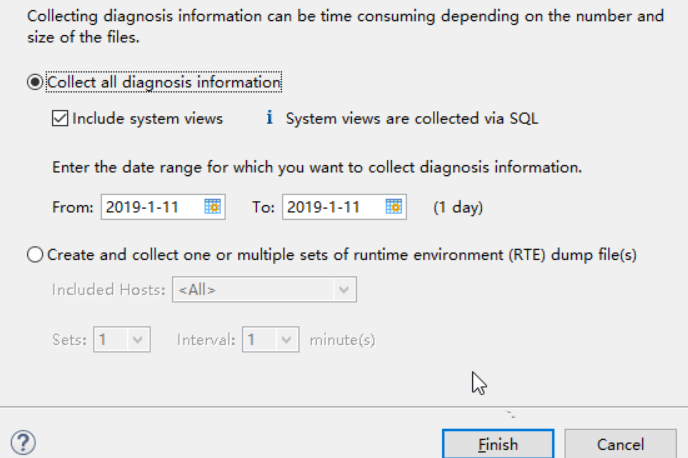
1.3.which you want to collect the diagnosis information.
1.4.Click the "Finish Button" to trigger the collection of diagnosis information
1.5.See below section 'Where to Download' to download the collection
- You are logged on as the operating system administrator adm on the command line:
2.1Change to directory where the fullSystemInfoDump.py script is located (terminal shortcut "cdpy") i.e. $DIR_INSTANCE/exe/python_support
2.2For a database in a single-container system please execute: python fullSystemInfoDump.py [--days=<number_of_days>]
For a database in a multiple-container (MultiDb, MDC) system, you must also specify name of the tenant database with the corresponding option.
For a tenant database: python fullSystemInfoDump.py -t <TENANT_DATABASE_NAME> [--days=<number_of_days>]
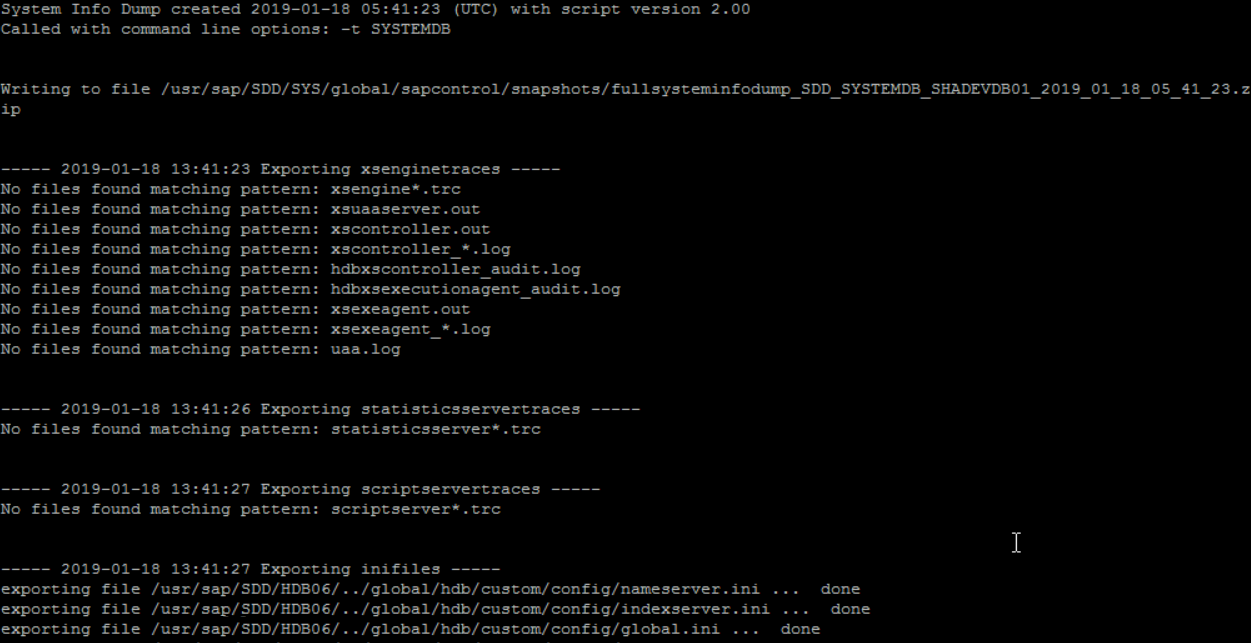
For the system database: python fullSystemInfoDump.py -t SYSTEMDB [--days=<number_of_days>]
You are logged on to DBACOCKPIT
Go to Diagnostics/Diagnosis Files, in the upper task bar click "List Diagnosis Information" [Requires permissions "GRANT SELECT ON SYS.FULL_SYSTEM_INFO_DUMPS" (available in HANA Revision 101 and later), "EXECUTE on the procedure SYS.FULL_SYSTEM_INFO_DUMP", "EXECUTE on the procedure SYS.FULL_SYSTEM_INFO_DUMP_CREATE", "EXECUTE on the procedure SYS.FULL_SYSTEM_INFO_DUMP_RETRIEVE", "EXECUTE on the procedure SYS.FULL_SYSTEM_INFO_DUMP_DELETE"]
If systems views shall be included then the following permissions are required as well [SELECT on SYS_STATISTICS schema, SELECT on SYS_EPM schema, EXPORT privilege]
Go to Diagnostics/Diagnosis Files, in the upper task bar click "Generate RTE Dump" [Requires permission "GRANT Resource Admin]
Those features require the following SAP_BASIS Support Packages:
7.51 (all service packs)
7.50 (SP01 and higher)
7.40 (SP14 and higher)
7.31 (SP18 and higher)
7.30 (SP15 and higher)
7.02 (SP18 and higher)
Note: For storage reasons, by default only trace files of the last 7 days are collected unabridged (time range can be modified). In case the incident you would like to report happened more than 7 days ago, please make sure to include all the traces since the time of the occurrence by using the corresponding option "-d " or "--days=". For example, to include all trace files from the last 14 days, use python fullSystemInfoDump.py --days=14
See also the video below:
The collection represents a snapshot of the HANA database including:
The trace files of each host in the landscape i.e. $DIR_INSTANCE//trace/.
The database configuration files.
The backup logs, crashdump files & recorded performance trace files.
A runtime dump for each indexserver.
Among a set of other trace / configuration files, please refer to the documentation referenced for details
For storage reasons, by default only trace files from the last 7 days are collected unabridged (time range can be modified).
Where to Download
You can download the collection of diagnosis files (ZIP-archive having file name pattern fullsysteminfodump_
In the Administration Editor in HANA Studio, choose the Diagnosis Files tab, then select Diagnosis Information > List to download the full-system-info-dump.
Directly from the directory DIR_GLOBAL/sapcontrol/snapshots which typically points to /usr/sap//SYS/global.
As the size of the ZIP-archive created usually exceeds the maximum upload size of attachments in incidents, please:
Either request a SAP Mobile Documents or sFTP (see KBA 2077673) share from the Support Engineer for uploading the trace files.
Or transfer them to SAP using sapserv# ftp. See SAP Note 40024 for more details.
Additional information to avoid running into known problems:
Do not collect the full-system-info-dump from a standby host in distributed landscape when using SAP's Storage Connector (see SAP Note 2014225 for details).
For HANA revision 74.04 and lower please choose the command line option (see SAP Note 2040144 for details).
In rare cases and before HANA revision 80, the python call from the command line lead to high CPU usage. To limit the resources allocated by python, you can assign a lower priority to this process call by using "nice -19 python ...".
1732157 - Collecting diagnosis information for SAP HANA [VIDEO]的更多相关文章
- 2101244 - FAQ: SAP HANA Multitenant Database Containers (MDC)
Symptom You face issues or have questions related to multitenant database containers in SAP HANA env ...
- 2690036 - SAP HANA 2.0 SPS 03 Database Revision 034
Symptom This is the SAP Release Note for SAP HANA 2.0 Database Revision 034 (2.00.034.00) of the SAP ...
- 1950261 - SAP HANA Database Backup Policy Recommendations and Regular Backup Script
=====Symptom For SAP Business One, version for SAP HANA users, SAP HANA provides a range of database ...
- SAP NOTE 1999997 - FAQ: SAP HANA Memory
Symptom You have questions related to the SAP HANA memory. You experience a high memory utilization ...
- SAP HANA学习资料大全[非常完善的学习资料汇总]
Check out this SDN blog if you plan to write HANA Certification exam http://scn.sap.com/community/ha ...
- 【转】SAP HANA学习资料大全[非常完善的学习资料汇总]
Check out this SDN blog if you plan to write HANA Certification exam http://scn.sap.com/community/ha ...
- SAP HANA学习资料大全 Simple Finane + Simple Logisitic [非常完善的学习资料汇总]
Check out this SDN blog if you plan to write HANA Certification exam http://scn.sap.com/community/ha ...
- sap hana 数据库 EBS
SAP实时数据平台详解 ************************************************************ EBS是Oracle 公司对原有应用产品整合后的一个产 ...
- Oracle GoldenGate 支持 从SAP HANA database抽取或者复制数据到SAP HANA database 吗?
Oracle GoldenGate 支持 从SAP HANA database抽取或者复制数据到SAP HANA database 吗? 来源于: Does Oracle GoldenGate Su ...
随机推荐
- 使用Python爬取代理ip
本文主要代码用于有代理网站http://www.kuaidaili.com/free/intr中的代理ip爬取,爬虫使用过程中需要输入含有代理ip的网页链接. 测试ip是否可以用 import tel ...
- C#磁性窗体设计
using System;using System.Collections.Generic;using System.ComponentModel;using System.Data;using Sy ...
- ios中模态弹窗用法及UINavigationController基本用法
- (void)viewDidLoad { [super viewDidLoad]; //点击按钮跳转 loginViewController *vc=[[loginViewController al ...
- tp5 Excel导入
/** * 导入Excel功能 */ public function import(){ if (!empty($_FILES)) { $file = request()->file('impo ...
- 剑指Offer 49. 把字符串转换成整数 (字符串)
题目描述 将一个字符串转换成一个整数(实现Integer.valueOf(string)的功能,但是string不符合数字要求时返回0),要求不能使用字符串转换整数的库函数. 数值为0或者字符串不是一 ...
- 解决Arcgis相同投影仍出现偏差的问题
网上下载了一个土地利用分类的polygon矢量图---导入arcgis--投影不是我想要的.出现了一些偏差 立即转换投影----按照网上教程--先定义投影-再定义坐标系---结果很糟糕,inconsi ...
- 网络编程并发 多进程 进程池,互斥锁,信号量,IO模型
进程:程序正在执行的过程,就是一个正在执行的任务,而负责执行任务的就是cpu 操作系统:操作系统就是一个协调.管理和控制计算机硬件资源和软件资源的控制程序. 操作系统的作用: 1:隐藏丑陋复杂的硬件接 ...
- iOS tableView分割线高度自定义
1.系统自带的集中分割线的形式 myTableView.separatorStyle=UITableViewCellSeparatorStyleNone;(这个是去掉所有分割线)可以通过这个来设置 2 ...
- 【转载】 强化学习(十一) Prioritized Replay DQN
原文地址: https://www.cnblogs.com/pinard/p/9797695.html ------------------------------------------------ ...
- 2018年4月中旬的PTA(三)
C高级第三次PTA作业(1) 题目6-1 输出月份英文名 1.设计思路 (1)算法(子函数) 第一步:定义字符型一级指针子函数名getmonth,形参整型n. 第二步:定义长度为12的字符数组指针mo ...