
[asp.net core]SignalR一个例子
摘要
在一个后台管理的页面想实时监控一些操作的数据,想到用signalR。
一个例子
asp.net core+signalR
使用Nuget安装包:Microsoft.AspNetCore.SignalR
在StartUp中启用signalR
  // This method gets called by the runtime. Use this method to add services to the container.

        public void ConfigureServices(IServiceCollection services)

        {

          //services.AddMvc().SetCompatibilityVersion(CompatibilityVersion.Version_2_1);

            services.AddCors(options => options.AddPolicy("CorsPolicy",

             builder =>

             {

                 builder.AllowAnyMethod().AllowAnyHeader()

                        .WithOrigins("http://localhost:55830")

                        .AllowCredentials();

             }));

            services.AddSignalR();

        }
    // This method gets called by the runtime. Use this method to configure the HTTP request pipeline.

        public void Configure(IApplicationBuilder app, IHostingEnvironment env)

        {

            if (env.IsDevelopment())

            {

                app.UseDeveloperExceptionPage();

            }

            else

            {

                app.UseExceptionHandler("/Home/Error");

                app.UseHsts();

            }

            app.UseCors("CorsPolicy");

            app.UseSignalR(routes =>

            {

                routes.MapHub<NotificationHub>("/notifyHub");

            });

            app.UseStaticFiles();

            app.UseMvc(routes =>

            {

                routes.MapRoute(

                    name: "default",

                    template: "{controller=Home}/{action=Index}/{id?}/{w?}");

            });

        }
 public class NotificationHub:Hub

    {

    }
在api中,通过构造函数注入
 //[Produces("application/json")]

    [Route("api/Mail")]

    public class MailController : Controller

    {

        private IHubContext<NotificationHub> _hubContext;

        public MailController(

             IHubContext<NotificationHub> hubContext)

        {

            _mSMailUtil = mSMailUtil;

            _requestHelper = requestHelper;

            _webLogUtil = webLogUtil;

            _accessor = accessor;

            _hubContext = hubContext;

        }

        [HttpGet("send")]

        public IActionResult Send()

        {

            _hubContext.Clients.All.SendAsync("Notify", $" {DateTime.Now}:->{new Random().Next(1, 10000)}");

            return this.Ok();

        }

    }
客户端
需要引入signalr.js
// The following sample code uses modern ECMAScript 6 features

// that aren't supported in Internet Explorer 11.

// To convert the sample for environments that do not support ECMAScript 6,

// such as Internet Explorer 11, use a transpiler such as

// Babel at http://babeljs.io/.

//

// See Es5-chat.js for a Babel transpiled version of the following code:

const connection = new signalR.HubConnectionBuilder()

    .withUrl("/notifyHub")

    .build();

connection.on("Notify", (message) => {

    console.log(message);

    const li = document.createElement("li");

    li.style.color = "white";

    const txt = "->" + message;

    li.textContent = txt;

    document.getElementById("ulList").appendChild(li);

});

connection.start().catch(err => console.error(err.toString()));
<div style="margin-top:20px;">

    <button id="btnAll" class="btn-danger">全部订阅</button>

</div>

<div style="background-color:black;width:100%;height:auto;margin-top:10px;">

    <ul id="ulList" style="list-style-type:none;">

        <li style="color:white;">

        </li>

    </ul>

</div>

<script src="~/lib/signalr/signalr.js"></script>

<script src="~/js/chat.js"></script>
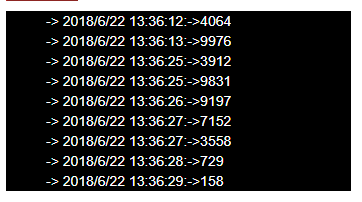
测试
通过访问api/mail/send
在页面https://localhost:44362/Home/all可以看到通知结果
[asp.net core]SignalR一个例子的更多相关文章
- ASP.NET Core SignalR中的流式传输
什么是流式传输? 流式传输是这一种以稳定持续流的形式传输数据的技术. 流式传输的使用场景 有些场景中,服务器返回的数据量较大,等待时间较长,客户端不得不等待服务器返回所有数据后,再进行相应的操作.这时 ...
- Asp.Net Core SignalR 与微信小程序交互笔记
什么是Asp.Net Core SignalR Asp.Net Core SignalR 是微软开发的一套基于Asp.Net Core的与Web进行实时交互的类库,它使我们的应用能够实时的把数据推送给 ...
- Asp.Net Core SignalR 用泛型Hub优雅的调用前端方法及传参
继续学习 最近一直在使用Asp.Net Core SignalR(下面成SignalR Core)为小程序提供websocket支持,前端时间也发了一个学习笔记,在使用过程中稍微看了下它的源码,不得不 ...
- ASP.NET Core SignalR
ASP.NET Core SignalR 是微软开发的一套基于ASP.NET Core的与Web进行实时交互的类库,它使我们的应用能够实时的把数据推送给Web客户端. 功能 自动管理连接 允许同时广播 ...
- ASP.NET Core SignalR:基础概述
一.简介 ASP.NET Core SignalR 是一个开源代码库,它简化了向应用添加实时 Web 功能的过程. 实时 Web 功能使服务器端代码能够即时将内容推送到客户端. SignalR 的适用 ...
- 使用websocket连接(对接)asp.net core signalr
使用通用websocket连接asp.net core signalr 一.背景介绍 signalr的功能很强大,可以为我们实现websocket服务端节省不少的时间.但是可能由于不同的环境,我们在对 ...
- ASP.NET CORE使用WebUploader对大文件分片上传,并通过ASP.NET CORE SignalR实时反馈后台处理进度给前端展示
本次,我们来实现一个单个大文件上传,并且把后台对上传文件的处理进度通过ASP.NET CORE SignalR反馈给前端展示,比如上传一个大的zip压缩包文件,后台进行解压缩,并且对压缩包中的文件进行 ...
- 给 asp.net core 写一个简单的健康检查
给 asp.net core 写一个简单的健康检查 Intro 健康检查可以帮助我们知道应用的当前状态是不是处于良好状态,现在无论是 docker 还是 k8s 还是现在大多数的服务注册发现大多都提供 ...
- Serilog 是 ASP.NET Core 的一个插件,可以简化日志记录
[翻译] ASP.NET Core 利用 Docker.ElasticSearch.Kibana 来记录日志 原文: Logging with ElasticSearch, Kibana, ASP.N ...
随机推荐
- (一)cygwin和vim——hello world!
好吧,我现在初出茅庐,一无所有,只有一台win xp.做什么呢?要不要试试Unix命令行编程的感觉,想到就做.Just try! 1.首先安装cygwin,最好是选择离线安装包. 2.默认选择安装所有 ...
- error: Microsoft Visual C++ 14.0 is required.
缺少包的依赖!! 解决办法1. 安装 Microsoft visual c++ 14.0 https://964279924.ctfile.com/fs/1445568-239446865 或 htt ...
- Python 高级面向对象
一.字段 1.字段包括:普通字段和静态字段,他们在定义和使用中有所区别,而最本质的区别是内存中保存的位置不同. a.普通字段属于对象(实例变量) b.静态字段属于类(类变量) 二.属性 对于属性,有以 ...
- 数学建模:1.概述& 监督学习--回归分析模型
数学建模概述 监督学习-回归分析(线性回归) 监督学习-分类分析(KNN最邻近分类) 非监督学习-聚类(PCA主成分分析& K-means聚类) 随机算法-蒙特卡洛算法 1.回归分析 在统计学 ...
- MySQL高级02
索引简介 索引(Index)是帮助MySQL高效获取数据的数据结构.可以得到索引的本质:索引是数据结构.你可以简单理解为“排好序的快速查找数据结构”. 在数据之外,数据库系统还维护着满足特定查找算法的 ...
- FileZilla FTP Client
FileZilla Client是一个快速.实用.多功能和界面直观的免费的FTP客户端,虽然它是免费软件,可功能却一点也不含糊,比起那些共享软件来有过之而无不及,在新的版本中作者改进了手动下载的界面和 ...
- Spring事务的传播:PROPAGATION_REQUIRED
PROPAGATION_REQUIRED-- 支持当前事务,如果当前没有事务,就新建一个事务.这是最常见的选择. ServiceA { void methodA() { ServiceB.method ...
- POJ 1284 Primitive Roots (欧拉函数+原根)
<题目链接> 题目大意: 满足{ ( $x^{i}$ mod p) | 1 <=$i$ <= p-1 } == { 1, …, p-1 }的x称为模p的原根.给出p,求原根个数 ...
- HDU 4614 Vases and Flowers 【线段树】+【二分】
<题目链接> 题目大意: 有n个花瓶,每个花瓶中只能放一朵花.两种操作,一种是从A开始放F朵花,如果有的花瓶中已经有花则跳过这个花瓶,往下一个花瓶放:第二种是将区间[A,B]之间花瓶中的花 ...
- Spring Boot 项目实战(四)集成 Redis
一.前言 上篇介绍了接口文档工具 Swagger 及项目监控工具 JavaMelody 的集成过程,使项目更加健壮.在 JAVA Web 项目某些场景中,我们需要用缓存解决如热点数据访问的性能问题,业 ...