
Spring 4 MVC example with Maven
In this tutorial, we show you a Spring 4 MVC example, using Maven build tool.
Technologies used :
- Spring 4.3.0.RELEASE
- Maven 3
- JDK 1.8
- Eclipse Mars.2 Release (4.5.2)
- Boostrap 3
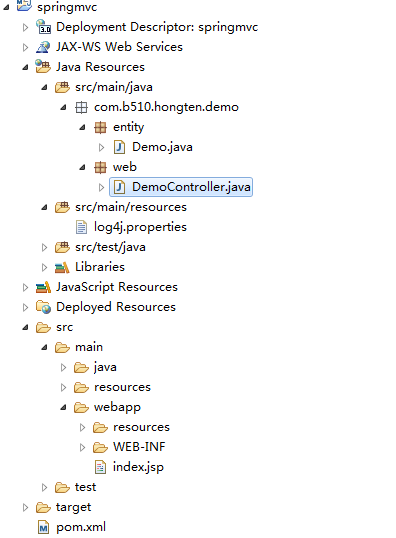
1. Project Structure
Download the project source code and review the project folder structure :
2. Maven
A pom.xml template to quick start a Spring MVC project, it defines Spring 4 dependencies and Eclipse workspace configuration.
 <project xmlns="http://maven.apache.org/POM/4.0.0" xmlns:xsi="http://www.w3.org/2001/XMLSchema-instance"

     xsi:schemaLocation="http://maven.apache.org/POM/4.0.0 http://maven.apache.org/maven-v4_0_0.xsd">

     <modelVersion>4.0.0</modelVersion>

     <groupId>com.b510.hongten</groupId>

     <artifactId>springmvc</artifactId>

     <packaging>war</packaging>

     <version>0.0.1-SNAPSHOT</version>

     <name>springmvc Maven Webapp</name>

     <url>http://maven.apache.org</url>

     <properties>

         <project-name>springmvc</project-name>

         <project-version>0.0.1-SNAPSHOT</project-version>

         <java-version>1.8</java-version>

         <org.springframework-version>4.3.0.RELEASE</org.springframework-version>

     </properties>

     <dependencies>

         <!-- Spring MVC dependency -->

         <dependency>

             <groupId>org.springframework</groupId>

             <artifactId>spring-webmvc</artifactId>

             <version>${org.springframework-version}</version>

         </dependency>

         <dependency>

             <groupId>javax.servlet</groupId>

             <artifactId>javax.servlet-api</artifactId>

             <version>3.0.1</version>

             <scope>provided</scope>

         </dependency>

         <dependency>

             <groupId>javax.servlet</groupId>

             <artifactId>jstl</artifactId>

             <version>1.2</version>

         </dependency>

         <!-- log4j dependency-->

         <dependency>

             <groupId>log4j</groupId>

             <artifactId>log4j</artifactId>

             <version>1.2.17</version>

         </dependency>

     </dependencies>

     <build>

         <finalName>${project-name}-${project-version}</finalName>

         <pluginManagement>

             <plugins>

                 <plugin>

                     <!-- Maven plugin -->

                     <groupId>org.apache.maven.plugins</groupId>

                     <artifactId>maven-compiler-plugin</artifactId>

                     <version>2.3.2</version>

                     <configuration>

                         <source>${java-version}</source>

                         <target>${java-version}</target>

                     </configuration>

                 </plugin>

                 <plugin>

                     <groupId>org.apache.maven.plugins</groupId>

                     <artifactId>maven-war-plugin</artifactId>

                     <version>2.4</version>

                     <configuration>

                         <warSourceDirectory>src/main/webapp</warSourceDirectory>

                         <warName>${project-name}</warName>

                         <failOnMissingWebXml>false</failOnMissingWebXml>

                     </configuration>

                 </plugin>

             </plugins>

         </pluginManagement>

     </build>

 </project>
3. Controller & Mapping
The @RequestMapping has been available since 2.5, but now enhanced to support REST style URLs.
 package com.b510.hongten.demo.web;

 import org.apache.log4j.Logger;

 import org.springframework.stereotype.Controller;

 import org.springframework.ui.Model;

 import org.springframework.web.bind.annotation.PathVariable;

 import org.springframework.web.bind.annotation.RequestMapping;

 import org.springframework.web.bind.annotation.RequestMethod;

 import com.b510.hongten.demo.entity.Demo;

 /**

  * @author Hongten

  * @date Nov 19, 2017

  */

 @Controller

 @RequestMapping("/demo")

 public class DemoController {

     private static final Logger logger = Logger.getLogger(DemoController.class);

     @RequestMapping(value = "/show/{name}", method = RequestMethod.GET)

     public String show(@PathVariable("name") String name, Model model) {

         logger.info("name is " + name);

         Demo demo = new Demo();

         demo.setTitle("Spring MVC Demo");

         demo.setName(name);

         model.addAttribute(demo);

         return "demo/show";

     }

     @RequestMapping(value = "/show", method = RequestMethod.GET)

     public String show(Model model) {

         logger.info("show method...");

         Demo demo = new Demo();

         demo.setTitle("Spring MVC Demo");

         demo.setName("Hongten");

         model.addAttribute("demo", demo);

         return "demo/show";

     }

 }
4. JSP Views
A JSP page(show.jsp) to display the value, and include bootstrap css and js.
 <%@ taglib prefix="spring" uri="http://www.springframework.org/tags"%>

 <%@ taglib prefix="c" uri="http://java.sun.com/jsp/jstl/core"%>

 <!DOCTYPE html>

 <html lang="en">

 <jsp:include page="/WEB-INF/views/common/common-libs.jsp" />

 <head>

 <title>Spring MVC Demo</title>

 </head>

 <nav class="navbar navbar-inverse navbar-fixed-top">

   <div class="container">

     <div class="navbar-header">

         <a class="navbar-brand" href="#">Spring MVC Demo</a>

     </div>

   </div>

 </nav>

 <div class="jumbotron">

   <div class="container">

     <h1>${demo.title}</h1>

     <p>

         <c:if test="${not empty demo.name}">

             Hello <font color='red'>${demo.name}</font>

         </c:if>

         <c:if test="${empty demo.name}">

             Welcome Welcome!

         </c:if>

     </p>

     <p>

     <a class="btn btn-primary btn-lg" href="./demo/show" role="button">Home</a>

     </p>

   </div>

 </div>

 <div class="container">

   <div class="row">

     <div class="col-md-4">

         <h2>Heading</h2>

         <p>Totoro</p>

         <p>

         <a class="btn btn-default" href="./demo/show/Totoro" role="button">View details</a>

         </p>

     </div>

     <div class="col-md-4">

         <h2>Heading</h2>

         <p>Tome James</p>

         <p>

         <a class="btn btn-default" href="./demo/show/Tome James" role="button">View details</a>

         </p>

     </div>

     <div class="col-md-4">

         <h2>Heading</h2>

         <p>John Mohanmode</p>

         <p>

         <a class="btn btn-default" href="./demo/show/John Mohanmode" role="button">View details</a>

         </p>

     </div>

   </div>

   <hr>

   <footer>

     <p>© Hongten 2017</p>

   </footer>

 </div>

 </body>

 </html>
5. Spring XML Configuration
5.1. Enable component scanning, view resolver and resource mapping.
 <beans xmlns="http://www.springframework.org/schema/beans"

     xmlns:context="http://www.springframework.org/schema/context"

     xmlns:xsi="http://www.w3.org/2001/XMLSchema-instance" xmlns:mvc="http://www.springframework.org/schema/mvc"

     xsi:schemaLocation="

         http://www.springframework.org/schema/beans

         http://www.springframework.org/schema/beans/spring-beans-3.2.xsd

         http://www.springframework.org/schema/mvc

         http://www.springframework.org/schema/mvc/spring-mvc-3.2.xsd

         http://www.springframework.org/schema/context

         http://www.springframework.org/schema/context/spring-context-3.2.xsd">

     <!-- Enable component scanning -->

     <context:component-scan base-package="com.b510.hongten" />

     <!-- Enable annotation -->

     <mvc:annotation-driven />

     <!-- Enable view resolver -->

     <bean class="org.springframework.web.servlet.view.InternalResourceViewResolver">

         <property name="prefix">

             <value>/WEB-INF/views/</value>

         </property>

         <property name="suffix">

             <value>.jsp</value>

         </property>

     </bean>

     <!-- Enable resource mapping -->

     <mvc:resources mapping="/resources/**" location="/resources/" />

 </beans>
5.2. Declares a DispatcherServlet in web.xml. If the Spring XML configuration file is NOT specified, Spring will look for the {servlet-name}-servlet.xml.
In this example, Spring will look for the spring-web-servlet.xml file.
 <web-app xmlns="http://java.sun.com/xml/ns/javaee" xmlns:xsi="http://www.w3.org/2001/XMLSchema-instance"

     xsi:schemaLocation="http://java.sun.com/xml/ns/javaee

           http://java.sun.com/xml/ns/javaee/web-app_3_0.xsd"

     version="3.0">

     <servlet>

         <servlet-name>spring-web</servlet-name>

         <servlet-class>org.springframework.web.servlet.DispatcherServlet</servlet-class>

         <load-on-startup>1</load-on-startup>

     </servlet>

     <servlet-mapping>

         <servlet-name>spring-web</servlet-name>

         <url-pattern>/</url-pattern>

     </servlet-mapping>

 </web-app>
6. Build Project
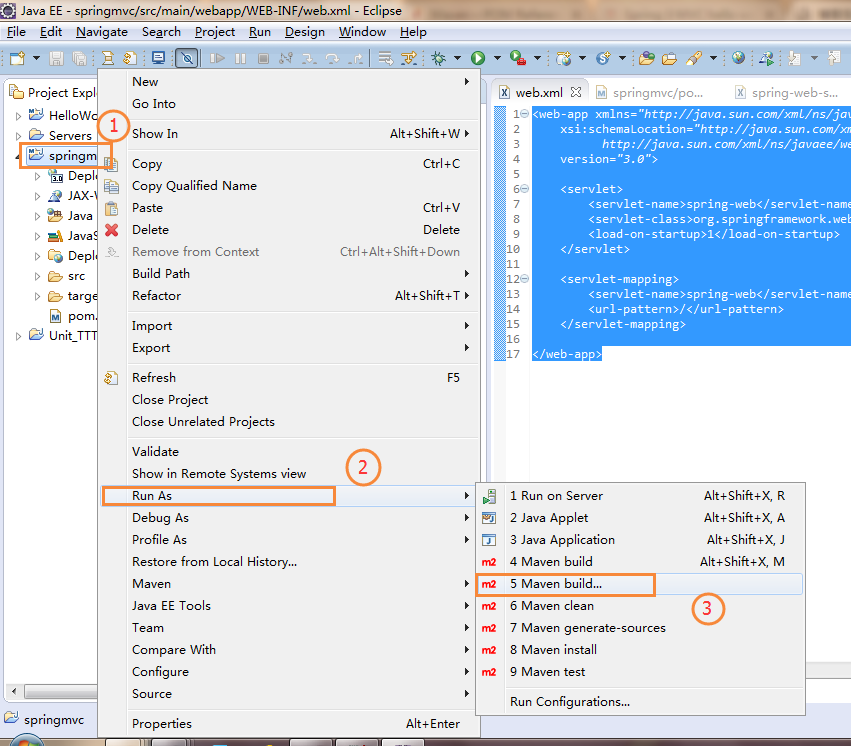
6.1 Build the project in eclipse with maven
Right click project -> Run As -> Maven build...
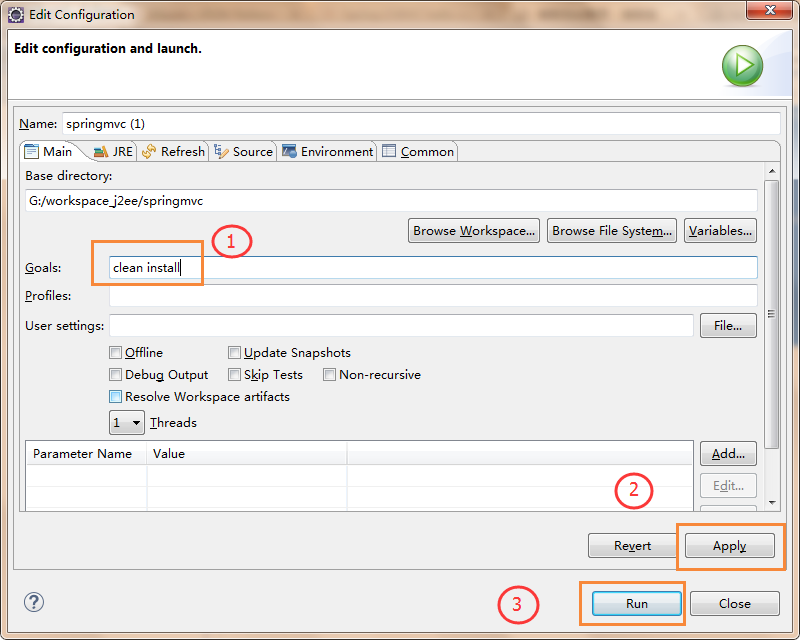
6.2.Enter 'clean install' to build project.
clean install
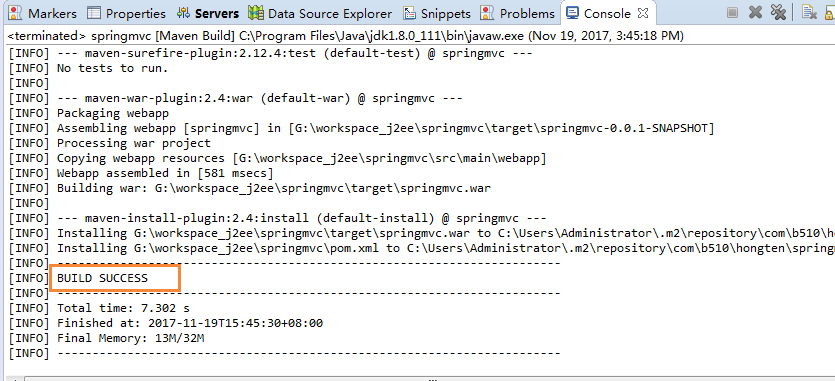
6.3.Should see the 'BUILD SUCCESS' result.
7. Run Project on Tomcat Server
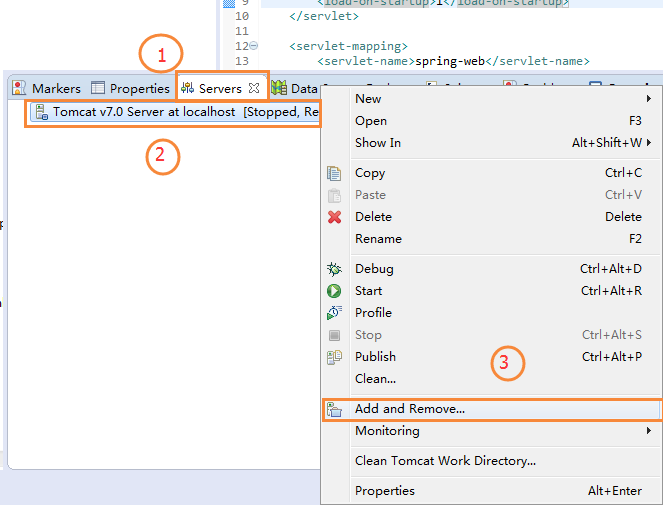
7.1.Select Servers tab and right click Tomcat v7.0 and select Add and Remove...
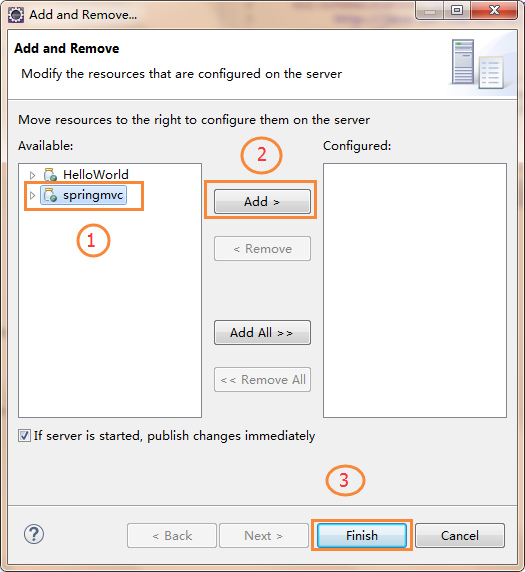
7.2.Add springmvc project to Tomcat.
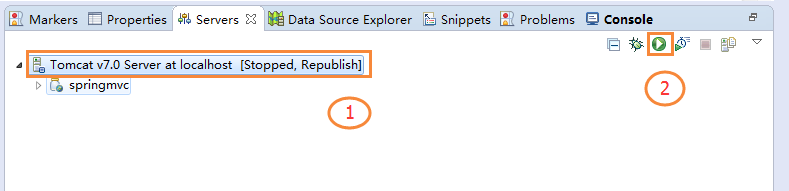
7.3. Start Tomcat server.
8. Demo
The result like this:
http://localhost:8080/springmvc/
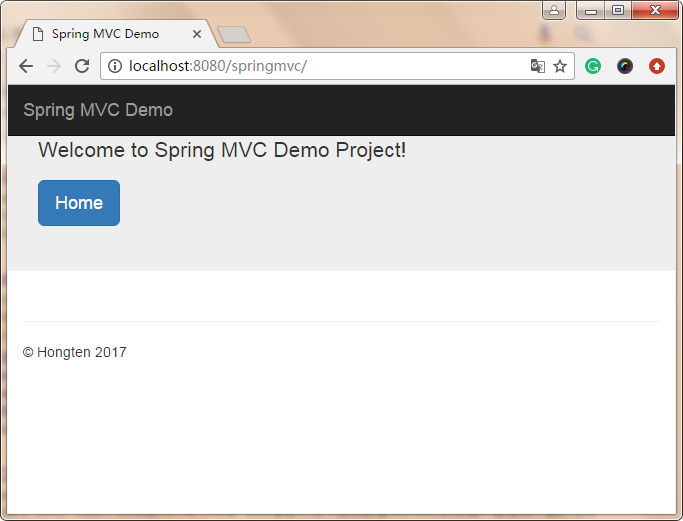
Click 'Home' button to go show page.

9. Source Code Download
The source code download below:
Good Luck!
========================================================
More reading,and english is important.
I'm Hongten
大哥哥大姐姐,觉得有用打赏点哦!多多少少没关系,一分也是对我的支持和鼓励。谢谢。
Hongten博客排名在100名以内。粉丝过千。
Hongten出品,必是精品。
E | hongtenzone@foxmail.com B | http://www.cnblogs.com/hongten
========================================================
Spring 4 MVC example with Maven的更多相关文章
- Spring 4 MVC example with Maven - [Source Code Download]
In this tutorial, we show you a Spring 4 MVC example, using Maven build tool. Technologies used : Sp ...
- Spring 4 MVC+Hibernate 4+MySQL+Maven使用注解集成实例
Spring 4 MVC+Hibernate 4+MySQL+Maven使用注解集成实例 转自:通过注解的方式集成Spring 4 MVC+Hibernate 4+MySQL+Maven,开发项目样例 ...
- Spring+SpringMVC+MyBatis+LogBack+C3P0+Maven+Git小结(转)
摘要 出于兴趣,想要搭建一个自己的小站点,目前正在积极的准备环境,利用Spring+SpringMVC+MyBatis+LogBack+C3P0+Maven+Git,这里总结下最近遇到的一些问题及解决 ...
- spring 3 mvc hello world + mavern +jetty
Spring 3 MVC hello world example By mkyong | August 2, 2011 | Updated : June 15, 2015 In this tutori ...
- 菜鸟学习Spring Web MVC之二
有文章从结构上详细讲解了Spring Web MVC,我个菜鸟就不引据来讲了.说说强悍的XP环境如何配置运行环境~~ 最后我配好的环境Tomcat.Spring Tool Suites.Maven目前 ...
- Spring Boot——2分钟构建spring web mvc REST风格HelloWorld
之前有一篇<5分钟构建spring web mvc REST风格HelloWorld>介绍了普通方式开发spring web mvc web service.接下来看看使用spring b ...
- [转]Spring Boot——2分钟构建spring web mvc REST风格HelloWorld
Spring Boot——2分钟构建spring web mvc REST风格HelloWorld http://projects.spring.io/spring-boot/ http://spri ...
- Unit03: Spring Web MVC简介 、 基于XML配置的MVC应用 、 基于注解配置的MVC应用
Unit03: Spring Web MVC简介 . 基于XML配置的MVC应用 . 基于注解配置的MVC应用 springmvc (1)springmvc是什么? 是一个mvc框架,用来简化基于mv ...
- Spring 4 MVC+Apache Tiles 3 Example
In this post we will integrate Apache Tiles 3 with Spring MVC 4, using annotation-based configuratio ...
随机推荐
- ubuntu中安装ftp服务器
1. 实验环境 ubuntu14.04 2.vsftpd介绍 vsftpd 是“very secure FTP daemon”的缩写,是一款在Linux发行版中最受推崇的FTP服务器程序,安全性是它的 ...
- Redis密码设置与访问限制(网络安全)
现在用redis缓存热数据越来越常见了,甚至一些配置,开关等等的东西也写到redis里.原因就是redis简单高效.redis里的数据也越来越重要了,例如一些业务的中间数据会暂时存放在redis里,所 ...
- jquery系列教程2-style样式操作全解
全栈工程师开发手册 (作者:栾鹏) 快捷链接: jquery系列教程1-选择器全解 jquery系列教程2-style样式操作全解 jquery系列教程3-DOM操作全解 jquery系列教程4-事件 ...
- 如何用IDEA一步一步开发WebService服务器端
工具:IntelliJ IDEA 15.0.4 IDEA这款IDE还是非常强大的,对WebService也有很好的支持.下面我们来一步一步的实现WebService服务器端: 第一步,新建一个工程:F ...
- Java数据结构和算法总结-字符串及高频面试题算法
前言:周末闲来无事,在七月在线上看了看字符串相关算法的讲解视频,收货颇丰,跟着视频讲解简单做了一下笔记,方便以后翻阅复习同时也很乐意分享给大家.什么字符串在算法中有多重要之类的大路边上的客套话就不多说 ...
- 关闭 Activity 关闭方式 finish(), exit(), killProcess(), restartPackage()(转载)
finish():结束当前 Activity,不会立即释放内存.遵循 android 内存管理机制.exit():结束当前组件如 Activity,并立即释放当前 Activity 所占资源.kill ...
- 怎用不用工具创建一个javaWeb项目
整体步骤是: 1: 新建一个文件夹: 以项目名称命名 2:在新建的文件夹下再新建一个文件夹 WEB-INF (注意:大小写) 和 一个文件 index.jsp : index.jsp里面的代码: ...
- Noip2016愤怒的小鸟(状压DP)
题目描述 题意大概就是坐标系上第一象限上有N只猪,每次可以构造一条经过原点且开口向下的抛物线,抛物线可能会经过某一或某些猪,求使所有猪被至少经过一次的抛物线最少数量. 原题中还有一个特殊指令M,对于正 ...
- Arduino.最小系统面包板搭建
最早试过用万用板做过最小系统,主要用来烧录芯片 后来为了方便,用面包板也搭了一个最小系统, 但不采用杜邦线,因为飞来飞去的线太乱了 因此就有了这个简洁的版本,先上个成品图 用个烧录器就可以很方便的烧写 ...
- 正则表达式&常用JS校验
符号 含义 ^ 以什么开头 $ 以什么结束 * 任意个(包括0个) + 至少一个 ? 没有或一个 {a,b} a-b个 {a} 正好a个 {a,} 至少a个 | 或 . 任意字符 [] 方括号内的任意 ...