
twisted(2)--聊天系统
我们今天要做一个聊天系统,这样可以和我们之前flask api那系列文章结合起来;其次,聊天系统最能代表tcpserver,以后可以套用各种模型,比如我们公司做的物联网,其实就是把聊天系统简化一下。
twisted官方网站已经为我们提供了一个非常好的例子,我们研究一下,然后在此基础上进行修改即可(这方面确实要比tornado做得好,不过tornado在阅读源码方面又有很大优势,以后我们做一个tornado版的)
from twisted.internet.protocol import Factory

from twisted.protocols.basic import LineReceiver

from twisted.internet import reactor

class Chat(LineReceiver):

    def __init__(self, users):

        self.users = users

        self.name = None

        self.state = "GETNAME"

    def connectionMade(self):

        self.sendLine("What's your name?")

    def connectionLost(self, reason):

        if self.name in self.users:

            del self.users[self.name]

    def lineReceived(self, line):

        if self.state == "GETNAME":

            self.handle_GETNAME(line)

        else:

            self.handle_CHAT(line)

    def handle_GETNAME(self, name):

        if name in self.users:

            self.sendLine("Name taken, please choose another.")

            return

        self.sendLine("Welcome, %s!" % (name,))

        self.name = name

        self.users[name] = self

        self.state = "CHAT"

    def handle_CHAT(self, message):

        message = "<%s> %s" % (self.name, message)

        for name, protocol in self.users.iteritems():

            if protocol != self:

                protocol.sendLine(message)

class ChatFactory(Factory):

    def __init__(self):

        self.users = {} # maps user names to Chat instances

    def buildProtocol(self, addr):

        return Chat(self.users)

reactor.listenTCP(8123, ChatFactory())

reactor.run()
代码非常简单,每个用户连接上来的时候,都新建一个Chat对象,Chat类中,包含各种对单个连接的操作方法,其实看名字都可以看出来他们的作用,
构造函数__init__中定义了3个变量,users是一个字典,包含所有当前连接的对象,key是它的name,value是Chat对象本身,代表自己这个连接;name标识这个连接名称,一定要明了,唯一,我们以后会用客户的电话号码作为它的name;state有点意思,它代表一个状态,当这个连接没有通过验证的时候,是一个状态,验证过以后,又是一个状态。其实state以后还会继续扩展,比如说,在很多时候,会有很多垃圾连接进来,通常一个连接上来,在一定时间内还没有通过验证,就可以abort掉。
connectionMade看名字也知道,连接创建好以后,触发的函数。
connectionLost看名字意思,连接丢失以后,触发的函数,这个函数以后可以扩展到redis记录连接状态。
lineReceived这个是一个连接用的最多的函数,就是数据接受到以后,触发的函数,下面2个函数就是在此基础上构建而成的。
handle_GETNAME和handle_CHAT的运用跟连接的state有关,当state在未验证状态时,调用handle_GETNAME函数;当已经验证过时,调用handle_CHAT。
再看看factory类,其中users就不用说了,记录每个连接的变量。
buildProtocol,新建一个连接以后,触发的函数,它调用了Chat的构造函数,新建一个Chat对象。
其实Chat继承LineReceive,而LineReceive继承Protocol的。真实的连接是transport,所以我们这个例子中没有展示出来transport,只有sendLine这样的函数,我下面自己写例子的时候,会加上去;Protocol其实就是整个连接连上来以后,加上一些这个连接当前的状态,再加上一些基本操作方法组成的;Factory就是所有Protocol组成的一个工厂类,每新加入或者减少一个Protocol对象时,都能在Factory里面表现出来。
整个代码分析完毕,官方例子就可以直接运行了,看看运行结果吧。

用telnet模拟一个客户端,就可以很好的操作了。
以上全是官方的例子,我们要引入自己的项目。
首先,数据模型,官方例子很简单,直接把str格式的数据发送出去,在测试的时候没问题,但正式项目中绝对不可能。通常每个数据,都会由2部分组成,一个header作为头,一个content作为内容。其实就是模拟http。header中,通常有数据长度、版本号、数据类型id等,这个都不是必须的,要根据你实际项目来。content作为真实数据内容,一般都用json数据格式,当然,如果你追求效率,也可以用google protor buf或者facebook的数据模式,都可以(很多公司都用的google protor buf模式,解析速度比较快,我们这为了简单,就用json格式)。

上面是我们数据格式,绿色段就是header,蓝色段就是content。我上面就说了,这只是随便写的一个项目,在真实项目中,要根据你的需求来选择,很可能要保留字段。这边稍微解释一下command_id,其实这个就类似于http中的url,http根据url表明它的作用;我们这同样根据command_id标示它的作用,因为在整个过程中,不但有聊天,还有验证过程,以后还可能有广播,组播等各种功能。我们就根据command_id来判断这个数据的作用(其实写到这,大家完全可以看出来,我们基本就是跟http学的,现实过程中也这样,几乎都在模仿http),而响应之类的,就是服务器主动推送给客户端的command_id,这也是跟http不同的地方,很多时候,我们都是主动推送给客户端。
好了,既然已经这样规定,我们再详细规定一下command_id吧,就像http的url一样。
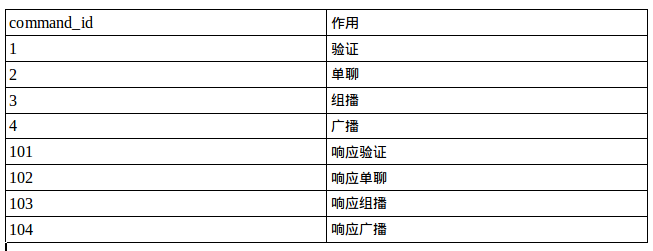
我们先比较简单的设定一下,以后要是有改动,再改变。
我们重写tcpserver,代码如下:
# coding:utf-8

from twisted.internet.protocol import Factory, Protocol

from twisted.internet import reactor

import struct

import json

from twisted.python import log

import sys

log.startLogging(sys.stdout)

class Chat(Protocol):

    def __init__(self, users):

        self.users = users

        self.phone_number = None

        self.state = "VERIFY"

        self.version = 0

        self.command_func_dict = {

            1: self.handle_verify,

            2: self.handle_single_chat,

            3: self.handle_group_chat,

            4: self.handle_broadcast_chat

        }

    def connectionMade(self):

        log.msg("New connection, the info is:", self.transport.getPeer())

    def connectionLost(self, reason):

        if self.phone_number in self.users:

            del self.users[self.phone_number]

    def dataReceived(self, data):

        """

        接受到数据以后的操作

        """

        length, self.version, command_id = struct.unpack('!3I', data[:12])

        content = data[12:length]

        if command_id not in [1, 2, 3, 4]:

            return

        if self.state == "VERIFY" and command_id == 1:

            self.handle_verify(content)

        else:

            self.handle_data(command_id, content)

    def handle_verify(self, content):

        """

        验证函数

        """

        content = json.loads(content)

        phone_number = content.get('phone_number')

        if phone_number in self.users:

            log.msg("电话号码<%s>存在老的连接." % phone_number.encode('utf-8'))

            self.users[phone_number].connectionLost("")

        log.msg("欢迎, %s!" % (phone_number.encode('utf-8'),))

        self.phone_number = phone_number

        self.users[phone_number] = self

        self.state = "DATA"

        send_content = json.dumps({'code': 1})

        self.send_content(send_content, 101, [phone_number])

    def handle_data(self, command_id, content):

        """

        根据command_id来分配函数

        """

        self.command_func_dict[command_id](content)

    def handle_single_chat(self, content):

        """

        单播

        """

        content = json.loads(content)

        chat_from = content.get('chat_from')

        chat_to = content.get('chat_to')

        chat_content = content.get('chat_content')

        send_content = json.dumps(dict(chat_from=chat_from, chat_content=chat_content))

        self.send_content(send_content, 102, [chat_to])

    def handle_group_chat(self, content):

        """

        组播

        """

        content = json.loads(content)

        chat_from = content.get('chat_from')

        chat_to = content.get('chat_to')

        chat_content = content.get('chat_content')

        send_content = json.dumps(dict(chat_from=chat_from, chat_content=chat_content))

        phone_numbers = chat_to

        self.send_content(send_content, 103, phone_numbers)

    def handle_broadcast_chat(self, content):

        """

        广播

        """

        content = json.loads(content)

        chat_from = content.get('chat_from')

        chat_content = content.get('chat_content')

        send_content = json.dumps(dict(chat_from=chat_from, chat_content=chat_content))

        phone_numbers = self.users.keys()

        self.send_content(send_content, 104, phone_numbers)

    def send_content(self, send_content, command_id, phone_numbers):

        """

        发送函数

        """

        length = 12 + len(send_content)

        version = self.version

        command_id = command_id

        header = [length, version, command_id]

        header_pack = struct.pack('!3I', *header)

        for phone_number in phone_numbers:

            if phone_number in self.users.keys():

                self.users[phone_number].transport.write(header_pack + send_content)

            else:

                log.msg("Phone_number:%s 不在线,不能聊天." % phone_number.encode('utf-8'))

class ChatFactory(Factory):

    def __init__(self):

        self.users = {}

    def buildProtocol(self, addr):

        return Chat(self.users)

reactor.listenTCP(8124, ChatFactory())

reactor.run()
代码修改的比较多,
首先,直接从Protocol继承了,这样比从LineReceive继承更直观一点;command_func_dict代表command_id和其处理函数的一一对应字典;
其次,dataReceived是主要的接受函数,接受到数据以后,先解析header,根据header里面的length截取数据,再根据command_id来把数据送个它的处理函数。如果command_id为1,就进入验证函数;如果为其他,就进入其他数据处理函数,不过要先验证通过,才能用其他函数处理。这就跟http一样。(这边以后要重写的,大家想象一下,如果我一个客户端连接,同时发送2个数据,按照上面代码,只能处理一个数据,另外一个就丢弃了。)
最后,send_content为总的发送函数,先把header头组建好,然后加上数据,就发送了。这边可能遇到发送的客户端不在线,要先检测一下(以后还会遇到各种意外断线情况,服务器端没法及时检测到,这个以后再讲。)
服务器端是不是很简单?再写一个客户端代码,客户端如果用GUI方式写的话,篇幅太长了,我们这就用最简单的方式,模拟客户端操作。下面是客户端代码。
# coding:utf-8

from twisted.internet import reactor, task

from twisted.internet.protocol import Protocol, ClientFactory

import struct

from twisted.python import log

import sys

import json

log.startLogging(sys.stdout)

class EchoClient(Protocol):

    def __init__(self):

        self.command_func_dict = {

            101: self.handle_verify_s,

            102: self.handle_single_chat_s,

            103: self.handle_group_chat_s,

            104: self.handle_broadcast_chat_s

        }

        self.version = 0

        self.state = "VERIFY"

        self.phone_number = ""

    def connectionMade(self):

        log.msg("New connection", self.transport.getPeer())

    def dataReceived(self, data):

        length, self.version, command_id = struct.unpack('!3I', data[:12])

        content = data[12:length]

        if self.state == "VERIFY" and command_id == 101:

            self.handle_verify_s(content)

        else:

            self.handle_data(command_id, content)

    def handle_data(self, command_id, pack_data):

        self.command_func_dict[command_id](pack_data)

    def connectionLost(self, reason):

        log.msg("connection lost")

    def handle_verify_s(self, pack_data):

        """

        接受验证结果

        """

        content = json.loads(pack_data)

        code = content.get('code')

        if code == 1:

            log.msg('验证通过')

        self.state = "Data"

    def handle_single_chat_s(self, pack_data):

        """

        接受单聊

        """

        content = json.loads(pack_data)

        chat_from = content.get('chat_from')

        chat_content = content.get('chat_content')

        log.msg("[单聊][%s]:%s" % (chat_from.encode('utf-8'), chat_content.encode('utf-8')))

    def handle_group_chat_s(self, pack_data):

        """

        接受组聊

        """

        content = json.loads(pack_data)

        chat_from = content.get('chat_from')

        chat_content = content.get('chat_content')

        log.msg("[组聊][%s]:%s" % (chat_from.encode('utf-8'), chat_content.encode('utf-8')))

    def handle_broadcast_chat_s(self, pack_data):

        """

        接受广播

        """

        content = json.loads(pack_data)

        chat_from = content.get('chat_from')

        chat_content = content.get('chat_content')

        log.msg("[群聊][%s]:%s" % (chat_from.encode('utf-8'), chat_content.encode('utf-8')))

    def send_verify(self, phone_number):

        """

        发送验证

        """

        content = json.dumps(dict(phone_number=phone_number))

        self.send_data(content, 1)

    def send_single_chat(self, chat_from, chat_to, chat_content):

        """

        发送单聊内容

        """

        content = json.dumps(dict(chat_from=chat_from, chat_to=chat_to, chat_content=chat_content))

        self.send_data(content, 2)

    def send_group_chat(self, chat_from, chat_to, chat_content):

        """

        发送组聊内容

        """

        content = json.dumps(dict(chat_from=chat_from, chat_to=chat_to, chat_content=chat_content))

        self.send_data(content, 3)

    def send_broadcast_chat(self, chat_from, chat_content):

        """

        发送群聊内容

        """

        content = json.dumps(dict(chat_from=chat_from, chat_content=chat_content))

        self.send_data(content, 4)

    def send_data(self, send_content, command_id):

        """

        发送函数

        """

        length = 12 + len(send_content)

        version = self.version

        command_id = command_id

        header = [length, version, command_id]

        header_pack = struct.pack('!3I', *header)

        self.transport.write(header_pack + send_content)

class EchoClientFactory(ClientFactory):

    def __init__(self):

        self.p = EchoClient()

    def startedConnecting(self, connector):

        log.msg("Started to connect")

    def buildProtocol(self, addr):

        log.msg("Connected.")

        return self.p

    def clientConnectionFailed(self, connector, reason):

        log.msg("Lost connection. Reason:", reason)

    def clientConnectionLost(self, connector, reason):

        log.msg("Connection failed. Reason:", reason)

if __name__ == '__main__':

    cf = EchoClientFactory()

    chat_from = sys.argv[1]

    all_phone_numbers = ['', '', '', '']

    all_phone_numbers.remove(chat_from)

    import random

    reactor.callLater(3, cf.p.send_verify, chat_from)

    reactor.callLater(10, cf.p.send_single_chat, chat_from, random.choice(all_phone_numbers), '你好,这是单聊')

    reactor.callLater(11, cf.p.send_group_chat, chat_from, [random.choice(all_phone_numbers), random.choice(all_phone_numbers)], '你好,这是组聊')

    reactor.callLater(12, cf.p.send_broadcast_chat, chat_from, '你好,这是群聊')

    reactor.connectTCP('127.0.0.1', 8124, cf)

    reactor.run()
客户端比较简单,主要是几个发送函数,基本都是以send_开头,就是主动发送消息以及验证的;接受从服务器的处理函数,基本以handle_开头。跟服务器端一样,接受到数据以后,先解析header,根据header里面的length截取数据,再根据command_id来把数据送个它的处理函数。
这边弄了个定时任务,第3秒开始验证;第10秒随机发送一个单聊;第11秒随机发送一个组聊;第12秒发送一个群聊。
我们开3个客户端,看看结果吧。
yudahai@yudahaiPC:tcpserver$ python frontClient.py

-- ::+ [-] Log opened.

-- ::+ [-] Starting factory <__main__.EchoClientFactory instance at 0x7fa325b41680>

-- ::+ [-] Started to connect

-- ::+ [Uninitialized] Connected.

-- ::+ [Uninitialized] New connection IPv4Address(TCP, '127.0.0.1', )

-- ::+ [EchoClient,client] 验证通过

-- ::+ [EchoClient,client] [群聊][]:你好,这是群聊

-- ::+ [EchoClient,client] [单聊][]:你好,这是单聊

-- ::+ [EchoClient,client] [组聊][]:你好,这是组聊

-- ::+ [EchoClient,client] [群聊][]:你好,这是群聊

-- ::+ [EchoClient,client] [单聊][]:你好,这是单聊

-- ::+ [EchoClient,client] [组聊][]:你好,这是组聊

-- ::+ [EchoClient,client] [群聊][]:你好,这是群聊
yudahai@yudahaiPC:tcpserver$ python frontClient.py

-- ::+ [-] Log opened.

-- ::+ [-] Starting factory <__main__.EchoClientFactory instance at 0x7f23f9a48680>

-- ::+ [-] Started to connect

-- ::+ [Uninitialized] Connected.

-- ::+ [Uninitialized] New connection IPv4Address(TCP, '127.0.0.1', )

-- ::+ [EchoClient,client] 验证通过

-- ::+ [EchoClient,client] [单聊][]:你好,这是单聊

-- ::+ [EchoClient,client] [群聊][]:你好,这是群聊

-- ::+ [EchoClient,client] [群聊][]:你好,这是群聊

-- ::+ [EchoClient,client] [群聊][]:你好,这是群聊
yudahai@yudahaiPC:tcpserver$ python frontClient.py

-- ::+ [-] Log opened.

-- ::+ [-] Starting factory <__main__.EchoClientFactory instance at 0x7ff3067dc680>

-- ::+ [-] Started to connect

-- ::+ [Uninitialized] Connected.

-- ::+ [Uninitialized] New connection IPv4Address(TCP, '127.0.0.1', )

-- ::+ [EchoClient,client] 验证通过

-- ::+ [EchoClient,client] [群聊][]:你好,这是群聊
这就是3个客户端的结果,是不是你期望的值?
再看看服务器端的调试结果。
/usr/bin/python2. /home/yudahai/PycharmProjects/blog01/tcpserver/frontTCP.py

-- ::+ [-] Log opened.

-- ::+ [-] ChatFactory starting on

-- ::+ [-] Starting factory <__main__.ChatFactory instance at 0x7f08b0ec8638>

-- ::+ [__main__.ChatFactory] New connection, the info is: IPv4Address(TCP, '127.0.0.1', )

-- ::+ [Chat,,127.0.0.1] 欢迎, !

-- ::+ [Chat,,127.0.0.1] Phone_number: 不在线,不能聊天.

-- ::+ [Chat,,127.0.0.1] Phone_number: 不在线,不能聊天.

-- ::+ [Chat,,127.0.0.1] Phone_number: 不在线,不能聊天.

-- ::+ [__main__.ChatFactory] New connection, the info is: IPv4Address(TCP, '127.0.0.1', )

-- ::+ [__main__.ChatFactory] New connection, the info is: IPv4Address(TCP, '127.0.0.1', )

-- ::+ [Chat,,127.0.0.1] 欢迎, !

-- ::+ [Chat,,127.0.0.1] 欢迎, !

-- ::+ [Chat,,127.0.0.1] Phone_number: 不在线,不能聊天.

-- ::+ [Chat,,127.0.0.1] Phone_number: 不在线,不能聊天.

-- ::+ [__main__.ChatFactory] New connection, the info is: IPv4Address(TCP, '127.0.0.1', )

-- ::+ [Chat,,127.0.0.1] Phone_number: 不在线,不能聊天.

-- ::+ [Chat,,127.0.0.1] 欢迎, !
不在线的时候,都打印出来了。
其实整个例子还是比较简单的,但是很多地方还非常不完善,这个要在我们接下来的系列中,慢慢完善。
比如:如果一个客户端同时发送2个数据,上面的代码就只处理了一个,另外一个就丢弃掉了;还有,我们的程序考虑的是正常的上线、离线,如果客户端因为网络问题,突然断线,没有发生tcp结束的4次握手,服务器端是不知道的,这时候如何保证服务器端知道客户端在线不在线?还有,twisted如何异步访问数据库、redis、rabbitmq等,这个我们以后都会慢慢讲。
twisted(2)--聊天系统的更多相关文章
- twisted高并发库transport函数处理数据包的些许问题
还是在学校时间比较多, 能够把时间更多的花在学习上, 尽管工作对人的提升更大, 但是总是没什么时间学习, 而且工作的气氛总是很紧凑, 忙碌, 少了些许激情吧.适应就好了.延续着之前对twisted高并 ...
- twisted(1)--何为异步
早就想写一篇文章,整体介绍python的2个异步库,twisted和tornado.我们在开发python的tcpserver时候,通常只会用3个库,twisted.tornado和gevent,其中 ...
- 转载 twisted(1)--何为异步
Reference: http://www.cnblogs.com/yueerwanwan0204/p/5589860.html 早就想写一篇文章,整体介绍python的2个异步库,twisted和t ...
- Mina、Netty、Twisted一起学(八):HTTP服务器
HTTP协议应该是目前使用最多的应用层协议了,用浏览器打开一个网站就是使用HTTP协议进行数据传输. HTTP协议也是基于TCP协议,所以也有服务器和客户端.HTTP客户端一般是浏览器,当然还有可能是 ...
- Python写各大聊天系统的屏蔽脏话功能原理
Python写各大聊天系统的屏蔽脏话功能原理 突然想到一个视频里面弹幕被和谐的一满屏的*号觉得很有趣,然后就想用python来试试写写看,结果还真玩出了点效果,思路是首先你得有一个脏话存放的仓库好到时 ...
- Twisted随笔
学习了socket后决定尝试使用框架,目标锁定了Twisted. 什么是Twisted? twisted是一个用python语言写的事件驱动的网络框架,他支持很多种协议,包括UDP,TCP,TLS和其 ...
- IM聊天系统
先上图片: c# 客户端,openfire服务端,基于java开源推送服务开发的及时聊天系统.大概功能有,单点消息支持文本/图片/截图/音频/视频发送直接播放/视频聊天/大文件传输/动态自定义表情等. ...
- Python 安装Twisted 提示python version 2.7 required,which was not found in the registry
由于我安装Python64位的,下载后没注册,安装Twisted时老提示“python version 2.7 required,which was not found in the registry ...
- Python - twisted web 入门学习之一
原文地址:http://zhouzhk.iteye.com/blog/765884 python的twisted框架中带了一个web server: twisted web.现在看看怎么用. 一)准备 ...
随机推荐
- 【转】第 02 天:在 Windows 平台必裝的三套 Git 工具
原文网址:https://github.com/doggy8088/Learn-Git-in-30-days/blob/master/docs/02%20%E5%9C%A8%20Windows%20% ...
- 【日语】secret base
君(きみ)と夏(なつ)の终(お)わり 将来(しょうらい)の梦(ゆめ)Kimi to natsu no owari shourai no yume大(おお)きな希望(きぼう) 忘(わす)れないOoki ...
- STL——heap的4大操作
STL的堆操作 STL里面的堆操作一般用到的只有4个:make_heap();.pop_heap();.push_heap();.sort_heap(); 他们的头文件函数是#include < ...
- Something broke! (Error 500)——reviewboard
Something broke! (Error 500) 1.什么时候会出现? 不清楚,出现过几次 2.解决手段及方法: 更改/www_rb/conf/settings_local.py文件,将DEB ...
- 利用PyQt4写的小工具软件
应公司文职工作人员需求,写一个车间人员工作时间的统计软件,输入开始工作时间1,再输入结束工作时间2,计算两个时间的差值. 根据需求,初步构想的UI界面如下: 下面开始干活. 分析后觉得利用PyQt4来 ...
- DTN学习的一些有用链接
1.DTN研究组,该网站提供了一些代码,有NS2上的实现,也有用java实现的源码. http://www.dtnrg.org/wiki/Code 2.DTN实现的另一个版本,与ONE比较,目前还没用 ...
- 了解SVG
页的节点类型,我们将说明怎样通过Illustrator高速的把SVG文档加入到网页中.我们还会讲讲D3.js,一个强大的.SVG控制的JavaScript库. "SVG并不仅仅用于像素处理. ...
- Sql排名和分组排名
在很多时候,都有排名这个功能,比如排行榜,并且还需要分页的功能,一般可以再select的时候按照某一字段 oorder by XX desc,这样limit 查找就可以得到排名信息,但是有时候是需要多 ...
- [Typescript] Introduction to Generics in Typescript
If Typescript is the first language in which you've encountered generics, the concept can be quite d ...
- Winform Textbox实现滚动条始终在最下面
在用textbox时,实现一些信息追加时,要使滚动条始终呆在最下面的实现方法. 以textbox1为例,事件TextChanged中执行以下代码即可 private void textBox1_Tex ...