
构建ASP.NET MVC4+EF5+EasyUI+Unity2.x注入的后台管理系统(47)-工作流设计-补充
原文:构建ASP.NET MVC4+EF5+EasyUI+Unity2.x注入的后台管理系统(47)-工作流设计-补充
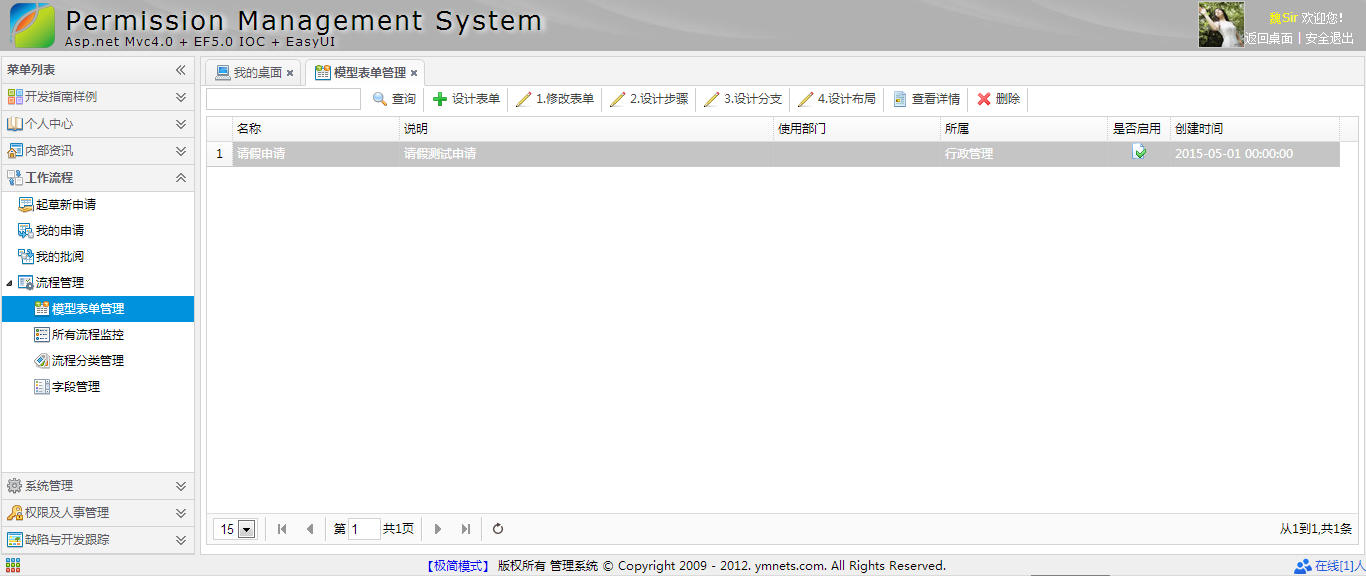
补充一下,有人要表单的代码,这个用代码生成器生成表Flow_Form表的Index代码就可以
加上几个按钮就可以了
<div class="mvctool">

    <input id="txtQuery" type="text" class="searchText" />

    @Html.ToolButton("btnQuery", "icon-search", "查询", perm, "Query", true)

    @Html.ToolButton("btnCreate", "icon-add", "设计表单", perm, "Create", true)

    @Html.ToolButton("btnEdit", "icon-edit", "1.修改表单", perm, "Edit", true)

    @Html.ToolButton("btnEditStep", "icon-edit", "2.设计步骤", perm, "Edit", true)

    @Html.ToolButton("btnEditStepRule", "icon-edit", "3.设计分支", perm, "Edit", true)

    @Html.ToolButton("btnEditLayout", "icon-edit", "4.设计布局", perm, "Edit", true)

    @Html.ToolButton("btnDetails", "icon-details", "查看详情", perm, "Details", true)

    @Html.ToolButton("btnDelete", "icon-remove", "删除", perm, "Delete", true)

</div>
然后再补充个查看详情
@model App.Models.Flow.Flow_FormModel

@using App.Common;

@using App.Models.Flow;

@using App.Admin;

@using App.Models.Sys;

@{

    ViewBag.Title = "创建";

    Layout = "~/Views/Shared/_Index_LayoutEdit.cshtml";

    List<permModel> perm = (List<permModel>)ViewBag.Perm;

    if (perm == null)

    {

        perm = new List<permModel>();

    }

}

<style>

    .tbdetail { width: 98%; border-collapse: collapse; }

.tbdetail .alignRight { width: 150px; text-align: right; }

.tbdetail td { border-bottom: 1px solid #F4F4F4; height: 30px; word-wrap:break-word; word-break:break-all; }

.tbcalendar, .tbcalendar td, .tbcalendar th { border: 1px solid #cccccc; border-collapse: collapse; padding: 5px; text-align: center; }

.tbcalendar th{ background: #f4f4f4; }

</style>

       <div class="tc" style="padding:10px;"> @Model.Name</div>

 <table class="tbdetail">

@{

    int i = 0;

    foreach (var item in Model.stepList)

    {

        i++;

            <tr>

                <td align="center">

         <table class="tbdetail">

                        <tr>

                            <td class="alignRight">

                                第

                                @i

                                步:

                            </td>

                            <td>

                                @item.Name

                            </td>

                        </tr>

                        <tr>

                            <td class="alignRight">

                                流转规则:

                            </td>

                            <td>

                               按@(item.FlowRule)

                            </td>

                        </tr>

                        @{

                            int j = 0;

                            foreach (var judge in item.stepRuleList)

                            {

                                j++;

                                            <tr>

                                                <td class="alignRight">

                                                    分支

                                                    @j:

                                                </td>

                                                <td>

                                                    @String.Format("如果 [{0} {1} {2}] → [{3}]", judge.AttrName, judge.Operator, judge.Result, judge.NextStep == "0" ? "流程结束" : judge.NextStepName)

                                                </td>

                                            </tr>

                            }

                         }

                    </table>

                </td>

            </tr>

            <tr>

                <td align="center">

                    ↓

                </td>

            </tr>

    }

}

        <tr>

            <td align="center">

                流程结束

            </td>

        </tr>

        </table>
Details
 #region 详细

       [SupportFilter(ActionName = "Edit")]

        public ActionResult Details(string id)

        {

            ViewBag.Perm = GetPermission();

            Flow_FormModel flowFormModel = m_BLL.GetById(id);

            //获取现有的步骤

            GridPager pager = new GridPager()

            {

                rows = 1000,

                page = 1,

                sort = "Id",

                order = "asc"

            };

            flowFormModel.stepList = new List<Flow_StepModel>();

            flowFormModel.stepList = stepBLL.GetList(ref pager, flowFormModel.Id);

            for (int i = 0; i < flowFormModel.stepList.Count; i++)//获取步骤下面的步骤规则

            {

                flowFormModel.stepList[i].stepRuleList = new List<Flow_StepRuleModel>();

                flowFormModel.stepList[i].stepRuleList = GetStepRuleListByStepId(flowFormModel.stepList[i].Id);

            }

            return View(flowFormModel);

        }

        #endregion
Details Action
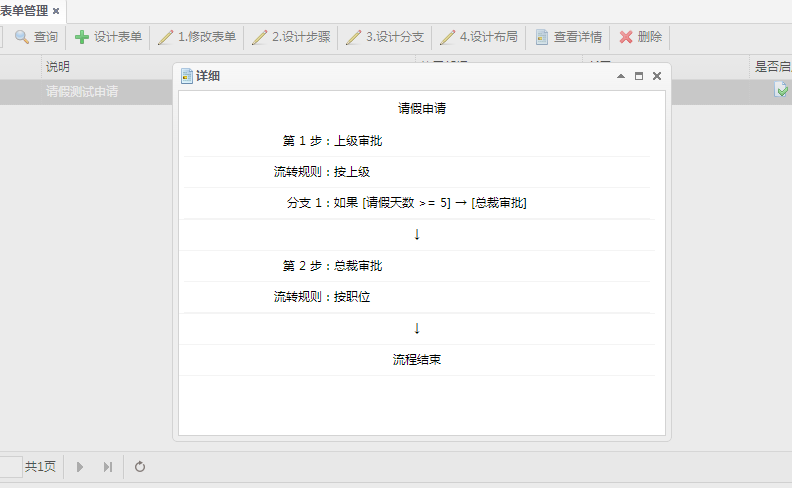
到目前为止,终于有点范儿了。
构建ASP.NET MVC4+EF5+EasyUI+Unity2.x注入的后台管理系统(47)-工作流设计-补充的更多相关文章
- 构建ASP.NET MVC4+EF5+EasyUI+Unity2.x注入的后台管理系统(1)-前言与目录(持续更新中...)
转自:http://www.cnblogs.com/ymnets/p/3424309.html 曾几何时我想写一个系列的文章,但是由于工作很忙,一直没有时间更新博客.博客园园龄都1年了,却一直都是空空 ...
- 构建ASP.NET MVC4+EF5+EasyUI+Unity2.x注入的后台管理系统(48)-工作流设计-起草新申请
原文:构建ASP.NET MVC4+EF5+EasyUI+Unity2.x注入的后台管理系统(48)-工作流设计-起草新申请 系列目录 创建新表单之后,我们就可以起草申请了,申请按照严格的表单步骤和分 ...
- 构建ASP.NET MVC4+EF5+EasyUI+Unity2.x注入的后台管理系统(46)-工作流设计-设计分支
原文:构建ASP.NET MVC4+EF5+EasyUI+Unity2.x注入的后台管理系统(46)-工作流设计-设计分支 系列目录 步骤设置完毕之后,就要设置好流转了,比如财务申请大于50000元( ...
- 构建ASP.NET MVC4+EF5+EasyUI+Unity2.x注入的后台管理系统(45)-工作流设计-设计步骤
原文:构建ASP.NET MVC4+EF5+EasyUI+Unity2.x注入的后台管理系统(45)-工作流设计-设计步骤 系列目录 步骤设计很重要,特别是规则的选择. 我这里分为几个规则 1.按自行 ...
- 构建ASP.NET MVC4+EF5+EasyUI+Unity2.x注入的后台管理系统(44)-工作流设计-设计表单
原文:构建ASP.NET MVC4+EF5+EasyUI+Unity2.x注入的后台管理系统(44)-工作流设计-设计表单 系列目录 设计表单是比较复杂的一步,完成一个表单的设计其实很漫长,主要分为四 ...
- 构建ASP.NET MVC4+EF5+EasyUI+Unity2.x注入的后台管理系统(43)-工作流设计-字段分类设计
原文:构建ASP.NET MVC4+EF5+EasyUI+Unity2.x注入的后台管理系统(43)-工作流设计-字段分类设计 系列目录 建立好42节的表之后,每个字段英文表示都是有意义的说明.先建立 ...
- 构建ASP.NET MVC4+EF5+EasyUI+Unity2.x注入的后台管理系统(42)-工作流设计01
原文:构建ASP.NET MVC4+EF5+EasyUI+Unity2.x注入的后台管理系统(42)-工作流设计01 工作流在实际应用中还是比较广泛,网络中存在很多工作流的图形化插件,可以做到拉拽的工 ...
- 构建ASP.NET MVC4+EF5+EasyUI+Unity2.x注入的后台管理系统(40)-精准在线人数统计实现-【过滤器+Cache】
原文:构建ASP.NET MVC4+EF5+EasyUI+Unity2.x注入的后台管理系统(40)-精准在线人数统计实现-[过滤器+Cache] 系列目录 上次的探讨没有任何结果,我浏览了大量的文章 ...
- 构建ASP.NET MVC4+EF5+EasyUI+Unity2.x注入的后台管理系统(41)-组织架构
原文:构建ASP.NET MVC4+EF5+EasyUI+Unity2.x注入的后台管理系统(41)-组织架构 本节开始我们要实现工作流,此工作流可以和之前的所有章节脱离关系,也可以紧密合并. 我们当 ...
随机推荐
- 简易的highcharts公共绘图模块封装--基于.net mvc
运行效果: 之所以选择这个图表插件,是因为它较其他同类插件轻量且中文文档详细完整,Demo丰富,配置使用简单.具体内容请登录中文官网:http://www.hcharts.cn/ 项目详细: 项目环境 ...
- 纯javascript联动的例子
有人想要学习下纯javascript联动的一些技巧,我这里就以日期的联动为例,附上一些代码至于复杂的省市区联动,不建议用纯javascript的,而是用ajax的方式,该不在此讨论范围内,想要了解aj ...
- php session 自定义的设置测试
<?php // ini_set('session.save_handler', 'user'); // 注意 set_session_save_handler() 一定要在 session_s ...
- CentOS如何查看端口是被哪个应用/进程占用
有时启动应用时会发现端口已经被占用,或者是感觉有些端口自己没有使用却发现是打开的.这时我们希望知道是哪个应用/进程在使用该端口. CentOS下可以用netstat或者lsof查看,Windows下也 ...
- 结合使用 Oracle Database 11g 和 Python
结合使用 Oracle Database 11g 和 Python 本教程介绍如何结合使用 Python 和 Oracle Database 11g. 所需时间 大约 1 个小时 概述 Python ...
- 【python】闰年规则
公历闰年判定遵循的规律为: 四年一闰,百年不闰,四百年再闰. 公历闰年的简单计算方法(符合以下条件之一的年份即为闰年)1.能被4整除而不能被100整除.2.能被400整除.
- 当xcode里点运行出现treating unicode character as whites
可能是由于粘贴网页上的代码的时候两行之间的回车引起的,两行之间重新输入回车就行......删掉重新写一遍就ok了 引入网页上的回车时 可能 网页对其格式做了处理,所以Xcode 不认识了
- 使用ListItem给DropDownList填充数据
global::日积月累啥的啊.DBhelper db = new 日积月累啥的啊.DBhelper(); ListItem[] item=]; DataTable dt=db.GetDataTabl ...
- BZOJ2375: 疯狂的涂色
题目:http://www.lydsy.com/JudgeOnline/problem.php?id=2375 小t非常喜爱画画,但是他还是一个初学者.他最近费尽千辛万苦才拜到已仙逝的达 芬奇为师(神 ...
- Service Locator 模式
什么是Service Locator 模式? 服务定位模式(Service Locator Pattern)是一种软件开发中的设计模式,通过应用强大的抽象层,可对涉及尝试获取一个服务的过程进行封装.该 ...