
构建ASP.NET MVC4+EF5+EasyUI+Unity2.x注入的后台管理系统(46)-工作流设计-设计分支
原文:构建ASP.NET MVC4+EF5+EasyUI+Unity2.x注入的后台管理系统(46)-工作流设计-设计分支
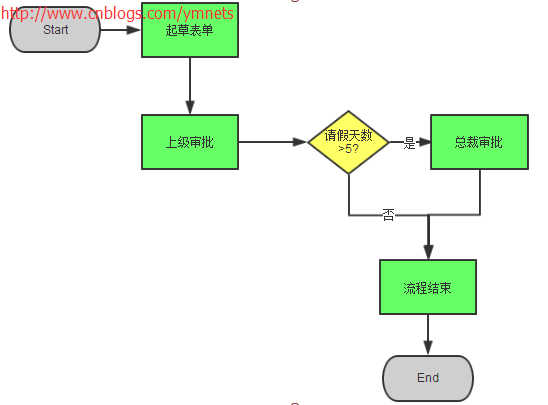
步骤设置完毕之后,就要设置好流转了,比如财务申请大于50000元(请假天数>5天)要总经理审批,否则财务审批之后就结束了。
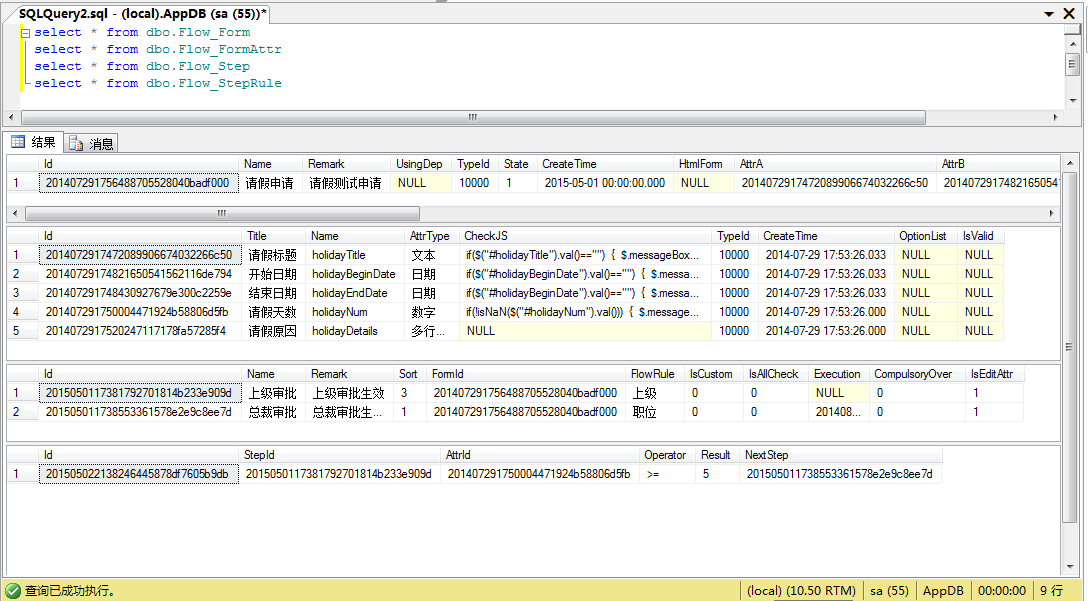
设置分支没有任何关注点,我们把关注点都放在了用户的起草表单。所以本节如同设置字段,设置步骤一样,只需要填充好Flow_StepRule表
表结构:Flow_StepRule表主要是字段对比值,所以需要操作符,我们约定操作符为=、>、<、<=、>=、!=六种
表Flow_StepRule的主表是Flow_Step,所以跟步骤一样为主从关系的设置
我是这样设计的,先获取步骤列表,再按列表的步骤来设置分支,如图

分支具体代码如下
<table id="List"></table>

<div id="modalwindow" class="easyui-window" data-options="modal:true,closed:true,minimizable:false,shadow:false"></div>

<script type="text/javascript">

    $(function () {

        $('#List').datagrid({

            url: '@Url.Action("GetStepList")?id=@(ViewBag.FormId)',

            width: SetGridWidthSub(10),

            methord: 'post',

            height: SetGridHeightSub(39),

            fitColumns: true,

            sortName: 'Sort',

            sortOrder: 'asc',

            idField: 'Id',

            pageSize: 15,

            pageList: [15, 20, 30, 40, 50],

            pagination: true,

            striped: true, //奇偶行是否区分

            singleSelect: true,//单选模式

            //rownumbers: true,//行号

            columns: [[

                { field: 'StepNo', title: '步骤', width: 80 },

                { field: 'Id', title: '', width: 80, hidden: true },

                { field: 'Name', title: '步骤名称', width: 80, sortable: true },

                { field: 'Remark', title: '步骤说明', width: 280, sortable: true },

                { field: 'Sort', title: '排序', width: 80, sortable: true, hidden: true },

                { field: 'FormId', title: '所属表单', width: 80, sortable: true, hidden: true },

                { field: 'FlowRule', title: '流转规则', width: 80, sortable: true },

                { field: 'Action', title: '操作分支',align:'center', width: 80, sortable: true }

            ]]

        });

    });

    //ifram 返回

    function frameReturnByClose() {

        $("#modalwindow").window('close');

    }

    function frameReturnByReload(flag) {

        if (flag)

            $("#List").datagrid('load');

        else

            $("#List").datagrid('reload');

    }

    function frameReturnByMes(mes) {

        $.messageBox5s('提示', mes);

    }

    function SetRule(stepId)

    {

        $("#modalwindow").html("<iframe width='100%' height='100%' scrolling='no' frameborder='0'' src='/Flow/Form/StepRuleList?stepId=" + stepId + "&formId=@(ViewBag.FormId)'></iframe>");

        $("#modalwindow").window({ title: '设置分支', width: 620, height: 300, iconCls: 'icon-add' }).window('open');

    }

</script>
StepList.cshtml
 [SupportFilter(ActionName = "Edit")]

        public ActionResult StepList(string id)

        {

            ViewBag.FormId = id;

            return View();

        }

        [HttpPost]

        [SupportFilter(ActionName = "Edit")]

        public JsonResult GetStepList(GridPager pager, string id)

        {

            List<Flow_StepModel> stepList = stepBLL.GetList(ref pager, id);

            int i = 1;

            var json = new

            {

                total = pager.totalRows,

                rows = (from r in stepList

                        select new Flow_StepModel()

                        {

                            StepNo = "第 "+(i++)+" 步",

                            Id = r.Id,

                            Name = r.Name,

                            Remark = r.Remark,

                            Sort = r.Sort,

                            FormId = r.FormId,

                            FlowRule = r.FlowRule,

                            Action = "<a href='javascript:SetRule(\"" + r.Id + "\")'>分支(" + GetStepRuleListByStepId(r.Id).Count() + ")</a></a>"

                        }).ToArray()

            };

            return Json(json);

        }
StepList Action
点击操作分支按钮将弹出分支的添加和删除
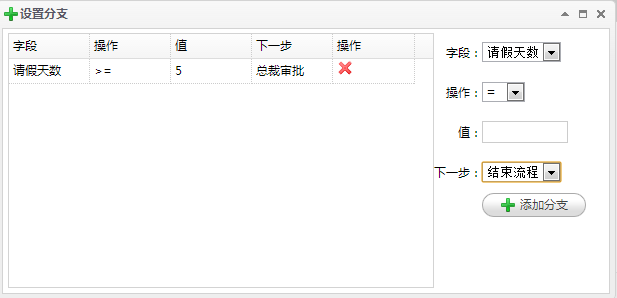
分支代码如下(增删查)
@using App.Admin;

@using App.Common;

@using App.Models.Sys;

@{

    ViewBag.Title = "主页";

    Layout = "~/Views/Shared/_Index_Layout.cshtml";

    List<permModel> perm = (List<permModel>)ViewBag.Perm;

    if (perm == null)

    {

        perm = new List<permModel>();

    }

}

<table>

    <tr>

        <td>

            <table id="List"></table>

        </td>

        <td style="width: 180px; vertical-align: top">

            <table style="line-height: 40px;">

                <tr>

                    <td class="tr">字段:</td>

                    <td>

                        <select id="LeftVal">

                            @foreach (var r in (List<App.Models.Flow.Flow_FormAttrModel>)ViewBag.AttrList)

                            {

                                <option value="@r.Id">@r.Title</option>

                            }

                        </select></td>

                </tr>

                <tr>

                    <td class="tr">操作:</td>

                    <td>

                        <select id="CenterVal">

                            <option value="=">= </option>

                            <option value=">">> </option>

                            <option value="<">< </option>

                            <option value="<="><= </option>

                            <option value=">=">>= </option>

                            <option value=">=">!= </option>

                        </select></td>

                </tr>

                <tr>

                    <td class="tr">值:</td>

                    <td>

                        <input id="RightVal" type="text" style="width: 80px;" /></td>

                    <tr>

                        <td class="tr">下一步:</td>

                        <td>

                            <select id="NextVal">

                                <option value="0">结束流程</option>

                                @foreach (var r in (List<App.Models.Flow.Flow_StepModel>)ViewBag.StepList)

                                {

                                    <option value="@r.Id">@r.Name</option>

                                }

                            </select></td>

                    </tr>

                <tr><td></td>

                    <td style="line-height:0px">

                        <a id="Result" href="javascript:AddEvent('@(ViewBag.StepId)')" class="easyui-linkbutton" data-options="iconCls:'icon-add'">添加分支</a>

                        </td>

                </tr>

            </table>

        </td>

    </tr>

</table>

<div id="modalwindow" class="easyui-window" data-options="modal:true,closed:true,minimizable:false,shadow:false"></div>

@Html.Partial("~/Views/Shared/_Partial_AutoGrid.cshtml")

<script type="text/javascript">

    $(function () {

        $('#List').datagrid({

            url: '@Url.Action("GetStepRuleList")?stepId=@(ViewBag.StepId)',

            width: SetGridWidthSub(180),

            methord: 'post',

            height: SetGridHeightSub(9),

            fitColumns: true,

            sortName: 'Id',

            sortOrder: 'desc',

            idField: 'Id',

            pageSize: 115,

            pagination: false,

            striped: true, //奇偶行是否区分

            singleSelect: true,//单选模式

            //rownumbers: true,//行号

            columns: [[

                { field: 'Id', title: 'ID', width: 80, hidden: true },

                { field: 'Mes', title: 'Mes', width: 80, hidden: true },

                { field: 'StepId', title: '步骤ID', width: 80, sortable: true, hidden: true },

                { field: 'AttrId', title: '字段ID', width: 80, sortable: true, hidden: true },

                { field: 'AttrName', title: '字段', width: 80, sortable: true },

                { field: 'Operator', title: '操作', width: 80, sortable: true },

                { field: 'Result', title: '值', width: 80, sortable: true },

                { field: 'NextStep', title: '下一步ID', width: 80, sortable: true, hidden: true },

                { field: 'NextStepName', title: '下一步', width: 80, sortable: true },

                { field: 'Action', title: '操作', width: 80},

            ]]

        });

    });

    //ifram 返回

    function frameReturnByClose() {

        $("#modalwindow").window('close');

    }

    function frameReturnByReload(flag) {

        if (flag)

            $("#List").datagrid('load');

        else

            $("#List").datagrid('reload');

    }

    function frameReturnByMes(mes) {

        $.messageBox5s('提示', mes);

    }

    //添加条件

    function AddEvent(stepId) {

        var leftVal = $("#LeftVal").val();

        var leftText = $("option[value='" + leftVal + "']").html();

        var centerVal = $("#CenterVal").val();

        var rightVal = $("#RightVal").val();

        var nextVal = $("#NextVal").val();

        if (rightVal == "") {

            $.messageBox5s('提示', "值不能为空");

            return;

        }

        $.post("@Url.Action("CreateStepEvent")", { "StepId": stepId, "AttrId": leftVal, "Operator": centerVal, "Result": rightVal, "NextStep": nextVal },

           function (data) {

               if (data.type == 1) {

                   $("#List").datagrid('load');

               } else {

                   $.messageBox5s('提示', data.message);

                   return

               }

           }, "json");

    }

    function DeleteEvent(stepId) {

        $.messager.confirm('提示', '你要删除此条件吗?', function (r) {

            if (r) {

                $.post("@Url.Action("DeleteStepRule")?id=" + stepId, function (data) {

                    if (data.type == 1) {

                        $("#List").datagrid('load');

                    } else {

                        $.messageBox5s('提示', data.message);

                        return

                    }

                }, "json");

            }

        });

    }

</script>
StepRuleList.cshtml
[SupportFilter(ActionName = "Edit")]

        public ActionResult StepRuleList(string stepId,string formId)

        {

            //获取现有的步骤

            GridPager pager = new GridPager()

            {

                rows = 1000,

                page = 1,

                sort = "Id",

                order = "desc"

            };

            Flow_FormModel flowFormModel = m_BLL.GetById(formId);

            List<Flow_FormAttrModel>  attrList = new List<Flow_FormAttrModel>();//获取表单关联的字段

            attrList = GetAttrList(flowFormModel);

            List<Flow_StepModel> stepList = stepBLL.GetList(ref pager, formId);

            ViewBag.StepId = stepId;

            ViewBag.AttrList = attrList;

            ViewBag.StepList = stepList;

            return View();

        }

        [HttpPost]

        [SupportFilter(ActionName = "Edit")]

        public JsonResult GetStepRuleList(string stepId)

        {

            List<Flow_StepRuleModel> stepList = stepRuleBLL.GetList(stepId);

            int i =1;

            var json = new

            {

                rows = (from r in stepList

                        select new Flow_StepRuleModel()

                        {

                            Mes="分支"+(i++),

                            Id = r.Id,

                            StepId = r.StepId,

                            AttrId = r.AttrId,

                            AttrName = r.AttrName,

                            Operator = r.Operator,

                            Result = r.Result,

                            NextStep = r.NextStep,

                            NextStepName = r.NextStepName,

                            Action = "<a href='#' title='删除' class='icon-remove' onclick='DeleteEvent(\""+r.Id+"\")'></a>"

                        }).ToArray()

            };

            return Json(json);

        }

        [HttpPost]

        [SupportFilter(ActionName = "Edit")]

        public JsonResult CreateStepEvent(Flow_StepRuleModel model)

        {

            model.Id = ResultHelper.NewId;

            if (model != null && ModelState.IsValid)

            {

                if (stepRuleBLL.Create(ref errors, model))

                {

                    LogHandler.WriteServiceLog(GetUserId(), "Id" + model.Id + ",StepId" + model.Id, "成功", "创建", "Flow_StepRule");

                    return Json(JsonHandler.CreateMessage(1, Suggestion.InsertSucceed, model.Id));

                }

                else

                {

                    string ErrorCol = errors.Error;

                    LogHandler.WriteServiceLog(GetUserId(), "Id" + model.Id + ",StepId" + model.Id + "," + ErrorCol, "失败", "创建", "Flow_StepRule");

                    return Json(JsonHandler.CreateMessage(0, Suggestion.InsertFail + ErrorCol));

                }

            }

            else

            {

                return Json(JsonHandler.CreateMessage(0, Suggestion.InsertFail));

            }

        }

        [HttpPost]

        [SupportFilter(ActionName = "Edit")]

        public JsonResult DeleteStepRule(string id)

        {

            if (!string.IsNullOrWhiteSpace(id))

            {

                if (stepRuleBLL.Delete(ref errors, id))

                {

                    LogHandler.WriteServiceLog(GetUserId(), "Id:" + id, "成功", "删除", "Flow_StepRule");

                    return Json(JsonHandler.CreateMessage(1, Suggestion.DeleteSucceed));

                }

                else

                {

                    string ErrorCol = errors.Error;

                    LogHandler.WriteServiceLog(GetUserId(), "Id" + id + "," + ErrorCol, "失败", "删除", "Flow_StepRule");

                    return Json(JsonHandler.CreateMessage(0, Suggestion.DeleteFail + ErrorCol));

                }

            }

            else

            {

                return Json(JsonHandler.CreateMessage(0, Suggestion.DeleteFail));

            }

        }

 //获取已经添加的字段

        private List<Flow_FormAttrModel> GetAttrList(Flow_FormModel model)

        {

            List<Flow_FormAttrModel> list = new List<Flow_FormAttrModel>();

            Flow_FormAttrModel attrModel = new Flow_FormAttrModel();

            #region 处理字段

            //获得对象的类型,myClass1

            Type formType = model.GetType();

            //查找名称为"MyProperty1"的属性

            string[] arrStr = { "AttrA", "AttrB", "AttrC", "AttrD", "AttrE", "AttrF", "AttrG", "AttrH", "AttrI", "AttrJ", "AttrK"

                                  , "AttrL", "AttrM", "AttrN", "AttrO", "AttrP", "AttrQ", "AttrR", "AttrS", "AttrT", "AttrU"

                                  , "AttrV", "AttrW", "AttrX", "AttrY", "AttrZ"};

            foreach (string str in arrStr)

            {

                object o = formType.GetProperty(str).GetValue(model, null);

                if (o != null)

                {

                    //查找model类的Class对象的"str"属性的值

                    attrModel = attrBLL.GetById(o.ToString());

                    list.Add(attrModel);

                }

            }

            #endregion

            return list;

        }
StepRuleList Action
写了这么多都是为了填充这种主从表关系的数据,目前为止都很容易消化。
构建ASP.NET MVC4+EF5+EasyUI+Unity2.x注入的后台管理系统(46)-工作流设计-设计分支的更多相关文章
- 构建ASP.NET MVC4+EF5+EasyUI+Unity2.x注入的后台管理系统(1)-前言与目录(持续更新中...)
转自:http://www.cnblogs.com/ymnets/p/3424309.html 曾几何时我想写一个系列的文章,但是由于工作很忙,一直没有时间更新博客.博客园园龄都1年了,却一直都是空空 ...
- 构建ASP.NET MVC4+EF5+EasyUI+Unity2.x注入的后台管理系统(48)-工作流设计-起草新申请
原文:构建ASP.NET MVC4+EF5+EasyUI+Unity2.x注入的后台管理系统(48)-工作流设计-起草新申请 系列目录 创建新表单之后,我们就可以起草申请了,申请按照严格的表单步骤和分 ...
- 构建ASP.NET MVC4+EF5+EasyUI+Unity2.x注入的后台管理系统(47)-工作流设计-补充
原文:构建ASP.NET MVC4+EF5+EasyUI+Unity2.x注入的后台管理系统(47)-工作流设计-补充 系列目录 补充一下,有人要表单的代码,这个用代码生成器生成表Flow_Form表 ...
- 构建ASP.NET MVC4+EF5+EasyUI+Unity2.x注入的后台管理系统(45)-工作流设计-设计步骤
原文:构建ASP.NET MVC4+EF5+EasyUI+Unity2.x注入的后台管理系统(45)-工作流设计-设计步骤 系列目录 步骤设计很重要,特别是规则的选择. 我这里分为几个规则 1.按自行 ...
- 构建ASP.NET MVC4+EF5+EasyUI+Unity2.x注入的后台管理系统(44)-工作流设计-设计表单
原文:构建ASP.NET MVC4+EF5+EasyUI+Unity2.x注入的后台管理系统(44)-工作流设计-设计表单 系列目录 设计表单是比较复杂的一步,完成一个表单的设计其实很漫长,主要分为四 ...
- 构建ASP.NET MVC4+EF5+EasyUI+Unity2.x注入的后台管理系统(43)-工作流设计-字段分类设计
原文:构建ASP.NET MVC4+EF5+EasyUI+Unity2.x注入的后台管理系统(43)-工作流设计-字段分类设计 系列目录 建立好42节的表之后,每个字段英文表示都是有意义的说明.先建立 ...
- 构建ASP.NET MVC4+EF5+EasyUI+Unity2.x注入的后台管理系统(42)-工作流设计01
原文:构建ASP.NET MVC4+EF5+EasyUI+Unity2.x注入的后台管理系统(42)-工作流设计01 工作流在实际应用中还是比较广泛,网络中存在很多工作流的图形化插件,可以做到拉拽的工 ...
- 构建ASP.NET MVC4+EF5+EasyUI+Unity2.x注入的后台管理系统(40)-精准在线人数统计实现-【过滤器+Cache】
原文:构建ASP.NET MVC4+EF5+EasyUI+Unity2.x注入的后台管理系统(40)-精准在线人数统计实现-[过滤器+Cache] 系列目录 上次的探讨没有任何结果,我浏览了大量的文章 ...
- 构建ASP.NET MVC4+EF5+EasyUI+Unity2.x注入的后台管理系统(41)-组织架构
原文:构建ASP.NET MVC4+EF5+EasyUI+Unity2.x注入的后台管理系统(41)-组织架构 本节开始我们要实现工作流,此工作流可以和之前的所有章节脱离关系,也可以紧密合并. 我们当 ...
随机推荐
- WPF DataGrid 行头小三角
<DataTemplate x:Key="RowHeaderTemplate"> <StackPanel Orientation="Horizontal ...
- [jQuery编程挑战]008 生成逗号分隔数字
<!DOCTYPE html> <html lang="zh"> <head> <meta charset="utf-8&quo ...
- 我的接口框架---框架函数文件common.php
<?php defined('JDHU') OR die('no allow access'); /** * 加载配置文件 */ function &get_config($replac ...
- PHP代码分离
所谓的代码分离 其实只是一种思路,既然是一种思路 那就意味着他是有需求的 没有需求就没有解决方案 没有方案就不存在思路. 在这之前,我们制作 PHP 程序页面的时候.都是 HTML 和 PHP 混合写 ...
- phpcms v9栏目列表调用每一篇文章内容方法1
我们先来看下默认栏目调用的代码: 复制代码代码如下:{pc:content action="lists" catid="$catid" num="25 ...
- 学习Swift -- 泛型
泛型 泛型代码可以让你写出根据自我需求定义.适用于任何类型的,灵活且可重用的函数和类型.它的可以让你避免重复的代码,用一种清晰和抽象的方式来表达代码的意图. 泛型所解决的问题 先来看一个交换两个int ...
- bzoj 2818: Gcd 歐拉函數
2818: Gcd Time Limit: 10 Sec Memory Limit: 256 MBSubmit: 1633 Solved: 724[Submit][Status] Descript ...
- [BZOJ 1011] [HNOI2008] 遥远的行星 【近似解】
题目链接: BZOJ - 1011 题目分析 这道题的特别之处在于,答案可以有5%的误差. 嗯..So? 我还是不会,于是看题解. 神犇的题解就是利用这误差范围求一个近似解. 怎么求近似解呢?假如 g ...
- Map迭代器
今天用到了,发现不会,随手谷歌之,整理如下. //Map是接口,刚才在那new Map,汗颜 Map<Character,Integer> mm = new HashMap ...
- Seven Steps to Success Machine Learning in Practice
Seven Steps to Success Machine Learning in Practice Project failures in IT are all too common. The r ...