
[转] iOS开发- UICollectionView详解+实例
本章通过先总体介绍UICollectionView及其常用方法,再结合一个实例,了解如何使用UICollectionView。
UICollectionView 和 UICollectionViewController 类是iOS6 新引进的API,用于展示集合视图,布局更加灵活,可实现多列布局,用法类似于UITableView 和 UITableViewController 类。
使用UICollectionView 必须实现UICollectionViewDataSource,UICollectionViewDelegate,UICollectionViewDelegateFlowLayout这三个协议。
下面先给出常用到的一些方法。(只给出常用的,其他的可以查看相关API)
- #pragma mark -- UICollectionViewDataSource
- //定义展示的UICollectionViewCell的个数
- -(NSInteger)collectionView:(UICollectionView *)collectionView numberOfItemsInSection:(NSInteger)section
- {
- return 30;
- }
- //定义展示的Section的个数
- -(NSInteger)numberOfSectionsInCollectionView:(UICollectionView *)collectionView
- {
- return 1;
- }
- //每个UICollectionView展示的内容
- -(UICollectionViewCell *)collectionView:(UICollectionView *)collectionView cellForItemAtIndexPath:(NSIndexPath *)indexPath
- {
- static NSString * CellIdentifier = @"GradientCell";
- UICollectionViewCell * cell = [collectionView dequeueReusableCellWithReuseIdentifier:CellIdentifier forIndexPath:indexPath];
- cell.backgroundColor = [UIColor colorWithRed:((10 * indexPath.row) / 255.0) green:((20 * indexPath.row)/255.0) blue:((30 * indexPath.row)/255.0) alpha:1.0f];
- return cell;
- }
- #pragma mark --UICollectionViewDelegateFlowLayout
- //定义每个UICollectionView 的大小
- - (CGSize)collectionView:(UICollectionView *)collectionView layout:(UICollectionViewLayout*)collectionViewLayout sizeForItemAtIndexPath:(NSIndexPath *)indexPath
- {
- return CGSizeMake(96, 100);
- }
- //定义每个UICollectionView 的 margin
- -(UIEdgeInsets)collectionView:(UICollectionView *)collectionView layout:(UICollectionViewLayout *)collectionViewLayout insetForSectionAtIndex:(NSInteger)section
- {
- return UIEdgeInsetsMake(5, 5, 5, 5);
- }
- #pragma mark --UICollectionViewDelegate
- //UICollectionView被选中时调用的方法
- -(void)collectionView:(UICollectionView *)collectionView didSelectItemAtIndexPath:(NSIndexPath *)indexPath
- {
- UICollectionViewCell * cell = (UICollectionViewCell *)[collectionView cellForItemAtIndexPath:indexPath];
- cell.backgroundColor = [UIColor whiteColor];
- }
- //返回这个UICollectionView是否可以被选择
- -(BOOL)collectionView:(UICollectionView *)collectionView shouldSelectItemAtIndexPath:(NSIndexPath *)indexPath
- {
- return YES;
- }
下面通过一个例子具体介绍下。(例子来自网络。但是是通过第三方获得的,无法取得链接。还望见谅。)
iOS CollectionView的出现是一大福利,再也不用用TableView来定义复杂的多栏表格了,用法与Table类似,只是Cell必须自己添加,无默认模式
由于CollectionView没有默认的Cell布局,所以一般还是自定义方便又快捷
一、自定义Cell
1、新建类CollectionCell继承自UICollectionViewCell
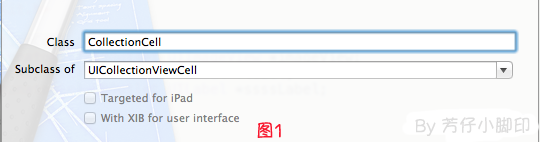
2、新建Xib,命名为CollectionCell.xib
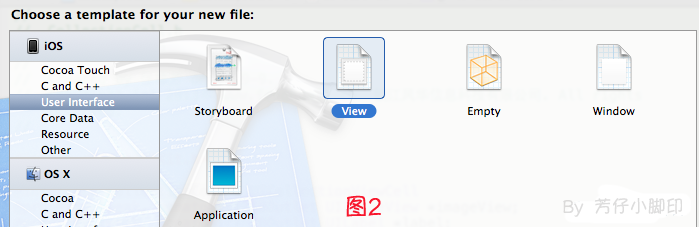
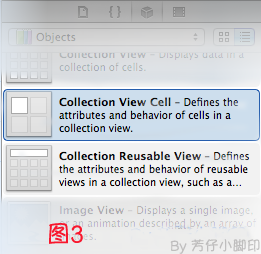
a.选中CollectionCell.xib删掉默认的View,从控件中拖一个Collection View Cell(图3)到画布中,设置大小为95*116;
b.选中刚刚添加的Cell,更改类名为CollectionCell,如图4

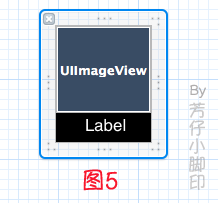
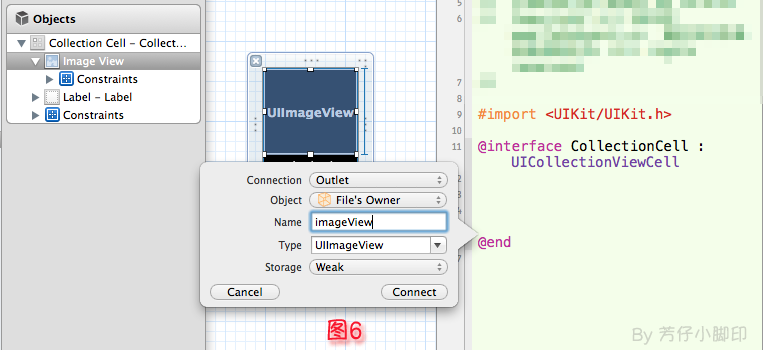
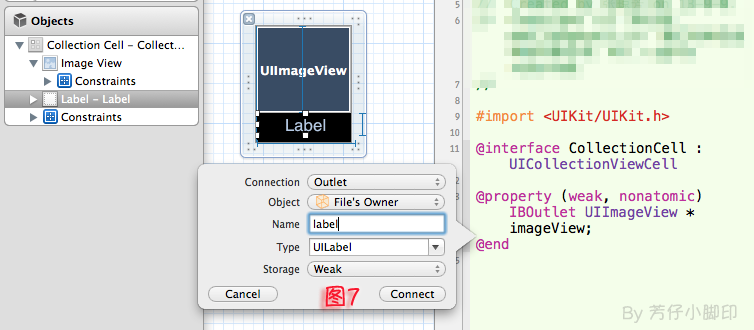
c.在CollectionCell.xib的CollectionCell中添加一个ImageView和一个Label(图5)
d.创建映射, 图6,图7
e.选中CollectionCell.m , 重写init方法
- - (id)initWithFrame:(CGRect)frame
- {
- self = [super initWithFrame:frame];
- if (self)
- {
- // 初始化时加载collectionCell.xib文件
- NSArray *arrayOfViews = [[NSBundle mainBundle] loadNibNamed:@"CollectionCell" owner:self options:nil];
- // 如果路径不存在,return nil
- if (arrayOfViews.count < 1)
- {
- return nil;
- }
- // 如果xib中view不属于UICollectionViewCell类,return nil
- if (![[arrayOfViews objectAtIndex:0] isKindOfClass:[UICollectionViewCell class]])
- {
- return nil;
- }
- // 加载nib
- self = [arrayOfViews objectAtIndex:0];
- }
- return self;
- }
f.选中CollectionCell.xib 修改其identifier为CollectionCell。
二、定义UICollectionView;
1、拖动一个Collection View到指定ViewController的View上
2、连线dataSource和delegate,并创建映射,命名为CollectionView
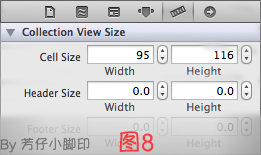
3、选中CollectionView的标尺,将Cell Size的Width和Height改成与自定义的Cell一样的95*116,图8
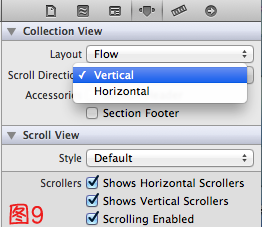
4、选中CollectionView的属性,可以修改其属性,比如是垂直滑动,还是水平滑动,选择Vertical或Horizontal
5、选中CollectionViewCell,修改Class,继承自CollectionCell
5、在ViewDidLoad方法中声明Cell的类,在ViewDidLoad方法中添加,此句不声明,将无法加载,程序崩溃
其中,CollectionCell是这个Cell的标识(之前几步已经定义过了。 )
- [self.collectionView registerClass:[CollectionCell class] forCellWithReuseIdentifier:@"CollectionCell"];
6、在ViewController.h中声明代理
- @interface ViewController : UIViewController<UICollectionViewDataSource,UICollectionViewDelegate>
7、在.m文件中实现代理方法
- //每个section的item个数
- -(NSInteger)collectionView:(UICollectionView *)collectionView numberOfItemsInSection:(NSInteger)section
- {
- return 12;
- }
- -(UICollectionViewCell *)collectionView:(UICollectionView *)collectionView cellForItemAtIndexPath:(NSIndexPath *)indexPath
- {
- CollectionCell *cell = (CollectionCell *)[collectionView dequeueReusableCellWithReuseIdentifier:@"CollectionCell" forIndexPath:indexPath];
- //图片名称
- NSString *imageToLoad = [NSString stringWithFormat:@"%d.png", indexPath.row];
- //加载图片
- cell.imageView.image = [UIImage imageNamed:imageToLoad];
- //设置label文字
- cell.label.text = [NSString stringWithFormat:@"{%ld,%ld}",(long)indexPath.row,(long)indexPath.section];
- return cell;
- }
8 。效果如图10

点击某项后跳转事件与UITableView类似,实现代理方法
- -(void)collectionView:(UICollectionView *)collectionView didSelectItemAtIndexPath:(NSIndexPath *)indexPath
即可,不赘述
[转] iOS开发- UICollectionView详解+实例的更多相关文章
- iOS开发- UICollectionView详解+实例
本章通过先总体介绍UICollectionView及其常用方法,再结合一个实例,了解如何使用UICollectionView. UICollectionView 和 UICollectionViewC ...
- iOS开发——UI篇OC篇&UICollectionView详解+实例
UICollectionView详解+实例 实现步骤: 一.新建两个类 1.继承自UIScrollView的子类,比如HMWaterflowView * 瀑布流显示控件,用来显示所有的瀑布流数据 2. ...
- iOS开发:详解Objective-C runTime
Objective-C总Runtime的那点事儿(一)消息机制 最近在找工作,Objective-C中的Runtime是经常被问到的一个问题,几乎是面试大公司必问的一个问题.当然还有一些其他问题也几乎 ...
- iOS开发-Runtime详解
iOS开发-Runtime详解 简介 Runtime 又叫运行时,是一套底层的 C 语言 API,其为 iOS 内部的核心之一,我们平时编写的 OC 代码,底层都是基于它来实现的.比如: [recei ...
- iOS开发——Block详解
iOS开发--Block详解 1. Block是什么 代码块 匿名函数 闭包--能够读取其他函数内部变量的函数 函数变量 实现基于指针和函数指针 实现回调的机制 Block是一个非常有特色的语法,它可 ...
- iOS开发——MVC详解&Swift+OC
MVC 设计模式 这两天认真研究了一下MVC设计模式,在iOS开发中这个算是重点中的重点了,如果对MVC模式不理解或者说不会用,那么你iOS肯定学不好,或者写不出好的东西,当然本人目前也在学习中,不过 ...
- IOS开发之----详解在IOS后台执行
文一 我从苹果文档中得知,一般的应用在进入后台的时候可以获取一定时间来运行相关任务,也就是说可以在后台运行一小段时间. 还有三种类型的可以运行在后以,1.音乐2.location 3.voip 文二 ...
- iOS开发--Bison详解连连支付集成简书
"最近由于公司项目需要集成连连支付,文档写的不是很清楚,遇到了一些坑,因此记录一下,希望能帮到有需要的人." 前面简单的集成没有遇到什么坑,在此整理一下官方的集成文档,具体步骤如下 ...
- iOS开发之详解正则表达式
本文由Charles翻自raywenderlich原文:NSRegularExpression Tutorial: Getting Started更新提示:本教程被James Frost更新到了iOS ...
随机推荐
- Area of Simple Polygons
poj1389:http://poj.org/problem?id=1389 题意:求矩形面积的并题解:扫描线加线段树 同poj1389 #include<iostream> #inclu ...
- 在InnoDB,记录在 non-clustered indexes(也被称为secondary indexes) 包含了主键值
In InnoDB, the records in non-clustered indexes (also called secondary indexes) contain the primary ...
- Unity NGUI实现按钮点击播放Aniamtion
unity版本:4.5 NGUI版本:3.6.5 参考链接:http://www.colabug.com/thread-1029974-1-1.html,作者:COLABUG.COM 橘虞 1.怎么创 ...
- AndroidStudio SVN检出
版本管理是每个项目的必经之路,很多的ADT都会集成版本管理插件.AS也同样可以集成GITHUB和SVN插件.github对项目有一定的限制,而SVN就比较开放了,所以我们在用AS开发的时候一般用SVN ...
- 【模拟】Codeforces 707A Brain's Photos
题目链接: http://codeforces.com/problemset/problem/707/A 题目大意: 给一张N*M的图,只有六种颜色(如下),只含B,W,G的是黑白图,否则是彩色图.问 ...
- Redis源码阅读笔记(1)——简单动态字符串sds实现原理
首先,sds即simple dynamic string,redis实现这个的时候使用了一个技巧,并且C99将其收录为标准,即柔性数组成员(flexible array member),参考资料见这里 ...
- hdu 1175 连连看 DFS
题目链接:http://acm.hdu.edu.cn/showproblem.php?pid=1175 解题思路:从出发点开始DFS.出发点与终点中间只能通过0相连,或者直接相连,判断能否找出这样的路 ...
- Period II - FZU 1901(KMP->next)
题目大意:给你一个字符串 S ,N = |S|,如果存在一个 P (1<=P<=N),并且满足 s[i] = s[P+i] (i = {0...N-P-1} ),求出来所有的 P 然后输出 ...
- C#序列化和反序列化
序列化和反序列化 序列化就是将一个对象的状态(各个属性量)保存起来,然后在适当的时候再获得. 序列化分为两大部分:序列化和反序列化.序列化是这个过程的第一部分,将数据分解成字节流,以便存储在文件中或在 ...
- C++设计模式---职责链模式
职责链模式:使多个对象都有机会处理请求,从而避免请求的发送者和接收者之间的耦合关系.将这个对象连成一条链,并沿这条链传递该请求,直到有一个对象处理它为止. 这里发出这个请求的客户端并不知道这当中的哪一 ...