
mobx react
目录结构:
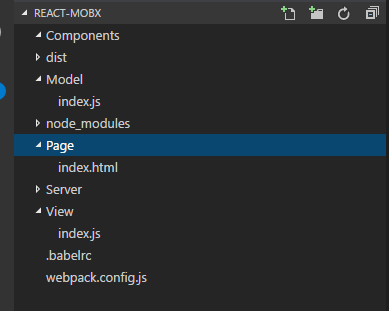
Model/index.js
'use strict';

import { action, autorun, observable, computed } from "mobx";

export default class TodoList {

    @observable todos = [{ title: "test", finished: true }];

    @observable data = [];
   constructor(){
    autorun(()=>{console.log(this.unfinishedTodoCount)});
   }

    @computed get unfinishedTodoCount() {

        return this.todos.filter(todo => !todo.finished).length;

    }

    @action getData() {

        fetch("http://localhost/Server/index.php").then(res => res.json()).then(data => this.data = data);

    }

    @action addList() {

        this.todos.push({ title: "test1", finished: false });

    }

}
- @: es6新增的装饰器语法,babel已支持需要安装 babel-plugin-transform-decorators-legacy
- 类的静态属性:es7新增的语法,babel已支持需要安装 babel-preset-stage-2
- @observer: 让 React 组件自动起来,它会自动更新,即便是在一个很大的程序里也会工作的很好
- @observable:监听数据,当数据发生改变的时候自动刷新视图
- @computed: 创建自动运算的表达式。(一般用于计算)
- @action:改变了@observable创建的数据,需要装饰action方法!(需要配合'use strict'使用,有助于更好地构建代码)(可以不适用action,但是不建议这样做)
- autorun: 当@observable创建的数据发生改变时自动执行
View/index.js
import React,{Component} from "react";

import ReactDOM from "react-dom";

import {observer} from "mobx-react";

import TodoList from "../Model/index";

@observer

class TodoListView extends Component {

    componentDidMount(){

        this.props.todoList.getData();

    }

    clickHandle(){

        this.props.todoList.addList();

    }

    render() {

        return <div>

            <ul>

                {this.props.todoList.todos.map(todo =>

                    <TodoView todo={todo} key={todo.id} />

                )}

            </ul>

            Tasks left: {this.props.todoList.unfinishedTodoCount}<br />

            姓名:{this.props.todoList.data.name}<br />

            年龄:{this.props.todoList.data.age}<br />

            密码:{this.props.todoList.data.pass}<br />

            <input name='name' type='button' value="按钮" onClick={this.clickHandle.bind(this)} />

        </div>

    }

}

const TodoView = observer(({todo}) =>

    <li>

        <input

            type="checkbox"

            checked={todo.finished}

            onClick={() => {return todo.finished = !todo.finished}}

        />{todo.title}

    </li>

)

const store = new TodoList();

ReactDOM.render(<TodoListView todoList={store} />, document.getElementById('container'));
webpack.config.js
var webpack = require('webpack');

var commonsPlugin = new webpack.optimize.CommonsChunkPlugin('common.js');

module.exports = {

    //插件项

    // plugins: [commonsPlugin],

    //页面入口文件配置

    entry: {

        index: './View/index.js'

    },

    //入口文件输出配置

    output: {

        path: 'dist/page',

        filename: '[name].js'

    },

    module: {

        //加载器配置

        loaders: [

            { test: /\.css$/, loader: 'style-loader!css-loader' },

            { test: /\.js$/, loader: 'babel-loader' },

            { test: /\.(png|jpg)$/, loader: 'url-loader' }

        ]

    },

};
.babelrc
{

    "presets": ["react", "es2015", "stage-2"],

    "plugins": [

        "transform-decorators-legacy"

    ]

}
Page/index.html
<html>

<head>

    <meta charset="utf-8" />

</head>

<body>

    <div id="container"></div>

    <script src="../dist/page/index.js"></script>

</body>

</html>
mobx react的更多相关文章
- MobX+react使用小demo
第一次接触mobx,网上找了很多例子,写此主要总结一下create-react-app + mobx入门 create-react-app myreact cd myreact npm install ...
- [React + Mobx] Mobx and React intro: syncing the UI with the app state using observable and observer
Applications are driven by state. Many things, like the user interface, should always be consistent ...
- mobx在react的使用
创建项目第六步 mobx 1.安装 yarn add mobx yarn add mobx-react 2.新建/src/store/store.js import {observable, co ...
- React MobX 开始
MobX 用于状态管理,简单高效.本文将于 React 上介绍如何开始,包括了: 了解 MobX 概念 从零准备 React 应用 MobX React.FC 写法 MobX React.Compon ...
- react学习一篇就够了
webstrom自动格式化代码 命令 js框架 MVC 安装 npm install create-react-app -g 生成项目(项目名npm发包包命名规范 /^[a-z0-9_-]$/) cr ...
- [Mobx] Use MobX actions to change and guard state
This lesson explains how actions can be used to control and modify the state of your application. Th ...
- Mobx-React : 当前适合React的状态管理工具
MobX 简单.可扩展的状态管理 MobX 是由 Mendix.Coinbase.Facebook 开源和众多个人赞助商所赞助的. 安装 安装: npm install mobx ...
- React的状态管理工具
Mobx-React : 当前最适合React的状态管理工具 MobX 简单.可扩展的状态管理 MobX 是由 Mendix.Coinbase.Facebook 开源和众多个人赞助商 ...
- 【译】Redux 还是 Mobx,让我来解决你的困惑!
原文地址:Redux or MobX: An attempt to dissolve the Confusion 原文作者:rwieruch 我在去年大量的使用了 Redux,但我最近都在使用 Mob ...
随机推荐
- UIImageView设置为圆形
CGFloat headimageX = self.view.frame.size.width * 0.2; CGFloat headimageY = self.view.frame.size. ...
- some words that I always make mistake
发音相似容易混淆的词汇 alteration 英 [ɔːltə'reɪʃ(ə)n; 'ɒl-] 美 [,ɔltə'reʃən] n. 修改,改变:变更 alteration /ˌɔːltəˈre ...
- 把图片生成Base64字符串
public class ImgeUtils { public static String img2String(BufferedImage img,String type){ String imgS ...
- 利用Tree命令生成磁盘文件列表
命令原型:D:/>tree /? 以图形显示驱动器或路径的文件夹结构.TREE [drive:][path] [/F] [/A]/F 显示每个文件夹中文件的名称./A 使用 ASCII 字符,而 ...
- Local System、Local Service與Network Service
CreateService参数介绍SC_HANDLE CreateService( SC_HANDLE hSCManager, //服务控制管理程序维护的登记数据库的句柄,由系统函数OpenSCMan ...
- OJ技巧
防爆盾: #pragma comment(linker,"/QUEUE:10240000,10240000") #pragma comment(linker,"/STAC ...
- HDOJ 1287 破译密码(异或运算)
Problem Description 有个叫"猪头帮"的国家,采用一种简单的文法加密,他们所用的语言里面只有大写字母,没有其他任何字符:现在还知道他们加密的方法是:只用一个大写字 ...
- HDOJ 2089 不要62(打表)
Problem Description 杭州人称那些傻乎乎粘嗒嗒的人为62(音:laoer). 杭州交通管理局经常会扩充一些的士车牌照,新近出来一个好消息,以后上牌照,不再含有不吉利的数字了,这样一来 ...
- Linux下的getline函数
最近在做国嵌的mp3项目,在mp3主控程序中用到了这个函数,挺好使的,在这里记录一下.注意是linux下的,不是C++中的. 函数原型 ssize_t getline(char **lineptr, ...
- php 中的$argv与$argc
例如 php test.php as a joke print_r($argv); echo $argc; print_r($argv); array_shift($argv); echo $argc ...