
[Repost]Events and Signals in PyQt4
Reference:http://zetcode.com/gui/pyqt4/eventsandsignals/
Events and Signals in PyQt4
In this part of the PyQt4 programming tutorial, we will explore events and signals occurring in applications.
Events
All GUI applications are event-driven. Events are generated mainly by the user of an application. But they can be generated by other means as well: e.g. an Internet connection, a window manager, or a timer. When we call the application's exec_() method, the application enters the main loop. The main loop fetches events and sends them to the objects.
In the event model, there are three participants:
- event source
- event object
- event target
The event source is the object whose state changes. It generates events. The event object (event) encapsulates the state changes in the event source. The event target is the object that wants to be notified. Event source object delegates the task of handling an event to the event target.
PyQt4 has a unique signal and slot mechanism to deal with events. Signals and slots are used for communication between objects. A signal is emitted when a particular event occurs. A slot can be any Python callable. A slot is called when a signal connected to it is emitted.
New API
PyQt4.5 introduced a new style API for working with signals and slots.
QtCore.QObject.connect(button, QtCore.SIGNAL('clicked()'), self.onClicked)
This is the old style API.
button.clicked.connect(self.onClicked)
The new style adheres more to the Python standards.
Signals & Slots
This is a simple example demonstrating signals and slots in PyQt4.
#!/usr/bin/python

# -*- coding: utf-8 -*-

"""

ZetCode PyQt4 tutorial

In this example, we connect a signal

of a QtGui.QSlider to a slot

of a QtGui.QLCDNumber.

author: Jan Bodnar

website: zetcode.com

last edited: October 2011

"""

import sys

from PyQt4 import QtGui, QtCore

class Example(QtGui.QWidget):

    def __init__(self):

        super(Example, self).__init__()

        self.initUI()

    def initUI(self):

        lcd = QtGui.QLCDNumber(self)

        sld = QtGui.QSlider(QtCore.Qt.Horizontal, self)

        vbox = QtGui.QVBoxLayout()

        vbox.addWidget(lcd)

        vbox.addWidget(sld)

        self.setLayout(vbox)

        sld.valueChanged.connect(lcd.display)

        self.setGeometry(300, 300, 250, 150)

        self.setWindowTitle('Signal & slot')

        self.show()

def main():

    app = QtGui.QApplication(sys.argv)

    ex = Example()

    sys.exit(app.exec_())

if __name__ == '__main__':

    main()
In our example, we display a QtGui.QLCDNumber and a QtGui.QSlider. We change the lcd number by dragging the slider knob.
sld.valueChanged.connect(lcd.display)
Here we connect a valueChanged signal of the slider to the display slot of the lcd number.
The sender is an object that sends a signal. The receiver is the object that receives the signal. Theslot is the method that reacts to the signal.
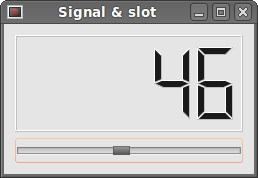 Figure: Signal & slot
Reimplementing event handler
Events in PyQt4 are processed often by reimplementing event handlers.
#!/usr/bin/python

# -*- coding: utf-8 -*-

"""

ZetCode PyQt4 tutorial

In this example, we reimplement an

event handler.

author: Jan Bodnar

website: zetcode.com

last edited: October 2011

"""

import sys

from PyQt4 import QtGui, QtCore

class Example(QtGui.QWidget):

    def __init__(self):

        super(Example, self).__init__()

        self.initUI()

    def initUI(self):

        self.setGeometry(300, 300, 250, 150)

        self.setWindowTitle('Event handler')

        self.show()

    def keyPressEvent(self, e):

        if e.key() == QtCore.Qt.Key_Escape:

            self.close()

def main():

    app = QtGui.QApplication(sys.argv)

    ex = Example()

    sys.exit(app.exec_())

if __name__ == '__main__':

    main()
In our example, we reimplement the keyPressEvent() event handler.
def keyPressEvent(self, e):

    if e.key() == QtCore.Qt.Key_Escape:

        self.close()
If we click the Escape button, the application terminates.
Event sender
Sometimes it is convenient to know which widget is the sender of a signal. For this, PyQt4 has thesender() method.
#!/usr/bin/python

# -*- coding: utf-8 -*-

"""

ZetCode PyQt4 tutorial

In this example, we determine the event sender

object.

author: Jan Bodnar

website: zetcode.com

last edited: October 2011

"""

import sys

from PyQt4 import QtGui, QtCore

class Example(QtGui.QMainWindow):

    def __init__(self):

        super(Example, self).__init__()

        self.initUI()

    def initUI(self):

        btn1 = QtGui.QPushButton("Button 1", self)

        btn1.move(30, 50)

        btn2 = QtGui.QPushButton("Button 2", self)

        btn2.move(150, 50)

        btn1.clicked.connect(self.buttonClicked)

        btn2.clicked.connect(self.buttonClicked)

        self.statusBar()

        self.setGeometry(300, 300, 290, 150)

        self.setWindowTitle('Event sender')

        self.show()

    def buttonClicked(self):

        sender = self.sender()

        self.statusBar().showMessage(sender.text() + ' was pressed')

def main():

    app = QtGui.QApplication(sys.argv)

    ex = Example()

    sys.exit(app.exec_())

if __name__ == '__main__':

    main()
We have two buttons in our example. In the buttonClicked() method we determine which button we have clicked by calling the sender() method.
btn1.clicked.connect(self.buttonClicked)

btn2.clicked.connect(self.buttonClicked)
Both buttons are connected to the same slot.
def buttonClicked(self):

    sender = self.sender()

    self.statusBar().showMessage(sender.text() + ' was pressed')
We determine the signal source by calling the sender() method. In the statusbar of the application, we show the label of the button being pressed.
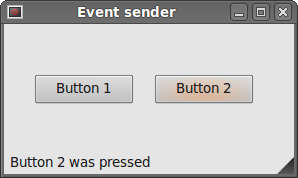 Figure: Event sender
Emitting signals
Objects created from a QtCore.QObject can emit signals. In the following example we will see how we can emit custom signals.
#!/usr/bin/python

# -*- coding: utf-8 -*-

"""

ZetCode PyQt4 tutorial

In this example, we show how to emit a

signal.

author: Jan Bodnar

website: zetcode.com

last edited: January 2015

"""

import sys

from PyQt4 import QtGui, QtCore

class Communicate(QtCore.QObject):

    closeApp = QtCore.pyqtSignal()

class Example(QtGui.QMainWindow):

    def __init__(self):

        super(Example, self).__init__()

        self.initUI()

    def initUI(self):

        self.c = Communicate()

        self.c.closeApp.connect(self.close)

        self.setGeometry(300, 300, 290, 150)

        self.setWindowTitle('Emit signal')

        self.show()

    def mousePressEvent(self, event):

        self.c.closeApp.emit()

def main():

    app = QtGui.QApplication(sys.argv)

    ex = Example()

    sys.exit(app.exec_())

if __name__ == '__main__':

    main()
We create a new signal called closeApp. This signal is emitted during a mouse press event. The signal is connected to the close() slot of the QtGui.QMainWindow.
class Communicate(QtCore.QObject):

    closeApp = QtCore.pyqtSignal()
A signal is created with the QtCore.pyqtSignal() as a class attribute of the external Communicate class.
self.c.closeApp.connect(self.close)
The custom closeApp signal is connected to the close() slot of the QtGui.QMainWindow.
def mousePressEvent(self, event):

    self.c.closeApp.emit()
When we click on the window with a mouse pointer, the closeApp signal is emitted. The application terminates.
In this part of the PyQt4 tutorial, we have covered signals and slots.
[Repost]Events and Signals in PyQt4的更多相关文章
- PyQt4入门
PyQt4入门教程(6)_对话框 文中译者的话将用方括号[]标出.对话框(Dialogs)是现代GUI程序中不可缺少的一部分.对话本来指的是两个或者更多人之间的交流,而在计算机应用中,对话是一个可以让 ...
- pyqt4_应用例子(计算器,对话框,进度条,日历等等)
sklearn实战-乳腺癌细胞数据挖掘(博客主亲自录制视频教程) https://study.163.com/course/introduction.htm?courseId=1005269003&a ...
- [wxWidgets] 2. 重访“Hello World” 程序
这是四年多来在博客园的第二篇博客.有了上一次的排版使用经验,这一篇文章应该有些进步(^_^). 闲话按下不表,言归正传.在编译.成功运行了上一个helloWorld.cpp(后文中'hw'简称hell ...
- STM32定时器级联 -- AN2592
Master configuration When a timer is selected as a master timer, the corresponding trigger output si ...
- API Design Principles -- QT Project
[the original link] One of Qt’s most reputed merits is its consistent, easy-to-learn, powerfulAPI. T ...
- Signal Handling--ref
http://www.chemie.fu-berlin.de/chemnet/use/info/libc/libc_21.html A signal is a software interrupt d ...
- Reactor Pattern and Non-blocking IO--reference
reference from:http://www.cs.bgu.ac.il/~spl051/Personal_material/Practical_sessions/Ps_12/ps12.html ...
- [转]使用gdb调试异常
有时程序中有未捕获的异常会导致程序异常的行为甚至导致程序的直接退出. 这对服务器程序来说是不可接受的. 可以使用gdb的catch命令来帮助我们调试异常. 使用gdb捕获异常的扔出点(相当于在扔出异常 ...
- ZetCode PyQt4 tutorial signals and slots
#!/usr/bin/python # -*- coding: utf-8 -*- """ ZetCode PyQt4 tutorial In this example, ...
随机推荐
- sphinx应用
sphinx调用原理 只需要提交要查询,sphinx将返回唯一的id号 API调用 1.创建连接 $sphinx = new SphinxClient(); $sphinx->SetServ ...
- Python 从零学起(纯基础) 笔记 之 迭代器、生成器和修饰器
Python的迭代器. 生成器和修饰器 1. 迭代器是访问集合元素的一种方式,从第一个到最后,只许前进不许后退. 优点:不要求事先准备好整个迭代过程中的所有元素,仅仅在迭代到某个元素时才计算该元素,而 ...
- PHPstorm的数据库功能
PHPstorm真是神器,居然有表.视图.存储过程的功能,非常人性化,建表那叫一个舒服,而且sql语句可以像其他代码一样显示"区域",结构更加清晰.
- TAC Alpha版本 冲冲冲!!!
第1天 第2天 第3天 第4天 第5天 第6天 第7天 第8天 第9天 第10天 测试随笔 冲刺总结
- Effective java读书笔记
2015年进步很小,看的书也不是很多,感觉自己都要废了,2016是沉淀的一年,在这一年中要不断学习.看书,努力提升自己 计在16年要看12本书,主要涉及java基础.Spring研究.java并发.J ...
- 裁剪要素出现错误 :HRESULT:0x80040239
pFeatureBuffer = pOutFeaCls.CreateFeatureBuffer(); pFeatureCursor = pOutFeaCls.Inser ...
- 【Tomcat】tomcat报连接超时错误
程序一直报这个错误 [getui-server][ERROR] [2016-03-17 10:50:00] getui.task.HftMongoInfoTask.execute(137) | --H ...
- Android高手速成--第二部分 工具库
主要包括那些不错的开发库,包括依赖注入框架.图片缓存.网络相关.数据库ORM建模.Android公共库.Android 高版本向低版本兼容.多媒体相关及其他. 一.依赖注入DI 通过依赖注入减少Vie ...
- UIScrollView和控制器
一般情况下,就设置UIScrollView所在的控制器 为 UIScrollView的delegate 设置控制器为UIScrollView的delegate有2种方法: 通过代码(self就是控制器 ...
- MFC在关闭第二个窗口时关闭主对话框
AfxGetApp()->m_pMainWnd->SendMessage(WM_CLOSE);//关闭主对话框