
C#通讯录——Windows Form Contact List
C#通讯录
Windows Form Contact List
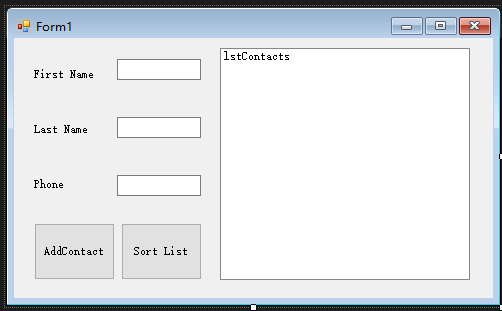
主窗口
using System;

using System.Collections.Generic;

using System.ComponentModel;

using System.Data;

using System.Drawing;

using System.IO;

using System.Linq;

using System.Text;

using System.Threading.Tasks;

using System.Windows.Forms;

namespace WindowsFormsApplication2

{

    public partial class Form1 : Form

    {

        public Form1()

        {

            InitializeComponent();

        }

        private Contact[] phoneBook = new Contact[];

        private void Write(Contact obj)

        {

                StreamWriter sw = new StreamWriter("contact.txt");

                sw.WriteLine(phoneBook.Length + );

                sw.WriteLine(obj.FirstName);

                sw.WriteLine(obj.LastName);

                sw.WriteLine(obj.Phone);

                for (int x = ; x < phoneBook.Length; x++)

                {

                    sw.WriteLine(phoneBook[x].FirstName);

                    sw.WriteLine(phoneBook[x].LastName);

                    sw.WriteLine(phoneBook[x].Phone);

                }

                sw.Close();

        }

        private void Read()

        {

                StreamReader sr = new StreamReader("contact.txt");

                phoneBook = new Contact[Convert.ToInt32(sr.ReadLine())];

                for (int x = ; x < phoneBook.Length; x++)

                {

                    phoneBook[x] = new Contact();

                    phoneBook[x].FirstName = sr.ReadLine();

                    phoneBook[x].LastName = sr.ReadLine();

                    phoneBook[x].Phone = sr.ReadLine();

                }

                sr.Close();

        }

        private void Display()

        {

                lstContacts.Items.Clear();

                for (int x = ; x < phoneBook.Length; x++)

                {

                    lstContacts.Items.Add(phoneBook[x].ToString());

                }

        }

        private void ClearForm()

        {

            textFirstName.Text = string.Empty;

            textLastName.Text = string.Empty;

            textPhone.Text = string.Empty;

        }

        private void btnAddContact_Click(object sender, EventArgs e)

        {

            Contact obj = new Contact();

            obj._Contact(textFirstName.Text,textLastName.Text,textPhone.Text);

            //lstContacts.Items.Add(obj.ToString());

            BubbleSort();

            FileIf();

            Write(obj);

            Read();

            Display();

            ClearForm();

        }

        private void FileIf()

        {

            if (File.Exists("contact.txt"))

            {

                return;

            }else

            {

                FileStream NewText = File.Create("contact.txt");

                NewText.Close();

            }

        }

        private void Form1_Load(object sender, EventArgs e)

        {

            FileIf();

            Read();

            Display();

        }

        private void  BubbleSort()

        {

            Contact temp;

            bool swap;

            do

            {

                swap = false;

                for(int x = ; x<(phoneBook.Length -);x++)

                {

                    if (phoneBook[x].LastName.CompareTo(phoneBook[x+].LastName)>){

                        temp = phoneBook[x];

                        phoneBook[x]=phoneBook[x+];

                        phoneBook[x+]=temp;

                        swap =true;

                    }

                }

            }while(swap == true);

        }

        private void btnSort_Click(object sender, EventArgs e)

        {

            BubbleSort();

            Display();

        }

    }//end of class

}//end of namespace
Contact类
using System;

using System.Collections.Generic;

using System.Linq;

using System.Text;

using System.Threading.Tasks;

namespace WindowsFormsApplication2

{

    class Contact

    {

        //public Contact()

        //{

        //    FirstName = "landv";

        //    LastName = "li";

        //    Phone = "13903120312";

        //}

        //public Contact(string _FirstName, string _LastName, string _Phone)

        //{

        //    FirstName = _FirstName;

        //    LastName = _LastName;

        //    Phone = _Phone;

        //}

        public void  _Contact(string _FirstName, string _LastName, string _Phone)

        {

            FirstName = _FirstName;

            LastName = _LastName;

            Phone = _Phone;

        }

        private string _FirstName;

        private string _LastName;

        private string _Phone;

        public string FirstName

        {

            get { return _FirstName; }

            set { _FirstName = value; }

        }

        public string LastName

        {

            get { return _LastName; }

            set { _LastName = value; }

        }

        public string Phone

        {

            get { return _Phone; }

            set

            {

                if(value.Length == )

                {

                    _Phone = value;

                }

                else

                {

                    _Phone = "";

                }

            }

        }

       public override string ToString()

       {

           string output = string.Empty;

           output += string.Format("{0},{1}", LastName, FirstName);

           output += string.Format(",{0} {1} {2}", Phone.Substring(, ), Phone.Substring(, ), Phone.Substring(, ));

           return output;

       }

    }// end of class

}//end of namespace
源码下载地址:
http://files.cnblogs.com/files/landv/WindowsFormContactList.zip
C#通讯录——Windows Form Contact List的更多相关文章
- 如何用Web技术开发Windows Form应用
现在H5很热,很多互联网公司的产品都采用混合编程,其中各个平台客户端的“壳”为原生控件,但是内容很多都是Web网页,因此可以做出很多炫酷的效果.随着Node.js和Ionic等框架的出现,现在感觉Ja ...
- Windows Form 中快捷键设置
在Windows Form程序中使用带下划线的快捷键只需要进行设置: 就能够工作.
- VS2008 Windows Form项目安装包生成详解
2008 Windows Form项目的发布对有经验的程序员来说,可能不值一提,但对很多新手来说却不知道如何操作,因为在很多关于Visual Studio的书籍中也没有相关介绍,权威如<C# 2 ...
- VISUAL STUDIO 2008 WINDOWS FORM项目发布生成安装包详解(转)
转自:http://www.cnblogs.com/killerofyang/archive/2012/05/31/2529193.html Visual Studio 2008 Windows Fo ...
- C# Adding Hyperlink to Windows Form z
When creating a Windows form in C#, we would like to create a hyperlink so that when the user click ...
- windows form (窗体) 之间传值小结
windows form (窗体) 之间传值小结 windows form (窗体) 之间传值小结 在windows form之间传值,我总结了有四个方法:全局变量.属性.窗体构造函数和deleg ...
- Ninject之旅之十二:Ninject在Windows Form程序上的应用(附程序下载)
摘要: 下面的几篇文章介绍如何使用Ninject创建不同类型的应用系统.包括: Windows Form应用系统 ASP.NET MVC应用系统 ASP.NET Web Form应用系统 尽管对于不同 ...
- Windows Form线程同步
.Net多线程开发中,经常需要启动工作线程Worker thread处理某些事情,而工作线程中又需要更新主线程UI thread的界面状态.我们只能在主线程中操作界面控件,否则.Net会抛出异常. 那 ...
- 在WPF中添加Windows Form控件(包括 ocx控件)
首先,需要向项目中的reference添加两个dll,一个是.NET库中的System.Windows.Forms,另外一个是WindowsFormsIntegration,它的位置一般是在C:\ ...
随机推荐
- hadoop-1.2.1集群搭建
继续上一篇:http://www.cnblogs.com/CoolJayson/p/7430654.html 首先需要安装上台虚拟机, 分别为: master, salve1, slave2 1.复制 ...
- 用Tesseract训练验证码遇到的问题
1.准备验证码图片 import os from urllib.request import urlretrieve urlPath='http://www.189.cn/portal/captcha ...
- SpringSocial业务系统与社交网站的绑定与解绑
SpringSocial提供了了以下三个服务,我们要做的仅仅是调用它们的服务,但是SpringSocial仅仅只提供了数据,没有提供视图 ⒈拿到所有社交网站与业务系统的绑定信息 SpringSocia ...
- [Docker]CentOS7下Docker安装教程
想要倒腾Kubernetes的话,第一步就是要会安装Docker,这篇文章讲一讲过程 安装步骤 检查内核版本,必须是3.10以上 uname -r 安装Docker yum -y install do ...
- 【转】python 退出程序的方式
[转]python 退出程序的方式 python程序退出方式[sys.exit() os._exit() os.kill() os.popen(...)] 知乎说明 http://www.zhihu. ...
- 【转】python类中super()和__init__()的区别
[转]python类中super()和__init__()的区别 单继承时super()和__init__()实现的功能是类似的 class Base(object): def __init__(se ...
- 【转】PyQt5开发环境配置并使用
[转]PyQt5开发环境配置并使用 https://blog.csdn.net/HuangZhang_123/article/details/78046706 本人新书<玩转Python网络爬虫 ...
- java接口可以继承多个接口
接口是常量值和方法定义的集合.接口是一种特殊的抽象类. java类是单继承的.classB Extends classA java接口可以多继承.Interface3 Extends Interf ...
- undefined reference to symbol '_ZNK11GenICam_3_016GenericException17GetSourceFileNameEv'
今天在编译DALSA二次开发的源码时,出现了如下错误: /usr/bin/ld: ./out/camera.o: undefined reference to symbol '_ZNK11GenICa ...
- [HTTP]Etag的工作流程
1. 浏览器首次访问该资源时,web服务器返回资源的同时,响应报文头携带ETag标签: 2. 浏览器将保存该Etag标签的值: 3. 当浏览器发起下一次请求,请求报文头将会携带 If-None-Mat ...