
用Tesseract训练验证码遇到的问题
1.准备验证码图片
 import os

 from urllib.request import urlretrieve

 urlPath='http://www.189.cn/portal/captcha/simple.do?date=1503125232339'

 localPath='G:\python_work\chapter11\captcha'

 # 根据文件名创建文件

 def createFileByFileName(localPath,fileName):

     if not os.path.exists(localPath):

         os.makedirs(localPath)

     totalPath=localPath+'\\'+fileName

     if not os.path.exists(totalPath):

         file=open(totalPath, 'a+')

         file.close()

         return totalPath

 # 根据图片的地址, 下载图片并保存在本地

 def getAndSaveImg(imgUrl, filename):

     if(len(imgUrl)!=0):

         file=filename+'.jpg'

         urlretrieve(imgUrl, createFileByFileName(localPath, file))

 # 下载图片

 i=0

 while i<100:

     getAndSaveImg(urlPath, str(i))

     i=i+1
2.将验证码图片转为灰度图 , 扩展名改为.tif
 import os

 from PIL import Image

 def getFileList(path):

     # 返回目录中所有jpg图像的文件名列表

     return [os.path.join(path, f) for f in os.listdir(path) if f.endswith('.jpg')]

 # 批量将图片转为灰度图

 def patchConvert(srcPath, destPath):

     fileList = getFileList(srcPath)

     for file in fileList:

         img = Image.open(file).convert('L')

         name_ext = getFileNameAndExt(file)

         destFile = os.path.join(destPath, name_ext[0]+'.tif')

         img.save(destFile)

 # 获取文件名和扩展名

 def getFileNameAndExt(filename):

     # 取目录与文件名

     (filepath, tempfilename) = os.path.split(filename)

     # 取文件名(不带扩展名)和扩展名

     (shotname, extension) = os.path.splitext(tempfilename)

     return shotname, extension

 patchConvert('captcha', 'captcha_gray')
3. 后续步骤参考原先的博客:
http://www.cnblogs.com/CoolJayson/p/7395824.html
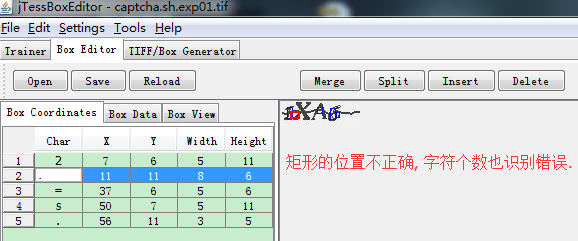
问题: 生成box文件后, 用jTessBoxEditor修改box文件时, 里面的矩形画的误差较大, 字符个数识别不准确 , 应该如何对矩形进行修改???
用Tesseract训练验证码遇到的问题的更多相关文章
- Tesseract训练中文字体识别
注:目前仅说明windows下的情况 前言 网上已经有大量的tesseract的识别教程,但是主要有两个缺点: 大多数比较老,有部分内容已经不适用. 大部分只是就英文的训练进行探索,很少针对中文的训练 ...
- tensorflow训练验证码识别模型
tensorflow训练验证码识别模型的样本可以使用captcha生成,captcha在linux中的安装也很简单: pip install captcha 生成验证码: # -*- coding: ...
- Tesseract 对验证码的识别原理和实现步骤
一. Steps: 学习图片库--->处理图片(初步处理)--->校正.学习图片 二. Tesseract: 1. 采集图片库(一般每个出现的字符出现20次左右识别效果比较好),根据图片特 ...
- Tesseract训练笔记
[参考] http://www.cnblogs.com/samlin/p/Tesseract-OCR.html https://code.google.com/p/tesseract-ocr/wiki ...
- Tesseract训练
最近在用Tesseract做一个图片识别的小应用,目标图像只有数字和英文字母,在实际使用过程中发现个别数识别错误,因此不得不研究学习Tesseract的训练. http://www.cnblogs.c ...
- tesseract 训练
下载chi_sim.traindata字库下载tesseract-ocr-setup-3.02.02.exe 下载地址:http://code.google.com/p/tesseract-ocr/d ...
- 跟我学算法- tensorflow 卷积神经网络训练验证码
使用captcha.image.Image 生成随机验证码,随机生成的验证码为0到9的数字,验证码有4位数字组成,这是一个自己生成验证码,自己不断训练的模型 使用三层卷积层,三层池化层,二层全连接层来 ...
- tesseract训练手写体
前面的步骤都一样,从第4步开始 4.使用tesseract生成.box文件: tesseract eng.handwriting.exp0.tif eng.handwriting.exp0 -l en ...
- tesseract系列(3) -- tesseract训练
tessract的训练有个工具叫 jTessBoxEditor 1.jTessBoxEditor是用java写的,首先要装java的环境 jdk-8u191-windows-x64.exe 这个我想从 ...
随机推荐
- E2E测试框架
1. 目前E2E测试工具有哪些? 项目 Web Star puppeteer Chromium (~170Mb Mac, ~282Mb Linux, ~280Mb Win) 41427 nightma ...
- 虚拟机centos无法连接外网时怎么处理
1. 首先查看service 如果没有启动请启动这2个服务. 2. 在虚拟机那重启网络端口 ifdown ens33 ifup ens33
- Zookeeper+Kafka完全分布式实战部署
Zookeeper+Kafka完全分布式实战部署 作者:尹正杰 版权声明:原创作品,谢绝转载!否则将追究法律责任. 其实我之前部署过kafak和zookeeper的完全分布式,集群是可以正常使用没错, ...
- script nGrinder_TestRunnerInsertMysqlSingle.groovy
s 阿里巴巴Java开发规范手册.zip http://dl.iteye.com/topics/download/ffc4ddcf-8b65-3b3c-b146-96468e2baf40 /** 关于 ...
- Java Web之JSP
什么是JSP? JSP就是一个可以写Java代码的HTML页面 JSP是什么? JSP是Servlet,JSP的本质就是Servlet Tomcat的web.xml文件下有这样几段代码: 看到下面的通 ...
- Sublime Text 3 浅色主题
1.参考 如何优雅使用Sublime Text3(Sublime设置豆沙绿背景色和自定义主题) Fluidvision Inspiredgithub LightRays Mac 20Classic P ...
- Spark源码剖析 - SparkContext的初始化(十)_Spark环境更新
12. Spark环境更新 在SparkContext的初始化过程中,可能对其环境造成影响,所以需要更新环境,代码如下: SparkContext初始化过程中,如果设置了spark.jars属性,sp ...
- SpringBoot系列: 使用MyBatis maven插件自动生成java代码
====================================pom.xml 文件====================================需要在 pom.xml 文件增加 m ...
- you have mixed tabs and spaces.Fix This屏蔽
这个功能很影响vs的速度,解决办法(VS2010版本为例),将Fix Mixed Tabs改为OFF即可.
- Native/Webview bridge for Hybrid
Native/Webview bridge for Hybrid 安装 npm i --save webview-bridge 特点 支持自定义app URL scheme 支持多种处理方式(全部涵盖 ...