
iOS-高仿通讯录之商品索引排序搜索
概述
详细
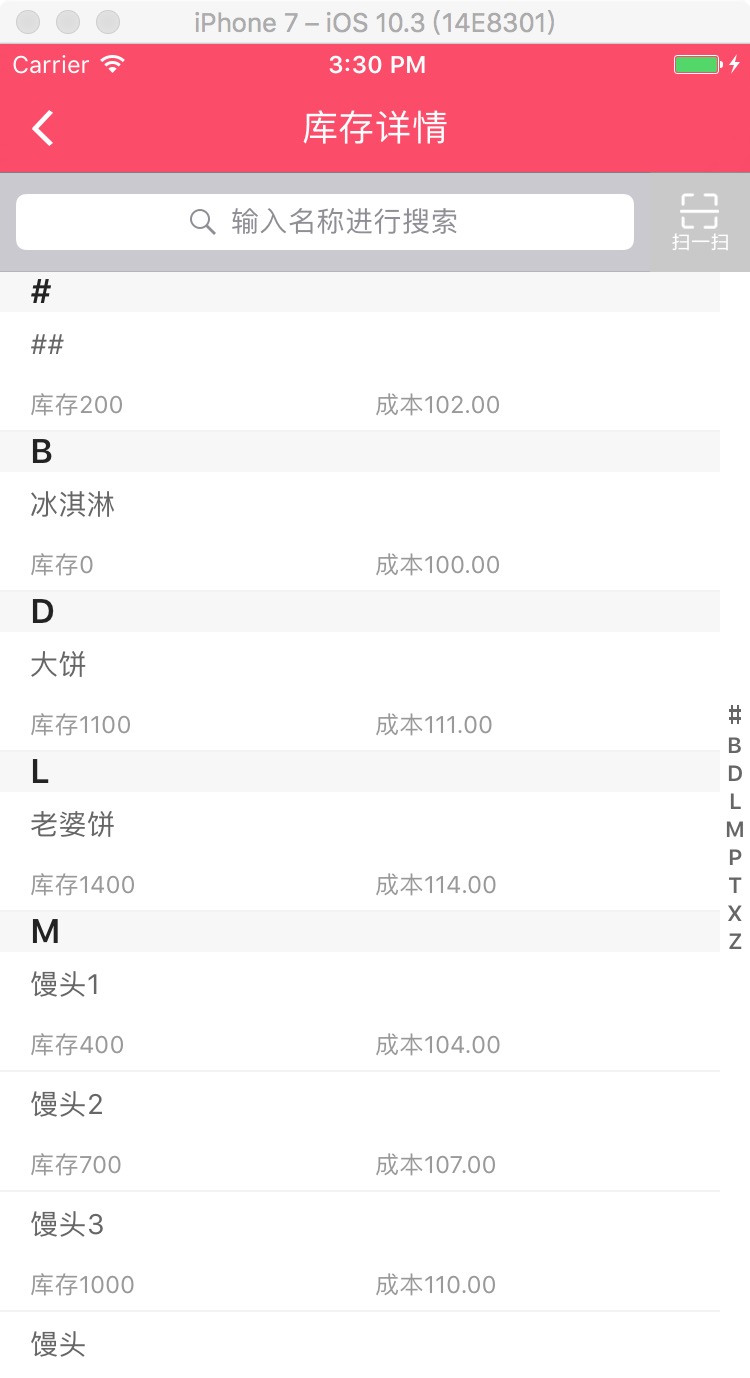
项目中像一些商品搜索类界面, TableView添加右侧索引的使用越来越多, 的确用户体验提高了许多.
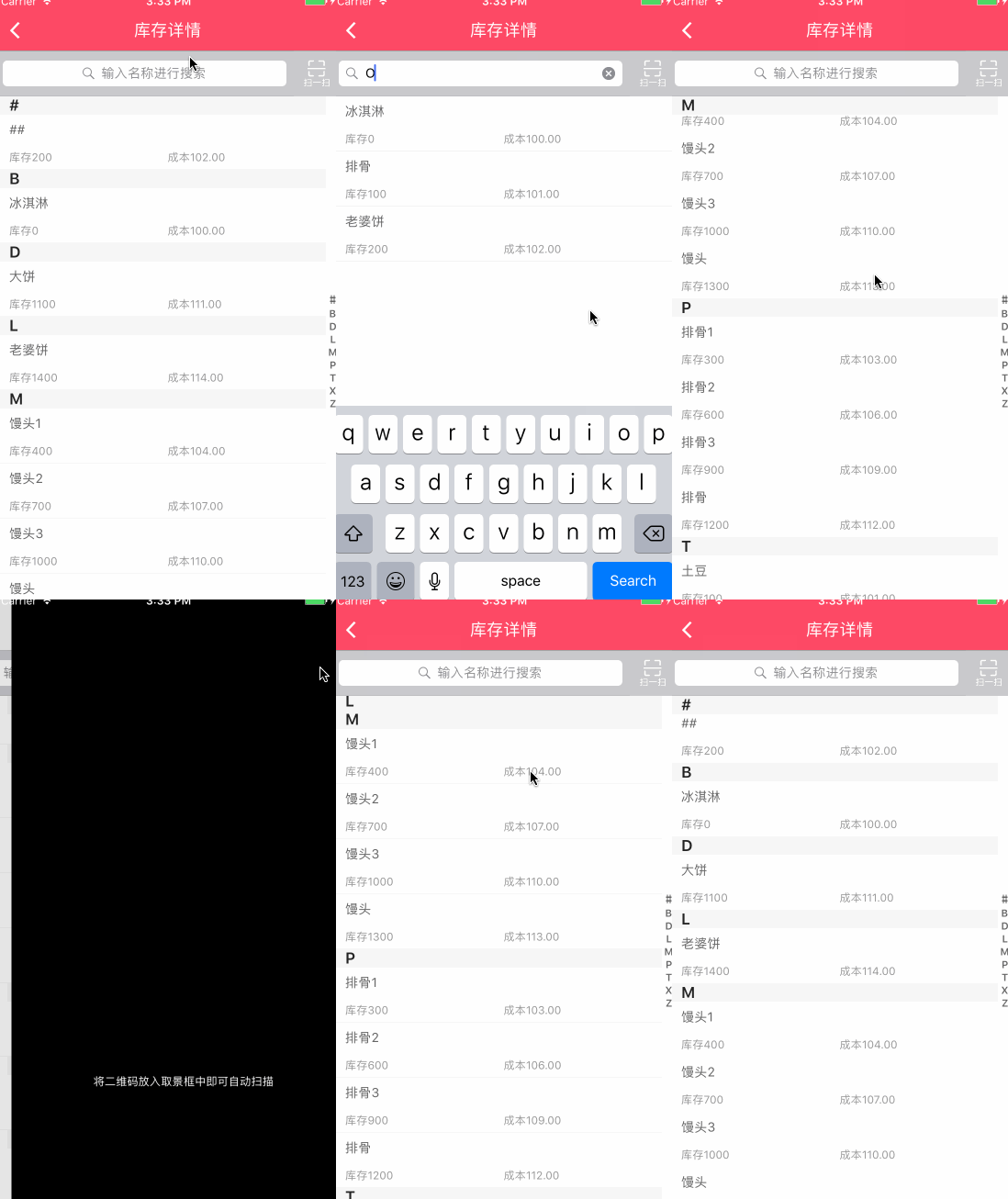
一、主要思路
大致思路:
1. 添加并设置右侧索引
2. 自定义汉字转化成拼音文件,通过拼音去匹配首字母
3. 将库存数据按照索引分组排序
4. 添加搜索功能
5. 搜索界面复用库存界面, 增加标识判断显示界面
二、程序实现
Step1. 添加并设置右侧索引
设置右侧索引数组:
// 索引标题数组

@property (nonatomic, strong) NSMutableArray * indexArr;

 // 设置右侧索引数组

 _indexArr = [[NSMutableArray alloc]init];

for(char c = 'A'; c<='Z'; c++) {

     [_indexArr addObject:[NSString stringWithFormat:@"%c", c]];

 }

 [_indexArr addObject:[NSString stringWithFormat:@"#"]];
设置右侧索引字体颜色:
self.tableView.sectionIndexColor = [UIColor grayColor];
设置右侧索引背景色:
self.tableView.sectionIndexBackgroundColor = [UIColor whiteColor];
设置标签数(其实就是分区数目):
- (NSInteger)numberOfSectionsInTableView:(UITableView *)tableView {

    return indexArr.count;

}
显示每组标题索引 (如果不实现 就不显示右侧索引):
- (NSArray *)sectionIndexTitlesForTableView:(UITableView *)tableView {

    return indexArr;

}
设置索引section的高度:
- (CGFloat)tableView:(UITableView *)tableView heightForHeaderInSection:(NSInteger)section

{

    return 20;

}
返回每个索引的内容:
- (NSString *)tableView:(UITableView *)tableView titleForHeaderInSection:(NSInteger)section{

    return indexArr[section];

}
这时候基本的索引展现了, 需要响应点击索引则添加下面方法 及 将数据分类展现.
响应点击索引时的委托方法(点击右侧索引表项时调用):
- (NSInteger)tableView:(UITableView *)tableView sectionForSectionIndexTitle:(NSString *)title atIndex:(NSInteger)index {

      NSInteger count = 0;

    for(NSString *character in _toBeReturned) {

        if([character isEqualToString:title]) {

            return count;

        }

        count ++;

    }

    return 0;

}
Step2. 自定义汉字转化成拼音文件,通过拼音去匹配首字母
将数据分类展现则是一个大问题!
因为后台返回给我们是所有数据,没法通过分区去控制各个分区数据的数据, 这个时候就**考虑到汉字转化成拼音,然后通过拼音去匹配首字母然后排序**解决这个问题.
封装一个汉字转化成拼音YYPChineseToPinyin 文件
1.根据汉字返回汉字的拼音:
/**

 *  根据汉字返回汉字的拼音

 *

 *  @param word 一个汉字

 *

 *  @return 拼音的字符串

 */

+ (NSString *)transformChinese:(NSString *)word {

    NSMutableString *pinyin = [word mutableCopy];

    CFStringTransform((__bridge CFMutableStringRef)pinyin, NULL, kCFStringTransformMandarinLatin, NO);

    CFStringTransform((__bridge CFMutableStringRef)pinyin, NULL, kCFStringTransformStripCombiningMarks, NO);

    return [pinyin uppercaseString];

}
2.比较对象数组:
/**

 *  排序后的首字母(不重复)用于tableView的右侧索引

 *

 *  @param objectArray  需要排序的对象数组

 *  @param key          需要比较的对象的字段

 *

 *  @return 排序后的首字母(不重复)

 */

+ (NSMutableArray *)indexWithArray:(NSArray *)objectArray Key:(NSString *)key;

/**

 *  给对象数组排序

 *

 *  @param objectArray 需要排序的对象数组

 *  @param key       需要比较的对象的字段

 *

 *  @return 根据字段排序后的对象数组(同首写字母的在一个数组中)

 */

+ (NSMutableArray *)sortObjectArray:(NSArray *)objectArray Key:(NSString *)key;
3.比较字符串数组:
/**

 *  排序后的首字母(不重复)用于tableView的右侧索引

 *

 *  @param stringArr 需要排序的字符数组

 *

 *  @return 排序后的首字母(不重复)

 */

+ (NSMutableArray*)indexArray:(NSArray*)stringArr;

/**

 *  返回名称

 *

 *  @param stringArr 需要排序的字符数组

 *

 *  @return 更具首字母排序后的字符数组

 */

+ (NSMutableArray *)letterSortArray:(NSArray *)stringArr;
Step3. 将库存数据按照索引分组排序
解决匹配首字母问题后, 则需要在所需控制器内去解决分组排序问题了
// 库存详情列表数组

@property (nonatomic, strong) NSMutableArray *inventoryList;

// 索引标题数组(排序后的出现过的拼音首字母数组)

@property(nonatomic, strong) NSMutableArray *indexArr;

// 排序好的结果数组

@property(nonatomic, strong) NSMutableArray *resultArr;
 // 根据YYPGoodsModel对象的 name 属性 按中文 对 YYPGoodsModel数组 排序

    self.indexArr = [YYPChineseToPinyin indexWithArray:self.inventoryList Key:@"name"];

    self.resultArr = [YYPChineseToPinyin sortObjectArray:self.inventoryList Key:@"name"];
模拟加载库存数据:
- (void)loadInventoryData {

    NSArray *inventoryArr = [NSArray arrayWithObjects:

                              @"冰淇淋",@"土豆",@"##",

                              @"排骨",@"馒头",@"老婆饼",

                              nil];

    self.inventoryList = [[NSMutableArray alloc] initWithCapacity:0];

    for (int i = 0; i < [inventoryArr count]; i++) {

        YYPGoodsModel *good = [[YYPGoodsModel alloc] init];

        good.name = [inventoryArr objectAtIndex:i];

        good.num = i * 100;

        good.cost = i + 100;

        [self.inventoryList addObject:good];

    }

}
Step4. 添加搜索功能
// 保存搜索状态下的搜索数组

@property (strong, nonatomic) NSMutableArray *searchList;
添加手势去移除键盘:
- (void)scrollViewWillBeginDragging:(UIScrollView *)scrollView {

    [self.searchBar resignFirstResponder];

}

- (void)tapAction{

    [self.tableView removeGestureRecognizer:_tap];

    [_searchBar resignFirstResponder];

}
使用代理UISearchBarDelegate做相应操作:
#pragma mark - UISearchBarDelegate -

- (BOOL)searchBarShouldBeginEditing:(UISearchBar *)searchBar{

    if (!_tap) {

        _tap = [[UITapGestureRecognizer alloc] initWithTarget:self action:@selector(tapAction)];

    }

    [self.tableView addGestureRecognizer:_tap];

    return YES;

}

- (void)searchBarSearchButtonClicked:(UISearchBar *)searchBar {

    [self.searchList removeAllObjects];

    // 模拟加载搜索数据

    [self loadSearchData];

    self.showSearch = YES;

    [self.tableView reloadData];

}

- (void)searchBar:(UISearchBar *)searchBar textDidChange:(NSString *)searchText {

    if ([searchBar.text isEqualToString:@""]) {

        self.showSearch = NO;

        [self.tableView reloadData];

    } else {

        [self.searchList removeAllObjects];

        // 模拟加载搜索数据

        [self loadSearchData];

        self.showSearch = YES;

        [self.tableView reloadData];

    }

}
模拟加载搜索数据:
- (void)loadSearchData {

    NSArray *searchArr = [NSArray arrayWithObjects:

                              @"排骨",@"馒头",@"老婆饼",

                              nil];

    self.searchList = [[NSMutableArray alloc] initWithCapacity:0];

    for (int i = 0; i < [searchArr count]; i++) {

        YYPGoodsModel *search = [[YYPGoodsModel alloc] init];

        search.name = [searchArr objectAtIndex:i];

        search.num = i * 100;

        search.cost = i + 100;

        [self.searchList addObject:search];

    }

}
一般搜索来说是固定在顶部的,我这边是用的UIViewController, 将搜索块当作子视图放在内. 然后创建了myTableView去实现滚动这些页面.
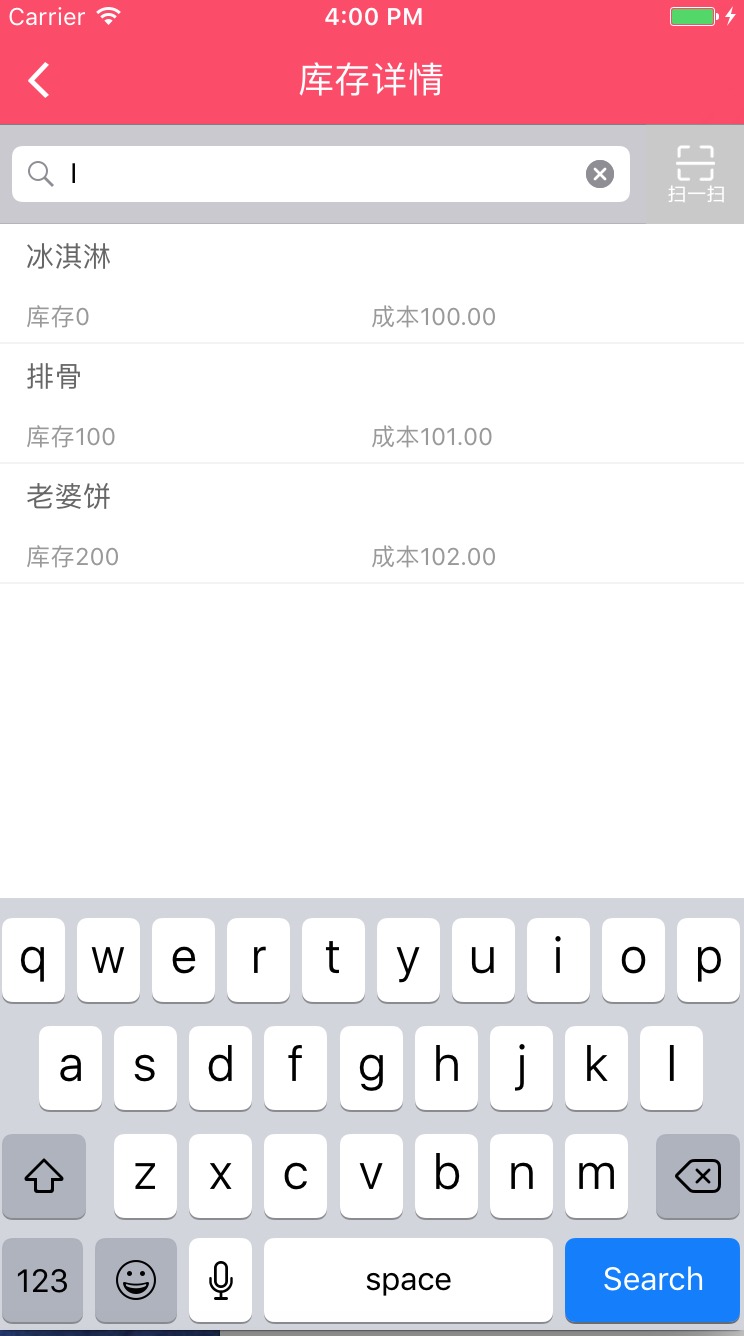
Step5. 搜索界面复用库存界面, 增加标识判断显示界面
由于我们搜索界面就是在当前库存页面上搜索结果后直接展现,并不存在跳转下个界面,并且两个界面的 cell 布局完全一样. 这个时候只需要稍作处理复用即可(因为搜索不存在索引提示记得去掉索引title).
定义一个是否标识showSearch, 用于判断是否显示搜索结果
@property (assign, nonatomic) BOOL showSearch;
这个时候就修改上面的相关索引设置了, 增加判断若是搜索状态则不需要设置的逻辑
#pragma mark - Table view data source

// 标签数

- (NSInteger)numberOfSectionsInTableView:(UITableView *)tableView {

    if (self.showSearch) {

        return 1;

    }

    return self.indexArr.count;

}

- (NSInteger)tableView:(UITableView *)tableView numberOfRowsInSection:(NSInteger)section {

    if (self.showSearch) {

        return self.searchList.count;

    }

    return [[self.resultArr objectAtIndex:section] count];

}

- (UITableViewCell *)tableView:(UITableView *)tableView cellForRowAtIndexPath:(NSIndexPath *)indexPath {

    YYPInventoryDetailsCell *cell =[YYPInventoryDetailsCell cellWithTableView:tableView];

    if (self.showSearch) {

        if (self.searchList.count) {

            YYPGoodsModel *model = self.searchList[indexPath.row];

            cell.model = model;

        }

        return cell;

    }

    YYPGoodsModel *model = [[self.resultArr objectAtIndex:indexPath.section] objectAtIndex:indexPath.row];

    cell.model = model;

    return cell;

}
显示每组标题索引 (如果不实现 就不显示右侧索引)
- (NSArray *)sectionIndexTitlesForTableView:(UITableView *)tableView {

    if (self.showSearch) {

        return nil;

    }

    return self.indexArr;

}
设置索引section的高度
- (CGFloat)tableView:(UITableView *)tableView heightForHeaderInSection:(NSInteger)section {

    if (self.showSearch) {

        return 0.0;

    }

    return 20;

}
返回每个索引的内容
- (NSString *)tableView:(UITableView *)tableView titleForHeaderInSection:(NSInteger)section{

    if (self.showSearch) {

        return @"";

    }

    return self.indexArr[section];

}
响应点击索引时的委托方法(点击右侧索引表项时调用)
- (NSInteger)tableView:(UITableView *)tableView sectionForSectionIndexTitle:(NSString *)title atIndex:(NSInteger)index {

    return index;

}
如果需要修改分区header 索引的文字颜色及背景颜色, 和在tableview 里设置表头一样的修改方法.
// 设置索引背景颜色及标题

- (UIView *)tableView:(UITableView *)tableView viewForHeaderInSection:(NSInteger)section {

    UIView *header = [[UIView alloc] initWithFrame:CGRectMake(0, 0, UI_View_Width, 20)];

    header.backgroundColor = YYPBackgroundColor;

    // Create label with section title

    UILabel *label = [[UILabel alloc] init];

    label.frame = CGRectMake(15, 0, UI_View_Width - 15, header.height);

    label.textColor = YYPColor(255, 255, 255);

    label.font = [UIFont systemFontOfSize:16.0];

    label.text = [[self.inventoryList objectAtIndex:section] valueForKey:@"name"];

    label.backgroundColor = [UIColor clearColor];

    [header addSubview:label];

    if (self.showSearch) {

        label.text = @"";

    } else {

        label.text = self.indexArr[section];

    }

    return header;

}
是不是思路很明了了,希望对大家有用!
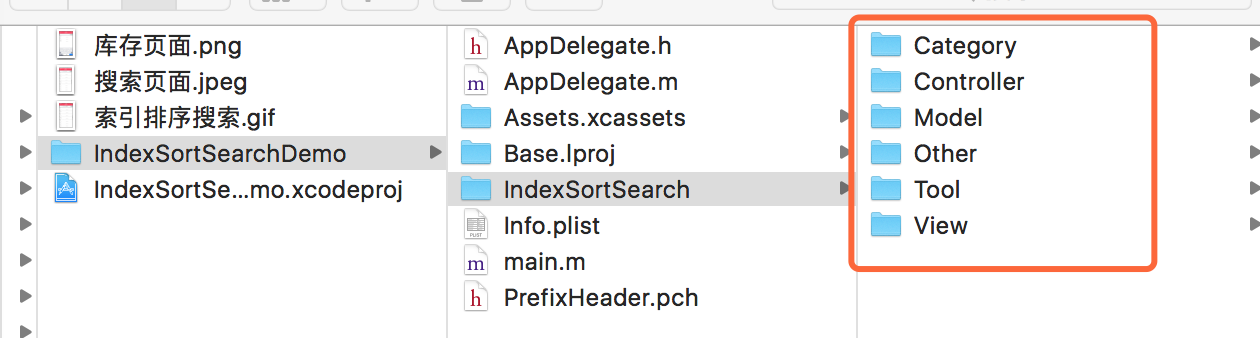
三、压缩文件截图
采用的 MVC 设计模式
界面性问题可以根据自己项目需求调整即可, 具体可参考代码, 项目能够直接运行!
注:本文著作权归作者,由demo大师发表,拒绝转载,转载需要作者授权
iOS-高仿通讯录之商品索引排序搜索的更多相关文章
- iOS高仿app源码:纯代码打造高仿优质《内涵段子》
iOS高仿app源码:纯代码打造高仿优质<内涵段子>收藏下来 字数1950 阅读4999 评论173 喜欢133 Github 地址 https://github.com/Charlesy ...
- iOS高仿微信项目、阴影圆角渐变色效果、卡片动画、波浪动画、路由框架等源码
iOS精选源码 iOS高仿微信完整项目源码 Khala: Swift 编写的iOS/macOS 路由框架 微信左滑删除效果的实现与TableViewCell的常用样式介绍 实现阴影圆角并存,渐变色背景 ...
- [Android源码]Android源码之高仿飞鸽传书WIFI热点搜索与创建(一)
(本文详情来源:android源码 http://www.eoeandroid.com/thread-296427-1-1.html 转载请注明出处!) [Android源码分享]飞鸽传书的An ...
- 实例源码--IOS高仿微信打飞机游戏(完整功能)
下载源码 技术要点: 1. IOS游戏开发基础框架 2. 高仿打飞机游戏 3. 游戏背景音频技术 4.源码详细的中文注释 ……. 详细介绍: 1. IOS游戏开发基础框架 此套源码为涉及IOS游戏开发 ...
- iOS高仿微信悬浮窗、忍者小猪游戏、音乐播放器、支付宝、今日头条布局滚动效果等源码
iOS精选源码 iOS WKWebView的使用源码 模仿apple music 小播放器的交互实现 高仿微信的悬浮小窗口 iOS仿支付宝首页效果 [swift]仿微信悬浮窗 类似于今日头条,网易新闻 ...
- iOS 高仿:花田小憩3.0.1
前言 断断续续的已经学习Swift一年多了, 从1.2到现在的2.2, 一直在语法之间徘徊, 学一段时间, 工作一忙, 再捡起来隔段时间又忘了.思来想去, 趁着这两个月加班不是特别多, 就决定用swi ...
- iOS高仿城觅应用客户端项目(开发思路和代码)
这是一款非常完整的一个ios项目,基本实现了我们常用的一些功能了,而且界面设计个人感觉还是挺不错的,是一个不错的学习ios项目,喜欢的朋友可以参考一下吧. 项目展示,由于没有数据,所以所有的cell显 ...
- iOS高仿城觅-感谢大神分享
项目展示,由于没有数据,所以所有的cell显示的都是我自己写的数据 抽屉 首页部分效果 首页效果 部分效果 发现 消息 搜索 设置 模糊效果 代码注释展示 代码注释展示 还有很多细节就不一一展示了,大 ...
- iOS --高仿QQ空间页面
1.首先分析一下qq空间页面的主要2个功能: 1)随着TableView的向上滑动导航栏的颜色渐变,变化过程是从透明变成白色. 2)随着TableView的向下滑动,图片随着offset放大. 2.首 ...
随机推荐
- dwr3实现消息精确推送详细步骤
最近项目中需要用到推送消息,找了很久终于找到一篇不错的文章,方便以后查看就转载了,也分享给大家,希望能帮到有需要的人. 第一.在项目中引入dwr.jar,然后在web.xml中进行配置,配置如下: & ...
- Apache2.2.16+PHP5.3.3+MySQL5.1.49的配置方法
第一步:下载安装的文件 1. MySQL:下载地址mysql-5.1.49-win32.msi: 2. Apache: 下载地址httpd-2.2.16-win32-x86-openssl-0.9.8 ...
- 微商营销实战技巧分享,轻松月入10W
如今能够说是移动互联时代.在这个时代,微信眼下能够说是当之无愧的移动应用,依据报道,眼下微信有7个多亿的用户,怪不得那么多人看到微商的时代,一大批人開始涌入微商,导致如今微信上卖产品都已经泛滥了,导致 ...
- Common Internet File System
CIFS (Common Internet File System) is a protocol that gained popularity around the year 2000, as ven ...
- mysqldump与source
mysqldump示例 mysqldump --default-character-set=utf8 -d --opt -hlocalhost -uroot -p123456 --where=&quo ...
- MICS:副本和纠删码混合存储系统
摘要 云存储系统的三个指标: 高可靠性,低存储开销,高读写性能. 这三个指标是没有办法同一时候满足的,许多时候须要进行tradeoff. 副本系统和纠删码是两种在存储系统中广泛使用的策略,它们在保证高 ...
- Objective-C:MRC手动释放对象内存举例(引用计数器)
手机内存下的类的设计练习: 设计Book类, 1.三个成员变量: title(书名)author(作者).price(价格) 2.不使用@property,自己完成存取方法(set方法,get方 ...
- [leetcode]Binary Tree Maximum Path Sum @ Python
原题地址:https://oj.leetcode.com/problems/binary-tree-maximum-path-sum/ 题意: Given a binary tree, find th ...
- Winform中用了皮肤控件之后,报错:容量超出了最大容量 参数名:capacity
解决方案: 设置 skin.SkinDialogs = false;
- Managed Debugging Assistant 'PInvokeStackImbalance' has detected a problem in 解决方案
because regular C functions work differently than the Windows API functions; their "calling con ...