
Machine Learning for hackers读书笔记(三)分类:垃圾邮件过滤
#定义函数,打开每一个文件,找到空行,将空行后的文本返回为一个字符串向量,该向量只有一个元素,就是空行之后的所有文本拼接之后的字符串
#很多邮件都包含了非ASCII字符,因此设为latin1就可以读取非ASCII字符
#readLines,读取每一行作为一个元素
#异常捕获是自己加的,书上没有,不加会出错,因为有些邮件没有空行
get.msg <- function(path)
{
con <- file(path, open = "rt",encoding='latin1')
text <- readLines(con)
# The message always begins after the first full line break
msg <- tryCatch(text[seq(which(text == "")[1] + 1, length(text),1)],error=function(e) return(NA))
close(con)
return(paste(msg, collapse = "\n"))
}
#dir读取目录下所有文件
spam.docs<-dir(spam.path)
#去掉目录下的cmds文件
spam.docs<-spam.docs[which(spam.docs!='cmds')]
#利用get.msg函数,读取每个邮件空行后的全部内容并形成文本向量
all.spam<-sapply(spam.docs,function(p) get.msg(paste(spam.path,p,sep='')))
#定义函数get.tdm,输入邮件文本向量,输出词项文档矩阵
#control设定如何提取文件,stopwords表示移除停用词,removePunctuation移除标点,removeNumbers移除数字,minDocFreq=2表示矩阵只包含词频>=2的词
get.tdm <- function(doc.vec)
{
control <- list(stopwords = TRUE,
removePunctuation = TRUE,
removeNumbers = TRUE,
minDocFreq = 2)
doc.corpus <- Corpus(VectorSource(doc.vec))
doc.dtm <- TermDocumentMatrix(doc.corpus, control)
return(doc.dtm)
}
#调用
spam.tdm<-get.tdm(all.spam)
#转矩阵,行为词项,列是文档
spam.matrix<-as.matrix(spam.tdm)
#rowSums创建向量,表示每个词在文档集中的频率
spam.counts<-rowSums(spam.matrix)
spam.df<-data.frame(cbind(names(spam.counts),as.numeric(spam.counts)),stringsAsFactors=FALSE)
names(spam.df)<-c('terms','frequency')
spam.df$frequency<-as.numeric(spam.df$frequency)
#通过sapply将每一行的行号传入一个无名函数,该函数统计该行中值为正数的元素个数,然后除以TDM中列的总数(垃圾邮件语料库中的文档总数),即文档频率/文档总数
spam.occurrence<-sapply(1:nrow(spam.matrix),function(i) {length(which(spam.matrix[i,]>0))/ncol(spam.matrix)})
#统计整个语料库中每个词项的频次,词频/词频总和
spam.density<-spam.df$frequency/sum(spam.df$frequency)
spam.df<-transform(spam.df,density=spam.density,occurrence=spam.occurrence)
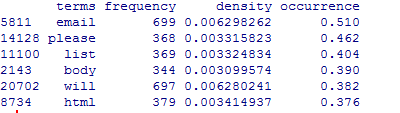
#看看情况,截图与书上并不一致
head(spam.df[with(spam.df,order(-occurrence)),])
#接下来构造正常邮件的,跟垃圾邮件一样,但要注意限制在500封,因为垃圾邮件也只有500封
easyham.path<-'data\\easy_ham\\'
easyham.docs<-dir(easyham.path)
easyham.docs<-easyham.docs[which(easyham.docs!='cmds')]
easyham.docs<-easyham.docs[1:500]
all.easyham<-sapply(easyham.docs,function(p) get.msg(paste(easyham.path,p,sep='')))
get.tdm <- function(doc.vec)
{
control <- list(stopwords = TRUE,
removePunctuation = TRUE,
removeNumbers = TRUE,
minDocFreq = 2)
doc.corpus <- Corpus(VectorSource(doc.vec))
doc.dtm <- TermDocumentMatrix(doc.corpus, control)
return(doc.dtm)
}
easyham.tdm<-get.tdm(all.easyham)
easyham.matrix<-as.matrix(easyham.tdm)
easyham.counts<-rowSums(easyham.matrix)
easyham.df<-data.frame(cbind(names(easyham.counts),as.numeric(easyham.counts)),stringsAsFactors=FALSE)
names(easyham.df)<-c('terms','frequency')
easyham.df$frequency<-as.numeric(easyham.df$frequency)
easyham.occurrence<-sapply(1:nrow(easyham.matrix),function(i) {length(which(easyham.matrix[i,]>0))/ncol(easyham.matrix)})
easyham.density<-easyham.df$frequency/sum(easyham.df$frequency)
easyham.df<-transform(easyham.df,density=easyham.density,occurrence=easyham.occurrence)
#接下来定义分类器,目的是给出一封邮件,用分类器来判定是正常邮件还是垃圾邮件
#新邮件中有些词已经在分类器中,但有些词不在分类器中,此时将未出现的词的概率c定为0.0001%
#假设是垃圾邮件和是正常邮件的可能性相同,将每一类的先验概率prior都设为50%
#以下函数用于分类
classify.email <- function(path, training.df, prior = 0.5, c = 1e-6)
{
# Here, we use many of the support functions to get the
# email text data in a workable format
msg <- get.msg(path)
msg.tdm <- get.tdm(msg)
msg.freq <- rowSums(as.matrix(msg.tdm))
# Find intersections of words
msg.match <- intersect(names(msg.freq), training.df$term)
# Now, we just perform the naive Bayes calculation
if(length(msg.match) < 1)
{
#没有任何词出现在垃圾邮件集中,length(msg.freq)是词的个数
return(prior * c ^ (length(msg.freq)))
}
else
{
#找出共现词的文档频率放到match.probs
match.probs <- training.df$occurrence[match(msg.match, training.df$term)]
return(prior * prod(match.probs) * c ^ (length(msg.freq) - length(msg.match)))
}
}
#可以应用了
hardham.docs <- dir(hardham.path)
hardham.docs <- hardham.docs[which(hardham.docs != "cmds")]
#应用正常邮件词频,得出是正常邮件的概率
hardham.spamtest <- sapply(hardham.docs,
function(p) classify.email(file.path(hardham.path, p), training.df = spam.df))
#应用垃圾邮件词频,得出是垃圾邮件的概率
hardham.hamtest <- sapply(hardham.docs,
function(p) classify.email(file.path(hardham.path, p), training.df = easyham.df))
#如果一封邮件是正常邮件的概率大于是垃圾邮件的概率,返回TRUE,否则返回FALSE
hardham.res <- ifelse(hardham.spamtest > hardham.hamtest,
TRUE,
FALSE)
summary(hardham.res)
#不能只拿正常邮件来测试,把刚才的正常和垃圾邮件都拿来分类看看效果
#结果分三个列,正常邮件概率,垃圾邮件概率和判别结果
spam.classifier <- function(path)
{
pr.spam <- classify.email(path, spam.df)
pr.ham <- classify.email(path, easyham.df)
return(c(pr.spam, pr.ham, ifelse(pr.spam > pr.ham, 1, 0)))
}
#把所有没分类的文件合并起来
easyham2.docs <- dir(easyham2.path)
easyham2.docs <- easyham2.docs[which(easyham2.docs != "cmds")]
hardham2.docs <- dir(hardham2.path)
hardham2.docs <- hardham2.docs[which(hardham2.docs != "cmds")]
spam2.docs <- dir(spam2.path)
spam2.docs <- spam2.docs[which(spam2.docs != "cmds")]
# 全部分类
easyham2.class <- suppressWarnings(lapply(easyham2.docs,
function(p)
{
spam.classifier(file.path(easyham2.path, p))
}))
hardham2.class <- suppressWarnings(lapply(hardham2.docs,
function(p)
{
spam.classifier(file.path(hardham2.path, p))
}))
spam2.class <- suppressWarnings(lapply(spam2.docs,
function(p)
{
spam.classifier(file.path(spam2.path, p))
}))
# 创建单个数据框包含了全部要分类的数据
easyham2.matrix <- do.call(rbind, easyham2.class)
easyham2.final <- cbind(easyham2.matrix, "EASYHAM")
hardham2.matrix <- do.call(rbind, hardham2.class)
hardham2.final <- cbind(hardham2.matrix, "HARDHAM")
spam2.matrix <- do.call(rbind, spam2.class)
spam2.final <- cbind(spam2.matrix, "SPAM")
class.matrix <- rbind(easyham2.final, hardham2.final, spam2.final)
class.df <- data.frame(class.matrix, stringsAsFactors = FALSE)
names(class.df) <- c("Pr.SPAM" ,"Pr.HAM", "Class", "Type")
class.df$Pr.SPAM <- as.numeric(class.df$Pr.SPAM)
class.df$Pr.HAM <- as.numeric(class.df$Pr.HAM)
class.df$Class <- as.logical(as.numeric(class.df$Class))
class.df$Type <- as.factor(class.df$Type)
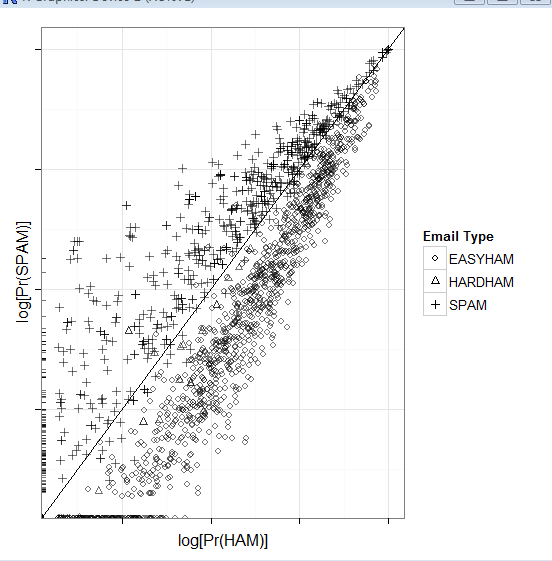
# 画图
class.plot <- ggplot(class.df, aes(x = log(Pr.HAM), log(Pr.SPAM))) +
geom_point(aes(shape = Type, alpha = 0.5)) +
stat_abline(yintercept = 0, slope = 1) +
scale_shape_manual(values = c("EASYHAM" = 1,
"HARDHAM" = 2,
"SPAM" = 3),
name = "Email Type") +
scale_alpha(guide = "none") +
xlab("log[Pr(HAM)]") +
ylab("log[Pr(SPAM)]") +
theme_bw() +
theme(axis.text.x = element_blank(), axis.text.y = element_blank())
print(class.plot)
get.results <- function(bool.vector)
{
results <- c(length(bool.vector[which(bool.vector == FALSE)]) / length(bool.vector),
length(bool.vector[which(bool.vector == TRUE)]) / length(bool.vector))
return(results)
}
# 给出正确率
easyham2.col <- get.results(subset(class.df, Type == "EASYHAM")$Class)
hardham2.col <- get.results(subset(class.df, Type == "HARDHAM")$Class)
spam2.col <- get.results(subset(class.df, Type == "SPAM")$Class)
class.res <- rbind(easyham2.col, hardham2.col, spam2.col)
colnames(class.res) <- c("NOT SPAM", "SPAM")
print(class.res)

Machine Learning for hackers读书笔记(三)分类:垃圾邮件过滤的更多相关文章
- Machine Learning for hackers读书笔记(六)正则化:文本回归
data<-'F:\\learning\\ML_for_Hackers\\ML_for_Hackers-master\\06-Regularization\\data\\' ranks < ...
- Machine Learning for hackers读书笔记(四)排序:智能收件箱
#数据集来源http://spamassassin.apache.org/publiccorpus/ #加载数据 library(tm)library(ggplot2)data.path<-'F ...
- Machine Learning for hackers读书笔记(十)KNN:推荐系统
#一,自己写KNN df<-read.csv('G:\\dataguru\\ML_for_Hackers\\ML_for_Hackers-master\\10-Recommendations\\ ...
- Machine Learning for hackers读书笔记(九)MDS:可视化地研究参议员相似性
library('foreign') library('ggplot2') data.dir <- file.path('G:\\dataguru\\ML_for_Hackers\\ML_for ...
- Machine Learning for hackers读书笔记(八)PCA:构建股票市场指数
library('ggplot2') prices <- read.csv('G:\\dataguru\\ML_for_Hackers\\ML_for_Hackers-master\\08-PC ...
- Machine Learning for hackers读书笔记(七)优化:密码破译
#凯撒密码:将每一个字母替换为字母表中下一位字母,比如a变成b. english.letters <- c('a', 'b', 'c', 'd', 'e', 'f', 'g', 'h', 'i' ...
- Machine Learning for hackers读书笔记(二)数据分析
#均值:总和/长度 mean() #中位数:将数列排序,若个数为奇数,取排好序数列中间的值.若个数为偶数,取排好序数列中间两个数的平均值 median() #R语言中没有众数函数 #分位数 quant ...
- Machine Learning for hackers读书笔记(一)使用R语言
#使用数据:UFO数据 #读入数据,该文件以制表符分隔,因此使用read.delim,参数sep设置分隔符为\t #所有的read函数都把string读成factor类型,这个类型用于表示分类变量,因 ...
- Machine Learning for hackers读书笔记_一句很重要的话
为了培养一个机器学习领域专家那样的直觉,最好的办法就是,对你遇到的每一个机器学习问题,把所有的算法试个遍,直到有一天,你凭直觉就知道某些算法行不通.
随机推荐
- 使用Tesseract OCR识别验证码
1.下载Tessrac OCR,默认安装 2.把验证码code.jpg图片放在D盘 3.打开cmd,进入D盘,输入:tesseract code.jpg result 4.进入D盘,生成了resul ...
- 分别向Set集合以及List集合中添加"A"、"a"、"c"、"C"、"a",观察重复值"a"能否添加成功
package lianxi; import java.util.*; public class JhSet { public static void main(String[] args) { Se ...
- Set Font Properties On Mouse Hover Of Push Button And Text Items At Run time In Oracle Forms
Change the font size and weight of text items and push buttons on mouse hover in Oracle Forms. An ...
- 2016ACM/ICPC亚洲区大连站-重现赛
题目链接:http://acm.hdu.edu.cn/search.php?field=problem&key=2016ACM%2FICPC%D1%C7%D6%DE%C7%F8%B4%F3%C ...
- VS2008中开发智能设备程序的一些总结
原文链接:http://blog.csdn.net/citybug_nj/article/details/2598705 程序中包括四个部分: 系统配置 这个部分用来配置系统中的相关参数,参数包括数据 ...
- hdu 2141 (二分)
链接:http://acm.hdu.edu.cn/showproblem.php?pid=2141 Can you find it? Time Limit: 10000/3000 MS (Java/O ...
- poj 1502 最短路+坑爹题意
链接:http://poj.org/problem?id=1502 MPI Maelstrom Time Limit: 1000MS Memory Limit: 10000K Total Subm ...
- python_way day15 HTML-DAY2 HTML-DAY2、JS
python_way day15 HTML-DAY2 html-css回顾 javascript 一.html-css回顾 1.input与+,-号的写法 <!DOCTYPE html> ...
- php xml 操作。
参考 文章:http://www.cnblogs.com/zcy_soft/archive/2011/01/26/1945482.html DOMDocument相关的内容. 属性: Attribut ...
- JQery 中的 $(".bb:eq(1)") eq () 解释。。
这是一段代码: <div id="bb">a</div> <div id="bb">b</div> <di ...