
python 井字棋(Tic Tac Toe)
说明
用python实现了井字棋,整个框架是本人自己构思的,自认为比较满意。另外,90%+的代码也是本人逐字逐句敲的。
minimax算法还没完全理解,所以参考了这里的代码,并作了修改。
特点
- 可以选择人人、人机、机人、机机四种对战模式之一
- 电脑玩家的AI使用了minimax算法,带apha-beta剪枝
- 电脑玩家在思考时,时时刻刻都有一个“假想敌”。以便使得minimax算法运转起来
代码
作者:hhh5460

时间:2017年6月26日

# 棋盘

class Board(object):

    def __init__(self):

        #self._board = '-'*9 # 坑!!

        self._board = ['-' for _ in range(9)]

        self._history = [] # 棋谱

    # 按指定动作,放入棋子

    def _move(self, action, take):

        if self._board[action] == '-':

            self._board[action] = take

            self._history.append((action, take)) # 加入棋谱

    # 撤销动作,拿走棋子

    def _unmove(self, action):

        self._board[action] = '-'

        self._history.pop()

    # 棋盘快照

    def get_board_snapshot(self):

        return self._board[:]

    # 取棋盘上的合法走法

    def get_legal_actions(self):

        actions = []

        for i in range(9):

            if self._board[i] == '-':

                actions.append(i)

        return actions

    # 判断走法是否合法

    def is_legal_action(self, action):

        return self._board[action] == '-'

    # 终止检测

    def teminate(self):

        board = self._board

        lines = [board[0:3], board[3:6], board[6:9], board[0::3], board[1::3], board[2::3], board[0::4], board[2:7:2]]

        if ['X']*3 in lines or ['O']*3 in lines or '-' not in board:

            return True

        else:

            return False

    # 胜负检查

    def get_winner(self):

        board = self._board

        lines = [board[0:3], board[3:6], board[6:9], board[0::3], board[1::3], board[2::3], board[0::4], board[2:7:2]]

        if ['X']*3 in lines:

            return 0

        elif ['O']*3 in lines:

            return 1

        else:

            return 2

    # 打印棋盘

    def print_b(self):

        board = self._board

        for i in range(len(board)):

            print(board[i], end='')

            if (i+1)%3 == 0:

                print()

    # 打印棋谱

    def print_history(self):

        print(self._history)

# 玩家

class Player(object):

    '''

    玩家只做两件事:思考、落子

        1. 思考 --> 得到走法

        2. 落子 --> 执行走法,改变棋盘

    '''

    def __init__(self, take='X'): # 默认执的棋子为 take = 'X'

        self.take=take

    def think(self, board):

        pass

    def move(self, board, action):

        board._move(action, self.take)

# 人类玩家

class HumanPlayer(Player):

    def __init__(self, take):

        super().__init__(take)

    def think(self, board):

        while True:

            action = input('Please input a num in 0-8:')

            if len(action)==1 and action in '012345678' and board.is_legal_action(int(action)):

                return int(action)

# 电脑玩家

class AIPlayer(Player):

    def __init__(self, take):

        super().__init__(take)

    def think(self, board):

        print('AI is thinking ...')

        take = ['X','O'][self.take=='X']

        player = AIPlayer(take)     # 假想敌!!!

        _, action = self.minimax(board, player)

        #print('OK')

        return action

    # 极大极小法搜索,α-β剪枝

    def minimax(self, board, player, depth=0) :

        '''参考:https://stackoverflow.com/questions/44089757/minimax-algorithm-for-tic-tac-toe-python'''

        if self.take == "O":

            bestVal = -10

        else:

            bestVal = 10

        if board.teminate() :

            if board.get_winner() == 0 :

                return -10 + depth, None

            elif board.get_winner() == 1 :

                return 10 - depth, None

            elif board.get_winner() == 2 :

                return 0, None

        for action in board.get_legal_actions() : # 遍历合法走法

            board._move(action, self.take)

            val, _ = player.minimax(board, self, depth+1) # 切换到 假想敌!!!

            board._unmove(action) # 撤销走法,回溯

            if self.take == "O" :

                if val > bestVal:

                    bestVal, bestAction = val, action

            else :

                if val < bestVal:

                    bestVal, bestAction = val, action

        return bestVal, bestAction

# 游戏

class Game(object):

    def __init__(self):

        self.board = Board()

        self.current_player = None

    # 生成玩家

    def mk_player(self, p, take='X'): # p in [0,1]

        if p==0:

            return HumanPlayer(take)

        else:

            return AIPlayer(take)

    # 切换玩家

    def switch_player(self, player1, player2):

        if self.current_player is None:

            return player1

        else:

            return [player1, player2][self.current_player == player1]

    # 打印赢家

    def print_winner(self, winner): # winner in [0,1,2]

        print(['Winner is player1','Winner is player2','Draw'][winner])

    # 运行游戏

    def run(self):

        ps = input("Please select two player's type:\n\t0.Human\n\t1.AI\nSuch as:0 0\n")

        p1, p2 = [int(p) for p in ps.split(' ')]

        player1, player2 = self.mk_player(p1, 'X'), self.mk_player(p2, 'O') # 先手执X,后手执O

        print('\nGame start!\n')

        self.board.print_b() # 显示棋盘

        while True:

            self.current_player = self.switch_player(player1, player2) # 切换当前玩家

            action = self.current_player.think(self.board) # 当前玩家对棋盘进行思考后,得到招法

            self.current_player.move(self.board, action)   # 当前玩家执行招法,改变棋盘

            self.board.print_b() # 显示当前棋盘

            if self.board.teminate(): # 根据当前棋盘,判断棋局是否终止

                winner = self.board.get_winner() # 得到赢家 0,1,2

                break

        self.print_winner(winner)

        print('Game over!')

        self.board.print_history()

if __name__ == '__main__':

    Game().run()
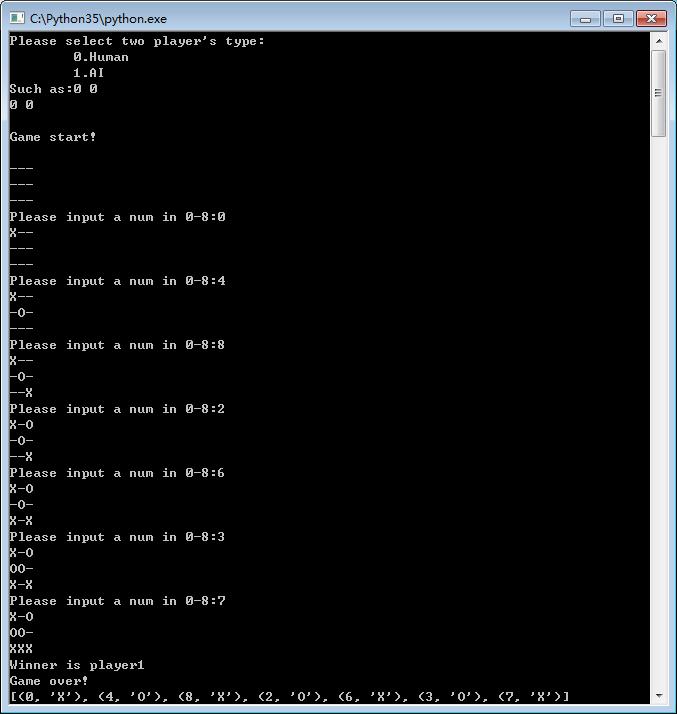
效果图
下图是人人对战的结果
python 井字棋(Tic Tac Toe)的更多相关文章
- [CareerCup] 17.2 Tic Tac Toe 井字棋游戏
17.2 Design an algorithm to figure out if someone has won a game oftic-tac-toe. 这道题让我们判断玩家是否能赢井字棋游戏, ...
- LeetCode 5275. 找出井字棋的获胜者 Find Winner on a Tic Tac Toe Game
地址 https://www.acwing.com/solution/LeetCode/content/6670/ 题目描述A 和 B 在一个 3 x 3 的网格上玩井字棋. 井字棋游戏的规则如下: ...
- Principle of Computing (Python)学习笔记(7) DFS Search + Tic Tac Toe use MiniMax Stratedy
1. Trees Tree is a recursive structure. 1.1 math nodes https://class.coursera.org/principlescomputin ...
- python 游戏(井字棋)
1. 游戏思路和流程图 实现功能,现实生活中的井字棋玩法 游戏流程图 2. 使用模块和游戏提示 import random def game_info(): print('欢迎来到井字棋游戏') pr ...
- POJ 2361 Tic Tac Toe
题目:给定一个3*3的矩阵,是一个井字过三关游戏.开始为X先走,问你这个是不是一个合法的游戏.也就是,现在这种情况,能不能出现.如果有人赢了,那应该立即停止.那么可以知道X的步数和O的步数应该满足x= ...
- [LeetCode] 348. Design Tic-Tac-Toe 设计井字棋游戏
Design a Tic-tac-toe game that is played between two players on a n x n grid. You may assume the fol ...
- 井字棋(Tic-Tac-Toe)
井字棋介绍:https://en.wikipedia.org/wiki/Tic-tac-toe 井字棋简单,但是获胜策略却和直觉不同,四角比中间重要性要高,而且先手有很大的获胜概率获胜(先手胜:91, ...
- python3 井字棋 GUI - 人机对战、机器对战 (threading、tkinter库)
python3 井字棋 GUI - 人机对战.机器对战 功能 GUI界面 人机对战(可选择机器先走) 机器对战(50局) 流程图 内核 棋盘 [0][1][2] [3][4][5] [6][7][8] ...
- [LeetCode] Design Tic-Tac-Toe 设计井字棋游戏
Design a Tic-tac-toe game that is played between two players on a n x n grid. You may assume the fol ...
随机推荐
- Lodash学习笔记
有多年开发经验的工程师,往往都会有自己的一套工具库,称为utils.helpers等等,这套库一方面是自己的技术积累,另一方面也是对某项技术的扩展,领先于技术规范的制订和实现. Lodash就是这样的 ...
- 理解 Azure 平台中虚拟机的计算能力
虚拟化平台至今已经发展了十多年的时间.其中 Hyper-V 技术现在也已经是第三代版本.用户对于虚拟化计算也越来越接受,这也有了公有云发展的基础.然而在很多时候,用户在使用基于 Hyper-V 的 A ...
- Oracle EBS OM 删除订单行
DECLARE l_header_rec OE_ORDER_PUB.Header_Rec_Type; l_line_tbl OE_ORDER_PUB.Line_Tbl_Type; l_action_r ...
- 网工最实用最常用的网络命令之一——Ping 命令详解(一)
Ping是Windows.Unix和Linux系统下的一个命令.ping也属于一个通信协议,是TCP/IP协议的一部分.利用“ping”命令可以检查网络是否连通,可以很好地帮助我们分析和判定网络故障. ...
- Python通过LDAP验证、查找用户(class,logging)
定义一个类,用于初始化ldap连接,验证.查找用户等功能 # -*- coding: UTF-8 -*- import sys reload(sys) sys.setdefaultencoding(' ...
- tcp的半连接与完全连接队列
队列及参数 https://segmentfault.com/a/1190000008224853 server端的半连接队列(syn队列) 在三次握手协议中,服务器维护一个半连接队列,该队列为每个客 ...
- NFS 系统的搭建
问题: 由于工作,需要,不断得进行挂在硬盘重装系统,NFS 系统给了我一个很好的解决方案.于是决定写一篇博客,防止以后再次使用的时候,能够很快得重新建立NFS 文件系统. 调研: NFS(Networ ...
- python基础学习21----进程
python中的多线程其实并不是真正的多线程,如果想要充分地使用多核CPU的资源,在python中大部分情况需要使用多进程. 进程与线程的使用有很多相似之处,有关线程方面的知识请参考https://w ...
- windows服务器安装telnet的方法指引
摘要: 1.telnet是一种网络排查的工具 2.当发现一台服务器异常的时候,通常有两个cmd命名做排查 3.ping 服务器ip,看网络是否联通 4.telnet 服务器ip 端口 看该服务器指定端 ...
- OpenGL超级宝典笔记——画三角形(转)
http://my.oschina.net/sweetdark/blog/161002 学习了画线的知识,我们可以使用GL_LINE_LOOP来画闭合的多边形.但是使用这种方式画出来的只有线框,多边形 ...