
springboot + redis(单机版)
本次和大家分享的是在springboot集成使用redis,这里使用的是redis的jedis客户端(这里我docker运行的redis,可以参考 docker快速搭建几个常用的第三方服务),如下添加依赖:
<dependency>

  <groupId>redis.clients</groupId>

  <artifactId>jedis</artifactId>

</dependency>
然后需要redis的相关配置(这里我的redis密码是空),在application.yml设置如:
spring:

  redis:

    single: 192.168.146.28:

    jedis:

      pool:

        max-idle:

        max-active:

        max-wait:

    timeout:

    password:
这是redis的一般配置,具体调优可以设置这些参数,下面在JedisConfig类中读取这些设置:
  @Value("${spring.redis.single}")

     private String strSingleNode;

     @Value("${spring.redis.jedis.pool.max-idle}")

     private Integer maxIdle;

     @Value("${spring.redis.jedis.pool.max-active}")

     private Integer maxActive;

     @Value("${spring.redis.jedis.pool.max-wait}")

     private Integer maxAWait;

     @Value("${spring.redis.timeout}")

     private Integer timeout;

     @Value("${spring.redis.password}")

     private String password;
有上面的配置,就需要有代码里面设置下,这里创建一个返回JedisPoolConfig的方法
     /**

      * jedis配置

      *

      * @return

      */

     public JedisPoolConfig getJedisPoolConfig() {

         JedisPoolConfig config = new JedisPoolConfig();

         config.setMaxIdle(maxIdle); #最大空闲数

         config.setMaxWaitMillis(maxAWait); #最大等待时间

         config.setMaxTotal(maxActive); #最大连接数

         return config;

     }
有了配置,接下来就创建JedisPool,这里把JedisPool托管到spring中
   /**

      * 获取jedispool

      *

      * @return

      */

     @Bean

     public JedisPool getJedisPool() {

         JedisPoolConfig config = getJedisPoolConfig();

         System.out.println("strSingleNode:" + this.strSingleNode);

         String[] nodeArr = this.strSingleNode.split(":");

         JedisPool jedisPool = null;

         if (this.password.isEmpty()) {

             jedisPool = new JedisPool(

                     config,

                     nodeArr[],

                     Integer.valueOf(nodeArr[]),

                     this.timeout);

         } else {

             jedisPool = new JedisPool(

                     config,

                     nodeArr[],

                     Integer.valueOf(nodeArr[]),

                     this.timeout,

                     this.password);

         }

         return jedisPool;

     }
上面简单区分了无密码的情况,到此jedis的配置和连接池就基本搭建完了,下面就是封装使用的方法,这里以set和get为例;首先创建个JedisComponent组件,代码如下:
/**

 * Created by Administrator on 2018/8/18.

 */

@Component

public class JedisComponent {

    @Autowired

    JedisPool jedisPool;

    public boolean set(String key, String val) {

        Jedis jedis = null;

        try {

            jedis = jedisPool.getResource();

            return jedis.set(key, val).equalsIgnoreCase("OK");

        } finally {

            if (jedis != null) {

                jedis.close();

            }

        }

    }

    public <T> boolean set(String key, T t) {

        String strJson = JacksonConvert.serilize(t);

        if (strJson.isEmpty()) {

            return false;

        }

        return this.set(key, strJson);

    }

    public String get(String key) {

        Jedis jedis = null;

        try {

            jedis = jedisPool.getResource();

            return jedis.get(key);

        } finally {

            if (jedis != null) {

                jedis.close();

            }

        }

    }

    public <T> T get(String key, Class<T> tClass) {

        String strJson = this.get(key);

        return JacksonConvert.deserilize(strJson, tClass);

    }

}
有了对jedis的调用封装,我们在Controller层的测试用例如下:
   @Autowired

     JedisComponent jedis;

     @GetMapping("/setJedis/{val}")

     public boolean setJedis(@PathVariable String val) {

         return jedis.set("token", val);

     }

     @GetMapping("/getJedis")

     public String getJedis() {

         return jedis.get("token");

     }
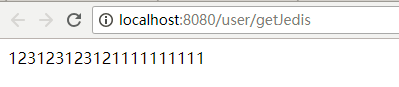
运行set和get的接口效果如:

springboot + redis(单机版)的更多相关文章
- Redis单机版以及集群版的安装搭建以及使用
1,redis单机版 1.1 安装redis n 版本说明 本教程使用redis3.0版本.3.0版本主要增加了redis集群功能. 安装的前提条件: 需要安装gcc:yum install g ...
- 十分钟搭建redis单机版 & java接口调用
本次单机版redis服务器搭建采用的包为redis-3.0.0.tar.gz,主要是记录下安装的心得,不喜勿喷! 一.搭建redis服务器单机版 1.上传redis-3.0.0.tar.gz到服务器上 ...
- Redis单机版安装
1.工具简单介绍 1.博主使用的是Xshell工具 ps:需要设置端口和连接名称,端口一般默认为22,需要的童鞋可以自行百度 2.Redis单机版安装 第一步:安装gcc编译环境 yum instal ...
- linux下redis单机版搭建
1.1.什么是redis Redis是用C语言开发的一个开源的高性能键值对(key-value)数据库.它通过提供多种键值数据类型来适应不同场景下的存储需求,目前为止Redis支持的键值数据类型如下: ...
- 补习系列(14)-springboot redis 整合-数据读写
目录 一.简介 二.SpringBoot Redis 读写 A. 引入 spring-data-redis B. 序列化 C. 读写样例 三.方法级缓存 四.连接池 小结 一.简介 在 补习系列(A3 ...
- SpringBoot+Redis整合
SpringBoot+Redis整合 1.在pom.xml添加Redis依赖 <!--整合Redis--> <dependency> <groupId>org.sp ...
- springboot +redis配置
springboot +redis配置 pom依赖 <dependency> <groupId>org.springframework.boot</groupId> ...
- 【springboot】【redis】springboot+redis实现发布订阅功能,实现redis的消息队列的功能
springboot+redis实现发布订阅功能,实现redis的消息队列的功能 参考:https://www.cnblogs.com/cx987514451/p/9529611.html 思考一个问 ...
- spring boot 学习(十四)SpringBoot+Redis+SpringSession缓存之实战
SpringBoot + Redis +SpringSession 缓存之实战 前言 前几天,从师兄那儿了解到EhCache是进程内的缓存框架,虽然它已经提供了集群环境下的缓存同步策略,这种同步仍然需 ...
随机推荐
- Latex数学公式中的空格表示方法
两个quad空格 a \qquad b 两个m的宽度 quad空格 a \quad b 一个m的宽度 大空格 a\ b 1/3m宽度 中等空格 a\;b 2/7m宽度 小空格 a\,b 1/6m宽度 ...
- DD XOFT虚拟键盘鼠标
下载:http://www.ddxoft.com/ 简介:最多用户选择,最简单易用,最稳定可靠 永久免费 系统底层集成,真正的驱动级硬件模拟 一键安装,即为电脑添加一对可完全编程控制的键盘鼠标,轻松自 ...
- c# 如何读取web.config中的内容(ConfigurationManager)
1.web.config中写入 <appSettings> <add key="TokenQPark" value="http://localho ...
- 把List<string>集合,编程string,并以“,”号分割
List<int> roleIdList = GetRoleIdList(user.ID); string roleIdsStr = ""; if (roleIdLis ...
- Java 线程池(ThreadPoolExecutor)原理分析与使用
在我们的开发中"池"的概念并不罕见,有数据库连接池.线程池.对象池.常量池等等.下面我们主要针对线程池来一步一步揭开线程池的面纱. 使用线程池的好处 1.降低资源消耗 可以重复利用 ...
- 在MFC中UpdateData()的作用
UpdateData()用来刷新数据,其中UpdateData(true)将控件中的数据传递到控件捆绑的变量中去.UpdateData(false)将变量值传递到控件中去.例如:窗口中用 DDX_Te ...
- 如何在ST官网下载STM32固件库
1.首先要注册一个ST账号,下载的时候需要. 2.找到工具与软件 3.进去之后选"产品列表" 4.在产品列表里选STM32微控制器软件,直接点下图标号2,不要点左边的加号 5.进去 ...
- 关于EffictiveC++笔记
我根据自己的理解,对原文的精华部分进行了提炼,并在一些难以理解的地方加上了自己的"可能比较准确"的「翻译」.
- 计算机17-3,4作业E
E.complete number Description 完数是指一个整数的因子和等于这个数本身,例如6=1+2+3,所以6是一个完数. 按照给定数据范围,找出期中所有完数并输出. Input 数据 ...
- 最新.net和Java调用SAP RFC中间件下载
还记得2012年初我发布的全网络第一个关于.net 连接SAP RFC的NCO3原创博文,用的就是SAP出的最新的.Net Connector 3.0的版本,在那个时候都是普遍用其他蹩脚的方式或Web ...