
在Winform开发中使用Grid++报表
之前一直使用各种报表工具,如RDLC、DevExpress套件的XtraReport报表,在之前一些随笔也有介绍,最近接触锐浪的Grid++报表,做了一些测试例子和辅助类来处理报表内容,觉得还是很不错的,特别是它的作者提供了很多报表的设计模板案例,功能还是非常强大的。试着用来做一些简单的报表,测试下功能,发现常规的二维表、套打、条形码二维码等我关注的功能都有,是一个比较强大的报表控件,本篇随笔主要介绍在Winform开发中使用Grid++报表设计报表模板,以及绑定数据的处理过程。
1、报表模板设计
这个报表系统,报表模板提供了很多案例,我们可以大概浏览下其功能。
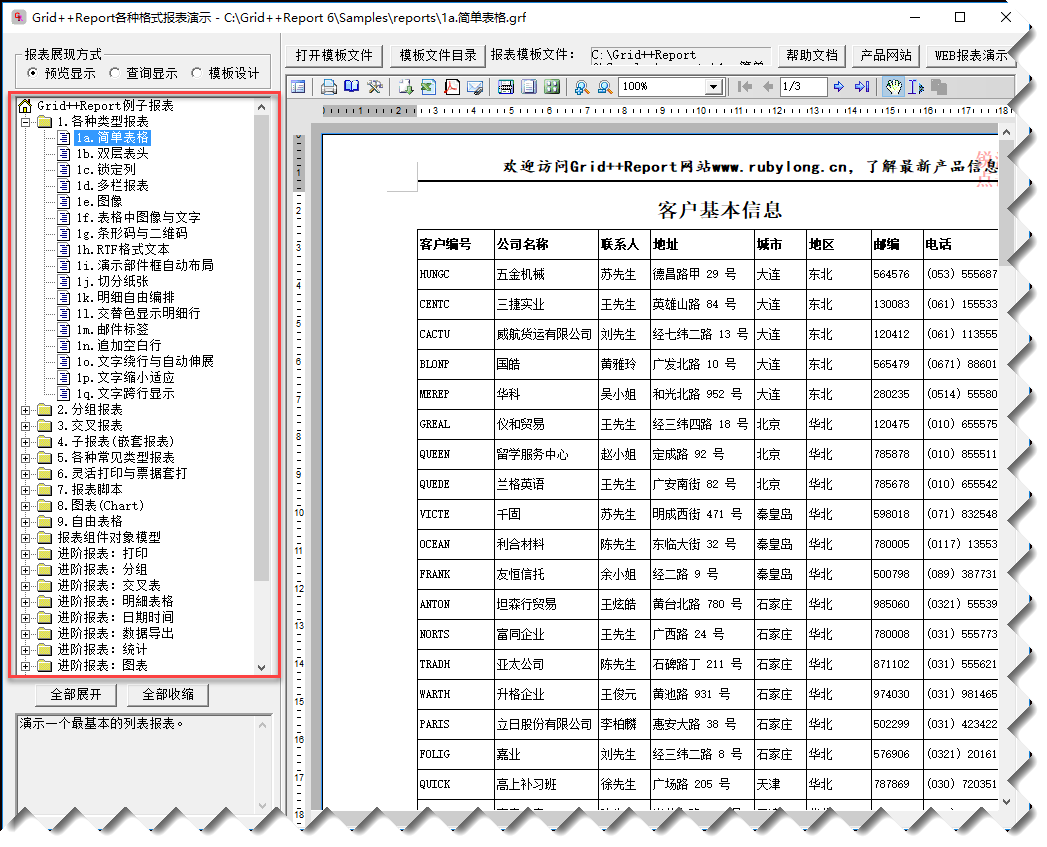
它对应在相应的文件目录里面,我们可以逐一查看了解下,感觉提供这么多报表还是很赞的,我们可以参考着来用,非常好。

整个报表主要是基于现有数据进行一个报表的模板设计的,如果要预览效果,我们一般是需要绑定现有的数据,可以从各种数据库提供数据源,然后设计报表模板,进行实时的数据和格式查看及调整。
空白的报表模板大概如下所示,包含页眉页脚,以及明细表格的内容。
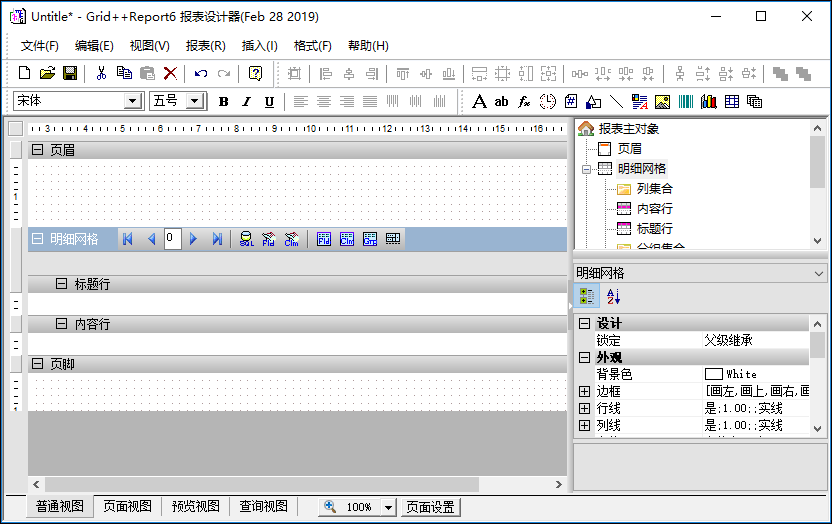
根据它的教程,模仿着简单的做了一个报表,也主要是设计报表格式的调整,和数据源的处理的关系,我们做一个两个报表就可以很快上手了。
为了动态的加入我们表格所需要的列,我们可以通过数据库里面的字段进行加入,首先提供数据源,指定我们具体的表即可(如果是自定义的信息,则可以手工添加字段)

这个里面就是配置不同的数据库数据源了
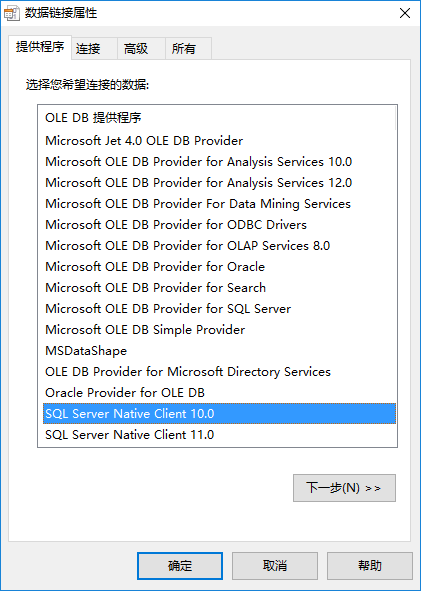
如SQLServer数据库的配置信息如下。
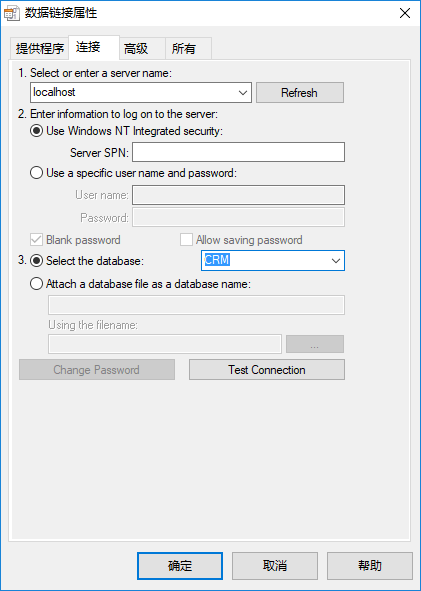
为了方便,我们可以利用案例的Access数据库,也就是Northwind.mdb来测试我们的报表,弄好这些我们指定对应的数据表数据即可。
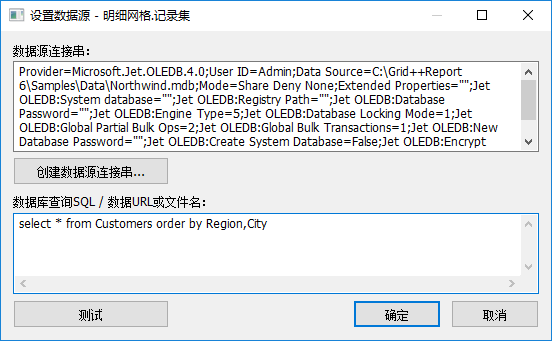
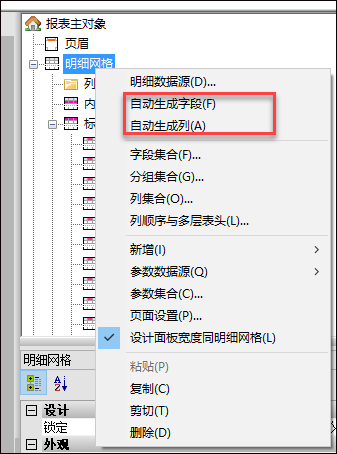
这里面配置好数据库表信息后,我们就可以用它生成相关的字段和对应的列信息了
修改列的表头,让它符合中文的表头列,如下所示。
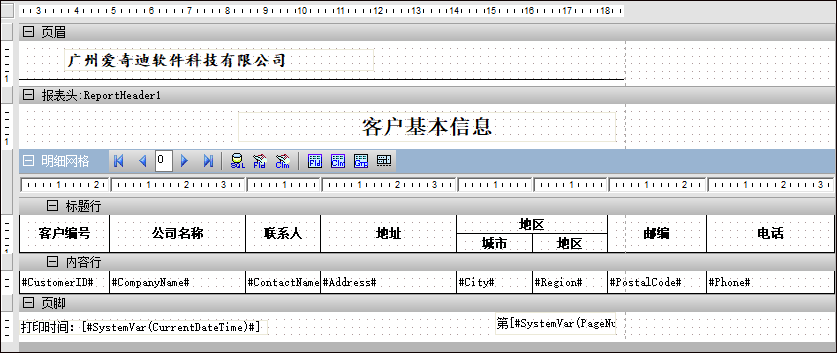
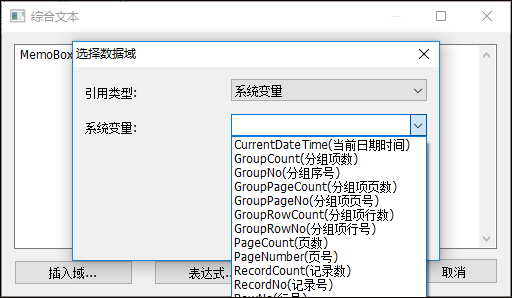
我们在页脚出,加入了打印时间,页码的一些系统变量,具体操作就是添加一个综合文本,然后在内容里面插入指定的域内容即可,如下所示
预览报表,我们就可以看到具体的报表格式显示了。
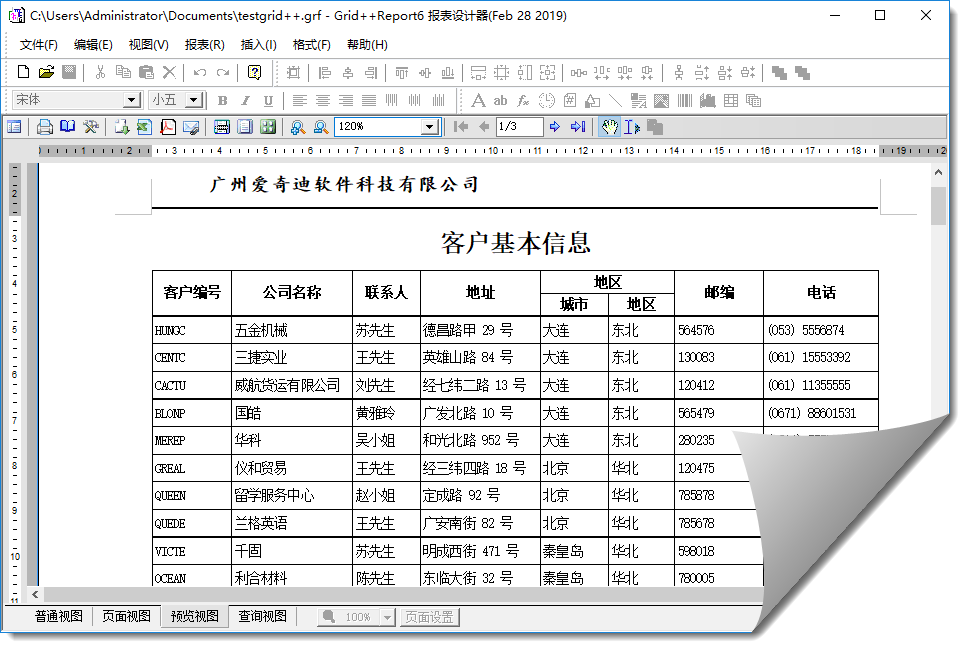
通过上面的操作,感觉生成一个报表还是很方便的,接着我有根据需要做了一个二维码的报表显示,方便打印资产标签。

绑定数据源显示的报表视图如下所示,看起来还是蛮好的。

2、数据绑定
一般我们绑定数据源,有的时候可以直接指定数据库连接,有时候可以绑定具体的数据列表,如DataTable或者List<T>这样的数据源,不同的方式报表控件的代码绑定不同。
直接绑定数据表的路径如下所示。
        /// <summary>

        /// 普通连接数据库的例子-打印预览

        /// </summary>

        private void btnNormalDatabase_Click(object sender, EventArgs e)

        {

            Report = new GridppReport();

            string reportPath = Path.Combine(Application.StartupPath, "Reports\\testgrid++.grf");

            string dbPath = Path.Combine(Application.StartupPath, "Data\\NorthWind.mdb");

            //从对应文件中载入报表模板数据

            Report.LoadFromFile(reportPath);

            //设置与数据源的连接串,因为在设计时指定的数据库路径是绝对路径。

            if (Report.DetailGrid != null)

            {

                string connstr = Utility.GetDatabaseConnectionString(dbPath);

                Report.DetailGrid.Recordset.ConnectionString = connstr;

            }

            Report.PrintPreview(true);

        }
而如果需要绑定和数据库无关的动态数据源,那么就需要通过控件的FetchRecord进行处理了,如下代码所示。
Report.FetchRecord += new _IGridppReportEvents_FetchRecordEventHandler(ReportFetchRecord);
通过这样我们增加每一个对应的列单元格信息,如下是随带案例所示
        //在C#中一次填入一条记录不能成功,只能使用一次将记录全部填充完的方式

        private void ReportFetchRecord()

        {

            //将全部记录一次填入

            Report.DetailGrid.Recordset.Append();

            FillRecord1();

            Report.DetailGrid.Recordset.Post();

            Report.DetailGrid.Recordset.Append();

            FillRecord2();

            Report.DetailGrid.Recordset.Post();

            Report.DetailGrid.Recordset.Append();

            FillRecord3();

            Report.DetailGrid.Recordset.Post();

        }

        private void FillRecord1()

        {

            C1Field.AsString = "A";

            I1Field.AsInteger = ;

            F1Field.AsFloat = 1.01;

        }

        private void FillRecord2()

        {

            C1Field.AsString = "B";

            I1Field.AsInteger = ;

            F1Field.AsFloat = 1.02;

        }

        private void FillRecord3()

        {

            C1Field.AsString = "C";

            I1Field.AsInteger = ;

            F1Field.AsFloat = 1.03;

        }
这样处理肯定很麻烦,我们常规做法是弄一个辅助类,来处理DataTable和List<T>等这样类型数据的动态增加操作。
        /// <summary>

        /// 绑定实体类集合的例子-打印预览

        /// </summary>

        private void btnBindList_Click(object sender, EventArgs e)

        {

            Report = new GridppReport();

            //从对应文件中载入报表模板数据

            string reportPath = Path.Combine(Application.StartupPath, "Reports\\testList.grf");

            Report.LoadFromFile(reportPath);

            Report.FetchRecord += ReportList_FetchRecord;

            Report.PrintPreview(true);

        }

        /// <summary>

        /// 绑定DataTable的例子-打印预览

        /// </summary>

        private void btnBindDatatable_Click(object sender, EventArgs e)

        {

            Report = new GridppReport();

            //从对应文件中载入报表模板数据

            string reportPath = Path.Combine(Application.StartupPath, "Reports\\testList.grf");

            Report.LoadFromFile(reportPath);

            Report.FetchRecord += ReportList_FetchRecord2;

            Report.PrintPreview(true);

        }

        private void ReportList_FetchRecord()

        {

            List<ProductInfo> list = BLLFactory<Product>.Instance.GetAll();

            GridReportHelper.FillRecordToReport<ProductInfo>(Report, list);

        }

        private void ReportList_FetchRecord2()

        {

            var dataTable = BLLFactory<Product>.Instance.GetAllToDataTable();

            GridReportHelper.FillRecordToReport(Report, dataTable);

        }
其中辅助类 GridReportHelper 代码如下所示。
    /// <summary>

    /// Gird++报表的辅助类

    /// </summary>

    public class GridReportHelper

    {

        private struct MatchFieldPairType

        {

            public IGRField grField;

            public int MatchColumnIndex;

        }

        /// <summary>

        /// 将 DataReader 的数据转储到 Grid++Report 的数据集中

        /// </summary>

        /// <param name="Report">报表对象</param>

        /// <param name="dr">DataReader对象</param>

        public static void FillRecordToReport(IGridppReport Report, IDataReader dr)

        {

            MatchFieldPairType[] MatchFieldPairs = new MatchFieldPairType[Math.Min(Report.DetailGrid.Recordset.Fields.Count, dr.FieldCount)];

            //根据字段名称与列名称进行匹配,建立DataReader字段与Grid++Report记录集的字段之间的对应关系

            int MatchFieldCount = ;

            for (int i = ; i < dr.FieldCount; ++i)

            {

                foreach (IGRField fld in Report.DetailGrid.Recordset.Fields)

                {

                    if (string.Compare(fld.RunningDBField, dr.GetName(i), true) == )

                    {

                        MatchFieldPairs[MatchFieldCount].grField = fld;

                        MatchFieldPairs[MatchFieldCount].MatchColumnIndex = i;

                        ++MatchFieldCount;

                        break;

                    }

                }

            }

            // 将 DataReader 中的每一条记录转储到Grid++Report 的数据集中去

            while (dr.Read())

            {

                Report.DetailGrid.Recordset.Append();

                for (int i = ; i < MatchFieldCount; ++i)

                {

                    var columnIndex = MatchFieldPairs[i].MatchColumnIndex;

                    if (!dr.IsDBNull(columnIndex))

                    {

                        MatchFieldPairs[i].grField.Value = dr.GetValue(columnIndex);

                    }

                }

                Report.DetailGrid.Recordset.Post();

            }

        }

        /// <summary>

        /// 将 DataTable 的数据转储到 Grid++Report 的数据集中

        /// </summary>

        /// <param name="Report">报表对象</param>

        /// <param name="dt">DataTable对象</param>

        public static void FillRecordToReport(IGridppReport Report, DataTable dt)

        {

            MatchFieldPairType[] MatchFieldPairs = new MatchFieldPairType[Math.Min(Report.DetailGrid.Recordset.Fields.Count, dt.Columns.Count)];

            //根据字段名称与列名称进行匹配,建立DataReader字段与Grid++Report记录集的字段之间的对应关系

            int MatchFieldCount = ;

            for (int i = ; i < dt.Columns.Count; ++i)

            {

                foreach (IGRField fld in Report.DetailGrid.Recordset.Fields)

                {

                    if (string.Compare(fld.Name, dt.Columns[i].ColumnName, true) == )

                    {

                        MatchFieldPairs[MatchFieldCount].grField = fld;

                        MatchFieldPairs[MatchFieldCount].MatchColumnIndex = i;

                        ++MatchFieldCount;

                        break;

                    }

                }

            }

            // 将 DataTable 中的每一条记录转储到 Grid++Report 的数据集中去

            foreach (DataRow dr in dt.Rows)

            {

                Report.DetailGrid.Recordset.Append();

                for (int i = ; i < MatchFieldCount; ++i)

                {

                    var columnIndex = MatchFieldPairs[i].MatchColumnIndex;

                    if (!dr.IsNull(columnIndex))

                    {

                        MatchFieldPairs[i].grField.Value = dr[columnIndex];

                    }

                }

                Report.DetailGrid.Recordset.Post();

            }

        }

        /// <summary>

        /// List加载数据集

        /// </summary>

        /// <typeparam name="T"></typeparam>

        /// <param name="Report">报表对象</param>

        /// <param name="list">列表数据</param>

        public static void FillRecordToReport<T>(IGridppReport Report, List<T> list)

        {

            Type type = typeof(T);  //反射类型

            MatchFieldPairType[] MatchFieldPairs = new MatchFieldPairType[Math.Min(Report.DetailGrid.Recordset.Fields.Count, type.GetProperties().Length)];

            //根据字段名称与列名称进行匹配,建立字段与Grid++Report记录集的字段之间的对应关系

            int MatchFieldCount = ;

            int i = ;

            MemberInfo[] members = type.GetMembers();

            foreach (MemberInfo memberInfo in members)

            {

                foreach (IGRField fld in Report.DetailGrid.Recordset.Fields)

                {

                    if (string.Compare(fld.Name, memberInfo.Name, true) == )

                    {

                        MatchFieldPairs[MatchFieldCount].grField = fld;

                        MatchFieldPairs[MatchFieldCount].MatchColumnIndex = i;

                        ++MatchFieldCount;

                        break;

                    }

                }

                ++i;

            }

            // 将 DataTable 中的每一条记录转储到 Grid++Report 的数据集中去

            foreach (T t in list)

            {

                Report.DetailGrid.Recordset.Append();

                for (i = ; i < MatchFieldCount; ++i)

                {

                    object objValue = GetPropertyValue(t, MatchFieldPairs[i].grField.Name);

                    if (objValue != null)

                    {

                        MatchFieldPairs[i].grField.Value = objValue;

                    }

                }

                Report.DetailGrid.Recordset.Post();

            }

        }

        /// <summary>

        /// 获取对象实例的属性值

        /// </summary>

        /// <param name="obj">对象实例</param>

        /// <param name="name">属性名称</param>

        /// <returns></returns>

        public static object GetPropertyValue(object obj, string name)

        {

            //这个无法获取基类

            //PropertyInfo fieldInfo = obj.GetType().GetProperty(name, bf);

            //return fieldInfo.GetValue(obj, null);

            //下面方法可以获取基类属性

            object result = null;

            foreach (PropertyDescriptor prop in TypeDescriptor.GetProperties(obj))

            {

                if (prop.Name == name)

                {

                    result = prop.GetValue(obj);

                }

            }

            return result;

        }

    }
绑定数据的报表效果如下所示

导出报表为PDF也是比较常规的操作,这个报表控件也可以实现PDF等格式文件的导出,如下所示。
        private void btnExportPdf_Click(object sender, EventArgs e)

        {

            List<ProductInfo> list = BLLFactory<Product>.Instance.GetAll();

            //从对应文件中载入报表模板数据

            string reportPath = Path.Combine(Application.StartupPath, "Reports\\testList.grf");

            GridExportHelper helper = new GridExportHelper(reportPath);

            string fileName = "d:\\my.pdf";

            var succeeded = helper.ExportPdf(list, fileName);

            if(succeeded)

            {

                Process.Start(fileName);

            }

        }

以上就是利用这个报表控件做的一些功能测试和辅助类封装,方便使用。
在Winform开发中使用Grid++报表的更多相关文章
- 在Bootstrap开发框架中使用Grid++报表
之前在随笔<在Winform开发中使用Grid++报表>介绍了在Winform环境中使用Grid++报表控件,本篇随笔介绍在Bootstrap开发框架中使用Grid++报表,也就是Web环 ...
- 在Winform开发中使用FastReport创建报表
FastReport.Net是一款适用于Windows Forms, ASP.NET和MVC框架的功能齐全的报表分析解决方案.可用在Microsoft Visual Studio 2005到2015, ...
- 在Winform开发中,我们使用的几种下拉列表展示字典数据的方式
在Winform开发中中,我们为了方便客户选择,往往使用系统的字典数据选择,毕竟选择总比输入来的快捷.统一,一般我们都会简单封装一下,以便方便对控件的字典值进行展示处理,本篇随笔介绍DevExpres ...
- 在Winform开发中使用日程控件XtraScheduler(2)--深入理解数据的存储
在上篇随笔<在Winform开发中使用日程控件XtraScheduler>中介绍了DevExpress的XtraScheduler日程控件的各种使用知识点,对于我们来说,日程控件不陌生,如 ...
- Winform开发中如何将数据库字段绑定到ComboBox控件
最近开始自己动手写一个财务分析软件,由于自己也是刚学.Net不久,所以自己写的的时候遇到了很多问题,希望通过博客把一些印象深刻的问题记录下来. Winform开发中如何将数据库字段绑定到ComboBo ...
- WinForm开发中通用附件管理控件设计开发参考
1.引言 在WinForm开发中,文件附件的管理几乎在任何一个应用上都会存在,是一个非常通用集中的公共模块.我们日常记录会伴随着有图片.文档等附件形式来展现,如果为每个业务对象都做一个附件管理,或者每 ...
- WinForm开发中针对TreeView控件改变当前选择节点的字体与颜色
本文转载:http://www.cnblogs.com/umplatform/archive/2012/08/29/2660240.html 在B/S开发中,对TreeView控件要改变当前选中节点的 ...
- Winform开发中的困境及解决方案
在我们开发各种应用的时候,都会碰到很多不同的问题,这些问题涉及架构.模块组合.界面处理.共同部分抽象等方面,我们这里以Winform开发为例,从系统模块化.界面组件选择.业务模块场景划分.界面基类和辅 ...
- 在Winform开发中,使用Async-Awati异步任务处理代替BackgroundWorker
在Winform开发中有时候我们为了不影响主UI线程的处理,以前我们使用后台线程BackgroundWorker来处理一些任务操作,不过随着异步处理提供的便利性,我们可以使用Async-Awati异步 ...
随机推荐
- MySQL 表名和字段名不要使用保留字命名
今天测试代码,新建了一张 Order 表,使用的 MySQL 数据库. 插入数据的时候报语法错误,我检查了好几遍,也没看出 SQL 语句哪里有问题,于是从 MyBatis 的日志里拷贝出 SQL 语句 ...
- shell打印 倒等腰三角形
#!/bin/bash read -p "input the length: " n方法一:内循环中的一个for循环shell写法for i in `seq 1 $n`do ...
- Python后台开发Django(启动)
Django版本为:2.1.7 Python的web框架,MTV思想 MVC Model(模板文件,数据库操作) view(视图模板文件 )controller(业务处理) MTV Model(模 ...
- javaScript设计模式--观察者模式(observer)
观察者模式(observer):又被称为 发布-订阅者模式或者消息机制,定义了一种依赖关系,解决了主体对象与观察者之间功能耦合. 一.这样的需求 在实现自己的需求,而添加一些功能代码,但是又不想新添加 ...
- [翻译] 使用 Python 创建你自己的 Shell:Part I
目录 使用 Python 创建你自己的 Shell:Part I 原文链接与说明 步骤 0:项目结构 步骤 1:Shell 循环 步骤 2:命令切分 步骤 3:执行 运行 使用 Python 创建你自 ...
- TensorRT学习总结
TensorRT是什么 建议先看看这篇https://zhuanlan.zhihu.com/p/35657027 深度学习 训练 部署 平常自学深度学习的时候关注的更多是训练的部分,即得到一个模型.而 ...
- 【转载】Sqlserver数据库中无自增Id的情况下使用ROW_NUMBER()函数进行数据分页
在Sqlserver数据库中,如果查询表中含有自增长Id列,一般会采用select Top的方式来数据的分页操作.而实际上很多数据表设计的时候,不一定含有自增长Id列,那么数据库没有Id自增列的时候要 ...
- IT技术团队管理之成长
------------------------------------------------------------------ 今天先到这儿,希望对您技术领导力, 企业管理,系统架构设计与评估, ...
- 【Redis】LRU算法和Redis的LRU实现
LRU原理 在一般标准的操作系统教材里,会用下面的方式来演示 LRU 原理,假设内存只能容纳3个页大小,按照 7 0 1 2 0 3 0 4 的次序访问页.假设内存按照栈的方式来描述访问时间,在上面的 ...
- js将一个数组分成多个数组
1,将数组array分成长度为subGroupLength的小数组并返回新数组 function group(array, subGroupLength) { let index = 0; let n ...