
spring-springmvc-jdbc小案例
此案例是为ssm作铺垫的。
创建一个银行账户和基金账户,然后通过银行账户购买基金。由spring、springmvc、spring自带的c3p0实现。
废话不多说。如下
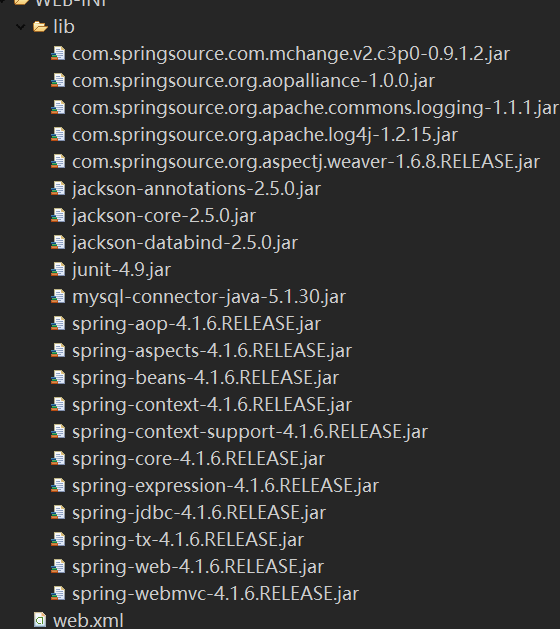
涉及到的 jar包(多了):
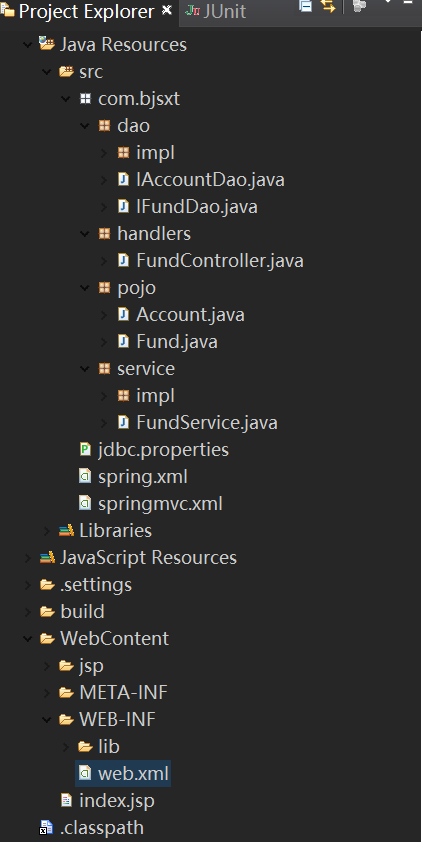
dao层:
package com.bjsxt.dao;

import com.bjsxt.pojo.Account;

public interface IAccountDao {

    //新增

    void insertAccount(String aname,double balance);

    //更新

    void updateAccount(Account account);

}
package com.bjsxt.dao;

import com.bjsxt.pojo.Fund;

public interface IFundDao {

    //新增

    void insertFund(String fname,int amount);

    //更新

    void updateFund(Fund fund);

}
package com.bjsxt.dao.impl;

import org.springframework.jdbc.core.support.JdbcDaoSupport;

import org.springframework.stereotype.Repository;

import com.bjsxt.dao.IAccountDao;

import com.bjsxt.pojo.Account;

@Repository

public class AccountDaoImpl extends JdbcDaoSupport implements IAccountDao {

    //新增

    @Override

    public void insertAccount(String aname, double balance) {

        String sql="insert into account(aname,balance) values(?,?)";

        this.getJdbcTemplate().update(sql, aname,balance);

    }

    //更新

    @Override

    public void updateAccount(Account account) {

        String sql="update account set balance=balance-? where aname=?";

        this.getJdbcTemplate().update(sql, account.getMoney(),account.getAname());

    }

}
package com.bjsxt.dao.impl;

import org.springframework.jdbc.core.support.JdbcDaoSupport;

import org.springframework.stereotype.Repository;

import com.bjsxt.dao.IFundDao;

import com.bjsxt.pojo.Fund;

@Repository

public class FundDaoImpl extends JdbcDaoSupport implements IFundDao {

    //新增

    @Override

    public void insertFund(String fname, int amount) {

        String sql="insert into fund(fname,amount) values(?,?)";

        this.getJdbcTemplate().update(sql, fname,amount);

    }

    //更新

    @Override

    public void updateFund(Fund fund) {

        String sql = "update fund set amount=amount+? where fname=?";

        this.getJdbcTemplate().update(sql, fund.getCount(),fund.getFname());

    }

}
handlers层:
package com.bjsxt.handlers;

import org.springframework.beans.factory.annotation.Autowired;

import org.springframework.context.annotation.Scope;

import org.springframework.stereotype.Controller;

import org.springframework.web.bind.annotation.RequestMapping;

import com.bjsxt.pojo.Account;

import com.bjsxt.pojo.Fund;

import com.bjsxt.service.FundService;

//后端控制器

@Controller

@Scope("prototype")

@RequestMapping("/springmvc")

public class FundController{

    @Autowired

    private FundService fundService;

    public FundService getFundService() {

        return fundService;

    }

    public void setFundService(FundService fundService) {

        this.fundService = fundService;

    }

    @RequestMapping("/buyFund")

    public String  buyFund(Account account,Fund fund){

        fundService.modify(account, fund);

        return "welcome";

    }

}
pojo层:
package com.bjsxt.pojo;

public class Account {

    private String aname;

    private double money;

    public String getAname() {

        return aname;

    }

    public void setAname(String aname) {

        this.aname = aname;

    }

    public double getMoney() {

        return money;

    }

    public void setMoney(double money) {

        this.money = money;

    }

    public Account() {

        super();

        // TODO Auto-generated constructor stub

    }

    public Account(String aname, double money) {

        super();

        this.aname = aname;

        this.money = money;

    }

    @Override

    public String toString() {

        return "Account [aname=" + aname + ", money=" + money + "]";

    }

}
package com.bjsxt.pojo;

public class Fund {

    private String fname;

    private int count;

    public String getFname() {

        return fname;

    }

    public void setFname(String fname) {

        this.fname = fname;

    }

    public int getCount() {

        return count;

    }

    public void setCount(int count) {

        this.count = count;

    }

    public Fund() {

        super();

        // TODO Auto-generated constructor stub

    }

    public Fund(String fname, int count) {

        super();

        this.fname = fname;

        this.count = count;

    }

    @Override

    public String toString() {

        return "Fund [fname=" + fname + ", count=" + count + "]";

    }

}
service层:
package com.bjsxt.service;

import com.bjsxt.pojo.Account;

import com.bjsxt.pojo.Fund;

public interface FundService {

    //新增银行账户

    void addAccount(Account account);

    //新增基金账户

    void addFund(Fund fund);

    //更新(购买基金)

    void modify(Account account,Fund fund);

}
package com.bjsxt.service.impl;

import org.springframework.beans.factory.annotation.Autowired;

import org.springframework.stereotype.Service;

import com.bjsxt.dao.IAccountDao;

import com.bjsxt.dao.IFundDao;

import com.bjsxt.pojo.Account;

import com.bjsxt.pojo.Fund;

import com.bjsxt.service.FundService;

@Service

public class FundServiceImpl implements FundService {

    @Autowired

    private IAccountDao accountDao;

    @Autowired

    private IFundDao fundDao;

    public IAccountDao getAccountDao() {

        return accountDao;

    }

    public void setAccountDao(IAccountDao accountDao) {

        this.accountDao = accountDao;

    }

    public IFundDao getFundDao() {

        return fundDao;

    }

    public void setFundDao(IFundDao fundDao) {

        this.fundDao = fundDao;

    }

    //新增银行账户

    @Override

    public void addAccount(Account account) {

        accountDao.insertAccount(account.getAname(), account.getMoney());

    }

    //新增基金账户

    @Override

    public void addFund(Fund fund) {

        fundDao.insertFund(fund.getFname(), fund.getCount());

    }

    //购买基金(更新)

    @Override

    public void modify(Account account, Fund fund) {

        accountDao.updateAccount(account);

        fundDao.updateFund(fund);

    }

}
src下的配置文件:
jdbc.driver=com.mysql.jdbc.Driver

jdbc.url=jdbc:mysql:///test

jdbc.username=root

jdbc.password=victor
<?xml version="1.0" encoding="UTF-8"?>

<beans xmlns="http://www.springframework.org/schema/beans"

    xmlns:xsi="http://www.w3.org/2001/XMLSchema-instance"

    xmlns:context="http://www.springframework.org/schema/context"

    xmlns:mvc="http://www.springframework.org/schema/mvc"

    xmlns:tx="http://www.springframework.org/schema/tx"

    xmlns:aop="http://www.springframework.org/schema/aop"

    xsi:schemaLocation="

        http://www.springframework.org/schema/beans

        http://www.springframework.org/schema/beans/spring-beans.xsd

        http://www.springframework.org/schema/tx

        http://www.springframework.org/schema/tx/spring-tx.xsd

        http://www.springframework.org/schema/aop

        http://www.springframework.org/schema/aop/spring-aop.xsd

        http://www.springframework.org/schema/mvc

        http://www.springframework.org/schema/mvc/spring-mvc.xsd

        http://www.springframework.org/schema/context

        http://www.springframework.org/schema/context/spring-context.xsd">

    <!-- 加载jdbc属性文件 -->

    <context:property-placeholder location="classpath:jdbc.properties"/>

    <!-- c3p0数据源 -->

    <bean id="dataSource" class="com.mchange.v2.c3p0.ComboPooledDataSource">

        <property name="driverClass" value="${jdbc.driver}"></property>

        <property name="jdbcUrl" value="${jdbc.url}"></property>

        <property name="user" value="${jdbc.username}"></property>

        <property name="password" value="${jdbc.password}"></property>

    </bean>

    <!-- 注册dao -->

    <bean id="accountDaoImpl" class="com.bjsxt.dao.impl.AccountDaoImpl">

        <property name="dataSource" ref="dataSource"/>

    </bean>

    <bean id="fundDaoImpl" class="com.bjsxt.dao.impl.FundDaoImpl">

        <property name="dataSource" ref="dataSource"/>

    </bean>

    <!-- 注册组件扫描器 -->

    <context:component-scan base-package="com.bjsxt.dao.impl"></context:component-scan>

    <context:component-scan base-package="com.bjsxt.service.impl"></context:component-scan>

</beans>
<?xml version="1.0" encoding="UTF-8"?>

<beans xmlns="http://www.springframework.org/schema/beans"

    xmlns:xsi="http://www.w3.org/2001/XMLSchema-instance"

    xmlns:context="http://www.springframework.org/schema/context"

    xmlns:mvc="http://www.springframework.org/schema/mvc"

    xmlns:tx="http://www.springframework.org/schema/tx"

    xmlns:aop="http://www.springframework.org/schema/aop"

    xsi:schemaLocation="

        http://www.springframework.org/schema/beans

        http://www.springframework.org/schema/beans/spring-beans.xsd

        http://www.springframework.org/schema/tx

        http://www.springframework.org/schema/tx/spring-tx.xsd

        http://www.springframework.org/schema/aop

        http://www.springframework.org/schema/aop/spring-aop.xsd

        http://www.springframework.org/schema/mvc

        http://www.springframework.org/schema/mvc/spring-mvc.xsd

        http://www.springframework.org/schema/context

        http://www.springframework.org/schema/context/spring-context.xsd">

    <!-- 注册组件扫描器 -->

    <context:component-scan base-package="com.bjsxt.handlers"></context:component-scan>

    <!-- 注册注解驱动 -->

    <mvc:annotation-driven/>

    <!-- 注册视图解析器 -->

    <bean class="org.springframework.web.servlet.view.InternalResourceViewResolver">

        <property name="prefix" value="/jsp/"></property>

        <property name="suffix" value=".jsp"></property>

    </bean>

    <!-- 静态资源无法访问第三种解决方案 -->

    <mvc:resources location="/images/" mapping="/images/**"></mvc:resources>

    <mvc:resources location="/js/" mapping="/js/**"></mvc:resources>

</beans>
web.xml
<?xml version="1.0" encoding="UTF-8"?>

<web-app xmlns:xsi="http://www.w3.org/2001/XMLSchema-instance" xmlns="http://java.sun.com/xml/ns/javaee" xsi:schemaLocation="http://java.sun.com/xml/ns/javaee http://java.sun.com/xml/ns/javaee/web-app_2_5.xsd" id="WebApp_ID" version="2.5">

  <display-name>springmvc--primary</display-name>

  <welcome-file-list>

    <welcome-file>index.jsp</welcome-file>

  </welcome-file-list>

  <!-- 指定spring配置文件的路径及名称 -->

  <context-param>

      <param-name>contextConfigLocation</param-name>

      <param-value>classpath:spring.xml</param-value>

  </context-param>

  <!-- 注册 ContextLoaderListener:监听ServletContext,当其初始化时,创建spring容器对象-->

  <listener>

      <listener-class>org.springframework.web.context.ContextLoaderListener</listener-class>

  </listener>

  <!-- 注册字符编码过滤器 -->

  <filter>

      <filter-name>CharacterEncodingFilter</filter-name>

      <filter-class>org.springframework.web.filter.CharacterEncodingFilter</filter-class>

      <init-param>

          <param-name>encoding</param-name>

          <param-value>utf-</param-value>

      </init-param>

      <init-param>

          <param-name>forceEncoding</param-name>

          <param-value>true</param-value>

      </init-param>

  </filter>

  <filter-mapping>

      <filter-name>CharacterEncodingFilter</filter-name>

      <url-pattern>/*</url-pattern>

  </filter-mapping>

  <!-- 注册springmvc前端控制器(中央调度器) -->

  <servlet>

      <servlet-name>springmvc</servlet-name>

      <servlet-class>org.springframework.web.servlet.DispatcherServlet</servlet-class>

      <!-- 指定springmvc配置文件的路径以及名称 -->

      <init-param>

          <param-name>contextConfigLocation</param-name>

          <param-value>classpath:springmvc.xml</param-value>

      </init-param>

  </servlet>

  <servlet-mapping>

      <servlet-name>springmvc</servlet-name>

      <url-pattern>/</url-pattern>

  </servlet-mapping>

</web-app>
index.jsp
<%@ page language="java" contentType="text/html; charset=UTF-8"

    pageEncoding="UTF-8"%>

<!DOCTYPE html PUBLIC "-//W3C//DTD HTML 4.01 Transitional//EN" "http://www.w3.org/TR/html4/loose.dtd">

<html>

<head>

<meta http-equiv="Content-Type" content="text/html; charset=UTF-8">

<title>Insert title here</title>

</head>

<body>

    <form action="${pageContext.request.contextPath}/springmvc/buyFund" method="POST">

        银行账户名称:<input type="text" name="aname"><br/>

        金额:<input type="text" name="money"><br/>

        基金账户名称:<input type="text" name="fname"><br/>

        数量:<input type="text" name="count"><br/>

        <input type="submit" value="提交"><br/>

    </form>

</body>

</html>
spring-springmvc-jdbc小案例的更多相关文章
- Spring+SpringMVC+Hibernate小案例(实现Spring对Hibernate的事务管理)
原文地址:https://blog.csdn.net/jiegegeaa1/article/details/81975286 一.工作环境 编辑器用的是MyEclipse,用Mysql数据库,mave ...
- Spring+springmvc+Mybatis整合案例 annotation版(myeclipse)详细版
Spring+springmvc+Mybatis整合案例 Version:annotation版 文档结构图: 从底层开始做起: 01.配置web.xml文件 <?xml version=&qu ...
- Spring+springmvc+Mybatis整合案例 xml配置版(myeclipse)详细版
Spring+springmvc+Mybatis整合案例 Version:xml版(myeclipse) 文档结构图: 从底层开始做起: 01.配置web.xml文件 <?xml version ...
- spring boot入门小案例
spring boot 入门小案例搭建 (1) 在Eclipse中新建一个maven project项目,目录结构如下所示: cn.com.rxyb中存放spring boot的启动类,applica ...
- Spring+SpringMVC+JDBC实现登录
Spring+SpringMVC+JDBC实现登录 有一位程序员去相亲的时候,非常礼貌得说自己是一名程序员,并解释自己是做底层架构的,于是女方听到"底层"两个字,就一脸嫌弃:什么时 ...
- Eclipse使用JDBC小案例
JDBC(Java Database Connectivity:Java访问数据库的解决方案)定义一套标准接口,即访问数据库的通用API,不同数据库厂商根据各自数据的特点去实现这些接口. JDBC是J ...
- 模拟用户登录-SpringMVC+Spring+Mybatis整合小案例
1. 导入相关jar包 ant-1.9.6.jarant-launcher-1.9.6.jaraopalliance.jarasm-5.1.jarasm-5.2.jaraspectj-weaver.j ...
- spring + springmvc + jdbc + quartz + maven整合
个人搭建框架: pom.xml: <project xmlns="http://maven.apache.org/POM/4.0.0" xmlns:xsi="htt ...
- spring+springmvc+hibernate架构、maven分模块开发样例小项目案例
maven分模块开发样例小项目案例 spring+springmvc+hibernate架构 以用户管理做測试,分dao,sevices,web层,分模块开发測试!因时间关系.仅仅測查询成功.其它的准 ...
- ssm框架(Spring Springmvc Mybatis框架)整合及案例增删改查
三大框架介绍 ssm框架是由Spring springmvc和Mybatis共同组成的框架.Spring和Springmvc都是spring公司开发的,因此他们之间不需要整合.也可以说是无缝整合.my ...
随机推荐
- HTML转义字符&npsp;表示non-breaking space,unicode编码为u'\xa0',超出gbk编码范围?
0.目录 1.参考2.问题定位不间断空格的unicode表示为 u\xa0',超出gbk编码范围?3.如何处理.extract_first().replace(u'\xa0', u' ').strip ...
- ionic2项目中实现md5加密
1. 安装插件 npm i ts-md5 --save 2. 在项目中引用 import { Md5 } from 'ts-md5/dist/md5'; ... ionViewDidLoad() { ...
- Sicily T-primes
DescriptionWe know that prime numbers are positive integers that have exactly two distinct positive ...
- JavaScript(一)
JavaScript介绍 JavaScript是运行在浏览器端的脚步语言,JavaScript主要解决的是前端与用户交互的问题,包括使用交互与数据交互. JavaScript是浏览器解释执行的,前端脚 ...
- [jzoj]4216.【NOIP2015模拟9.12】平方和
Link https://jzoj.net/senior/#main/show/4216 Description 给出一个N个整数构成的序列,有M次操作,每次操作有一下三种: ①Insert Y X, ...
- css 基本语法及页面引用:
css基本语法: css的定义方法是: 选择器{ 属性:值; 属性:值; 属性:值; } 选择器是将样式和页面元素关联起来的名称,属性是希望设置的样式属性,每个属性有一个或多个值. 如: div{ w ...
- 构建MHA实现MySQL高可用集群架构
一.MHA简介 MHA(Master HighAvailability)目前在MySQL高可用方面是一个相对成熟的解决方案,它由日本DeNA公司youshimaton(现就职于Facebook公司)开 ...
- 机器学习方法、距离度量、K_Means
特征向量 1.特征向量:以人为例,每个元素可能就对应这人的某些方面,这就是特征,例如:身高.年龄.性别.国际....2.特征工程:目的就是将现有数据中可作为信号的特征与那些仅是噪声的特征区分开来:当数 ...
- 查找已连接过的wifi密码
无意之间看到能破解已连接过的wifi密码的诀窍,赶紧存储下来. 1. 首先打开终端 2. 在没有网路的情况下输入: netsh wlan show profiles 结果如下(自己的): 这些‘用户配 ...
- ECMA Script 6_模块加载方案 ES6 Module 模块语法_import_export
1. 模块加载方案 commonJS 背景: 历史上,JavaScript 一直没有模块(module)体系, 无法将一个大程序拆分成互相依赖的小文件,再用简单的方法拼装起来. 其他语言都有这项功能: ...