
web全栈应用【爬取(scrapy)数据 -> 通过restful接口存入数据库 -> websocket推送展示到前台】
作为
https://github.com/fanqingsong/web_full_stack_application
子项目的一功能的核心部分,使用scrapy抓取数据,解析完的数据,使用 python requets库,将数据推送到 webservice接口上, webservice接口负责保存数据到mongoDB数据库。
实现步骤:
1、 使用requests库,与webservice接口对接。
2、 使用scrapy抓取数据。
3、 结合1 2 实现完整功能。
Requests库 (Save to DB through restful api)
库的安装和快速入门见:
http://docs.python-requests.org/en/master/user/quickstart/#response-content
给出测试通过示例代码:
insert_to_db.py
import requests
resp = requests.get('http://localhost:3000/api/v1/summary')
# ------------- GET --------------
if resp.status_code != 200:
# This means something went wrong.
raise ApiError('GET /tasks/ {}'.format(resp.status_code))for todo_item in resp.json():
print('{} {}'.format(todo_item['Technology'], todo_item['Count']))# ------------- POST --------------
Technology = {"Technology": "Django", "Count": "50" }resp = requests.post('http://localhost:3000/api/v1/summary', json=Technology)
if resp.status_code != 201:
raise ApiError('POST /Technologys/ {}'.format(resp.status_code))print("-------------------")
print(resp.text)print('Created Technology. ID: {}'.format(resp.json()["_id"])
Python VirutalEnv运行环境
https://realpython.com/python-virtual-environments-a-primer/
Create a new virtual environment inside the directory:
# Python 2:

$ virtualenv env

# Python 3

$ python3 -m venv env
Note: By default, this will not include any of your existing site packages.
windows 激活:
env\Scripts\activate
Scrapy(Scratch data)
An open source and collaborative framework for extracting the data you need from websites.
In a fast, simple, yet extensible way.
https://scrapy-chs.readthedocs.io/zh_CN/0.24/topics/architecture.html
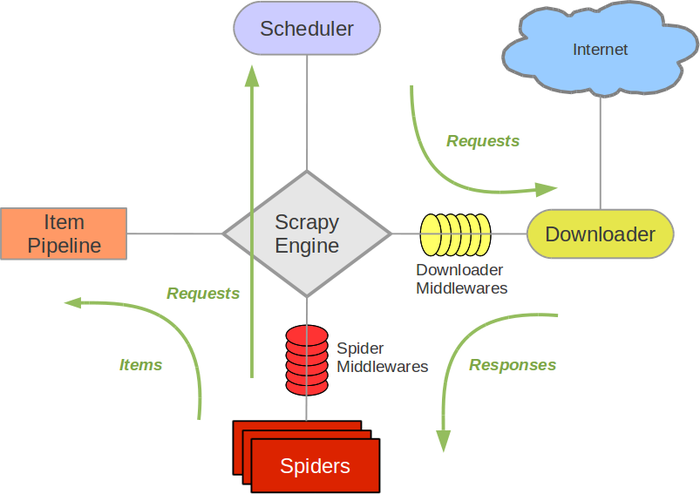
安装和使用参考:
https://www.cnblogs.com/lightsong/p/8732537.html
安装和运行过程报错解决办法:
1、 Scrapy运行ImportError: No module named win32api错误
https://blog.csdn.net/u013687632/article/details/57075514
pip install pypiwin32
https://www.cnblogs.com/baxianhua/p/8996715.html
1. http://www.lfd.uci.edu/~gohlke/pythonlibs/#twisted 下载twisted对应版本的whl文件(我的Twisted‑17.5.0‑cp36‑cp36m‑win_amd64.whl),cp后面是python版本,amd64代表64位,
2. 运行命令:
pip install C:\Users\CR\Downloads\Twisted-17.5.0-cp36-cp36m-win_amd64.whl
给出示例代码:
quotes_spider.py
import scrapy
class QuotesSpider(scrapy.Spider):
name = "quotes"
start_urls = [
'http://quotes.toscrape.com/tag/humor/',
]def parse(self, response):
for quote in response.css('div.quote'):
yield {
'text': quote.css('span.text::text').extract_first(),
'author': quote.xpath('span/small/text()').extract_first(),
}next_page = response.css('li.next a::attr("href")').extract_first()
if next_page is not None:
yield response.follow(next_page, self.parse)
在此目录下,运行
scrapy runspider quotes_spider.py -o quotes.json
输出结果
[
{"text": "\u201cThe person, be it gentleman or lady, who has not pleasure in a good novel, must be intolerably stupid.\u201d", "author": "Jane Austen"},
{"text": "\u201cA day without sunshine is like, you know, night.\u201d", "author": "Steve Martin"},
{"text": "\u201cAnyone who thinks sitting in church can make you a Christian must also think that sitting in a garage can make you a car.\u201d", "author": "Garrison Keillor"},
{"text": "\u201cBeauty is in the eye of the beholder and it may be necessary from time to time to give a stupid or misinformed beholder a black eye.\u201d", "author": "Jim Henson"},
{"text": "\u201cAll you need is love. But a little chocolate now and then doesn't hurt.\u201d", "author": "Charles M. Schulz"},
{"text": "\u201cRemember, we're madly in love, so it's all right to kiss me anytime you feel like it.\u201d", "author": "Suzanne Collins"},
{"text": "\u201cSome people never go crazy. What truly horrible lives they must lead.\u201d", "author": "Charles Bukowski"},
{"text": "\u201cThe trouble with having an open mind, of course, is that people will insist on coming along and trying to put things in it.\u201d", "author": "Terry Pratchett"},
{"text": "\u201cThink left and think right and think low and think high. Oh, the thinks you can think up if only you try!\u201d", "author": "Dr. Seuss"},
{"text": "\u201cThe reason I talk to myself is because I\u2019m the only one whose answers I accept.\u201d", "author": "George Carlin"},
{"text": "\u201cI am free of all prejudice. I hate everyone equally. \u201d", "author": "W.C. Fields"},
{"text": "\u201cA lady's imagination is very rapid; it jumps from admiration to love, from love to matrimony in a moment.\u201d", "author": "Jane Austen"}
]
业务全流程实例
https://github.com/fanqingsong/web_data_visualization
由于zhipin网站对爬虫有反制策略, 本例子采用scrapy的官方爬取实例quotes为研究对象。
流程为:
1、 爬取数据, scrapy 的两个组件 spider & item pipeline
2、 存数据库, requests库的post方法推送数据到 webservice_quotes服务器的api
3、 webservice_quotes将数据保存到mongoDB
4、 浏览器访问vue页面, 与websocket_quotes服务器建立连接
5、 websocket_quotes定期(每隔1s)从mongoDB中读取数据,推送给浏览器端,缓存为Vue应用的data,data绑定到模板视图
scrapy item pipeline 推送数据到webservice接口
# -*- coding: utf-8 -*-
# Define your item pipelines here
#
# Don't forget to add your pipeline to the ITEM_PIPELINES setting
# See: https://doc.scrapy.org/en/latest/topics/item-pipeline.htmlimport requests
class ScratchZhipinPipeline(object):
def process_item(self, item, spider):print("--------------------")
print(item['text'])
print(item['author'])
print("--------------------")# save to db through web service
resp = requests.post('http://localhost:3001/api/v1/quote', json=item)
if resp.status_code != 201:
raise ApiError('POST /item/ {}'.format(resp.status_code))
print(resp.text)
print('Created Technology. ID: {}'.format(resp.json()["_id"]))return item
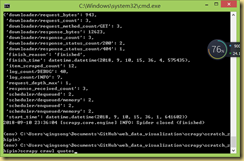
爬虫运行: scrapy crawl quotes
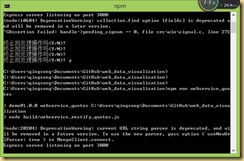
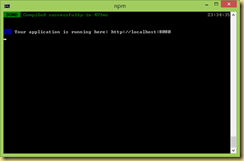
webservice运行: npm run webservice_quotes
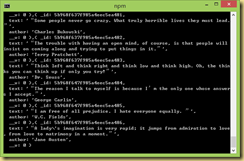
websocket运行: npm run websocket_quotes
vue调试环境运行: npm run dev
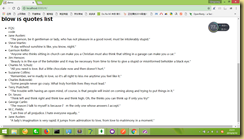
chrome:
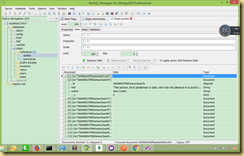
db:
Python生成requirement.text文件
http://www.cnblogs.com/zhaoyingjie/p/6645811.html
快速生成requirement.txt的安装文件

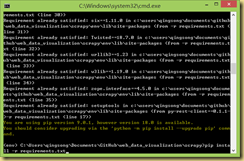
(CenterDesigner) xinghe@xinghe:~/PycharmProjects/CenterDesigner$ pip freeze > requirements.txt
安装所需要的文件 pip install -r requirement.txt
web全栈应用【爬取(scrapy)数据 -> 通过restful接口存入数据库 -> websocket推送展示到前台】的更多相关文章
- 从0开始学爬虫8使用requests/pymysql和beautifulsoup4爬取维基百科词条链接并存入数据库
从0开始学爬虫8使用requests和beautifulsoup4爬取维基百科词条链接并存入数据库 Python使用requests和beautifulsoup4爬取维基百科词条链接并存入数据库 参考 ...
- python3爬取百度知道的问答并存入数据库(MySQL)
一.链接分析: 以"Linux"为搜索的关键字为例: 首页的链接为:https://zhidao.baidu.com/search?lm=0&rn=10&pn=0& ...
- web全栈架构师[笔记] — 02 数据交互
数据交互 一.http协议 基本特点 1.无状态的协议 2.连接过程:发送连接请求.响应接受.发送请求 3.消息分两块:头.体 http和https 二.form 基本属性 action——提交到哪儿 ...
- python爬取网页数据并存储到mysql数据库
#python 3.5 from urllib.request import urlopen from urllib.request import urlretrieve from bs4 impor ...
- NodeJs简单七行爬虫--爬取自己Qzone的说说并存入数据库
没有那么难的,嘿嘿,说起来呢其实挺简单的,或者不能叫爬虫,只需要将自己的数据加载到程序里再进行解析就可以了,如果说你的Qzone是向所有人开放的,那么就有一个JSONP的接口,这么说来就简单了,也就不 ...
- python爬虫爬取ip记录网站信息并存入数据库
import requests import re import pymysql #10页 仔细观察路由 db = pymysql.connect("localhost",&quo ...
- python爬取拉勾网数据并进行数据可视化
爬取拉勾网关于python职位相关的数据信息,并将爬取的数据已csv各式存入文件,然后对csv文件相关字段的数据进行清洗,并对数据可视化展示,包括柱状图展示.直方图展示.词云展示等并根据可视化的数据做 ...
- Web 全栈大会:万维网之父的数据主权革命
大家好,今天我和大家分享一下由万维网之父发起的一场数据主权革命.什么叫数据主权?很容易理解,现在我们的数据是把持在巨头手里的,你的微信通讯录和聊天记录都无法导出,不管是从人权角度还是从法理角度,这些数 ...
- web scraper——简单的爬取数据【二】
web scraper——安装[一] 在上文中我们已经安装好了web scraper现在我们来进行简单的爬取,就来爬取百度的实时热点吧. http://top.baidu.com/buzz?b=1&a ...
随机推荐
- CSS---文档流布局 | 脱标-postion-zindex | 脱标-浮动
一.css文档流布局概念 1.1,什么是标准文档流 1.2,标准文档流下有哪些微观现象 二.CSS---position属性 2.1,position:relative 2.2,position:fi ...
- Cookies 和session
一 会话跟踪 在一个会话的多个请求中共享数据,这就是会话跟踪技术 请求登录(请求参数是用户名和密码): 请求转账(请求参数与转账相关的数据): 请求信誉卡还款(请求参数与还款相关的数据). 登录信息在 ...
- TortoiseGit之配置密钥
TortoiseGit 使用扩展名为ppk的密钥,而不是ssh-keygen生成的rsa密钥.使用命令ssh-keygen -C "邮箱地址" -t rsa产生的密钥在Tortoi ...
- 不安分的 Go 语言开始入侵 Web 前端领域了!( WebAssembly )
参考:https://blog.csdn.net/csdnnews/article/details/84038848 从 Go 语言诞生以来,它就开始不断侵蚀 Java .C.C++ 语言的领地.今年 ...
- 使用github 的相关博客
基于hexo+github搭建一个独立博客 如何用Github的gh-pages分支展示自己的项目 使用git clone error: RPC failed Git的使用-- ...
- [Oracle]Sqlplus 中使用 new_value
通过再sqlplus 中使用 new_value,可以把从表中查询出来的值,放置到 变量中.然后使用变量时,类似与宏定义一样,就可以像使用表中字段一样方便. 这使得sqlplus 的脚本具备和pl/s ...
- 在 .NET Core 中结合 HttpClientFactory 使用 Polly(上篇)
译者:王亮作者:Polly 团队原文:http://t.cn/EhZ90oq 译者序一:前两天写了一篇文章 .NET Core 开源项目 Polly 介绍,在写这篇文章查看 Polly 资料时,看到了 ...
- 使用Roslyn脚本化C#代码,C#动态脚本实现方案
[前言] Roslyn 是微软公司开源的 .NET 编译器. 编译器支持 C# 和 Visual Basic 代码编译,并提供丰富的代码分析 API. Roslyn不仅仅可以直接编译输出,难能可贵的就 ...
- websocket作用及意义
Browser已经支持http协议,为什么还要开发一种新的WebSocket协议呢?我们知道http协议是一种单向的网络协议,在建立连接后,它只允许Browser/UA(UserAgent)向WebS ...
- 近期学习docker遇到的一些问题
最近看某谷的springboot视频,看到了docker部分,在实践过程中遇到了一些问题 默认国外镜像,下载软件很慢 linux内核版本过低,与docker运行不匹配 这里记录一下解决方案 第一个问题 ...