
html body width height 100%使用
首先我们来看一个实际的问题,让body中的一个div占全屏,(问题来源:http://stackoverflow.com/questions/1575141/make-div-100-height-of-browser-window
下面的代码符合要求吗?
<style>

#div1{

    background:#ccc;

    border:1px solid red;

    width:100%;

    height:100%;

}

</style>

</head>

<body>

<div id="div1">

    div1

</div>
运行后div1还是只占一行,height没有到达全屏。
当然,我们以前用过一种方法,就是使用position:absolute,设置top:0,bottom;0这样元素的尺寸就会根据偏移来推断了。
不改变position,怎么达到要求呢?
增加一句;
html,body{

    height:100%;

    width:100%;

}
就可以了。
为什么?
首先我们要清楚htmlVSbody区别。
一篇好文;
html VS body
Summary
- The
htmlandbodyelements are distinct block-level entities, in a parent/child relationship. - The
htmlelement's height and width are controlled by the browser window. html尺寸由浏览器窗口控制。 - It is the
htmlelement which has (by default)overflow:auto, causing scrollbars to appear when needed. - The
bodyelement is (by default)position:static, which means that positioned children of it are positioned relative to thehtmlelement's coordinate system. - In almost all modern browsers, the built-in offset from the edge of the page is applied through a
marginon thebodyelement, notpaddingon thehtmlelement.几乎所有的浏览器,默认的偏移margin是在body元素上,而不是html的padding.(通过做实验确实如此)有些还是body的padding,所有重置页边距用body{margin:0;padding:0}缺一不可。
Introduction
Many web developers do not understand the difference between applying style to the body element versus the html element. Most of the time these authors will apply style only to the body element; when that's not sufficient, they'll spam all sorts of styles on both html and body until the page happens to look correct.
The confusion is understandable. In the beginning, both were treated similarly, with (now-deprecated) attributes like bgcolor being applied to the body tag, affecting the whole page.
This article attempts to enlighten you, Web Developer, to fully grok how these two elements are used in modern web browsers.
Mommy, Where Do Scrollbars Come From?
On any non-trivial HTML page, there's enough content that the page gets a scrollbar on the side. Where does this scrollbar come from? Magic? An unholy tryst between UI widgets? Maybe. Or maybe it's the simple result of an implicit CSS rule like:
html { overflow:auto }"But the html element doesn't have a height!" you cry, confused. "How can it generate scrollbars, if it's a block-level element without a specific height?"
The html element is a little bit special. Its height and width are governed by the window/frame it's in. When you increase your window width, the fixed width of the html element is increased; when you make the window taller, so increases the height of the html element.
Because pictures often help, let's see what it would look like if the html element could have overflow:visible:
滚动条从哪里来?原因是
html { overflow:auto;} 是默认的。
如果不设置html height怎么会有滚动条,原来html有点特殊,它的widht和height是有浏览器窗口大小决定的。
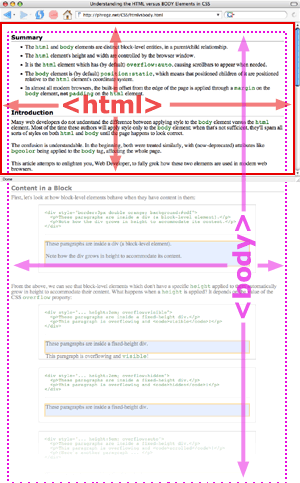
Hopefully this picture helps, rather than confuses. See how the html element (in red) goes to the edges of the window, but the body overflows that container? The html element is responsible for showing the scrollbar for the 'page' when the content gets too tall.
So What?
What does this mean for you? A couple things:
- If you're one of those designers who likes fixed-width, centered pages, you can do this by setting a
widthon thebodytag and centering it. (Example) - Because
bodyisn't positioned (or more accurately, it'sposition:staticby default), setting a child element toheight:100%causes it to be 100% of the height of thehtmlelement, not thebodyelement. Thus, if you want something to be as tall as the body is (going down past the bottom of the page) usebody { position:relative } 意思是说如果你想一个child元素 height为100%, (However, see also Tall Nav and Tall Content.)
- Hopefully it helps you understand exactly where
marginandpaddingandborderwill be appear when applied to thehtmlandbodyelements.
转自:http://phrogz.net/css/htmlvsbody.html 演示参考这个网页
清楚了html和body后,我们来看
html,body{

    height:100%;

    width:100%;

}

div{

    width:100%;

    height:100%;

}
为什么这个可以将div的尺寸变成屏幕一样大。、
看下面的例子,我们没有设置body的width和height。
html{

    height:100%;

    width:100%;

}

#div1{

    background:#ccc;

    width:100%;

    height:100%;

}

</style>

<script>

window.onload=function(){alert(document.body.clientHeight); };

</script>

</head>

<body>

<div id="div1">

    div1

</div>
显示是,div1背景还是只有一行。说明height:100%
javascript函数输出:18。这说明,我们没有定义body的height,但由于里面有内容,把里面的内容包起来的最小高度为18px,
由于body是块元素,width没设置时更父元素的width一样,也就是html的width。
《css权威指南指出》height width百分数是相对于包含块的。在本例中,div1的height相对于body,但由于body没有设置
height,《css权威指南》又指出(P180),如果没有显示声明包含块的height,百分数高度会重置为auto,所以上面div1height设置为任何值都跟设置没设置一样。包含块与div1高度完全相同。
所有出现了上面的情况。
(牢记:就是要设置div100%显示,必须设置其上一级div的宽度或高度,否则无效。)
所有html,body,div都要设置height为100%。虽然html默认的width和height一样,但是由于body设置的是100%,如果没有
显式设置html,body还是相当于没设置。
html body width height 100%使用的更多相关文章
- css top,right,bottom,left设置为0有什么用?它和width:100%和height:100%有什么区别?
壹 ❀ 引 当我们使用position属性时,总免不了与top,left,right,bottom四个属性打交道,那么这四个属性都设置为0时有什么用,与宽高设置100%又有什么区别?本文对此展开讨论 ...
- height:100% 布局
常常会碰到需要填满整个浏览器,并且自适应高度的需求.首先肯定会想到给容器设定height:100%,但是会没有效果.原因是body没有高度,所以百分比无法生效. 解决方案:给html,body,标签都 ...
- 设置height:100%无效的解决方法
设置height:100%无效的解决方法 刚接触网页排版的新手,常出现这种情况:设置table和div的高height="100%"无效,使用CSS来设置height:" ...
- height:100%与height:inherit的区别
一.兼容性 首先,inherit这个属性只是在ie8+才支持:100%支持ie6: 二.大多数情况下没有区别 在正常情况下height:100%与height:inherit没有任何区别: 1.父元素 ...
- flex引起height:100%失效
<!DOCTYPE html> <html> <head> <meta http-equiv="Content-Type" content ...
- height:100%不起作用(无效),div全屏
当父容器是body时,height:100%不起作用(无效),解决办法:在css代码段中添加 html, body{ margin:0; height:100%; } 实现div全屏的时候需要上面那段 ...
- 如何让 height:100%; 起作用
当你设置一个页面元素的高度(height)为100%时,期望这样元素能撑满整个浏览器窗口的高度,但大多数情况下,这样的做法没有任何效果.你知道为什么height:100%不起作用吗? 按常理,当我们用 ...
- table和div设置height:100%无效的完美解决方法
刚接触网页排版的新手,常出现这种情况:设置table和div的高height="100%"无效,使用CSS来设置height:"100%"也无效,为什么会这样呢 ...
- table布局 height=100%无效分析
(从死了一次又一次终于挂掉的百度空间中抢救出来的,发表日期 2014-08-11) 原文链接:http://www.cnblogs.com/gaojun/archive/2012/05/07/2487 ...
随机推荐
- 苹果市值破万亿,iPhone 会涨价吗?
今日导读 苹果教父乔布斯曾经说过:“活着就是为了改变世界.”虽然他在 56 岁时就遗憾离世,但他极具创新和变革的精神早已深埋进苹果公司的企业文化里,影响着一代又一代的人.就在最近,这家一直努力“改变世 ...
- python 搜集参数
def print_params(*params): print(params) print_params('Testing')print_params(1,2,3) #参数前的星号将所有值放置在同一 ...
- DNA Pairing-freecodecamp算法题目
DNA Pairing 1.要求 DNA 链缺少配对的碱基.依据每一个碱基,为其找到配对的碱基,然后将结果作为第二个数组返回. Base pairs(碱基对)是一对 AT 和 CG,为给定的字母匹配缺 ...
- 【NOIP2017提高组模拟7.3】B
树上路径统计,点分治解决. 统计一段区间,naive地用了set解决,这样的复杂度是O(nlog^2n)的 考场代码出了个问题,统计答案时找到了之前的最优答案,但是没有加上新的一段,导致60分 #in ...
- nginx日志相关优化安全
一.编写脚本实现nginx access日志轮询 配置日志切割脚本,如下: [root@nginx shell]# cat cut_nginx_log.sh #!/bin/bash #Author:M ...
- mysql数据库使用mybatis 插入数据时返回主键
为了体现题目,特指的是mysql,先贴上代码: <insert id="saveBizProdOrderDetail" useGeneratedKeys="true ...
- H5 JS判断客户端是否是iOS或者Android手机移动端
<script type="text/javascript"> var u = navigator.userAgent; || u.indexOf(; //androi ...
- Huawei warns against 'Berlin Wall' in digital world
From China Daily Huawei technologies criticized recent registration imposed on the Chinese tech comp ...
- python中文件操作的基本方法
在python中对一个文件进行操作,分为三大步:打开,操作,关闭 首先创建一个文件hello,里面内容为hello world 一.打开一个文件 1.#open(‘文件名或文件路径’,‘操作模式’,文 ...
- python爬取+使用网易卡搭作品数量api
第一步,当然是打开浏览器~ 然后打开卡搭~ 看着熟悉的界面,是不是有点不知所措? 这就对了,咱找点事情干干. 随便找个倒霉蛋,比如这位:"混世大王",打开他的主页! 按下f12(我 ...