
Hibernate学习三----------session详解
© 版权声明:本文为博主原创文章,转载请注明出处
如何获取session对象
1. openSession
2. getCurrentSession
- 如果使用getCurrentSession需要在hibernate.cfg.xml中进行如下配置:
如果是本地事务(jdbc事务)
<property name="current_session_context_class">thread</property>
如果是全局事务(jta事务)
<property name="current_session_context_class">jta</property>
- 全局事务和本地事务
本地事务适合对一个数据库进行操作,全局事务适合对多个数据库进行操作;
当存在多个数据库是,也就存在多个session,这样本地事务就无法对多个session进行统一管理,因此可以使用全局事务。
3. openSession和getCurrentSession区别
- getCurrentSession在事务提交或者回滚之后会自动关闭session,而openSession需要你手动关闭session。如果使用openSession而没有手动关闭,多次之后会导致连接池溢出
- openSession每次创建新的session对象,getCurrentSession使用现有的session对象
实例
1.项目结构
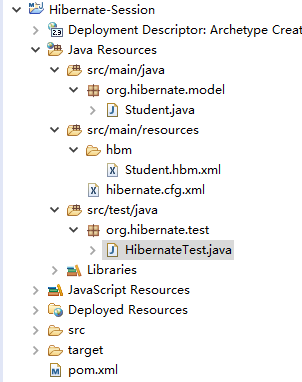
2.pom.xml
<project xmlns="http://maven.apache.org/POM/4.0.0" xmlns:xsi="http://www.w3.org/2001/XMLSchema-instance"

  xsi:schemaLocation="http://maven.apache.org/POM/4.0.0 http://maven.apache.org/maven-v4_0_0.xsd">

  	<modelVersion>4.0.0</modelVersion>

	<groupId>org.hibernate</groupId>

	<artifactId>Hibernate-Session</artifactId>

	<packaging>war</packaging>

	<version>0.0.1-SNAPSHOT</version>

	<name>Hibernate-Session Maven Webapp</name>

	<url>http://maven.apache.org</url>

	<properties>

		<project.build.sourceEncoding>UTF-8</project.build.sourceEncoding>

		<hiberante.version>5.1.6.Final</hiberante.version>

	</properties>

	<dependencies>

		<!-- junit -->

		<dependency>

			<groupId>junit</groupId>

			<artifactId>junit</artifactId>

			<version>4.12</version>

			<scope>test</scope>

		</dependency>

		<!-- hibernate -->

		<dependency>

		    <groupId>org.hibernate</groupId>

		    <artifactId>hibernate-core</artifactId>

		    <version>${hiberante.version}</version>

		</dependency>

		<!-- mysql -->

		<dependency>

		    <groupId>mysql</groupId>

		    <artifactId>mysql-connector-java</artifactId>

		    <version>5.1.42</version>

		</dependency>

	</dependencies>

	<build>

		<finalName>Hibernate-Session</finalName>

	</build>

</project>
3.hibernate.cfg.xml
<?xml version="1.0" encoding="UTF-8"?>
<!DOCTYPE hibernate-configuration PUBLIC
"-//Hibernate/Hibernate Configuration DTD 3.0//EN"
"http://www.hibernate.org/dtd/hibernate-configuration-3.0.dtd">
<hibernate-configuration> <!-- 配置SessionFactory -->
<session-factory>
<!-- 设置数据库连接属性 -->
<property name="connection.username">root</property>
<property name="connection.password">***</property>
<property name="connection.driver_class">com.mysql.jdbc.Driver</property>
<property name="connection.url">
jdbc:mysql:///hibernate?useSSL=true&characterEncoding=UTF-8
</property> <!-- 设置常用属性 -->
<property name="show_sql">true</property><!-- 输出SQL -->
<property name="format_sql">true</property><!-- 格式化SQL -->
<property name="dialect">org.hibernate.dialect.MySQL5InnoDBDialect</property><!-- 方言 -->
<property name="hbm2ddl.auto">create</property><!-- 检查数据库表结构是否一致,不一致更新,一致忽略 -->
<property name="current_session_context_class">thread</property><!-- 本地事务(jdbc事务) --> <!-- 引入映射文件 -->
<mapping resource="hbm/Student.hbm.xml"/>
</session-factory> </hibernate-configuration>
4.Student.java
package org.hibernate.model;

import java.util.Date;

public class Student {

	private long sid; // 学号

	private String sname; // 姓名

	private String gender; // 性别

	private Date birthday; // 出生日期

	private String address;// 地址

	public Student(long sid, String sname, String gender, Date birthday, String address) {

		super();

		this.sid = sid;

		this.sname = sname;

		this.gender = gender;

		this.birthday = birthday;

		this.address = address;

	}

	public long getSid() {

		return sid;

	}

	public void setSid(long sid) {

		this.sid = sid;

	}

	public String getSname() {

		return sname;

	}

	public void setSname(String sname) {

		this.sname = sname;

	}

	public String getGender() {

		return gender;

	}

	public void setGender(String gender) {

		this.gender = gender;

	}

	public Date getBirthday() {

		return birthday;

	}

	public void setBirthday(Date birthday) {

		this.birthday = birthday;

	}

	public String getAddress() {

		return address;

	}

	public void setAddress(String address) {

		this.address = address;

	}

}
5.Student.hbm.xml
<?xml version="1.0" encoding="UTF-8"?>

<!DOCTYPE hibernate-mapping PUBLIC

        "-//Hibernate/Hibernate Mapping DTD 3.0//EN"

        "http://www.hibernate.org/dtd/hibernate-mapping-3.0.dtd" >

<hibernate-mapping>

	<class name="org.hibernate.model.Student" table="STUDENT">

		<id name="sid" type="java.lang.Long">

			<column name="SID"/>

			<generator class="assigned"/><!-- 自定义主键 -->

		</id>

		<property name="sname" type="java.lang.String">

			<column name="SNAME"/>

		</property>

		<property name="gender" type="java.lang.String">

			<column name="GENDER"/>

		</property>

		<property name="birthday" type="java.util.Date">

			<column name="BIRTHDAY"/>

		</property>

		<property name="address" type="java.lang.String">

			<column name="ADDRESS"/>

		</property>

	</class>

</hibernate-mapping>
6.HibernateTest.java
package org.hibernate.test;

import java.sql.Connection;

import java.sql.SQLException;

import java.util.Date;

import org.hibernate.Session;

import org.hibernate.SessionFactory;

import org.hibernate.Transaction;

import org.hibernate.cfg.Configuration;

import org.hibernate.jdbc.Work;

import org.hibernate.model.Student;

import org.junit.Test;

public class HibernateTest {

	@Test

	public void testOpenSession() {

		Configuration config = new Configuration().configure();// 获取配置对象

		SessionFactory sessionFactory = config.buildSessionFactory();// 获取SessionFactory对象

		Session session1 = sessionFactory.openSession();// 获取Session对象

		Session session2 = sessionFactory.openSession();// 获取Session对象

		boolean result = session1 == session2;

		if (result) {

			System.out.println("openSession使用现有的session对象");

		} else {

			System.out.println("openSession每次都创建新的session对象");

		}

	}

	@Test

	public void testGetCurrentSession() {

		Configuration config = new Configuration().configure();// 获取配置对象

		SessionFactory sessionFactory = config.buildSessionFactory();// 获取SessionFactory对象

		Session session1 = sessionFactory.getCurrentSession();// 获取Session对象

		Session session2 = sessionFactory.getCurrentSession();// 获取Session对象

		boolean result = session1 == session2;

		if (result) {

			System.out.println("getCurrentSession使用现有的session对象");

		} else {

			System.out.println("getCurrentSession每次都创建新的session对象");

		}

	}

	@Test

	public void testSaveStudentWithOpenSession() {

		Configuration config = new Configuration().configure();// 获取配置对象

		SessionFactory sessionFactory = config.buildSessionFactory();// 获取SessionFactory对象

		Session session1 = sessionFactory.openSession();// 获取Session对象

		Transaction transaction = session1.beginTransaction();// 开启事务

		Student student = new Student(1, "张三", "男", new Date(), "北京");// 创建Student对象

		session1.doWork(new Work() {

			public void execute(Connection connection) throws SQLException {

				System.out.println("connection hashCode: " + connection.hashCode());

			}

		});

		session1.save(student);// 保存对象

		transaction.commit();

		System.out.println(session1);

		Session session2 = sessionFactory.openSession();// 获取Session对象

		transaction = session2.beginTransaction();// 开启事务

		student = new Student(2, "李四", "男", new Date(), "上海");// 创建Student对象

		session2.doWork(new Work() {

			public void execute(Connection connection) throws SQLException {

				System.out.println("connection hashCode: " + connection.hashCode());

			}

		});

		session2.save(student);// 保存对象

		transaction.commit();

		System.out.println(session2);

	}

	@Test

	public void testSaveStudentWithGetCurrentSession() {

		Configuration config = new Configuration().configure();// 获取配置对象

		SessionFactory sessionFactory = config.buildSessionFactory();// 获取SessionFactory对象

		Session session1 = sessionFactory.getCurrentSession();// 获取Session对象

		Transaction transaction = session1.beginTransaction();// 开启事务

		Student student = new Student(1, "张三", "男", new Date(), "北京");// 创建Student对象

		session1.doWork(new Work() {

			public void execute(Connection connection) throws SQLException {

				System.out.println("connection hashcode: " + connection.hashCode());

			}

		});

		session1.save(student);// 保存对象

		transaction.commit();// 提交事务

		System.out.println(session1);

		Session session2 = sessionFactory.getCurrentSession();// 获取Session对象

		transaction = session2.beginTransaction();// 开启事务

		student = new Student(2, "李四", "男", new Date(), "上海");// 创建Student对象

		session2.doWork(new Work() {

			public void execute(Connection connection) throws SQLException {

				System.out.println("connection hashcode: " + connection.hashCode());

			}

		});

		session2.save(student);// 保存对象

		transaction.commit();// 提交事务

		System.out.println(session2);

	}

}
7.效果预览
7.1 执行testOpenSession()方法(通过openSession方法两次获取的session不一致,所以openSession每次都创建新的session对象)

7.2 执行testGetCurrentSession()方法(通过getCurrentSession方法两次获取的session一致,所以getCurrentSession使用现有的session对象)

7.3 执行testSaveStudentWithOpenSession()方法(两个session的哈希值是一样的,但是session都没有关闭;说明openSession不会自动关闭session,但是事务提交之后会自动关闭数据连接,因此第二个session使用的是第一个session关闭的数据库连接)
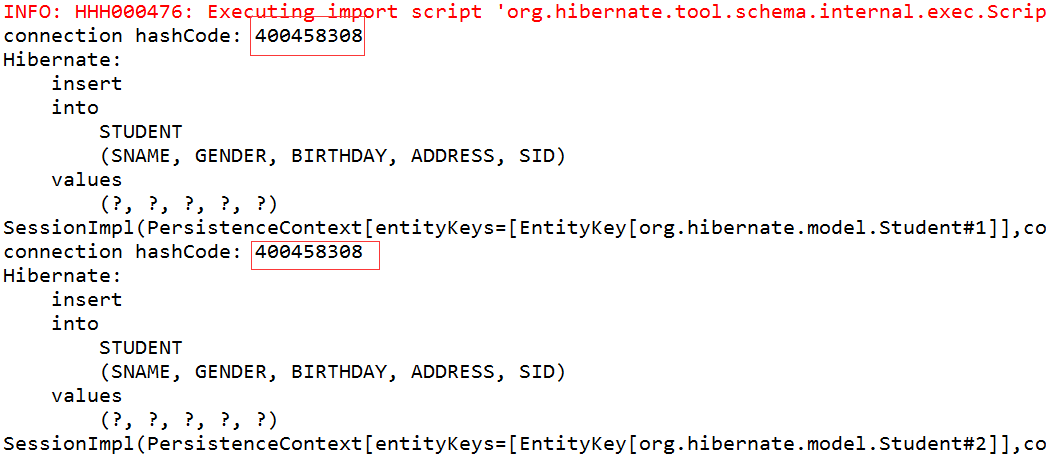
7.4 执行testSaveStudentWithGetCurrentSession()方法(两个session的哈希值是一样的,session都关闭了;说明getCurrentSession在事务提交后会自动关闭session,关闭数据连接,因此第二个session使用的是第一个session关闭的数据库连接)

9.总结
参考视频中说openSession获取的session不手动释放session,也就不会释放数据库连接。但是测试发现,openSession获取的session不会自动释放session,但是事务提交后会自动释放数据库连接。个人感觉只要提交事务后数据库连接都会被释放,session若是通过openSession获取的需手动关闭,若是通过getCurrentSession获取的则会在事务提交后自动释放
参考:http://www.imooc.com/learn/396
http://blog.csdn.net/skiof007/article/details/10960027
Hibernate学习三----------session详解的更多相关文章
- Struts2框架学习(三)——配置详解
一.struts.xml配置 <?xml version="1.0" encoding="UTF-8"?> <!DOCTYPE struts ...
- MYSQL学习(三) --索引详解
创建高性能索引 (一)索引简介 索引的定义 索引,在数据结构的查找那部分知识中有专门的定义.就是把关键字和它对应的记录关联起来的过程.索引由若干个索引项组成.每个索引项至少包含两部分内容.关键字和关键 ...
- [转]iOS学习之UINavigationController详解与使用(三)ToolBar
转载地址:http://blog.csdn.net/totogo2010/article/details/7682641 iOS学习之UINavigationController详解与使用(二)页面切 ...
- 【Hibernate】Hibernate系列2之Session详解
Session详解 2.1.概述-一级缓存 2.2.操作session缓存方法 2.3.数据库隔离级别 2.4.持久化状态 2.5.状态转换 2.6.存储过程与触发器
- iOS学习之UINavigationController详解与使用(三)ToolBar
1.显示Toolbar 在RootViewController.m的- (void)viewDidLoad方法中添加代码,这样Toobar就显示出来了. [cpp] view plaincopy [ ...
- iOS学习之UINavigationController详解与使用(一)添加UIBarButtonItem
http://blog.csdn.net/totogo2010/article/details/7681879 1.UINavigationController导航控制器如何使用 UINavigati ...
- PHP5 session 详解【经典】 -- 转帖
PHP5 session 详解[经典] http协议是WEB服务器与客户端(浏览器)相互通信的协议,它是一种无状态协议.所谓无状态,指的是不会维护http请求数据,http请求是独立的,非持久的.而越 ...
- 各大公司广泛使用的在线学习算法FTRL详解
各大公司广泛使用的在线学习算法FTRL详解 现在做在线学习和CTR常常会用到逻辑回归( Logistic Regression),而传统的批量(batch)算法无法有效地处理超大规模的数据集和在线数据 ...
- Cookie与Session详解
来源:<PHP核心技术与最佳实践> 列旭松 陈文 著 Cookie与Session详解读书笔记,从概念.操作.应用.注意事项以及区别等几方面详细阐述两者的基础知识,它们都是针对HTTP协议 ...
随机推荐
- Java EE 学习:使用 idea2017 搭建 SSM 框架
需要准备的环境: idea 2017.1 jdk1.8 Maven 3.3.9 请提前将idea与Maven.jdk配置好,本次项目用的都是比较新的 步骤: 一.首先使用idea新建一个Maven w ...
- Memcache缓存用好了,性能有了很大的提高
web服务器1 web服务器2 web服务器3如果每台web服务器都向mysql服务器表插入信息并且要做出相应最新编号反馈出现这样的高并发时候怎么减少服务器压力,同时用户体验还要好 可以使用Memca ...
- 洋媳妇Susan教育孩子的方法
洋媳妇Susan教育孩子的方法 一个中国婆婆跟我说:「我的儿子去美国留学,毕业后定居美国. 还给我找了个洋媳妇Susan. 如今,小孙子Toby已经3岁了. 今年夏天,儿子為我申请了探亲签证. 在美国 ...
- Javascript&Html-弹出窗口的屏蔽程序
大多数的浏览器都内置了弹出窗口的屏蔽程序,即使没有内置此类屏蔽程序的浏览器,用户也可以安装Yahoo tool等带有内置屏蔽程序的应用工具. 结果就是用户可以将绝大多数弹出窗口屏蔽掉. 于是,再弹出窗 ...
- compiler related
1. 词法分析 词法分析器根据词法规则识别出源程序中的各个记号(token),每个记号代表一类单词(lexeme).源程序中常见的记号可以归为几大类:关键字.标识符.字面量和特殊符号.词法分析器的输入 ...
- Eclipse中的android项目前面有叹号 (转)
问题描述:在Eclipse中导入一个项目,在项目名上有感叹号出现,基本上是由于build path的问题. 解决方法: 在项目上右击-->build path -> configure b ...
- layui 自定义表单验证 以及提交表单
订购数量</span> <span style="color: red">*</span>: <input type="text ...
- git tag 的使用
// 查看tag,列出所有tag,列出的tag是按字母排序的,和创建时间没关系. $ git tag v0.1 v1.3 /查看指定版本的tag,git tag -l “v1.4.2.**” $ gi ...
- (6)centos安装和解压
一.rpm包安装方式步骤:1.找到相应的软件包,比如soft.version.rpm,下载到本机某个目录:2.打开一个终端,su -成root用户:3.cd soft.version.rpm所在的目录 ...
- Akka 和 μJavaActors入门
Akka和μJavaActorsμJavaActors均是java的Actor库,其中Akka提供了叫为完整的Actor开发框架,较为庞大,学习成本很高,μJavaActors 是一个轻量级 ...