
iOS学习之UINavigationController详解与使用(三)ToolBar
1、显示Toolbar
在RootViewController.m的- (void)viewDidLoad方法中添加代码,这样Toobar就显示出来了。
- [self.navigationController setToolbarHidden:NO animated:YES];

2、在ToolBar上添加UIBarButtonItem
新建几个UIBarButtonItem,然后以数组的形式添加到Toolbar中
- UIBarButtonItem *one = [[UIBarButtonItem alloc] initWithBarButtonSystemItem:UIBarButtonSystemItemAdd target:nil action:nil];
- UIBarButtonItem *two = [[UIBarButtonItem alloc] initWithBarButtonSystemItem:UIBarButtonSystemItemBookmarks target:nil action:nil];
- UIBarButtonItem *three = [[UIBarButtonItem alloc] initWithBarButtonSystemItem:UIBarButtonSystemItemAction target:nil action:nil];
- UIBarButtonItem *four = [[UIBarButtonItem alloc] initWithBarButtonSystemItem:UIBarButtonSystemItemEdit target:nil action:nil];
- UIBarButtonItem *flexItem = [[UIBarButtonItem alloc] initWithBarButtonSystemItem:UIBarButtonSystemItemFlexibleSpace target:nil action:nil];
- [self setToolbarItems:[NSArray arrayWithObjects:flexItem, one, flexItem, two, flexItem, three, flexItem, four, flexItem, nil]];
效果:
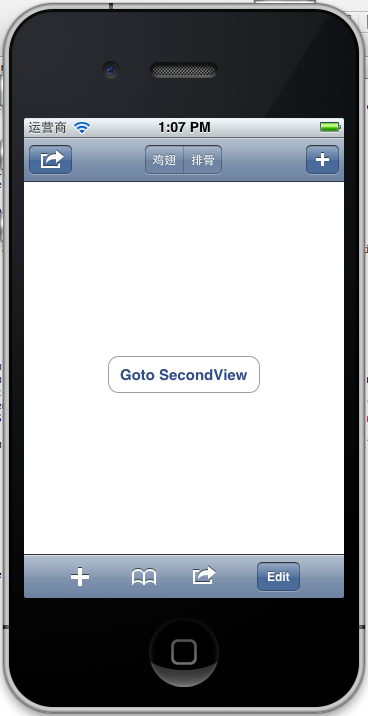
注意:用 [self.navigationController.toolbar setItems:(NSArray *) animated:<#(BOOL)#>]这个方法添加item是不起效果的。下面我动态自己添加Toolbar时,这个才起效果。
3、动态添加Toolbar
我们在SecondView添加动态的Toolbar。
在SecondViewController.h添加
- #import <UIKit/UIKit.h>
- @interface SecondViewController : UIViewController
- {
- UIToolbar *toolBar;
- }
- @end
在SecondViewController.m添加
- - (void)viewDidLoad
- {
- [super viewDidLoad];
- [self.navigationController setToolbarHidden:YES animated:YES];
- UIBarButtonItem *addButton = [[UIBarButtonItem alloc] initWithBarButtonSystemItem:UIBarButtonSystemItemSearch target:self action:@selector(gotoThridView:)];
- toolBar = [[UIToolbar alloc] initWithFrame:CGRectMake(0.0, self.view.frame.size.height - toolBar.frame.size.height - 44.0, self.view.frame.size.width, 44.0)];
- [toolBar setBarStyle:UIBarStyleDefault];
- toolBar.autoresizingMask = UIViewAutoresizingFlexibleTopMargin;
- [toolBar setItems:[NSArray arrayWithObject:addButton]];
- [self.view addSubview:toolBar];
- // Do any additional setup after loading the view from its nib.
- }
先把RootView时显示的Toobar隐藏
[self.navigationController setToolbarHidden:YESanimated:YES];然后把新建的Toolbar添加的SecondView中,并为Toobar设置了一个Item.
[toolBarsetItems:[NSArrayarrayWithObject:addButton]];
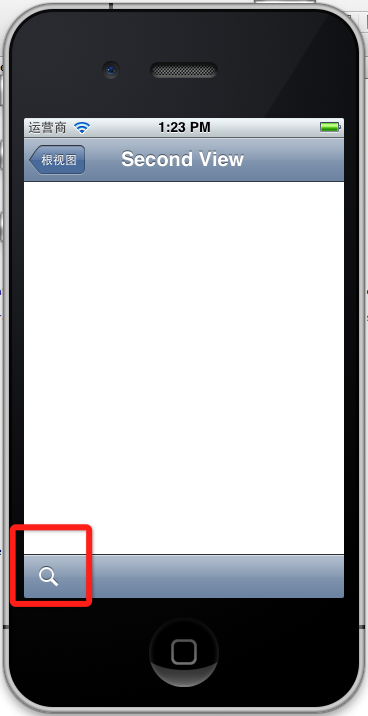
BarButtonItem用 的是UIBarButtonSystemItemSearch, 效果如下:
4、新建ThridView,从SecondView跳转到
Commad+N新建一个ThridViewController,
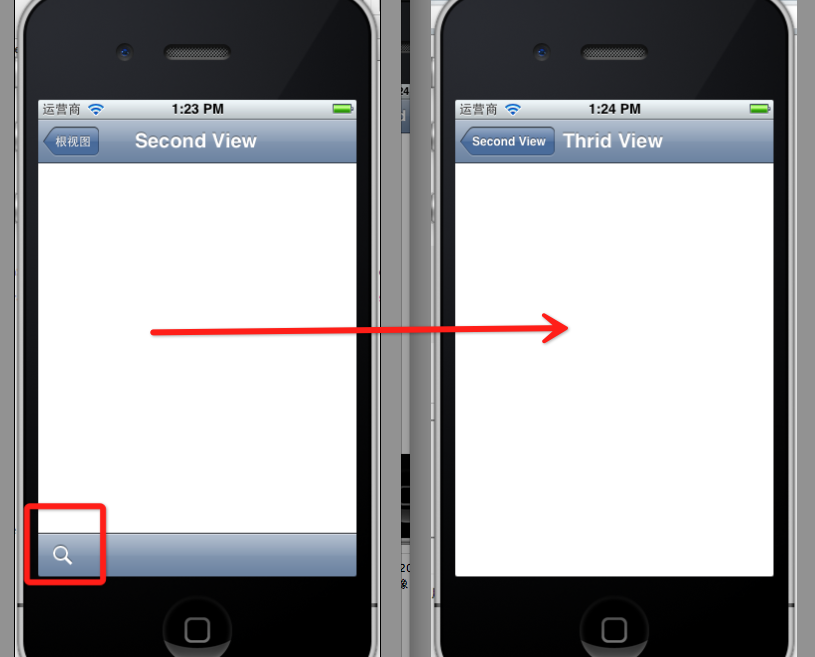
这个addButton跳转到ThridView
- -(void)gotoThridView:(id)sender
- {
- ThridViewController *thridView = [[ThridViewController alloc] init];
- [self.navigationController pushViewController:thridView animated:YES];
- thridView.title = @"Thrid View";
- }
跳转Second到Third效果:
到此UINavigationController练习的差不多了。
前面两篇:
iOS学习之UINavigationController详解与使用(一)添加UIBarButtonItem
iOS学习之UINavigationController详解与使用(二)页面切换和segmentedController
例子代码:https://github.com/schelling/YcDemo
iOS学习之UINavigationController详解与使用(三)ToolBar的更多相关文章
- [转]iOS学习之UINavigationController详解与使用(三)ToolBar
转载地址:http://blog.csdn.net/totogo2010/article/details/7682641 iOS学习之UINavigationController详解与使用(二)页面切 ...
- iOS学习之UINavigationController详解与使用(二)页面切换和segmentedController
iOS学习之UINavigationController详解与使用(一)添加UIBarButtonItem是上篇,我们接着讲UINavigationController的重要作用,页面的管理和切换. ...
- iOS学习之UINavigationController详解与使用(一)添加UIBarButtonItem
http://blog.csdn.net/totogo2010/article/details/7681879 1.UINavigationController导航控制器如何使用 UINavigati ...
- [转]iOS学习之UINavigationController详解与使用(二)页面切换和segmentedController
转载地址:http://blog.csdn.net/totogo2010/article/details/7682433 iOS学习之UINavigationController详解与使用(一)添加U ...
- [转]iOS学习之UINavigationController详解与使用(一)添加UIBarButtonItem
转载地址:http://blog.csdn.net/totogo2010/article/details/7681879 1.UINavigationController导航控制器如何使用 UINav ...
- IOS开发之UINavigationController详解
UINavigationController是IOS编程中比较常用的一种容器view controller,很多系统的控件(如UIImagePickerViewController)以及很多有名的AP ...
- UINavigationController详解一(转)UIBarButtonItem
本文出自:http://www.cnblogs.com/smileEvday/archive/2012/05/14/2495153.html 特别感谢. 1.UINavigationControlle ...
- IOS 友盟使用详解
IOS 友盟使用详解 这篇博客将会详细介绍友盟的使用,希望对博友们有所帮助. 首先我们在浏览器上搜索友盟. 在这里我们选择官网这个,进去友盟官网后我们按照下图进行选择. 接下来选择如下图 Next 这 ...
- iOS中—触摸事件详解及使用
iOS中--触摸事件详解及使用 (一)初识 要想学好触摸事件,这第一部分的基础理论是必须要学会的,希望大家可以耐心看完. 1.基本概念: 触摸事件 是iOS事件中的一种事件类型,在iOS中按照事件划分 ...
随机推荐
- JS 区分单击双击
var timeout =null; $("#Btn").on("click",function(){ clearTimeout(timeout);//停止单击 ...
- (1/2) 为了理解 UWP 的启动流程,我从零开始创建了一个 UWP 程序
每次使用 Visual Studio 的模板创建一个 UWP 程序,我们会在项目中发现大量的项目文件.配置.应用启动流程代码和界面代码.然而这些文件在 UWP 程序中到底是如何工作起来的? 我从零开始 ...
- ASP.NET Core 中的SEO优化(2):中间件中渲染Razor视图
前言 上一篇文章<ASP.NET Core 中的SEO优化(1):中间件实现服务端静态化缓存>中介绍了中间件的使用方法.以及使用中间件实现服务端静态化缓存的功能.本系列文章的这些技巧都是我 ...
- Flask第四篇——第一个程序
看,是第一个程序,不是脚本哦~~ 把生成的模板上面加上编码,然后运行,看输出台: 上图中有 Running on http://127.0.0.1:5000/ 点击那个地址,就可以在浏览器看到代码运行 ...
- 关于altera fpga的io时序优化问题
chip planner中一个io的结构如下图所示 其中左边是输出部分右边是输入部分,但是会注意到两个结构:1,寄存器,2,delay模块 以下是我的推测:这两个结构是为了做时序优化时用的,在alte ...
- cocos2dx 云彩特效
cocos2dx 云彩特效,就是一张云彩Png 图片从屏幕左边移动到右边,再从左边移动到右边 yuncai = static_cast<ImageView*>(Helper::seekWi ...
- (转)JavaMail邮件发送-发送一个文本邮件和一些问题说明
需要下载的JAR包: JavaMail:http://www.oracle.com/technetwork/java/javamail/index.html JAF:http://www.oracle ...
- Extjs tree1
1.代码如下: 1 <!DOCTYPE html PUBLIC "-//W3C//DTD XHTML 1.0 Transitional//EN" "http://w ...
- 面试常考知识点——Java(JVM,JDK,JRE)
1. 什么是Java虚拟机?为什么Java被称作是“平台无关的编程语言”? 答:(1)Java虚拟机是一个可以执行Java字节码的虚拟机进程.Java源文件被编译成能被Java虚拟机执行的字节码文件. ...
- redis+php实现微博功能(一)
(一).微博功能概况 微博用户账号注册 微博用户登录 微博发布 添加微博好友(粉丝) 微博推送 微博冷数据写入mysql数据库 (二).redis数据结构设计 这节分享微博用户注册与登录:我们完全采用 ...