
[转]iOS学习之UINavigationController详解与使用(三)ToolBar
转载地址:http://blog.csdn.net/totogo2010/article/details/7682641
iOS学习之UINavigationController详解与使用(二)页面切换和segmentedController 接上篇,我们接着讲Navigation 的Toolbar。
1、显示Toolbar
在RootViewController.m的- (void)viewDidLoad方法中添加代码,这样Toobar就显示出来了。
- [self.navigationController setToolbarHidden:NO animated:YES];

2、在ToolBar上添加UIBarButtonItem
新建几个UIBarButtonItem,然后以数组的形式添加到Toolbar中
- UIBarButtonItem *one = [[UIBarButtonItem alloc] initWithBarButtonSystemItem:UIBarButtonSystemItemAdd target:nil action:nil];
- UIBarButtonItem *two = [[UIBarButtonItem alloc] initWithBarButtonSystemItem:UIBarButtonSystemItemBookmarks target:nil action:nil];
- UIBarButtonItem *three = [[UIBarButtonItem alloc] initWithBarButtonSystemItem:UIBarButtonSystemItemAction target:nil action:nil];
- UIBarButtonItem *four = [[UIBarButtonItem alloc] initWithBarButtonSystemItem:UIBarButtonSystemItemEdit target:nil action:nil];
- UIBarButtonItem *flexItem = [[UIBarButtonItem alloc] initWithBarButtonSystemItem:UIBarButtonSystemItemFlexibleSpace target:nil action:nil];
- [self setToolbarItems:[NSArray arrayWithObjects:flexItem, one, flexItem, two, flexItem, three, flexItem, four, flexItem, nil]];
效果:
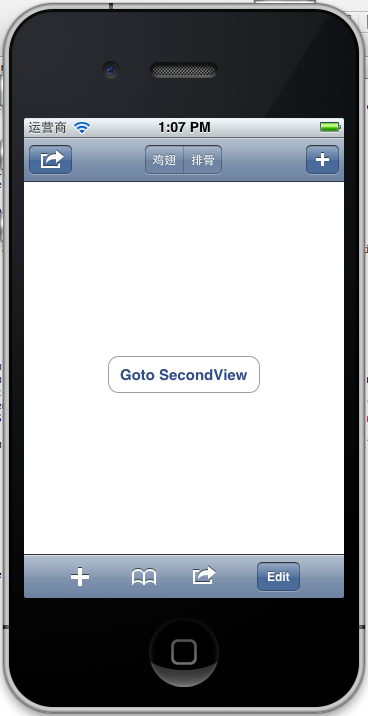
注意:用 [self.navigationController.toolbar setItems:(NSArray *) animated:<#(BOOL)#>]这个方法添加item是不起效果的。下面我动态自己添加Toolbar时,这个才起效果。
3、动态添加Toolbar
我们在SecondView添加动态的Toolbar。
在SecondViewController.h添加
- #import <UIKit/UIKit.h>
- @interface SecondViewController : UIViewController
- {
- UIToolbar *toolBar;
- }
- @end
在SecondViewController.m添加
- - (void)viewDidLoad
- {
- [super viewDidLoad];
- [self.navigationController setToolbarHidden:YES animated:YES];
- UIBarButtonItem *addButton = [[UIBarButtonItem alloc] initWithBarButtonSystemItem:UIBarButtonSystemItemSearch target:self action:@selector(gotoThridView:)];
- toolBar = [[UIToolbar alloc] initWithFrame:CGRectMake(0.0, self.view.frame.size.height - toolBar.frame.size.height - 44.0, self.view.frame.size.width, 44.0)];
- [toolBar setBarStyle:UIBarStyleDefault];
- toolBar.autoresizingMask = UIViewAutoresizingFlexibleTopMargin;
- [toolBar setItems:[NSArray arrayWithObject:addButton]];
- [self.view addSubview:toolBar];
- // Do any additional setup after loading the view from its nib.
- }
先把RootView时显示的Toobar隐藏
[self.navigationController setToolbarHidden:YESanimated:YES];然后把新建的Toolbar添加的SecondView中,并为Toobar设置了一个Item.
[toolBarsetItems:[NSArrayarrayWithObject:addButton]];
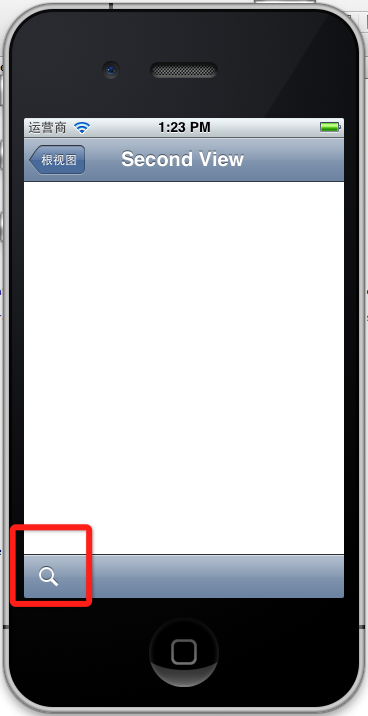
BarButtonItem用 的是UIBarButtonSystemItemSearch, 效果如下:
4、新建ThridView,从SecondView跳转到
Commad+N新建一个ThridViewController,
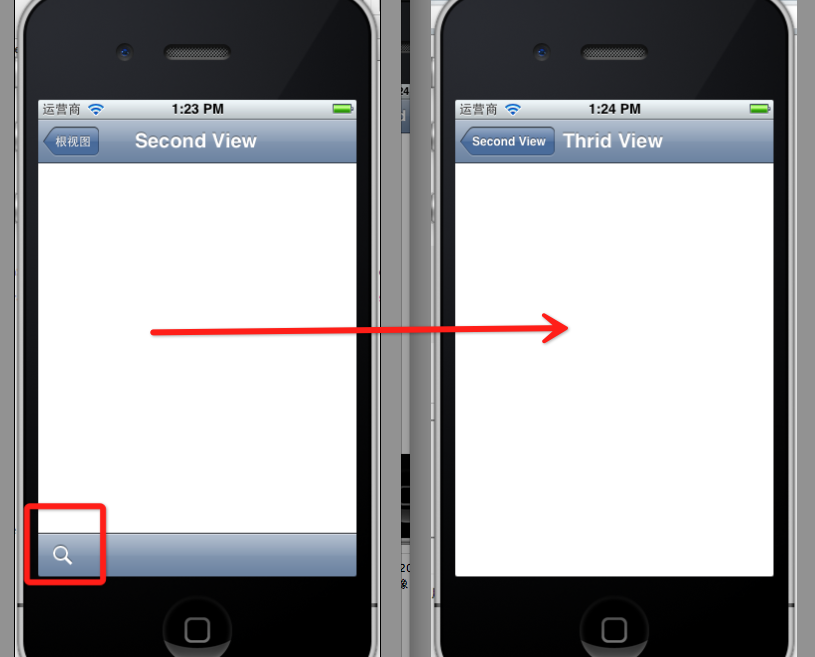
这个addButton跳转到ThridView
- -(void)gotoThridView:(id)sender
- {
- ThridViewController *thridView = [[ThridViewController alloc] init];
- [self.navigationController pushViewController:thridView animated:YES];
- thridView.title = @"Thrid View";
- }
跳转Second到Third效果:
到此UINavigationController练习的差不多了。
[转]iOS学习之UINavigationController详解与使用(三)ToolBar的更多相关文章
- [转]iOS学习之UINavigationController详解与使用(二)页面切换和segmentedController
转载地址:http://blog.csdn.net/totogo2010/article/details/7682433 iOS学习之UINavigationController详解与使用(一)添加U ...
- iOS学习之UINavigationController详解与使用(三)ToolBar
1.显示Toolbar 在RootViewController.m的- (void)viewDidLoad方法中添加代码,这样Toobar就显示出来了. [cpp] view plaincopy [ ...
- iOS学习之UINavigationController详解与使用(二)页面切换和segmentedController
iOS学习之UINavigationController详解与使用(一)添加UIBarButtonItem是上篇,我们接着讲UINavigationController的重要作用,页面的管理和切换. ...
- iOS学习之UINavigationController详解与使用(一)添加UIBarButtonItem
http://blog.csdn.net/totogo2010/article/details/7681879 1.UINavigationController导航控制器如何使用 UINavigati ...
- [转]iOS学习之UINavigationController详解与使用(一)添加UIBarButtonItem
转载地址:http://blog.csdn.net/totogo2010/article/details/7681879 1.UINavigationController导航控制器如何使用 UINav ...
- IOS开发之UINavigationController详解
UINavigationController是IOS编程中比较常用的一种容器view controller,很多系统的控件(如UIImagePickerViewController)以及很多有名的AP ...
- [转]iOS学习笔记(2)--Xcode6.1创建仅xib文件无storyboard的hello world应用
转载地址:http://www.mamicode.com/info-detail-514151.html 由于Xcode6之后,默认创建storyboard而非xib文件,而作为初学,了解xib的加载 ...
- UINavigationController详解一(转)UIBarButtonItem
本文出自:http://www.cnblogs.com/smileEvday/archive/2012/05/14/2495153.html 特别感谢. 1.UINavigationControlle ...
- IOS 友盟使用详解
IOS 友盟使用详解 这篇博客将会详细介绍友盟的使用,希望对博友们有所帮助. 首先我们在浏览器上搜索友盟. 在这里我们选择官网这个,进去友盟官网后我们按照下图进行选择. 接下来选择如下图 Next 这 ...
随机推荐
- zk编程语言: 如何改变datebox框值的大小及高度
<?page title="" contentType="text/html;charset=UTF-8"?> <zk > <st ...
- 帝国备份王(Empirebak)万能cookie及拿shell
1.伪造cookie登录系统(其实这一步多余的,大多用户连密码都没改,都是默认的123456) 登录成功设置4个cookie,看代码 function login($lusername,$lpassw ...
- SQL存储过程生成顺序编码
一.第一种方式 USE [WJKC]GO/****** Object: StoredProcedure [dbo].[Address_GetCode1] Script Date: 2016/3 ...
- SSH整合简单实例
1.配置struts.xml文件: <?xml version="1.0" encoding="UTF-8"?> <!DOCTYPE str ...
- IOS第16天(3,Quartz2D饼图)
**** #import "HMPieView.h" #import "UIColor+Random.h" @implementation HMPieView ...
- 使用LVM对硬盘在线扩容
初始状态: root@control:/dev/nova-volumes# vgdisplay --- Volume group --- VG Name nova-volumes System ID ...
- 【代码升级】【iCore3 双核心板】例程二十八:FSMC实验——读写FPGA
实验指导书及代码包下载: http://pan.baidu.com/s/1qXAxwgk iCore3 购买链接: https://item.taobao.com/item.htm?id=524229 ...
- 新广告法,极限词剔除,替换掉的mysql语句
国家级,世界级,最高级, 最佳,最大,第一, 唯一,首个,首选, 最好,最大,精确, 顶级,最高,最低, 最,最具,最便宜, 最新,最先进,最大程度, 最新技术,最先进科学,国家级产品, 填补国内空白 ...
- win commands
wmic process where name="explorer.exe" delete 我想你问得应该是运行命令吧!我查了,没有,你自己参考一下:Windows常用命令集 wi ...
- Golang之sdl2学习之路(零) -- 环境工具准备
学习Golang有一段时间了,从毫无头绪到四处乱撞,再到如今静下心来安心学习sdl2也有小半年了. 今晚重构之前的学习代码,发现如果不写该文,可能会在以后回顾这段时间写的代码上花费时间,故以此文做一点 ...