
微信小程序_(组件)swiper轮播图
微信小程序swiper轮播图组件官方文档 传送门
Learn:
swiper组件
一、swiper组件
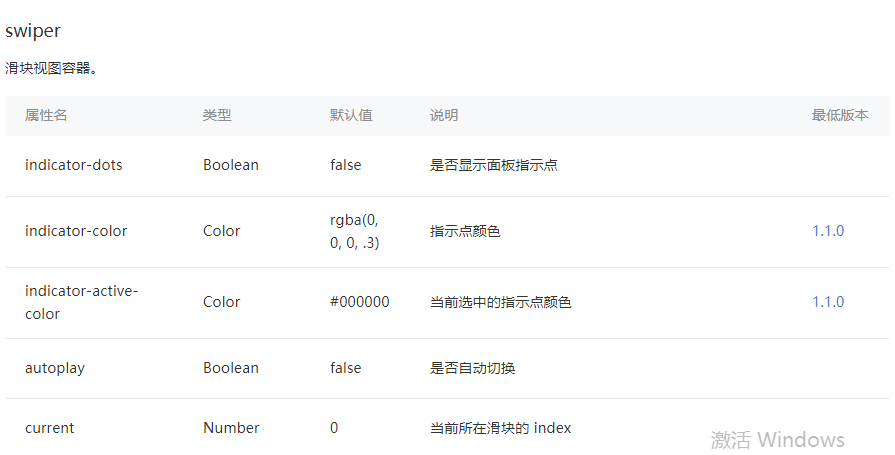
indicator-dots:是否显示面板指示点【默认值false】
autoplay:是否自动切换【默认值false】
interval:自动切换时间间隔【默认值5000】
duration:滑动动画时长【默认值500】
swiper滑块组件代码,初始化indicator-dots,autoplay,interval,duration四个属性
<swiper

  indicator-dots="{{indicatorDots}}"

  autoplay="{{autoplay}}"

  interval="{{interval}}"

  duration="{{duration}}"

>

  <block wx:for="{{imgUrls}}" wx:key="">

    <swiper-item>

      <image src="{{item}}" class="slide-image" width="355" height="150" />

    </swiper-item>

  </block>

</swiper>
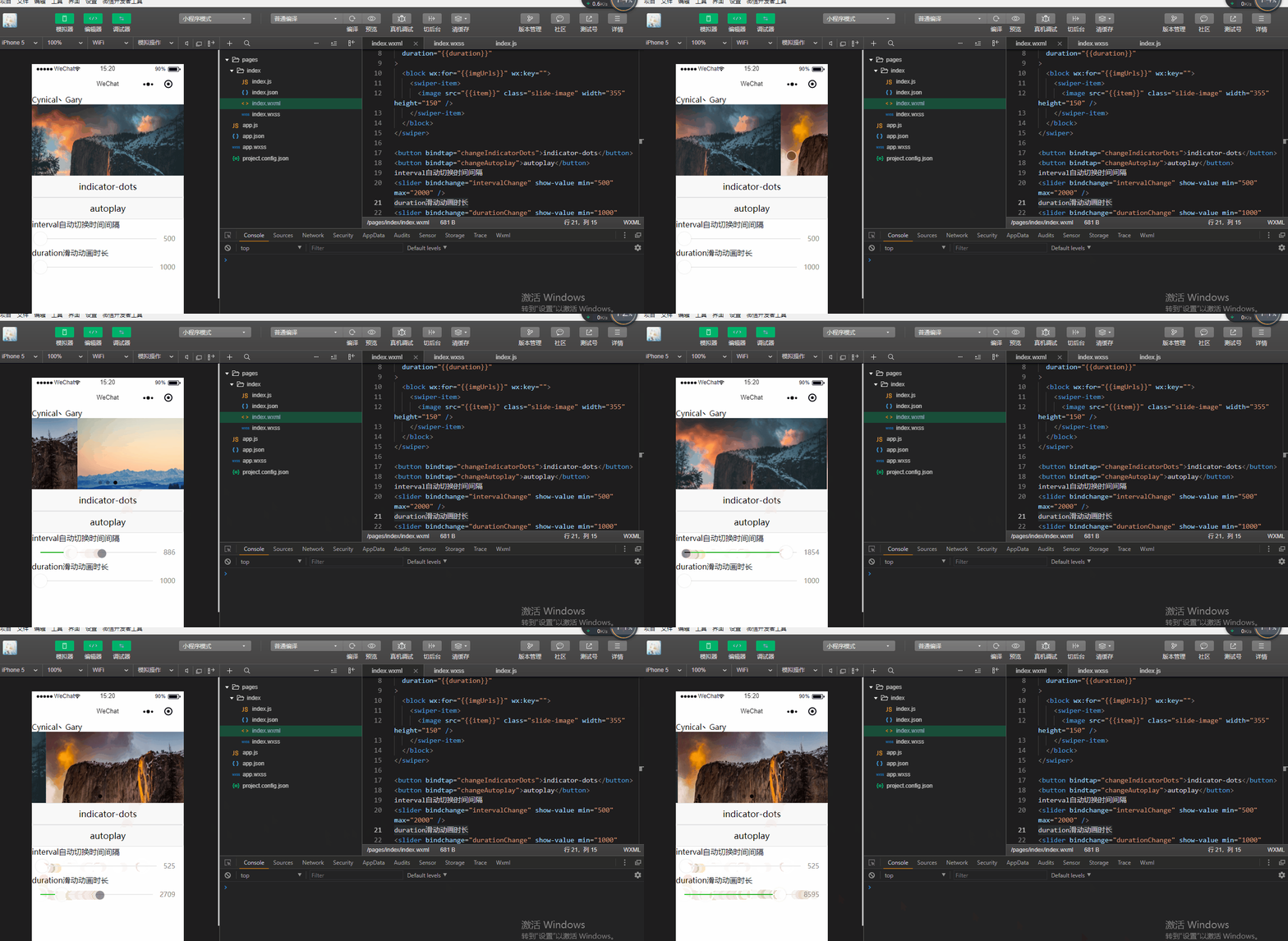
添加<button>组件绑定函数,去修改indicator-dots,autoplay,interval,duration四个属性
<button bindtap="changeIndicatorDots">indicator-dots</button>

<button bindtap="changeAutoplay">autoplay</button>

interval自动切换时间间隔

<slider bindchange="intervalChange" show-value min="500" max="2000" />

duration滑动动画时长

<slider bindchange="durationChange" show-value min="1000" max="10000" />
<!--index.wxml-->

Cynical丶Gary

<!-- 建立swiper代码块 -->

<swiper

  indicator-dots="{{indicatorDots}}"

  autoplay="{{autoplay}}"

  interval="{{interval}}"

  duration="{{duration}}"

>

  <block wx:for="{{imgUrls}}" wx:key="">

    <swiper-item>

      <image src="{{item}}" class="slide-image" width="355" height="150" />

    </swiper-item>

  </block>

</swiper>

<button bindtap="changeIndicatorDots">indicator-dots</button>

<button bindtap="changeAutoplay">autoplay</button>

interval自动切换时间间隔

<slider bindchange="intervalChange" show-value min="500" max="2000" />

duration滑动动画时长

<slider bindchange="durationChange" show-value min="1000" max="10000" />
index.html
Page({

  data: {

    imgUrls: [

      'https://images.unsplash.com/photo-1551334787-21e6bd3ab135?w=640',

      'https://images.unsplash.com/photo-1551214012-84f95e060dee?w=640',

      'https://images.unsplash.com/photo-1551446591-142875a901a1?w=640'

    ],

    indicatorDots: false,

    autoplay: false,

    interval: 5000,

    duration: 1000

  },

  changeIndicatorDots(e) {

    this.setData({

      indicatorDots: !this.data.indicatorDots

    })

  },

  changeAutoplay(e) {

    this.setData({

      autoplay: !this.data.autoplay

    })

  },

  intervalChange(e) {

    this.setData({

      interval: e.detail.value

    })

  },

  durationChange(e) {

    this.setData({

      duration: e.detail.value

    })

  }

})
index.js
微信小程序_(组件)swiper轮播图的更多相关文章
- 微信小程序中自定义swiper轮播图面板指示点的样式
重置样式: .swiper{ width: 100%; height: 240px; margin-bottom: 0.5rem; position:relative; } div.wx-swiper ...
- 【云开发】10分钟零基础学会做一个快递查询微信小程序,快速掌握微信小程序开发技能(轮播图、API请求)
大家好,我叫小秃僧 这次分享的是10分钟零基础学会做一个快递查询微信小程序,快速掌握开发微信小程序技能. 这篇文章偏基础,特别适合还没有开发过微信小程序的童鞋,一些概念和逻辑我会讲细一点,尽可能用图说 ...
- 【微信小程序】:实现轮播图3秒滚动
wxml模板:(数据一维数组) <scroll-view scroll-y="true"> <swiper autoplay="auto" i ...
- 微信小程序_(组件)icon、text、rich-text、progress四大基础组件
微信小程序基础组件官方文档 传送门 Learn 一.icon图标组件 二.rich-text富文本组件 三.text文本组件 四.progress进度条组件 一.icon图标组件 type:icon的 ...
- 微信小程序_(组件)可拖动movable-view
微信小程序movable-view组件官方文档 传送门 Learn 一.moveable-view组件 一.movable-view组件 direction:movable-view的移动方向,属性值 ...
- 微信小程序_(组件)scroll-view可滚动视图
微信小程序scroll-view组件官方文档 传送门 提前准备:使用<view>组件制作五条撑满的横向区域 <!--index.wxml--> Cynical丶Gary < ...
- 微信小程序_(组件)view视图容器
微信小程序view组件官方文档 传送门 Learn 一.hover-class属性 二.hover-start-time与hover-stay-time属性 三.hover-stop-propagat ...
- 微信小程序_(组件)picker
picker组件效果 官方文档:传送门 Page({ data: { array: ['美国', '中国', '巴西', '日本'], objectArray: [ { id: 0, name: '美 ...
- 微信小程序_(组件)组件基础
(progress.text.block) 组件基础效果 官方文档:传送门 Page({ /** * 页面的初始数据 */ data: { text:"Gary 微信小程序\n", ...
随机推荐
- C#发送Outlook邮件(仅SMTP版本)
先表明Outlook的参数:网址:https://support.office.com/zh-cn/article/Outlook-com-%E7%9A%84-POP%E3%80%81IMAP-%E5 ...
- asp.net 9 ViewState
VIEWSTATE aspx: <%@ Page Language="C#" AutoEventWireup="true" CodeBehind=&quo ...
- 数据库SQL优化分析查询语句总结
方法一: SELECT TOP 10 TEXT AS 'SQL Statement' ,last_execution_time AS 'Last Execution Time' ,(total_log ...
- JS基础_质数练习的改进,提高程序执行效率
<!DOCTYPE html> <html> <head> <meta charset="UTF-8"> <title> ...
- vue-router History 本地开发环境和nginx配置
vue-router mode=history本地开发环境配置 解决方法1.修改webpack的的devServer配置项(devServe存在于,rvue-cli2在webapck.config.j ...
- Html5+Css3小试牛刀
前因: 我开始做个收款系统,突然客户跑来要插进一个任务,据说他们老板挺在意的,一个小商场,一个首页,一个详情页,UI无自由发挥,要求,尽量好看点. 一番交谈后,确认这是一个对外的网站,最好移动端也能正 ...
- fastadmin tp等模板变量在html中的js中如何使用?
<script> var a = {$b} </script>
- shell脚本获取传递的参数
1 脚本编写 #!/bin/bash 2 解释 $n 表示是第几个参数 $0 表示脚本命令本身 3 执行效果
- 解决docker容器的窗口大小问题
解决docker容器的窗口大小问题 最近哥们在是使用docker时,发现有些容器内部窗口大小有问题. 如下午所示,vi窗口只占据左上角一部分.正常情况下vi应该铺满整个窗口才对呀. 所以哥们找到了解决 ...
- F - One Occurrence CodeForces - 1000F (线段树+离线处理)
You are given an array aa consisting of nn integers, and qq queries to it. ii-th query is denoted by ...