
微信小程序_(组件)scroll-view可滚动视图
微信小程序scroll-view组件官方文档 传送门
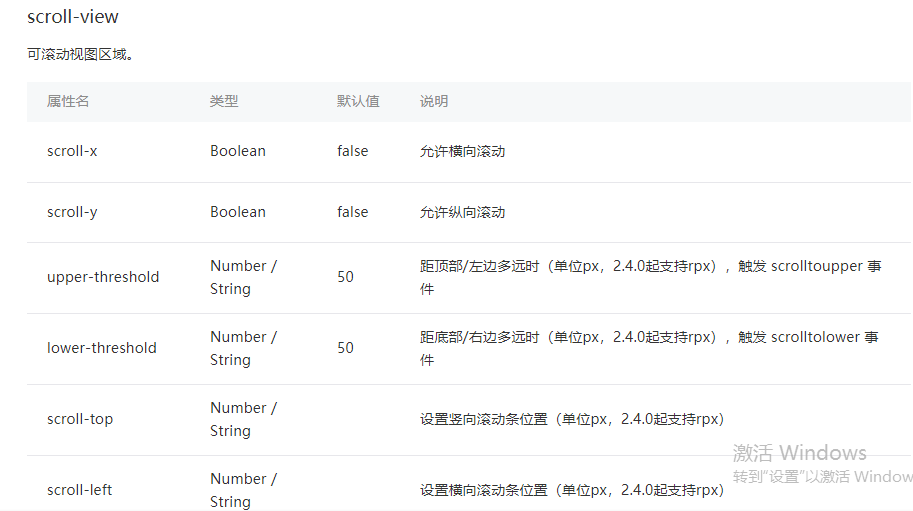
提前准备:使用<view>组件制作五条撑满的横向区域
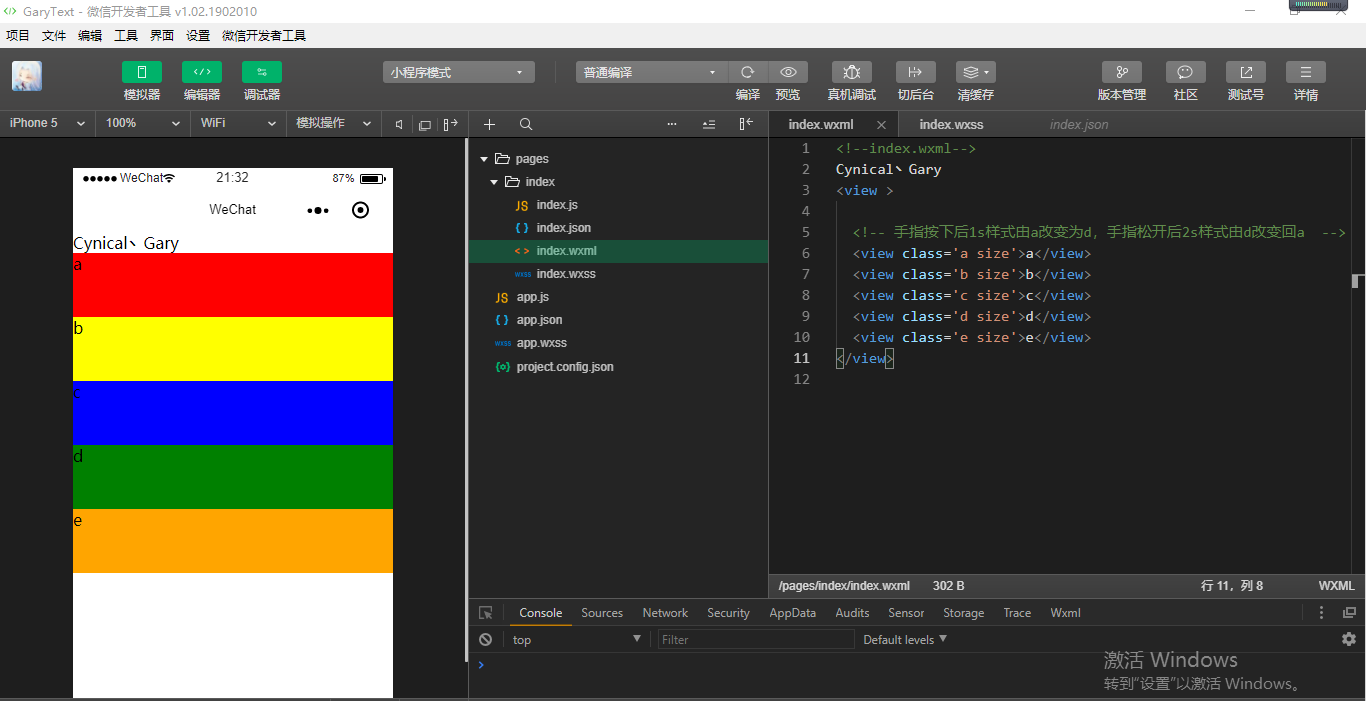
<!--index.wxml-->

Cynical丶Gary

<view >

  <!-- 手指按下后1s样式由a改变为d,手指松开后2s样式由d改变回a  -->

  <view class='a size'>a</view>

  <view class='b size'>b</view>

  <view class='c size'>c</view>

  <view class='d size'>d</view>

  <view class='e size'>e</view>

</view>
index.wxml
.container{

  display: flex;

}

.size{

  width: 100%;

  height: 150rpx;

}

.a{

  background: red;

  order:;

  flex:;

}

.b{

  background: yellow;

  order:;

  flex:;

}

.c{

  background: blue;

  order:;

  flex:;

}

.d{

  background: green;

  order:;

  flex:;

}

.e{

  background: orange;

  order:;

  flex:;

}
index.wxss
Learn
一、scroll-y属性
二、scroll-x属性
一、scroll-y属性
scroll-y:允许纵向滚动【默认值false】
使用<scroll-view>组件可以设置小程序中<view>组件纵向滚动,使用<scroll-view>组件时注意必须设置高度的样式如:style='height:300rpx'
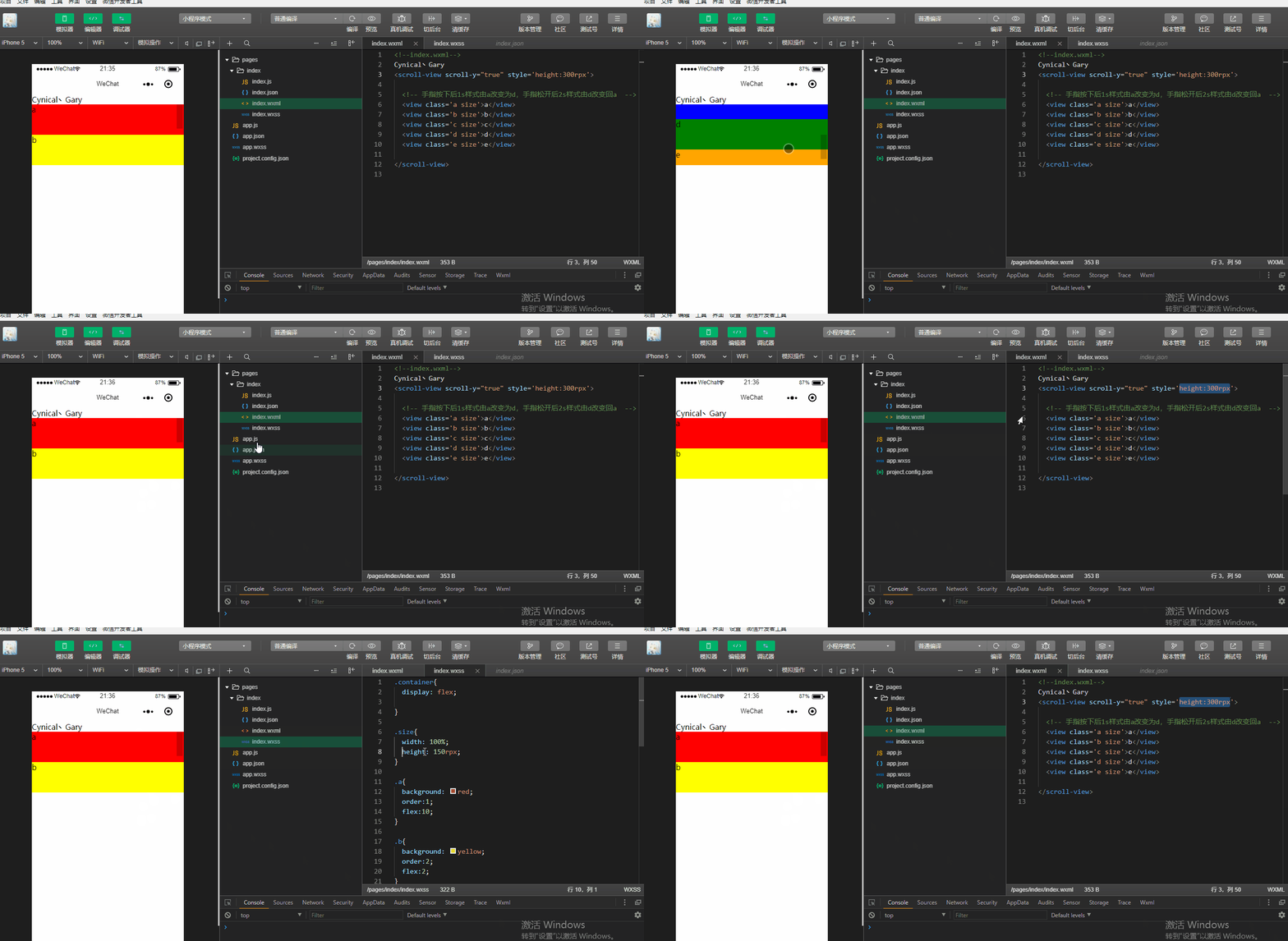
<!--index.wxml-->

Cynical丶Gary

<scroll-view scroll-y="true" style='height:300rpx'>

  <!-- 手指按下后1s样式由a改变为d,手指松开后2s样式由d改变回a  -->

  <view class='a size'>a</view>

  <view class='b size'>b</view>

  <view class='c size'>c</view>

  <view class='d size'>d</view>

  <view class='e size'>e</view>

</scroll-view>
index.wxml
.container{

  display: flex;

}

.size{

  width: 100%;

  height: 150rpx;

}

.a{

  background: red;

  order:;

  flex:;

}

.b{

  background: yellow;

  order:;

  flex:;

}

.c{

  background: blue;

  order:;

  flex:;

}

.d{

  background: green;

  order:;

  flex:;

}

.e{

  background: orange;

  order:;

  flex:;

}
index.wxss
upper-threshold:距顶部/左边多远时(单位px,2.4.0起支持rpx),触发 scrolltoupper 事件【默认值50】
lower-threshold:距底部/右边多远时(单位px,2.4.0起支持rpx),触发 scrolltolower 事件【默认值50】
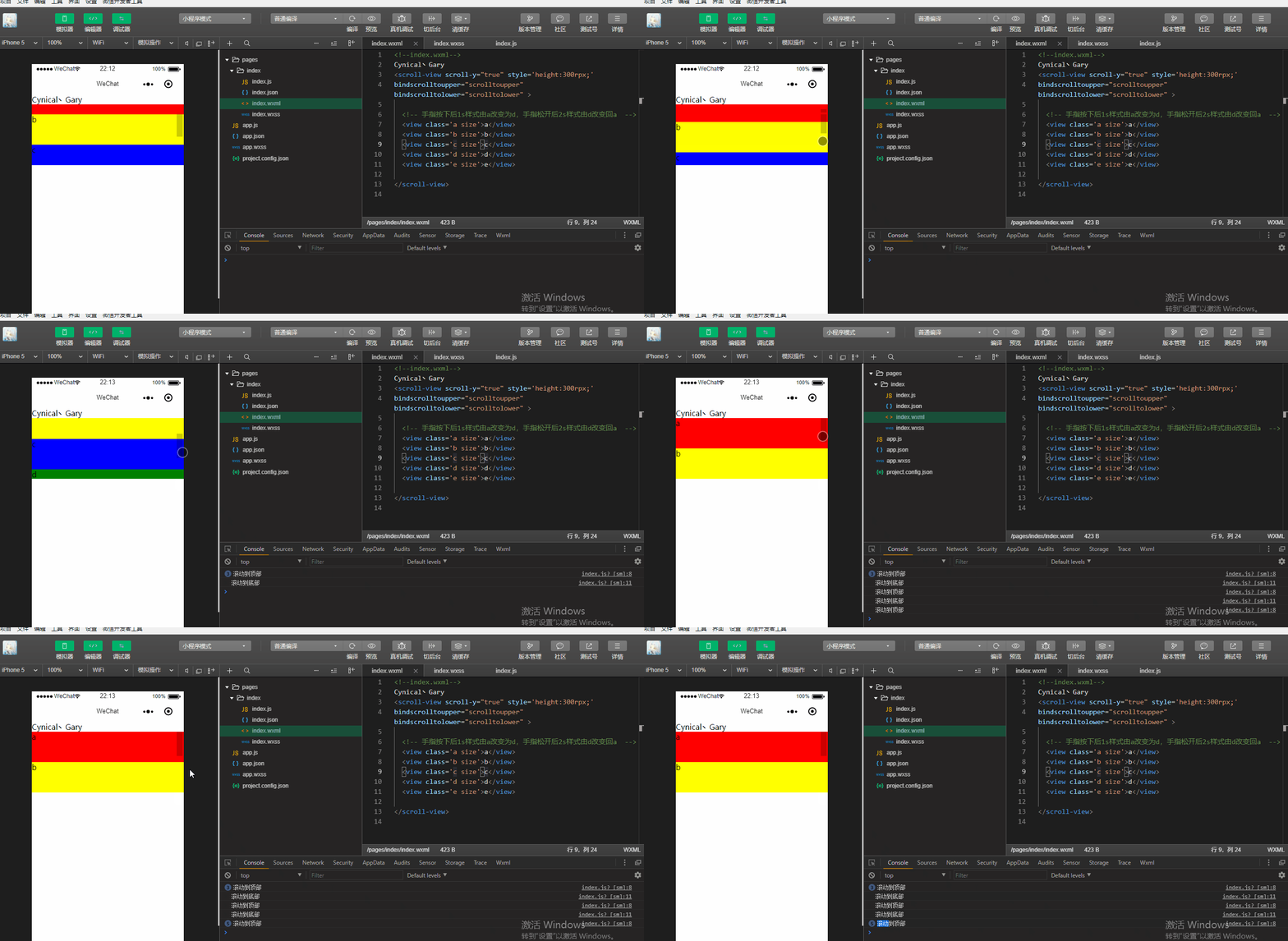
bindscrolltoupper:滚动到顶部/左边,会触发 scrolltoupper 事件
bindscrolltolower:滚动到底部/右边,会触发 scrolltolower 事件
给<scroller-view>组件添加滚动触发事件
<scroll-view scroll-y="true" style='height:300rpx;' bindscrolltoupper="scrolltoupper" bindscrolltolower="scrolltolower" >
并在index.js中添加scrolltoupper函数事件和scrolltolower函数事件
  scrolltoupper:function(){

      console.log("滚动到顶部");

  },

  scrolltolower:function(){

    console.log("滚动到底部");

  }
<!--index.wxml-->

Cynical丶Gary

<scroll-view scroll-y="true" style='height:300rpx;'

bindscrolltoupper="scrolltoupper" bindscrolltolower="scrolltolower" >

  <!-- 手指按下后1s样式由a改变为d,手指松开后2s样式由d改变回a  -->

  <view class='a size'>a</view>

  <view class='b size'>b</view>

  <view class='c size'>c</view>

  <view class='d size'>d</view>

  <view class='e size'>e</view>

</scroll-view>
index.wxml
.container{

  display: flex;

}

.size{

  width: 100%;

  height: 150rpx;

}

.a{

  background: red;

  order:;

  flex:;

}

.b{

  background: yellow;

  order:;

  flex:;

}

.c{

  background: blue;

  order:;

  flex:;

}

.d{

  background: green;

  order:;

  flex:;

}

.e{

  background: orange;

  order:;

  flex:;

}
index.wxss
Page({

  data:{

  },

  scrolltoupper:function(){

      console.log("滚动到顶部");

  },

  scrolltolower:function(){

    console.log("滚动到底部");

  }

})
index.js
当然我们也可以给<scroll-view>添加两个额外的属性upper-threshold和lower-threshold
upper-threshold:距顶部/左边多远时(单位px,2.4.0起支持rpx),触发 scrolltoupper 事件【默认值50】
lower-threshold:距底部/右边多远时(单位px,2.4.0起支持rpx),触发 scrolltolower 事件【默认值50】
使用方法
<scroll-view scroll-y="true" style='height:300rpx;'

bindscrolltoupper="scrolltoupper" bindscrolltolower="scrolltolower" upper-threshold="0" lower-threshold="0">
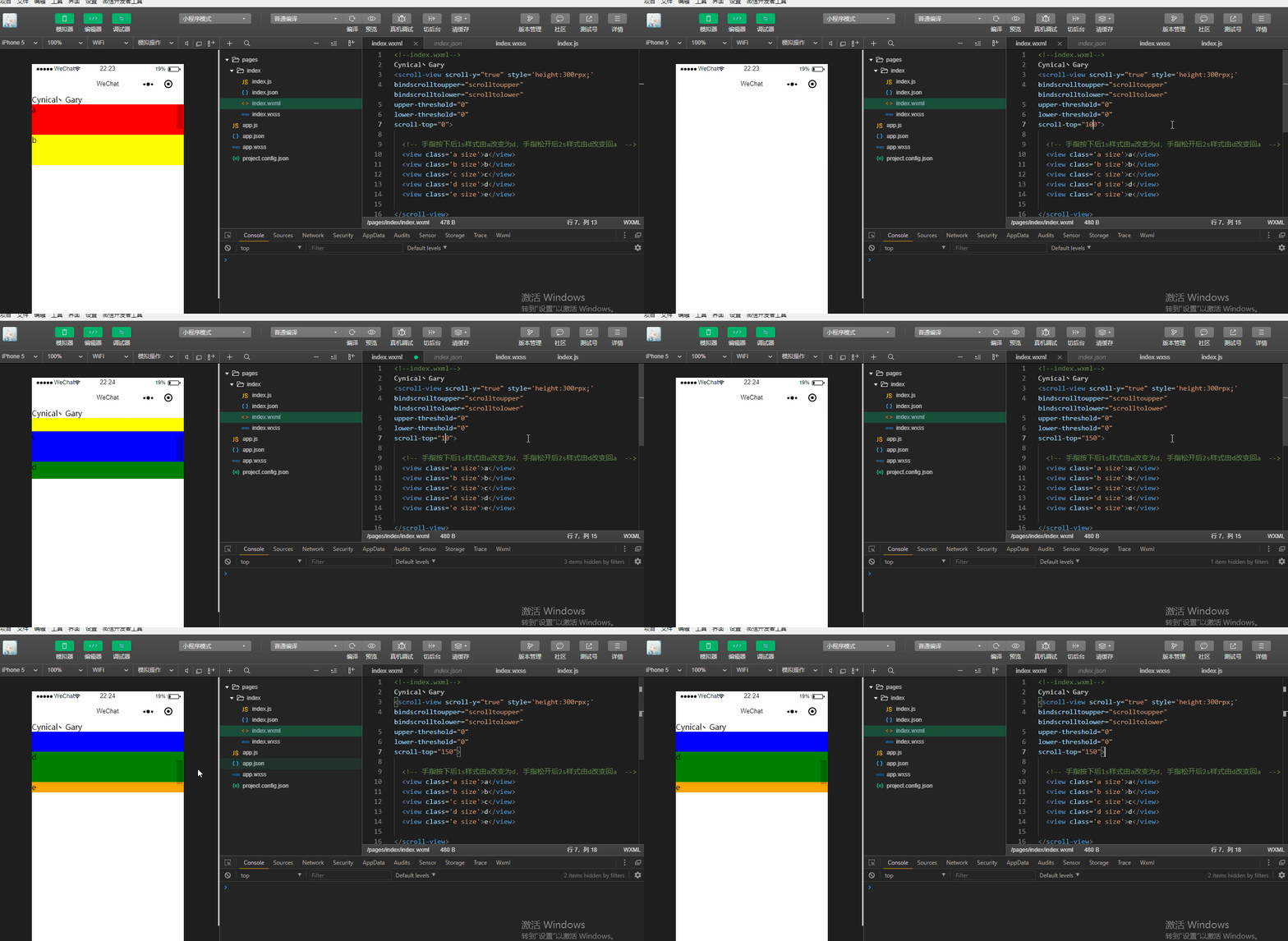
scroll-top:设置竖向滚动条位置(单位px,2.4.0起支持rpx)【无默认值】
可以看到,当我们设置scroll-top="100"时,滚动条默认出现在距离顶部100px位置的地方,当我们设置scroll-top="150"时,滚动条默认出现在距离顶部150px位置的地方
<!--index.wxml-->

Cynical丶Gary

<scroll-view scroll-y="true" style='height:300rpx;'

bindscrolltoupper="scrolltoupper" bindscrolltolower="scrolltolower"

upper-threshold="0"

lower-threshold="0"

scroll-top="150">

  <!-- 手指按下后1s样式由a改变为d,手指松开后2s样式由d改变回a  -->

  <view class='a size'>a</view>

  <view class='b size'>b</view>

  <view class='c size'>c</view>

  <view class='d size'>d</view>

  <view class='e size'>e</view>

</scroll-view>
index.wxml
.container{

  display: flex;

}

.size{

  width: 100%;

  height: 150rpx;

}

.a{

  background: red;

  order:1;

  flex:10;

}

.b{

  background: yellow;

  order:2;

  flex:2;

}

.c{

  background: blue;

  order:3;

  flex:1;

}

.d{

  background: green;

  order:4;

  flex:1;

}

.e{

  background: orange;

  order:5;

  flex:1;

}
index.wxss
Page({

  data:{

  },

  scrolltoupper:function(){

      console.log("滚动到顶部");

  },

  scrolltolower:function(){

    console.log("滚动到底部");

  }

})
index.js
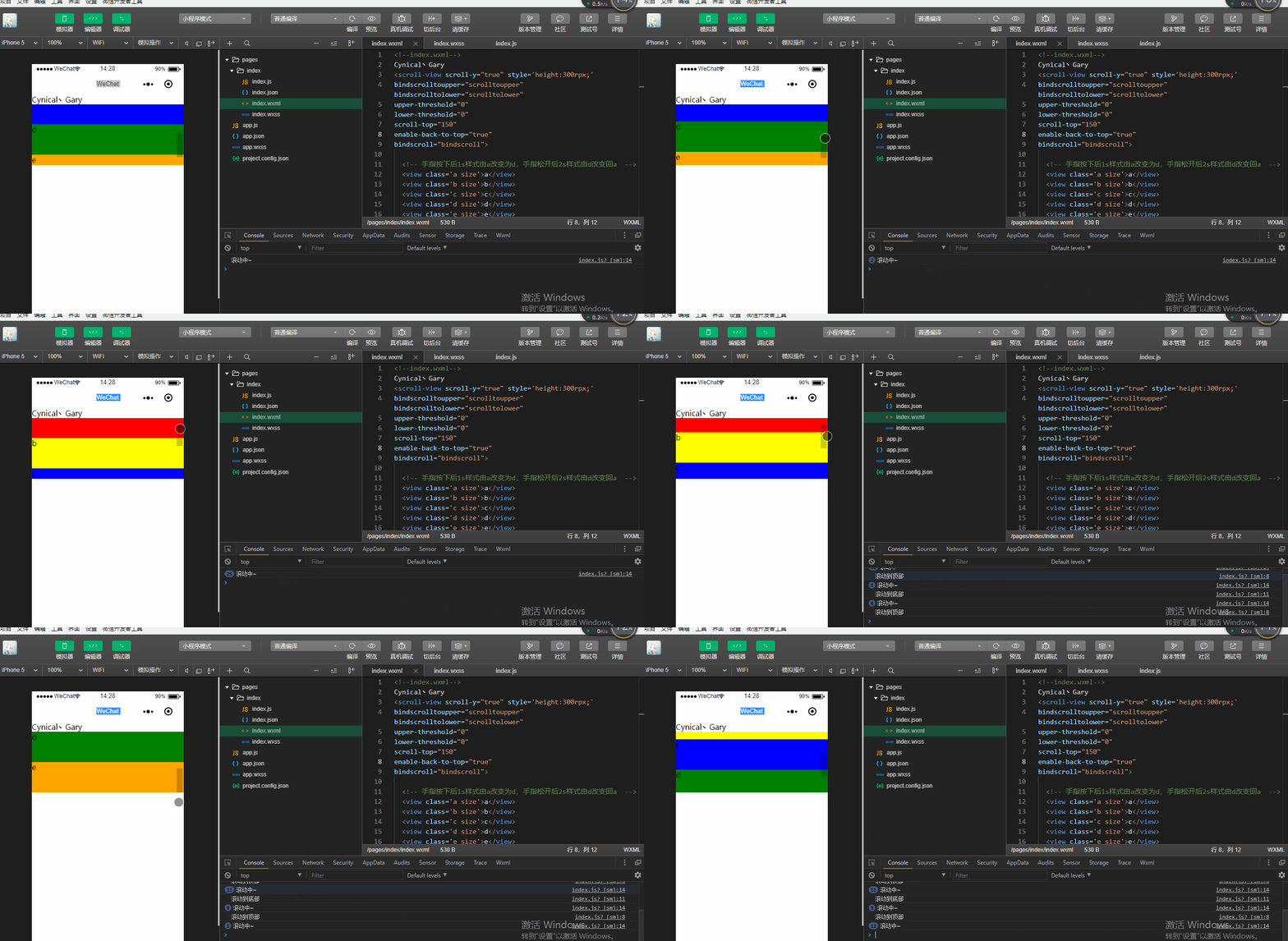
enable-back-to-top:iOS点击顶部状态栏、安卓双击标题栏时,滚动条返回顶部,只支持竖向【默认值false】
注意:微信小程序开发工具中默认在web环境中进行开发,而此属性需要在手机上运行~
bindscroll:滚动时触发,event.detail = {scrollLeft, scrollTop, scrollHeight, scrollWidth, deltaX, deltaY}
在index.js中添加滚动时触发的函数bindscroll()
  bindscroll:function(){

    console.log("滚动中~");

  }
在index.wxml中进行事件绑定bindscroll="bindscroll"
  <scroll-view scroll-y="true" style='height:300rpx;'

  bindscrolltoupper="scrolltoupper" bindscrolltolower="scrolltolower"

  upper-threshold="0"

  lower-threshold="0"

  scroll-top="150"

  enable-back-to-top="true"

  bindscroll="bindscroll">
<!--index.wxml-->

Cynical丶Gary

<scroll-view scroll-y="true" style='height:300rpx;'

bindscrolltoupper="scrolltoupper" bindscrolltolower="scrolltolower"

upper-threshold="0"

lower-threshold="0"

scroll-top="150"

enable-back-to-top="true"

bindscroll="bindscroll">

  <!-- 手指按下后1s样式由a改变为d,手指松开后2s样式由d改变回a  -->

  <view class='a size'>a</view>

  <view class='b size'>b</view>

  <view class='c size'>c</view>

  <view class='d size'>d</view>

  <view class='e size'>e</view>

</scroll-view>
index.wxml
Page({

  data:{

  },

  scrolltoupper:function(){

      console.log("滚动到顶部");

  },

  scrolltolower:function(){

    console.log("滚动到底部");

  },

  bindscroll:function(){

    console.log("滚动中~");

  }

})
index.js
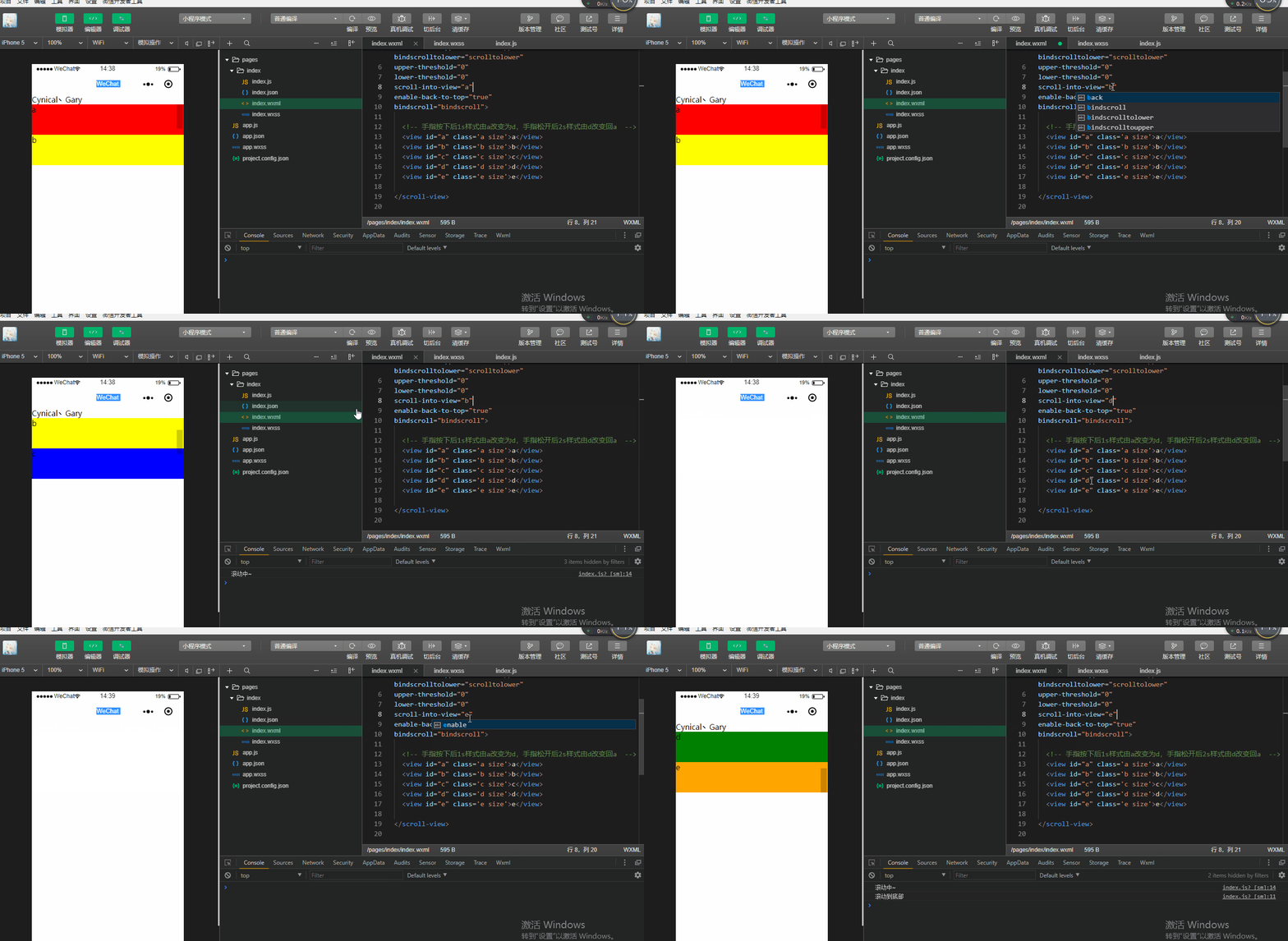
scroll-into-view:值应为某子元素id(id不能以数字开头)。设置哪个方向可滚动,则在哪个方向滚动到该元素
index.wxml中给五个<view>组件添加id元素
  <view id="a" class='a size'>a</view>

  <view id="b" class='b size'>b</view>

  <view id="c" class='c size'>c</view>

  <view id="d" class='d size'>d</view>

  <view id="e" class='e size'>e</view>
通过scroll-into-view给<scroll-view>组件添加属性
  <scroll-view scroll-y="true" style='height:300rpx;'

  bindscrolltoupper="scrolltoupper" bindscrolltolower="scrolltolower"

  upper-threshold="0"

  lower-threshold="0"

  scroll-into-view="e"

  enable-back-to-top="true"

  bindscroll="bindscroll">
<!--index.wxml-->

Cynical丶Gary

<!-- scroll-top="150" -->

<scroll-view scroll-y="true" style='height:300rpx;'

bindscrolltoupper="scrolltoupper" bindscrolltolower="scrolltolower"

upper-threshold="0"

lower-threshold="0"

scroll-into-view="e"

enable-back-to-top="true"

bindscroll="bindscroll">

  <!-- 手指按下后1s样式由a改变为d,手指松开后2s样式由d改变回a  -->

  <view id="a" class='a size'>a</view>

  <view id="b" class='b size'>b</view>

  <view id="c" class='c size'>c</view>

  <view id="d" class='d size'>d</view>

  <view id="e" class='e size'>e</view>

</scroll-view>
index.wxml
Page({

  data:{

  },

  scrolltoupper:function(){

      console.log("滚动到顶部");

  },

  scrolltolower:function(){

    console.log("滚动到底部");

  },

  bindscroll:function(){

    console.log("滚动中~");

  }

})
index.js
二、scroll-x属性
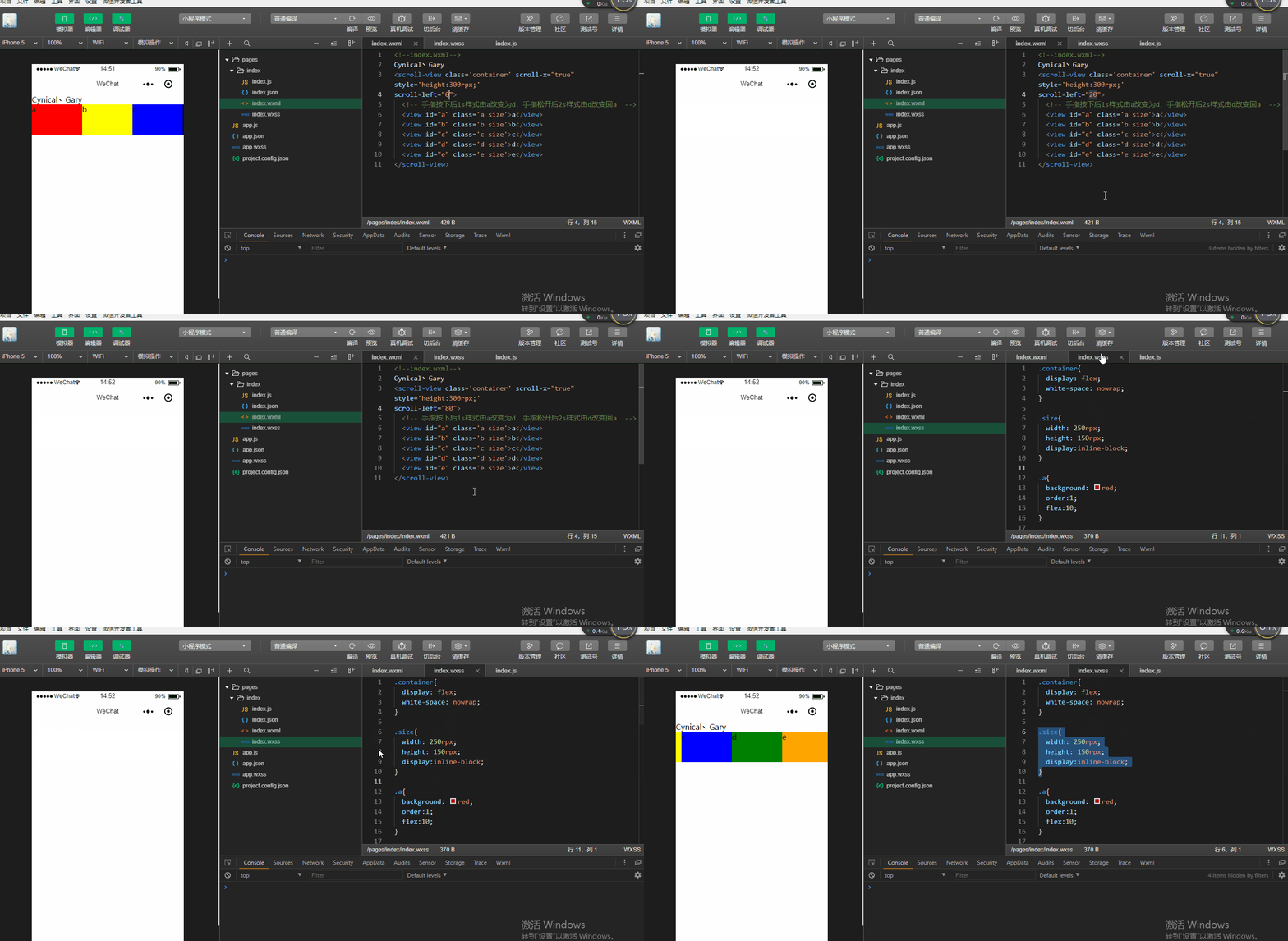
scroll-x:允许横向滚动【默认值为false】
scroll-left:设置横向滚动条位置(单位px,2.4.0起支持rpx)
<!--index.wxml-->

Cynical丶Gary

<scroll-view class='container' scroll-x="true" style='height:300rpx;'

scroll-left="200">

  <!-- 手指按下后1s样式由a改变为d,手指松开后2s样式由d改变回a  -->

  <view id="a" class='a size'>a</view>

  <view id="b" class='b size'>b</view>

  <view id="c" class='c size'>c</view>

  <view id="d" class='d size'>d</view>

  <view id="e" class='e size'>e</view>

</scroll-view>
index.wxml
.container{

  display: flex;

  white-space: nowrap;

}

.size{

  width: 250rpx;

  height: 150rpx;

  display:inline-block;

}

.a{

  background: red;

  order:;

  flex:;

}

.b{

  background: yellow;

  order:;

  flex:;

}

.c{

  background: blue;

  order:;

  flex:;

}

.d{

  background: green;

  order:;

  flex:;

}

.e{

  background: orange;

  order:;

  flex:;

}
index.wxss
Page({

  data:{

  },

  scrolltoupper:function(){

      console.log("滚动到顶部");

  },

  scrolltolower:function(){

    console.log("滚动到底部");

  },

  bindscroll:function(){

    console.log("滚动中~");

  }

})
index.js
微信小程序_(组件)scroll-view可滚动视图的更多相关文章
- 微信小程序_(组件)icon、text、rich-text、progress四大基础组件
微信小程序基础组件官方文档 传送门 Learn 一.icon图标组件 二.rich-text富文本组件 三.text文本组件 四.progress进度条组件 一.icon图标组件 type:icon的 ...
- 微信小程序_(组件)可拖动movable-view
微信小程序movable-view组件官方文档 传送门 Learn 一.moveable-view组件 一.movable-view组件 direction:movable-view的移动方向,属性值 ...
- 微信小程序_(组件)view视图容器
微信小程序view组件官方文档 传送门 Learn 一.hover-class属性 二.hover-start-time与hover-stay-time属性 三.hover-stop-propagat ...
- 微信小程序_(组件)picker
picker组件效果 官方文档:传送门 Page({ data: { array: ['美国', '中国', '巴西', '日本'], objectArray: [ { id: 0, name: '美 ...
- 微信小程序_(组件)组件基础
(progress.text.block) 组件基础效果 官方文档:传送门 Page({ /** * 页面的初始数据 */ data: { text:"Gary 微信小程序\n", ...
- 微信小程序_(组件)canvas画布
canvas画布效果 官方文档:传送门 Page({ canvasIdErrorCallback: function (e) { console.error(e.detail.errMsg) }, o ...
- 微信小程序_(组件)swiper轮播图
微信小程序swiper轮播图组件官方文档 传送门 Learn: swiper组件 一.swiper组件 indicator-dots:是否显示面板指示点[默认值false] autoplay:是否自动 ...
- 微信小程序_(组件)flex布局
小程序建议使用flex布局进行排版 flex是一个盒装弹性布局 flex是一个容器,所有子元素都是他的成员 定义布局:display:flex flex容器的属性: 一.flex-direction: ...
- 微信小程序_(组件)form表单
Form表单.switch开关.数值选择器效果 官方文档:传送门 点击提交表单(按钮,提交开关,数值选择器,输入文本中)的值,显示在控制台上,点击重置,重置表单中的值. 实现过程 form表单,添加f ...
随机推荐
- jq之display:none与visible:hidden
http://www.cnblogs.com/linxiong945/p/4075146.html 今天学习到jquery的hide()部分时,突然有一个想法,jquery中的隐藏/显示部分的实现是给 ...
- swagger 报错打不开
1.controller中的接口里使用的 qto的数据类型有问题: qo中的字段中缺少:(@JsonProperty(value = "sort"),以及定义的example值的格 ...
- O057、Delete Volume 操作
参考https://www.cnblogs.com/CloudMan6/p/5648665.html 状态为Available 的volume 才能够被delete,如果volume当前已经被at ...
- 微信小程序富文本
<div class="weui-panel__bd pad-all fs13 " > <rich-text nodes="{{detail.conte ...
- mac下MySQL出现乱码的解决方法
之前写过一篇Linux下MySQL出现乱码的解决方法,本文说下mac下的处理,其实处理方式是一样的,我电脑的mysql版本是5.7.26-log 网上很多帖子都说去/usr/local/mysql/s ...
- 《python解释器源码剖析》第5章--python中的tuple对象
5.0 序 我们知道对于tuple,就相当于不支持元素添加.修改.删除等操作的list 5.1 PyTupleObject对象 tuple的实现机制非常简单,可以看做是在list的基础上删除了增删改等 ...
- 04-【servlet转发和重定向】
转发: //forward(将 数据传给下一个资源(servlet,jsp ,html等 ,把请求和响应的数据和参数设置带过去 ) request.getRequestDispatcher(" ...
- springboot中使用filter用配置类方式
在03-springboot-web的Filter包下,创建HeFilter类 代码示例: package com.bjpowernode.springboot.filter; import java ...
- Vue快速学习_第五节
axios安装及使用 网站文档地址:https://www.kancloud.cn/yunye/axios/234845 1.npm安装 cnpm install axios 2.// 在main.j ...
- python+Appium自动化:运行第一个appium脚本
用pycharm工具进行编写,运行一个开启淘宝app实例 from appium import webdriver desired_caps = { "platformName": ...