
Oracle数据库导入(expdp)和导出(impdp)
文档最后,列出了常用的一些导入导出的场景,以及一些导入导出的属性说明。
一、数据库导出(expdp)
- 使用sys或system账号登录oracle
通过"Window + R" 打开dos命令行界面,使用sys或system登录oracle。格式:sqlplus sys/密码@数据库实例名 as sysdba
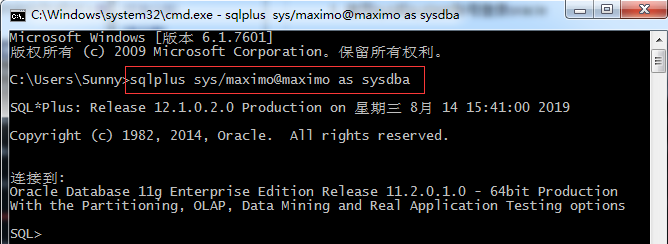
2、创建逻辑目录 : create or replace directory data_dir as 'E:\orcl\data';
data_dir为路径名称,可自命名,E:\orcl\data为数据库导出文件存放路径(路径必须存在);
创建备份逻辑目录,此目录不是真实的目录,此目录需要手动在数据库服务端创建。

通过 select * from dba_directories 可以查看所有的目录.
3、为用户授予访问数据目录的权限,输入命令:Grant read,write on directory data_dir to dbuser;
dbuser为数据库用户名(与第4步中相同)

4、导入导出操作授权,输入命令:grant exp_full_database,imp_full_database to dbuser;
5、退出,输入命令:exit;
6、数据导出,执行命令:
expdp dbuser/123456@orcl schemas=dbuser dumpfile=expdp.dmp directory=data_dir logfile=expdp.log
注意:命令结束不需要加“;”

    expdp [为用户名]/[密码]@[服务名]
      schemas=[为用户名]
      dumpfile=[导出数据库文件(可自命名)]
      directory=[目录名]
      logfile=[日志文件文件名(可自命名)]
数据库还原前准备
1、创建表空间
    create tablespace tbs_dbsunny datafile

    'D:\app\Sunny\oradata\TableSpace\tbs_dbsunny.DBF' size 1G

    autoextend on next 100M maxsize unlimited logging

    extent management local autoallocate

    segment space management auto;
2、创建临时表空间
create temporary tablespace tbs_dnsunny_temp tempfile 'D:\app\Sunny\oradata\TableSpace\tbs_dnsunny_temp.DBF' size 1000M autoextend on next 100M maxsize unlimited ;
3、创建用户
create user sunny identified by sunny123 DEFAULT TABLESPACE tbs_dbsunny TEMPORARY TABLESPACE tbs_dnsunny_temp;
4、授权
alter user sunny temporary tablespace tbs_dnsunny_temp;
ALTER USER sunny QUOTA UNLIMITED ON TBS_DBSUNNY

grant connect to sunny;

grant resource to sunny;

grant dba to sunny;

grant create trigger to sunny;

grant create session to sunny;

grant create sequence to sunny;

grant create synonym to sunny;

grant create table to sunny;

grant create view to sunny;

grant create procedure to sunny;

grant alter session to sunny;

grant execute on ctxsys.ctx_ddl to sunny;

grant create job to sunny;

grant sysdba to sunny;

alter user sunny default role all;
-- 删除这个用户以及这个用户下的所有对象
DROP USER sunny CASCADE;
数据库导入(impdp)
1、使用sys或system 登录
通过"Window + R" 打开dos命令行界面,使用sys或system登录oracle。格式:sqlplus sys/密码@数据库实例名 as sysdba
sqlplus sys/12345@dborcl as sysdba
2、创建逻辑目录,并手动创建真实目录,并将备份文件DMP,放进此目录下
sqlplus create or replace directory data_dir as 'E:\orcl\data';
3、给目标用户授权
sqlplus grant read,write on directory data_dir to sunny;
4、导入:在dos命令行,执行
注意 : impdp 语句 后面 不要加 " ; "
impdp sunny/sunny123@DBSUNNY directory=data_dir dumpfile=EXPDPBUDGET.DMP logfile=impbudgett.log remap_schema =budgett:sunny remap_tablespace=PIMS:TBS_DBSUNNY
注:remap_schema=olduser:newuser 表示把左边的olduser用户的数据,导入到右边的newuser 用户里面
remap_tablespace=old_tbs:new_tbs 表示把将要导入的备份库的表空间old_tbs,导入到新库替换为 new_tbs
expdp导出数据
语法: expdp 用户名/密码@ip地址/实例 .... ip地址不写默认就是本地
属性说明:

userid=test/test            --导出的用户,本地用户!!

directory=dmpfile          --导出的逻辑目录,一定要在oracle中创建完成的,并且给用户授权读写权限

dumpfile=xx.dmp      --导出的数据文件的名称,如果想在指定的位置的话可以写成dumpfile=/home/oracle/userxx.dmp

logfile=xx.log          --日志文件,如果不写这个参数的话默认名称就是export.log,可以在本地的文件夹中找到

schemas=userxx       --使用dblink导出的用户不是本地的用户,需要加上schema来确定导出的用户,类似于exp中的owner,但还有一定的区别

EXCLUDE=TABLE:"IN('T1','T2','T3')"     --exclude 可以指定不导出的东西,table,index等,后面加上不想导出的表名

network_link=db_local          --这个参数是使用的dblink来远程导出,需要指定dblink的名称
列出一些场景:
1)导出用户及其对象

expdp scott/tiger@orcl schemas=scott dumpfile=expdp.dmp directory=dump_dir logfile=expdp.log;

2)导出指定表

expdp scott/tiger@orcl tables=emp,dept dumpfile=expdp.dmp directory=dump_dir logfile=expdp.log;

3)按查询条件导

expdp scott/tiger@orcl directory=dump_dir dumpfile=expdp.dmp tables=empquery='where deptno=20' logfile=expdp.log;

4)按表空间导

expdp system/manager@orcl directory=dump_dir dumpfile=tablespace.dmp tablespaces=temp,example logfile=expdp.log;

5)导整个数据库

expdp scott/123@127.0.0.1/orcl directory=dump_dir dumpfile=ly.dmp full=y  logfile=expdp.log;
一般用的都是导出整个数据库,本人使用的代码:
//包含所有用户的表、视图、索引等

expdp JCPT/123@127.0.0.1/orcl directory=mydata dumpfile=ly.dmp full=y  logfile=expdp.log;

//指定用户的表、视图、索引等

expdp JCPT/123@127.0.0.1/orcl directory=mydata schemas=jcpt dumpfile=ly.dmp logfile=expdp.log;
impdp 导入
列出一些场景:
1)导入用户(从用户scott导入到用户scott)

impdp scott/tiger@orcl directory=dump_dir dumpfile=expdp.dmp schemas=scott logfile=impdp.log;

2)导入表(从scott用户中把表dept和emp导入到system用户中)

impdp system/manager@orcl directory=dump_dir dumpfile=expdp.dmp tables=scott.dept,scott.emp remap_schema=scott:system logfile=impdp.log table_exists_action=replace (表空间已存在则替换);

3)导入表空间

impdp system/manager@orcl directory=dump_dir dumpfile=tablespace.dmp tablespaces=example logfile=impdp.log;

4)导入整个数据库

impdb system/manager@orcl directory=dump_dir dumpfile=full.dmp full=y logfile=impdp.log;

5)追加数据

impdp system/manager@orcl directory=dump_dir dumpfile=expdp.dmp schemas=systemtable_exists_action logfile=impdp.log;
日常使用的:
//把用户jcpt中所有的表导入到lyxt用户下

impdp lyxt/lyxt123@127.0.0.1/orcl directory=mydata dumpfile=LY.DMP   remap_schema=jcpt:lyxt logfile=ims20171122.log table_exists_action=replace
Oracle数据库导入(expdp)和导出(impdp)的更多相关文章
- oracle导入expdp、导出impdp数据库用户
仅限oracle服务器上执行:把172.16.251.136:1521/orcl的AMI4_2用户导入到192.168.2.30:1521/orclss中的AMI1用户: 关于导入导出更详细的见文章 ...
- Oracle 数据库导入与出
Oracle 数据库导入与出 导出( EXPORT )是用 EXP 将数据库部分或全对象的结构和导出 . 导入( 导入( IMPORT )是用 )是用 IMP IMP将 OS 文件中的对象结构和数据装 ...
- oracle数据库导入导出命令!(转)
oracle数据库导入导出命令! Oracle数据导入导出imp/exp 功能:Oracle数据导入导出imp/exp就相当与oracle数据还原与备份. 大多情况都可以用Oracle数据导入导出完成 ...
- Oracle数据库导入csv文件(sqlldr命令行)
1.说明 Oracle数据库导入csv文件, 当csv文件较小时, 可以使用数据库管理工具, 比如DBevaer导入到数据库, 当csv文件很大时, 可以使用Oracle提供的sqlldr命令行工具, ...
- Oracle数据库备份 expdp/impdp导出导入命令
使用EXPDP和IMPDP时应该注意的事项: EXP和IMP是客户端工具程序,它们既可以在客户端使用,也可以在服务端使用. EXPDP和IMPDP是服务端的工具程序,他们只能在ORACLE服务端使用, ...
- oracle数据库导入导出
简单记录下数据泵导出导入expdp .impdp 和 普通导出导入 exp.imp 一.数据泵导出数据库(按用户)步骤: 1.以oracle用户登录oracle所在服务器,创建数据库备份文件目录 &g ...
- oracle数据库导入导出问题
场景描述: 1.做一个从UAT到PRD的Schema迁移,UAT环境有sys用户,PRD环境没有sys用户,由于权限限制,没办法使用expdp/impdp,只好选择exp/imp命令: 2.UAT和P ...
- oracle数据库导入导出方法
Oracle Database 10g以后引入了最新的数据泵(Data Dump)技术,使DBA或开发人员可以将数据库元数据(对象定义)和数据快速移动到另一个oracle数据库中. 数据泵导出导入(E ...
- Oracle数据库导入、导出(远程、10g、11g)
1 查看oracle的版本信息 (1)用客户端连接到数据库,执行select * from v$instance 查看version项 (2)select * from pr ...
随机推荐
- 二十:强类型HTML辅助方法
1. 强类型HTML辅助方法的使用 1. HTML辅助方法 例如,要输出一个文本框 @Html.TextBox("email") 2.强类型HTML辅助方法 命名规则是: HTML ...
- python基础:数据类型二
一.元组类型 二.字典类型 三.集合 一.元组类型 # 什么是元组: 元组就是一个不可变的列表 # ======================================基本使用======== ...
- 为什么Microsoft Office 2016安装时不能自选安装组件和安装路径?
使用特别版本的安装镜像文件 SW_DVD5_Office_Professional_Plus_2016_64Bit_ChnSimp_MLF_X20-42426.iso,请自行搜索和下载 文件: SW_ ...
- CSS基础学习 21.CSS居中总结
注意:*在IE中并不代表通配符的意思,是代表根元素的意思,所以为了匹配适应各种浏览器,进行页面初始化 <style> *{ margin:0; padding:0; } </styl ...
- 性能分析之TCP全连接队列占满问题分析及优化过程(转载)
前言 在对一个挡板系统进行测试时,遇到一个由于TCP全连接队列被占满而影响系统性能的问题,这里记录下如何进行分析及解决的. 理解下TCP建立连接过程与队列 从图中明显可以看出建立 TCP 连接的时候, ...
- Series拼接回DataFrame
从这样的表,如何计算一行汇总层拼接回去
- 关于pe结构
每一种操作系统它最重要的格式就是它的可执行文件格式, 因为操作系统就是为了支持这些文件而生成的,内核里面有很多机制,也是配合这种文件格式设计的. 换句话说,这种文件格式也是适合操作系统设计的. 比如: ...
- POJ2182 Lost Cows 树状数组
题意:有编号1~n乱序排列的奶牛,给出了每一个奶牛前小于自己编号的奶牛数目 维护一个树状数组,下标是编号,值为$0/1$标识是否存在,很显然最后一个牛的编号是知道的,我们在树状数组上二分出前缀和为小于 ...
- 头条编程题 万万没想到之抓捕孔连顺 JavaScript
[编程题] 万万没想到之抓捕孔连顺 时间限制:1秒 空间限制:131072K 我叫王大锤,是一名特工.我刚刚接到任务:在字节跳动大街进行埋伏,抓捕恐怖分子孔连顺.和我一起行动的还有另外两名特工,我提议 ...
- luogu 2279 [HNOI2003]消防局的设立 树形dp
就是细节多一些,思路都非常常规. Code: #include <bits/stdc++.h> #define N 1005 #define inf 1061109567 #define ...