
MySQL router
MySQL Router is a building block for high availability (HA) solutions. It simplifies application development
by intelligently routing connections to MySQL servers for increased performance and reliability.
MySQL Router 8 fully supports MySQL 5.7 and MySQL 8, and it replaces the MySQL Router 2.x series. If
you currently use Router 2.0 or 2.1 then we recommend upgrading your installation to MySQL Router 8.
1 mysql router 安装
==mysqlroueter 2.1,本测试环境是mysql 5.6.15, Kylin Linux release 3.3.1707 (Core)

[root@mysqlhq soft]# rpm -ivh mysql-router-2.1.6-1.el6.x86_64.rpm

warning: mysql-router-2.1.6-1.el6.x86_64.rpm: Header V3 DSA/SHA1 Signature, key ID 5072e1f5: NOKEY

Preparing...                          ################################# [100%]

Updating / installing...

   1:mysql-router-2.1.6-1.el6         ################################# [100%]

[root@mysqlhq soft]# whereis mysqlrouter

mysqlrouter: /usr/bin/mysqlrouter /usr/lib64/mysqlrouter /etc/mysqlrouter

[root@mysqlhq soft]# ll /usr/bin/mysqlrouter

-rwxr-xr-x 1 root root 23592 Feb 21  2018 /usr/bin/mysqlrouter

[root@mysqlhq soft]# which mysqlrouter

/usr/bin/mysqlrouter

[root@mysqlhq soft]# rpm -qa|grep mysql-router

mysql-router-2.1.6-1.el6.x86_64

[root@mysqlhq soft]# ll /etc/mysqlrouter/

total 4

-rw-r--r-- 1 root root 1231 Feb 21  2018 mysqlrouter.conf

[root@mysqlhq soft]# ll /etc/init.d/mysqlrouter

-rwxr-xr-x 1 root root 2879 Feb 21  2018 /etc/init.d/mysqlrouter

[root@mysqlhq ~]# ll /usr/lib64/mysqlrouter

total 2592

-rwxr-xr-x 1 root root    9424 Feb 21  2018 keepalive.so

-rwxr-xr-x 1 root root   24136 Feb 21  2018 logger.so

-rwxr-xr-x 1 root root  124416 Feb 21  2018 metadata_cache.so

-rwxr-xr-x 1 root root   30096 Feb 21  2018 mysql_protocol.so

-rwxr-xr-x 1 root root  210504 Feb 21  2018 routing.so

-rwxr-xr-x 1 root root 2241288 Feb 21  2018 x_protocol.so

#m-s架构
#m 192.168.19.145
#s 192.168.19.227

[root@mysqlhq mysqlrouter]# vim mysqlrouter.conf

[DEFAULT]

logging_folder = /var/log/mysqlrouter/

plugin_folder = /usr/lib64/mysqlrouter

runtime_folder = /var/run/mysqlrouter

config_folder = /etc/mysqlrouter

[logger]

level = info

[routing:read_write]

bind_address = 192.168.19.145

bind_port = 7001

mode = read-write

destinations = 192.168.19.145:3306,192.168.19.227:3306

max_connections = 1024

max_connect_errors = 100

client_connect_timeout = 6

connect_timeout=3

# If no plugin is configured which starts a service, keepalive

# will make sure MySQL Router will not immediately exit. It is

# safe to remove once Router is configured.

[routing:read_only]

bind_address = 192.168.19.145

bind_port = 7002

mode = read-only

destinations = 192.168.19.145:3306,192.168.19.227:3306

max_connections = 1024

max_connect_errors = 100

client_connect_timeout = 6

connect_timeout=3

[keepalive]

interval = 60

[root@mysqlhq mysqlrouter]# mysqlrouter -v

MySQL Router v2.1.6 on Linux (64-bit) (GPL community edition)

[root@mysqlhq mysqlrouter]# groupadd  mysqlrouter

groupadd: group 'mysqlrouter' already exists

[root@mysqlhq mysqlrouter]# useradd -g mysqlrouter mysqlrouter

useradd: user 'mysqlrouter' already exists

[root@mysqlhq mysqlrouter]# id mysqlrouter

uid=989(mysqlrouter) gid=984(mysqlrouter) groups=984(mysqlrouter)

[root@mysqlhq mysqlrouter]#  chown -R mysqlrouter:mysqlrouter /etc/mysqlrouter

[root@mysqlhq mysqlrouter]# /usr/bin/mysqlrouter  -c  /etc/mysqlrouter/mysqlrouter.conf  &

[1] 3577

[root@mysqlhq mysqlrouter]# ps -ef|grep mysqlrouter

root      3577   831  0 16:57 pts/0    00:00:00 /usr/bin/mysqlrouter -c /etc/mysqlrouter/mysqlrouter.conf

root      3588   831  0 16:57 pts/0    00:00:00 grep --color=auto mysqlrouter

[root@mysqlhq mysqlrouter]# netstat -lnt|grep 7001

tcp        0      0 192.168.19.145:7001     0.0.0.0:*               LISTEN

[root@mysqlhq ~]#  cd /var/log/mysqlrouter/

[root@mysqlhq mysqlrouter]# vim mysqlrouter.log

2019-01-14 16:57:10 WARNING [7f266a1d1700] [routing:read_only] setup_tcp_service() error from bind(): Cannot assign requested address

2019-01-14 16:57:10 ERROR   [7f266a1d1700] routing:read_only: Setting up TCP service using 192.168.20.118:7002: [routing:read_only] Failed to setup service socket: Cannot assign requested address

2019-01-14 16:57:10 INFO    [7f26699d0700] [routing:read_write] started: listening on 192.168.19.145:7001; read-write

2019-01-14 16:57:10 INFO    [7f266a9d2700] keepalive started with interval 60

2019-01-14 16:57:10 INFO    [7f266a9d2700] keepalive

2019-01-14 16:58:10 INFO    [7f266a9d2700] keepalive
2 启动,测试mysql router
[mysql@mysqlhq ~]$ mysql  -h 192.168.19.145  -u system -p*** -P 7001

Warning: Using a password on the command line interface can be insecure.

Welcome to the MySQL monitor.  Commands end with ; or \g.

Your MySQL connection id is 312548

Server version: 5.6.15-log MySQL Community Server - (GPL)

Copyright (c) 2000, 2013, Oracle and/or its affiliates. All rights reserved.

Oracle is a registered trademark of Oracle Corporation and/or its

affiliates. Other names may be trademarks of their respective

owners.

Type 'help;' or '\h' for help. Type '\c' to clear the current input statement.

(system@192.168.19.145:7001) [(none)]> show databases;

+--------------------+

| Database           |

+--------------------+

| information_schema |

| mysql              |

| performance_schema |

| test               |

| zabbix             |

+--------------------+

(system@192.168.19.145:7001) [(none)]> show variables like '%read_only%';

+------------------+-------+

| Variable_name    | Value |

+------------------+-------+

| innodb_read_only | OFF   |

| read_only        | OFF   |

| tx_read_only     | OFF   |

+------------------+-------+

[mysql@mysqlhq ~]$ mysql  -h 192.168.19.145  -u system -p*** -P 7001 -e "select @@hostname;"

Warning: Using a password on the command line interface can be insecure.

+------------+

| @@hostname |

+------------+

| mysqlhq    |

+------------+

[root@mysqlhq mysqlrouter]# netstat -lnt|grep 7002  #7002端口没有启动起来,log中没有报错信息

检查配置文件,发现ip写错了

[routing:read_only]

bind_address = 192.168.20.118 #此处修改为192.168.19.145

重新启动mysqlrouter

[root@mysqlhq mysqlrouter]# /usr/bin/mysqlrouter --help

[root@mysqlhq mysqlrouter]# ps -ef|grep mysqlrouter

root      3577   831  0 16:57 pts/0    00:00:00 /usr/bin/mysqlrouter -c /etc/mysqlrouter/mysqlrouter.conf

root      4266  4138  0 17:04 pts/2    00:00:00 tail -f mysqlrouter.log

root      5544   831  0 17:18 pts/0    00:00:00 grep --color=auto mysqlrouter

[root@mysqlhq mysqlrouter]# kill 3577

[root@mysqlhq mysqlrouter]#  /usr/bin/mysqlrouter -c /etc/mysqlrouter/mysqlrouter.conf &

[root@mysqlhq mysqlrouter]# netstat -lnt|grep 7001

tcp        0      0 192.168.19.145:7001     0.0.0.0:*               LISTEN

[root@mysqlhq mysqlrouter]# netstat -lnt|grep 7002

tcp        0      0 192.168.19.145:7002     0.0.0.0:*               LISTEN

日志信息

2019-01-14 17:18:13 INFO    [7faef06c7700] keepalive started with interval 60

2019-01-14 17:18:13 INFO    [7faef06c7700] keepalive

2019-01-14 17:18:13 INFO    [7faeefec6700] [routing:read_only] started: listening on 192.168.19.145:7002; read-only

2019-01-14 17:18:13 INFO    [7faeef6c5700] [routing:read_write] started: listening on 192.168.19.145:7001; read-write

在2个port上进行查询

[mysql@mysqlhq scripts]$ mysql  -h 192.168.19.145  -u system -p*** -P 7001 -e "select @@hostname;"

Warning: Using a password on the command line interface can be insecure.

+------------+

| @@hostname |

+------------+

| mysqlhq    |

+------------+

[mysql@mysqlhq scripts]$ mysql  -h 192.168.19.145  -u system -p*** -P 7002 -e "select @@hostname;"

Warning: Using a password on the command line interface can be insecure.

+------------+

| @@hostname |

+------------+

| mysqlhq    |

+------------+
(system@192.168.19.145:7001) [(none)]> select @@port;
+--------+
| @@port |
+--------+
| 3306 |
+--------+
3 性能--
Deploying MySQL Router
Performance Recommendations
For best performance, MySQL Router is typically installed on the same host as the application that uses it. Possible reasons include:
为了获得更好的性能,建议把mysql router安装在application的主机上
To allow local UNIX domain socket connections to the application, instead of TCP/IP. 允许本地UNIX域套接字连接到应用程序,替代TCP/IP
To decrease network latency. 减少网络的潜在因素
To allow MySQL Router to connect to MySQL without requiring extra accounts for the Router's host, for MySQL accounts that are created specifically
for application hosts, such as myapp@198.51.100.45 instead of a value like myapp@%. 账号安全
Typically application servers are easiest to scale. 通常,应用服务器是最容易伸缩的
You can run several instances of MySQL Router on your network, and do not need to isolate the router to a single machine or even a single
Router instance. This is because MySQL Router has no affinity for any particular server or host.
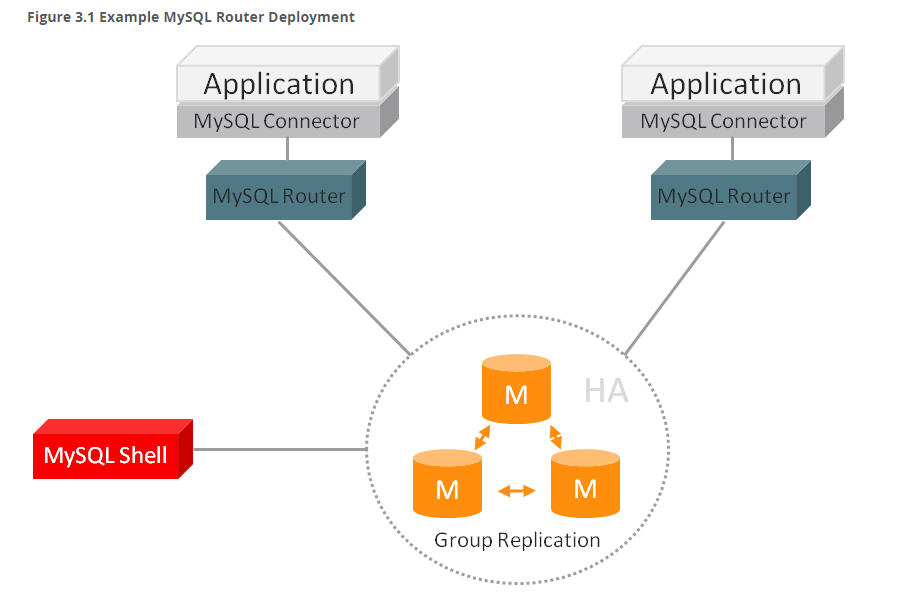
https://dev.mysql.com/doc/mysql-router/2.1/en/mysql-router-preface.html
MySQL router的更多相关文章
- MYSQL router 自动均衡负载
配制文件: /etc/mysqlrouter/mysqlrouter.ini [DEFAULT] logging_folder = /var/log/mysql-router plugin_folde ...
- mysql router 自动failover测试
mysql router 启动服务文件内容: [root@monitor mysqlrouter]# cat /etc/init.d/mysqlrouter#! /bin/bash## mysqlro ...
- MySQL Router 测试使用 转
MySQL Router 测试使用 . 特性 MySQL Router 并没有包括一些特别新的特性, 总体上看中规中矩, 不过 first-available 和插件两个特性挺有意思, 后续会进行讲解 ...
- MySQL Router实现MySQL的读写分离
1.简介 MySQL Router是MySQL官方提供的一个轻量级MySQL中间件,用于取代以前老版本的SQL proxy. 既然MySQL Router是一个数据库的中间件,那么MySQL Rout ...
- mysql router使用配置
mysql router使用配置 参考资料: https://www.jianshu.com/p/7fc8d77bea59 一.架构图 介绍: MySQL Router是处于应用client和dbse ...
- MySQL Router单点隐患通过Keepalived实现
目录 一.介绍 二.环境准备 三.安装步骤 3.1下载软件包,解压 3.2源码安装 3.3配置keepalived 3.4修改keepalived配置文件 3.5启动keepalived 3.6查看V ...
- MySQL Router重装后重新连接集群进行引导出现的——此主机中之前已配置过的问题
问题出现的前因: 因为重新安装了MySQL Router,然后打算重新连接上目标集群进行MySQL Router的初始化引导,结果报错了! [root@linux666 system]# mysqlr ...
- 利用MySQL Router构建读写分离MGR集群
GreatSQL社区原创内容未经授权不得随意使用,转载请联系小编并注明来源. 目录 1. 部署MySQL Router 2. 启动mysqlrouter服务 3. 确认读写分离效果 4. 确认只读负载 ...
- Mysql Router 的集群
1. c:\mysql-router, c:\mysql-5.7.23, 这两个目录的bin都要加入path 2. c:\mysql-shell,在bin下,有一个 mysqlsh.exe, 双击,打 ...
随机推荐
- 如何将Django部署到Apache服务器上
操作环境: Ubuntu 16.04 Apache 2.4 Django 1.9 Python 2.7 mod_wsgi 前言:本教程纯自己查阅资料后整理,望对大家有帮助! 1. 安装 mod_ws ...
- 20165332实验一 Java开发环境的熟悉
实验一 Java开发环境的熟悉 一.Java开发环境的熟悉-1 1.实验要求: 0 参考实验要求: 1 建立"自己学号exp1"的目录 : 2 在"自己学号exp1&qu ...
- Appium 自动化测试(5)-- Appium详细介绍:Appium 手机自动化测试_TesterHome公开版pdf
- uva 10891 区间dp+记忆化搜索
https://vjudge.net/problem/UVA-10891 给定一个序列x,A和B依次取数,规则是每次只能从头或者尾部取走若干个数,A和B采取的策略使得自己取出的数尽量和最大,A是先手, ...
- laravel支持的日志写入模式和日志严重程度级别:
四种日志写入模式: single:单一的 daily:日常的 syslog:系统记录 errorlog:错误日志 Monolog 识别以下严重程度的级别, 从低到高为: debug. info.not ...
- SurfaceView基本使用--动态画正弦函数
package com.zzw.TestSurfaceView; import android.content.Context; import android.graphics.Canvas; imp ...
- javaScript-条件语句优化
1.多重判断时使用 Array.includes test = (fruit: string) => { if (fruit == 'apple' || fruit == 'strawberry ...
- About GCC
GCC used to stand for the GNU C Compiler, but since the compiler supports several other languages as ...
- Android应用接入第三方登陆之新浪微博
众所周知,移动互联网在这几年经历了蓬勃发展,到目前为止,移动互联网发展仍然很强劲.其中移动设备系统以android占据主导地位,之前是加拿大的黑莓系统占据主导,但后来随着android系统的问世,黑莓 ...
- Android 应用程序窗体显示状态操作(requestWindowFeature()的应用)
我们在开发程序是经常会需要软件全屏显示.自定义标题(使用按钮等控件)和其他的需求,今天这一讲就是如何控制Android应用程序的窗体显示. 首先介绍一个重要方法那就是requestWindowF ...