
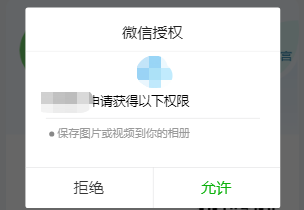
微信小程序点击按钮将图片保存到手机
 SaveCard: function(e) {

    let that = this;

    console.log('保存');

    var imgSrc = e.currentTarget.dataset.img;

    //获取相册授权

    wx.getSetting({

      success(res) {

        if (!res.authSetting['scope.writePhotosAlbum']) {

          wx.authorize({

            scope: 'scope.writePhotosAlbum',

            success() {

              console.log('授权成功');

              that.img(imgSrc)

            }

          })

        }else{

          that.img(imgSrc)

        }

      }

    })

  },

img: function (imgSrc){

    var imgSrc = imgSrc;

    wx.downloadFile({

      url: imgSrc,

      success: function (res) {

        console.log(res); //图片保存到本地

        wx.saveImageToPhotosAlbum({

          filePath: res.tempFilePath,

          success: function (data) {

            console.log(data);

            wx.showToast({

              title: '保存成功',

              duration: 2000

            })

          },

          fail: function (err) {

            console.log(err);

            if (err.errMsg === "saveImageToPhotosAlbum:fail auth deny") {

              wx.openSetting({

                success(settingdata) {

                  console.log(settingdata)

                  if (settingdata.authSetting['scope.writePhotosAlbum']) {

                    wx.showToast({

                      title: '图片已保存',

                      icon:'none',

                      duration:2000

                    })

                    console.log('获取权限成功,给出再次点击图片保存到相册的提示。')

                  } else {

                    console.log('获取权限失败,给出不给权限就无法正常使用的提示')

                  }

                }

              })

            }

          }

        })

      }

    })

  },
先授权,再保存
微信小程序点击按钮将图片保存到手机的更多相关文章
- 微信小程序点击按钮,修改状态
WXML中: <view wx:if="{{orderstate}} = '待送检' " data-no="{{orderstate}}" bindtap ...
- 微信小程序点击图片放大预览
微信小程序点击图片放大预览使用到 wx.previewImage 接口,可以放大.上/下一张 上代码 wxml代码 <view class='content-img' wx:if="{ ...
- 微信小程序点击控制元素的显示与隐藏
微信小程序点击控制元素的显示与隐藏 首先我们先来看一下单个点击效果 我们来看一下wxml中的代码: <view class="conten"> <view cla ...
- mpvue开发微信小程序,分享按钮报错:`Cannot read property 'apply' of null`
用mpvue开发微信小程序,分享按钮报错:Cannot read property 'apply' of null onShareAppMessage 是于微信小程序Pages的生命周期钩子,顾这个方 ...
- 在小程序内点击按钮分享H5网页给好友或者朋友圈
在小程序内点击按钮分享H5网页给好友或者朋友圈 首先需要建立h5容器文件夹 页面.wxml <navigator url="/pages/report-await/fouryearh5 ...
- 微信小程序的button按钮设置宽度无效
亲,你是不是也遇到了微信小程序的button按钮设置宽度无效.让我来告诉你怎么弄 方法1. 样式中加入!important,即:width: 100% !important; wxss代码示例 1 2 ...
- [转]微信小程序开发(二)图片上传+服务端接收
本文转自:http://blog.csdn.net/sk719887916/article/details/54312573 文/YXJ 地址:http://blog.csdn.net/sk71988 ...
- 微信小程序点击保存图片到本地相册——踩坑
在微信小程序中要保存图片到本地相册,需要获取相册权限. 总之整个功能实现下来需要如下几个小程序的API:wx.getSetting,wx.authorize,wx.openSetting,wx.dow ...
- 微信小程序wxss的background本地图片问题
在web 或者webapp开发中我们习惯了直接饮用本地图片做背景,例如 .aaa { background: url('img/1.png'); } 但是这种引用方式在微信小程序中是无法使用的,控制台 ...
随机推荐
- codeforces 632F. Magic Matrix (最小生成树)
You're given a matrix A of size n × n. Let's call the matrix with nonnegative elements magic if it i ...
- HDU 3336——Count the string
It is well known that AekdyCoin is good at string problems as well as number theory problems. When g ...
- 牛客编程巅峰赛S1第6场 - 黄金&钻石&王者 A.牛牛爱奇数 (模拟)
题意:有一组数,每次将所有相等的偶数/2,求最少操作多少次使得所有数变成奇数. 题解:用桶标记,将所有不同的偶数取出来,然后写个while模拟统计一下次数就行. 代码: class Solution ...
- LVS-DR 模式
SNAT(Source Network Address Translation)源地址转换,类似家里路由器设置,内网地址向外访问时,发起访问的内网ip地址转换为指定的 IP 地址 DNAT(Desti ...
- leetcode31 下一个排列 字典序
数字的字典序就是比大小 先想几个例子 123_>132 1243-> 1324 ,12453-> 12534 1.不可排的序列就是降序序列 2.两个相同长度的串比大小,前面相同, ...
- HDU 4049 Tourism Planning(状压DP)题解
题意:m个城市,n个人,让这n个人按固定顺序走遍m个城市.每个城市有一个单人票价pi.每个人在每个城市能获得vij的价值.如果多个人在同一城市,那么会额外获得价值,给出一张n * n价值表,额外价值为 ...
- In_array()函数弱比较
0x01 定义 (PHP 4, PHP 5, PHP 7) in_array - 检查数组中是否存在某个值 说明 in_array ( mixed $needle , array $haystack ...
- DC1(msf drupal7+suid-find提权)
这边我们靶机是仅主机模式,IP是192.168.56.101,,直接上msf拿到shell, 不过payload要改一下 改成php/meterperter/bind_tcp 拿到shell了 ,采 ...
- IE & 自定义滚动条 & scroll
IE & 自定义滚动条 & scroll 请问这种在 IE 下的自定义滚动条,是如何实现的? https://fairyever.gitee.io/d2-admin-preview/# ...
- CSS3实现 垂直居中 水平居中 的技巧
1 1 1 How To Center Anything With CSS Front End posted by Code My Views 1 Recently, we took a dive i ...