
TabHost的使用
Android中的选项卡是用TabHost实现的。
首先,定义TabHost的布局文件:
<?xml version="1.0" encoding="utf-8"?>

<TabHost xmlns:android="http://schemas.android.com/apk/res/android"

	android:id="@android:id/tabhost" android:layout_width="fill_parent"

	android:layout_height="fill_parent">

	<LinearLayout android:orientation="vertical"

		android:layout_width="fill_parent" android:layout_height="fill_parent">

		<TabWidget android:id="@android:id/tabs"

			android:layout_alignParentBottom="true"

			android:layout_width="fill_parent"

			android:layout_height="wrap_content"/>

		<FrameLayout

		    android:id="@android:id/tabcontent"

		    android:layout_width="fill_parent"

		    android:layout_height="fill_parent" />

	</LinearLayout>

</TabHost>
其中,TabWidget即是选项卡上面的标签,FrameLayout是选项卡的内容。
在Java类文件中定义如下:
public class MainActivity extends TabActivity {

	private TabHost my_tabhost;

	private TabWidget my_tabwidget;

	private int i,k;

	private TextView tv;

	private String[] tabMenu = { "系统", "硬件", "操作"};

	private Intent intent0, intent1, intent2;

	private Intent[] intents = { intent0, intent1, intent2};

	private TabHost.TabSpec tabSpec0, tabSpec1, tabSpec2, tabSpec3;

	private TabHost.TabSpec[] tabSpecs = { tabSpec0, tabSpec1, tabSpec2, tabSpec3};

	public static Context mContext;

	@Override

	protected void onCreate(Bundle savedInstanceState) {

		super.onCreate(savedInstanceState);

                // 不要窗体标题

               requestWindowFeature(Window.FEATURE_NO_TITLE);

               setContentView(R.layout.activity_main);

		setContentView(R.layout.activity_main);

		my_tabhost = getTabHost();

		intent0 = new Intent(this, system.class);

		intent1 = new Intent(this, hardware.class);

		intent2 = new Intent(this, operation.class);

		tabSpec0 = my_tabhost.newTabSpec("system").setIndicator(tabMenu[0],null).

				setContent(intent0);

		tabSpec1 = my_tabhost.newTabSpec("hardware").setIndicator(tabMenu[1],null).

				setContent(intent1);

		tabSpec2 = my_tabhost.newTabSpec("operation").setIndicator(tabMenu[2],null).

				setContent(intent2);

		my_tabhost.addTab(tabSpec1);

		my_tabhost.addTab(tabSpec0);

		my_tabhost.addTab(tabSpec2);


                 // 设置默认选中的选项卡为第2个

                     my_tabhost.setCurrentTab(1);

	}

}
每一个选项卡对应一个Intent,每一个Intent又对应一个类,选中这个选项卡时,就显示对应的类。
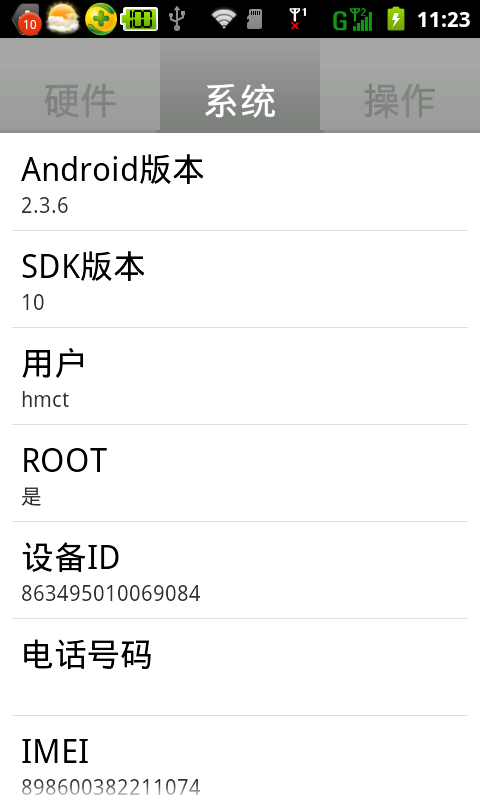
运行结果如下:
TabHost的使用的更多相关文章
- android 使用Tabhost 发生could not create tab content because could not find view with id 错误
使用Tabhost的时候经常报:could not create tab content because could not find view with id 错误. 总结一下发生错误的原因,一般的 ...
- Android 轮换页面+TabHost 实例
最终效果展示: 首先我们需要一个ViewPager控件,不过可以发现在左侧的控件列表中并没有这个控件 这时我们要去升级包中查看 然后在厘米找到 ViewPager.class 这时我们双击这个发现不能 ...
- tabhost 下 setOnItemClickListener失效的问题
分析了一下代码,应该是tabhost 的ontabchangedListener接管了下面应该由setOnItemClickListener接管的部分,导致不能相应setOnItemClickList ...
- 安卓初級教程(5):TabHost的思考
package com.myhost; import android.os.Bundle; import android.view.LayoutInflater; import android.wid ...
- Android 实现分页(使用TabWidget/TabHost)
注:本文为转载,但该内容本人已亲身尝试,确认该方法可行,代码有点小的改动,转载用作保存与分享. 原作者地址:http://gundumw100.iteye.com/blog/853967 个人吐嘈:据 ...
- 安卓TabHost页面
<?xml version="1.0" encoding="UTF-8"?> <!-- TabHost组件id值不可变--> <T ...
- Android TabHost使用
TabHost是Android中自带的选项卡控件,效果图如下: 主布局文件 <RelativeLayout xmlns:android="http://schemas.android. ...
- tabhost使用
Tabhost用法 使用方法一:使用同一个布局文件 在xml中如此定义tabhost: <RelativeLayout xmlns:android="http://schemas.an ...
- tab使用 TabActivity TabHost Tabspec常用方法
本文是参考Android官方提供的sample里面的ApiDemos的学习总结. TabActivity 首先Android里面有个名为TabActivity来给我们方便使用.其中有以下可以关 ...
- Android工作学习第5天之TabHost实现菜单栏底部显示
TabHost是一个装载选项卡窗口的容器,实现分模块显示的效果.像新浪微博客户端.微信客户端都是使用tabehost组件来开发的. TabHost的组成: |---TabWidget:实现标签栏,可供 ...
随机推荐
- tomcat项目无法发布异常,Could not copy all resources to .........(转)
[plain] <span style="font-size:18px;">Deployment failure on Tomcat 6.x. Could not c ...
- 如何获得PRINCE2认证
PRINCE2认证考试共有两种:基础级和从业级 一. 基础级考试 基础级考试是一种低水平的认证.如果想要进行从业级考试,必须要参加并通过该考试,或者已经获得pmp资质.基础级考试包括以下关键点: 1. ...
- Node.js入门:文件查找机制
文件查找流程图 从文件模块缓存中加载 尽管原生模块与文件模块的优先级不同,但是都不会优先于从文件模块的缓存中加载已经存在的模块. 从原生模块加载 原生模块的优先级仅次于文件模块缓存的优 ...
- Atitit.java图片图像处理attilax总结 BufferedImage extends java.awt.Image获取图像像素点image.getRGB(i, lineIndex); 图片剪辑/AtiPlatf_cms/src/com/attilax/img/imgx.javacutImage图片处理titit 判断判断一张图片是否包含另一张小图片 atitit 图片去噪算法的原理与
Atitit.java图片图像处理attilax总结 BufferedImage extends java.awt.Image 获取图像像素点 image.getRGB(i, lineIndex); ...
- 批处理集锦——(4)2>nul和1>nul是什么意思?
>nul 是屏蔽操作成功显示的信息,但是出错还是会显示(即1>nul) 2>nul 是屏蔽操作失败显示的信息,如果成功依旧显示. >nul 2>nul 就是正确的错误的一 ...
- EXCEL的导出
具体实现代码: protected void EXCEL_Click(object sender, EventArgs e) { ToExcel(GridView1); } public void T ...
- IDEA开发多项目的示例
前言:慢慢习惯用IDEA了,觉得用起来确实还不错,有VS的感觉,但是缺点就是每次启动慢,如果修改以后反应也需要好久,这方面做得不好.但是职能提示个人觉得要比Eclipse好太多.好了现在我用IDEA来 ...
- 手动为php安装memcached扩展模块
最近公司需要新部署几台服务器,主要就是lnmp平台,这几台服务器需要部署公司的系统,由于本屌刚入职时间不长,加上又是新手,所以对公司的架构一头雾水,前前后后折腾了一个月时间,终于磕磕绊绊的将系统服务器 ...
- java中同步嵌套引起的死锁事例代码
/* 目的:自己写一个由于同步嵌套引起的死锁! 思路:多个线程在执行时,某一时刻,0-Thread绑定了LockA锁,1-Thread绑定了LockB锁! 当0-Thread要去绑定LockB锁时 和 ...
- Cwinux源码解析系列
Cwinux源码解析系列