
springBoot与Swagger2的整合
1、在项目pom文件中引入swagger2的jar包
<!-- swagger2开始 -->

<dependency>

	<groupId>io.springfox</groupId>

	<artifactId>springfox-swagger2</artifactId>

	<version>2.4.0</version>

</dependency>

<dependency>

	<groupId>io.springfox</groupId>

	<artifactId>springfox-swagger-ui</artifactId>

	<version>2.4.0</version>

</dependency>

<!-- swagger2结束 -->
2、编写用于配置swagger2的类 Swagger2.java(名字可任意取)
package com.example.demo;

import org.springframework.context.annotation.Bean;

import org.springframework.context.annotation.Configuration;

import springfox.documentation.builders.ApiInfoBuilder;

import springfox.documentation.builders.PathSelectors;

import springfox.documentation.builders.RequestHandlerSelectors;

import springfox.documentation.service.ApiInfo;

import springfox.documentation.service.Contact;

import springfox.documentation.spi.DocumentationType;

import springfox.documentation.spring.web.plugins.Docket;

import springfox.documentation.swagger2.annotations.EnableSwagger2;

@Configuration

@EnableSwagger2

public class Swagger2 {

    //swagger2的配置文件,这里可以配置swagger2的一些基本的内容,比如扫描的包等等

    @Bean

    public Docket createRestApi(){

        return new Docket(DocumentationType.SWAGGER_2)

                .apiInfo(apiInfo())

                .select()

                //为当前需要扫描到的包的路径

                .apis(RequestHandlerSelectors.basePackage("com.example.demo"))

                .paths(PathSelectors.any())

                .build();

    }

    //构建 api文档的详细信息函数,注意这里的注解引用的是哪个

    private ApiInfo apiInfo() {

        return new ApiInfoBuilder()

                //页面标题

                .title("SpringBoot的Swagger2构建RESTful API接口形式")

                //创建人

                .contact(new Contact("cxy", "https://www.cnblogs.com/lazycxy/", "cxymasters@163.com"))

                //版本号

                .version("1.0")

                //描述

                .description("API相关描述")

                .build();

    }

}
3、在你的接口类中添加如下注释
@RestController

@Api("测试接口描述")

public class HelloWorld {

    @RequestMapping("/hello")

    @ApiOperation(value = "方法介绍描述", httpMethod = "GET", response = String.class, notes = "方法介绍描述")

    public String hello(

            @RequestParam(value = "field", required = false)@ApiParam("参数描述") String field

    ){

        return "hello world~~~";

    }

}
4、启动你的项目,输入localhost:8081/swagger-ui.html 进行访问swagger页面 ps:这个swagger-ui.html 是封装到swagger的jar包里的
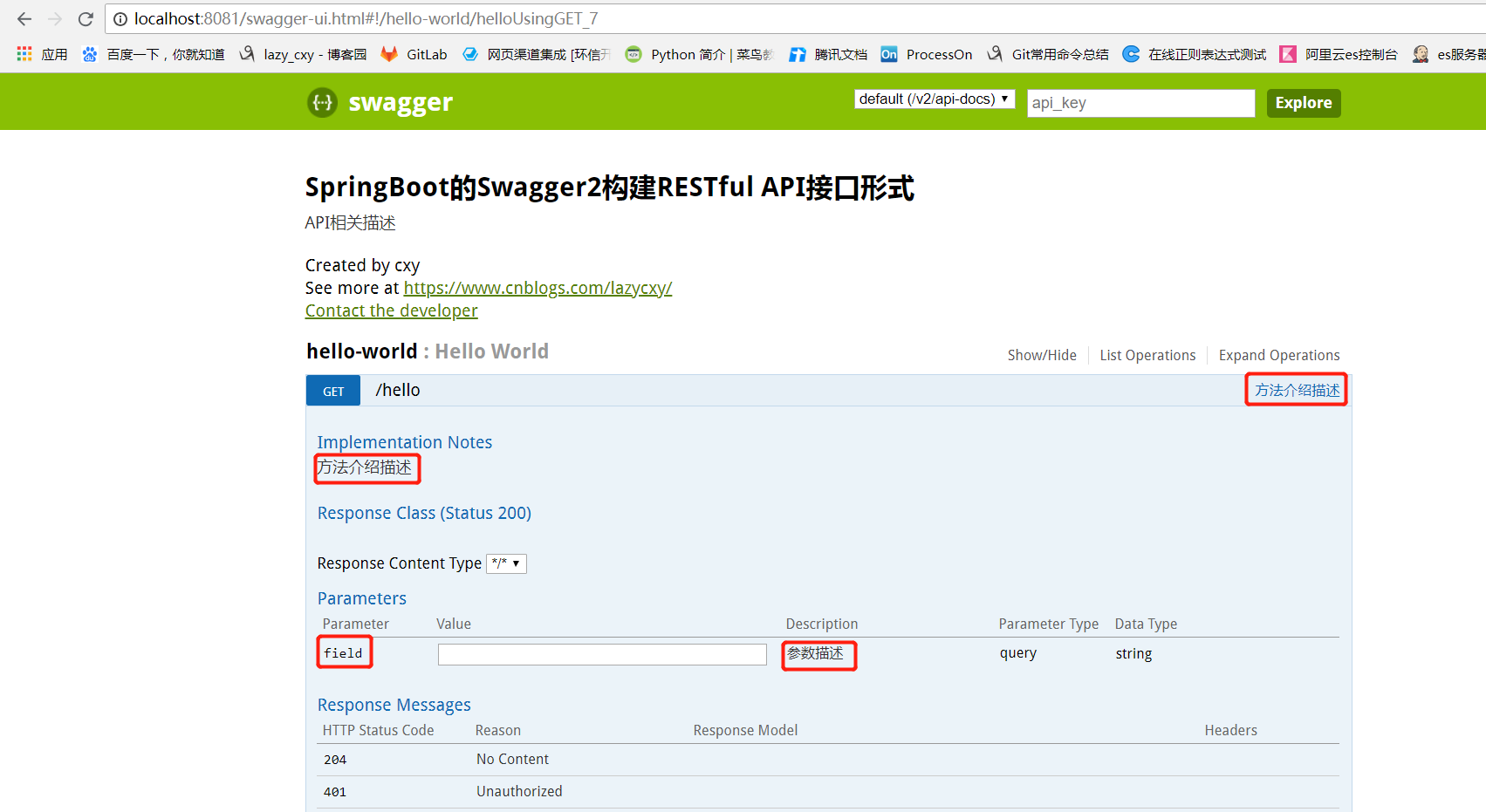
整合完毕
springBoot与Swagger2的整合的更多相关文章
- (办公)SpringBoot和swagger2的整合.
因为开发项目的接口需要给app,小程序测试,所以用swagger. 1.pom.xml: <dependency><!--添加Swagger依赖 --> <groupId ...
- springboot+jpa+mysql+swagger整合
Springboot+jpa+MySQL+swagger整合 创建一个springboot web项目 <dependencies> <dependency> < ...
- SpringBoot使用Swagger2实现Restful API
很多时候,我们需要创建一个接口项目用来数据调转,其中不包含任何业务逻辑,比如我们公司.这时我们就需要实现一个具有Restful API的接口项目. 本文介绍springboot使用swagger2实现 ...
- SpringBoot之Swagger2文档生成
SpringBoot之Swagger2文档生成 1.Swagger2介绍 编写和维护接口文档是每个程序员的职责,前面我们已经写好的接口现在需要提供一份文档,这样才能方便调用者使用.考虑到编写接口文档是 ...
- [转] spring-boot集成swagger2
经测,spring-boot版本使用1.5.2+时需使用springfox-swagger2版本2.5+(spring-boot 1.2 + springfox-swagger2 2.2 在未扫描ja ...
- (九) SpringBoot起飞之路-整合/集成Swagger 2 And 3
兴趣的朋友可以去了解一下其他几篇,你的赞就是对我最大的支持,感谢大家! (一) SpringBoot起飞之路-HelloWorld (二) SpringBoot起飞之路-入门原理分析 (三) Spri ...
- SpringBoot集成Swagger2并配置多个包路径扫描
1. 简介 随着现在主流的前后端分离模式开发越来越成熟,接口文档的编写和规范是一件非常重要的事.简单的项目来说,对应的controller在一个包路径下,因此在Swagger配置参数时只需要配置一 ...
- SpringBoot之Swagger2
SpringBoot利用Swagger2只需配置少量的注解信息便能方便地构建强大的API文档. 1.添加maven依赖 2.创建Swagger2配置类 3.在API添加文档内容 4.访问http:// ...
- 【转载】SpringBoot系列——Swagger2
微服务学习二:springboot与swagger2的集成:https://www.cnblogs.com/fengli9998/p/7522973.html 注:需要在启动类加 @EnableSwa ...
随机推荐
- 求1到n的质数个数和O(n)
也许更好的阅读体验 \(\mathcal{AIM}\) 我们知道: 对于一个合数\(x\) 有\(x=p^{a_1}_1*p^{a_2}_2*...*p^{a_n}_n\) 现在给出一个\(n\) 求 ...
- Android使用webService(发送xml数据的方式,不使用jar包)
Android使用webService可以用ksoap2.jar包来使用.但是我觉得代码不好理解,而且记不住. 所以我查询了好多资料,以及自己的理解.可以用代码发送http请求(发送xml数据)来访问 ...
- C语言入门9-2-模块大致一览
字母数字 判断字符是否为英文字母isalpha()判断字符是否为数字isdigit()判断字符是否为英文字母或数字isalnum()判断字符是否为小写字母islower()判断字符是否为大写字母isu ...
- C语言入门9-1-分类函数
分类函数 ASCII字符可以分为英文字母.数字.控制字符.空白字符.大小写字母以及标点符号,分类是指对字符进行属性判定,判断字符属于哪些范畴,这些属性的判定在程序中非常常见,尤其是通信协议的字符处理部 ...
- 基于tess4j的图片文字提取
1.文件结构目录 2.具体实现 ①添加maven依赖 <dependency> <groupId>net.sourceforge.tess4j</groupId> ...
- C#中谁最快:结构还是类?
前言 在内存当道的日子里,无论什么时候都要考虑这些代码是否会影响程序性能呢? 在现在的世界里,几乎不会去考虑用了几百毫秒,可是在特别的场景了,往往这几百毫米确影响了整个项目的快慢. 通过了解这两者之间 ...
- CentOS 配置阿里云 NTP 服务
NTP 是网络时间协议(Network Time Protocol),NTP 服务能保证服务器的本地时间与标准时间同步. ▶ 配置时区信息 1.删除系统里的当地时间链接 sudo rm /etc/lo ...
- 8天入门docker系列 —— 第八天 让程序跑在swarm集群上
真正的落地部署都是希望程序跑在集群下,而不是单机版下测测玩玩,所以这篇就来聊一下怎么使用docker swarm进行部署,因为是swarm是docker自带的, 所以部署起来还是非常简单的. 一:前置 ...
- Thinkphp5.0快速入门笔记(2)
学习来源与说明 https://www.kancloud.cn/thinkphp/thinkphp5_quickstart 测试与部署均在windows10下进行学习. 示例建立新的模块和控制器 在a ...
- .net持续集成测试篇之Nunit参数化测试
系列目录 在进行单元测试的时候,很多时候,很多时候我们都是在单元测试方法内部提供特定的值,但是这样测试往往造成样本数不足从而导致覆盖的结果不够全面,很多时候我们更想提供来自外部的,满足条件的一组值来进 ...