
WPF学习总结1:INotifyPropertyChanged接口的作用
在代码中经常见到这个接口,它里面有什么?它的作用是什么?它和依赖属性有什么关系?
下面就来总结回答这三个问题。
1.这个INotifyPropertyChanged接口里就一个PropertyChanged的event,这个接口其实是从.net 2.0就引入进来的,用它实现观察者模式很是方便。
#region Assembly System.dll, v4.0.0.0

// C:\Program Files (x86)\Reference Assemblies\Microsoft\Framework\.NETFramework\v4.5\System.dll

#endregion

namespace System.ComponentModel

{

    // Summary:

    //     Notifies clients that a property value has changed.

    public interface INotifyPropertyChanged

    {

        // Summary:

        //     Occurs when a property value changes.

        event PropertyChangedEventHandler PropertyChanged;

    }

}
2.它的作用是什么?
首先创建一个不用这个接口的例子。
创建一个Employee.cs类。
using System;

using System.Collections.Generic;

using System.Linq;

using System.Text;

using System.Threading.Tasks;

namespace WpfAppLearning

{

    public class Employee

    {

        private string _name;

        public string Name

        {

            get {

                return _name;

            }

            set

            {

                _name = value;

            }

        }

    }

}
再创建一个MainWindow.xaml
<Window x:Class="WpfAppLearning.MainWindow"

        xmlns="http://schemas.microsoft.com/winfx/2006/xaml/presentation"

        xmlns:x="http://schemas.microsoft.com/winfx/2006/xaml"

        Title="MainWindow" Height="" Width="">

    <Grid>

        <TextBox Name="txt1" HorizontalAlignment="Left" Height="" Margin="148,74,0,0" TextWrapping="Wrap" Text="TextBox" VerticalAlignment="Top" Width=""/>

        <Button Content="Button" HorizontalAlignment="Left" Margin="148,143,0,0" VerticalAlignment="Top" Width=""/>

    </Grid>

</Window>
在MainWindow.xaml.cs里将Employee的Name属性和TextBox的Text属性绑定起来。
using System;

using System.Collections.Generic;

using System.Linq;

using System.Text;

using System.Threading.Tasks;

using System.Windows;

using System.Windows.Controls;

using System.Windows.Data;

using System.Windows.Documents;

using System.Windows.Input;

using System.Windows.Media;

using System.Windows.Media.Imaging;

using System.Windows.Navigation;

using System.Windows.Shapes;

namespace WpfAppLearning

{

    /// <summary>

    /// Interaction logic for MainWindow.xaml

    /// </summary>

    public partial class MainWindow : Window

    {

        public MainWindow()

        {

            InitializeComponent();

            //新建一个员工,并给员工姓名赋初值

            Employee employee = new Employee();

            employee.Name = "Tom";

            //创建绑定

            Binding bind = new Binding();

            bind.Source = employee;

            bind.Path = new PropertyPath("Name");

            //设置绑定

            this.txt1.SetBinding(TextBox.TextProperty, bind);

            //修改员工姓名以后

            employee.Name = "Bob";

        }

    }

}
运行起来,效果如下: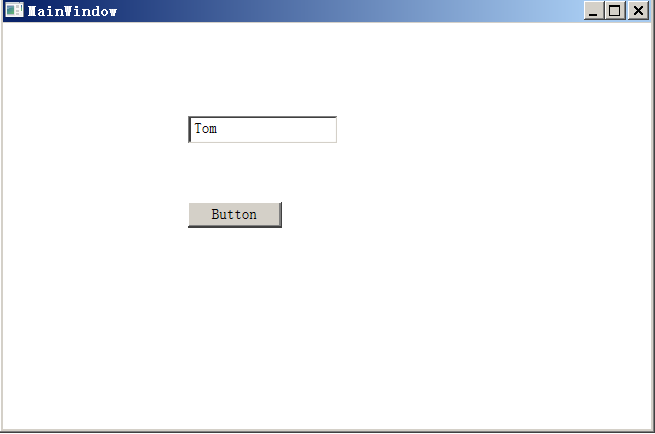
也就是说,给textbox绑定了数据源Employee对象之后,我修改了Employee对象的Name属性,但在界面上并没有显示出来,界面上显示的还是原来的初始值。
这时,可以让PropertyChanged登场了,其他都不动,只重新修改Employee.cs代码:
using System;

using System.Collections.Generic;

using System.Linq;

using System.Text;

using System.Threading.Tasks;

using System.ComponentModel;

namespace WpfAppLearning

{

    public class Employee : INotifyPropertyChanged

    {

        public event PropertyChangedEventHandler PropertyChanged;

        private string _name;

        public string Name

        {

            get

            {

                return _name;

            }

            set

            {

                _name = value;

                if (this.PropertyChanged != null)

                {

                    this.PropertyChanged.Invoke(this, new PropertyChangedEventArgs("Name"));

                }

            }

        }

    }

}
运行如下: 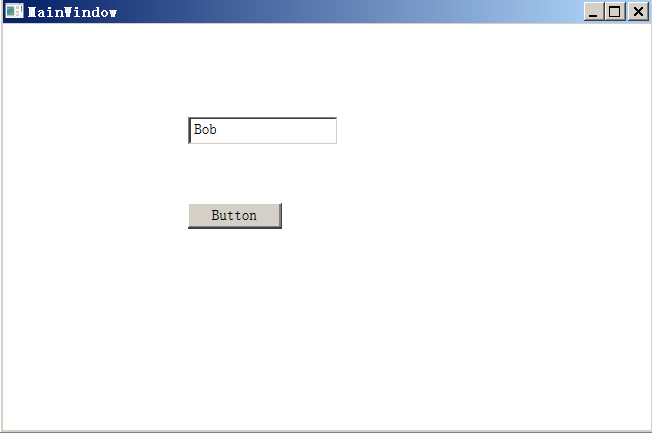
可见,只要实现了这个接口,在Name属性值改变时激发一下PropertyChanged这个event,就能使binding得到变更通知了。
显然,在创建Binding对象并将它作为数据源绑定到TextBox控件时,TextBox控件自动订阅了这个PropertyChanged event。
但它是在哪里订阅的呢?很想知道,于是...
在Reflector里查看Binding.cs的代码,从它的构造函数,到Source及Path属性的代码中都找不到订阅该event的踪影。
    public class Binding : BindingBase

    {

        public Binding()

        {

        }

        public object Source

        {

            get

            {

                WeakReference<object> weakReference = (WeakReference<object>)base.GetValue(BindingBase.Feature.ObjectSource, null);

                if (weakReference == null)

                {

                    return null;

                }

                object result;

                if (!weakReference.TryGetTarget(out result))

                {

                    return null;

                }

                return result;

            }

            set

            {

                base.CheckSealed();

                if (this._sourceInUse != Binding.SourceProperties.None && this._sourceInUse != Binding.SourceProperties.Source)

                {

                    throw new InvalidOperationException(SR.Get("BindingConflict", new object[]

                    {

                        Binding.SourceProperties.Source,

                        this._sourceInUse

                    }));

                }

                if (value != DependencyProperty.UnsetValue)

                {

                    base.SetValue(BindingBase.Feature.ObjectSource, new WeakReference<object>(value));

                    this.SourceReference = new ExplicitObjectRef(value);

                    return;

                }

                base.ClearValue(BindingBase.Feature.ObjectSource);

                this.SourceReference = null;

            }

        }

        public PropertyPath Path

        {

            [TargetedPatchingOptOut("Performance critical to inline this type of method across NGen image boundaries")]

            get

            {

                return this._ppath;

            }

            set

            {

                base.CheckSealed();

                this._ppath = value;

                this._attachedPropertiesInPath = -;

                base.ClearFlag(BindingBase.BindingFlags.PathGeneratedInternally);

                if (this._ppath == null || !this._ppath.StartsWithStaticProperty)

                {

                    return;

                }

                if (this._sourceInUse == Binding.SourceProperties.None || this._sourceInUse == Binding.SourceProperties.StaticSource)

                {

                    this.SourceReference = Binding.StaticSourceRef;

                    return;

                }

                throw new InvalidOperationException(SR.Get("BindingConflict", new object[]

                {

                    Binding.SourceProperties.StaticSource,

                    this._sourceInUse

                }));

            }

        }

    }
实际上Binding类中有一个UpdateSourceTrigger属性:
public class Binding : BindingBase

{

  [DefaultValue()]

  public UpdateSourceTrigger UpdateSourceTrigger

  {

    get

    {

        switch (base.GetFlagsWithinMask(BindingBase.BindingFlags.UpdateOnLostFocus | BindingBase.BindingFlags.UpdateExplicitly))

        {

            case BindingBase.BindingFlags.UpdateOnPropertyChanged:

                return UpdateSourceTrigger.PropertyChanged;

            case BindingBase.BindingFlags.UpdateOnLostFocus:

                return UpdateSourceTrigger.LostFocus;

            case BindingBase.BindingFlags.UpdateExplicitly:

                return UpdateSourceTrigger.Explicit;

            case (BindingBase.BindingFlags.UpdateOnLostFocus | BindingBase.BindingFlags.UpdateExplicitly):

                return UpdateSourceTrigger.Default;

        }

        Invariant.Assert(false, "Unexpected UpdateSourceTrigger value");

        return UpdateSourceTrigger.Default;

    }

    set

    {

        base.CheckSealed();

        BindingBase.BindingFlags flags = BindingBase.FlagsFrom(value);

        if (flags == BindingBase.BindingFlags.IllegalInput)

        {

            throw new InvalidEnumArgumentException("value", (int) value, typeof(UpdateSourceTrigger));

        }

        base.ChangeFlagsWithinMask(BindingBase.BindingFlags.UpdateOnLostFocus | BindingBase.BindingFlags.UpdateExplicitly, flags);

    }

  }

}
它的类型就是UpdateSourceTrigger枚举,这个枚举类型的值如下:
public enum UpdateSourceTrigger { Default, PropertyChanged, LostFocus, Explicit }
However, the default value for most dependency properties is System.Windows.Data.UpdateSourceTrigger.PropertyChanged,所以说,创建binding对象时虽然没有设置这个属性,但因为它有默认值,是PropertyChanged,如下:
//创建绑定
Binding bind = new Binding();
bind.Source = employee;
bind.Path = new PropertyPath("Name");
//bind.UpdateSourceTrigger = UpdateSourceTrigger.PropertyChanged; 这句可以省略。
这样看来,似乎已经找到根了,此时Binding对象应该知道了要监听PropertyChanged事件了,但实际上还没有具体订阅上,到底在哪里订阅上PropertyChanged事件的呢?
Debug一下,发现在创建完上面的绑定之后, employee.PropertyChanged为空,可见,此时还未订阅。
employee.PropertyChanged
null
当向下执行完this.txt1.SetBinding(TextBox.TextProperty, bind) 这句后, employee.PropertyChanged不为空了,说明此时已经订阅上了。
employee.PropertyChanged
{Method = {Void OnPropertyChanged(System.Object, System.ComponentModel.PropertyChangedEventArgs)}}
base {System.MulticastDelegate}: {Method = {Void OnPropertyChanged(System.Object, System.ComponentModel.PropertyChangedEventArgs)}}
看看这个this.txt1.SetBinding的Reflector代码,实际上还是调用的BindingOperations类的SetBinding方法。
[RuntimeNameProperty("Name"), UsableDuringInitialization(true), StyleTypedProperty(Property="FocusVisualStyle", StyleTargetType=typeof(Control)), XmlLangProperty("Language")]

public class FrameworkElement : UIElement, IFrameworkInputElement, IInputElement, ISupportInitialize, IHaveResources, IQueryAmbient

{

  public BindingExpressionBase SetBinding(DependencyProperty dp, BindingBase binding)

  {

    return BindingOperations.SetBinding(this, dp, binding);

  }

}
BindingOperations类的SetBinding方法代码如下:
using MS.Internal.Data;

using System;

using System.Collections;

using System.Collections.Generic;

using System.Collections.ObjectModel;

using System.Runtime;

namespace System.Windows.Data

{

        public static BindingExpressionBase SetBinding(DependencyObject target, DependencyProperty dp, BindingBase binding)

        {

            if (target == null)

            {

                throw new ArgumentNullException("target");

            }

            if (dp == null)

            {

                throw new ArgumentNullException("dp");

            }

            if (binding == null)

            {

                throw new ArgumentNullException("binding");

            }

            BindingExpressionBase bindingExpressionBase = binding.CreateBindingExpression(target, dp);

            target.SetValue(dp, bindingExpressionBase);

            return bindingExpressionBase;

        }

}
再跳进去查,还是没有发现具体订阅的代码,看来还藏得够隐蔽的!算了,不查了,以后再说。
2013/9/3 补充,之所以找不到显式的事件订阅,可能是使用了weakreference来实现更加高明的订阅,学习中。
WPF学习总结1:INotifyPropertyChanged接口的作用的更多相关文章
- C#学习笔记(17)——C#中接口的作用
说明(2017-7-17 23:50:48): 原文: 接口的作用 接口的作用(C#)(另一篇) C#接口是一个让很多初学C#者容易迷糊的东西,用起来好像很简单,定义接口,里面包含方法,但没有方法具体 ...
- 深入浅出分析C#接口的作用
1.C#接口的作用 :C#接口是一个让很多初学C#者容易迷糊的东西,用起来好像很简单,定义接口,里面包含方法,但没有方法具体实现的代码,然后在继承该接口的类里面要实现接口的所有方法的代码,但没有真正认 ...
- C#接口的作用详解
.C#接口的作用 : C#接口是一个让很多初学C#者容易迷糊的东西,用起来好像很简单,定义接口,里面包含方法,但没有方法具体实现的代码,然后在继承该接口的类里面要实现接口的所有方法的代码,但没有真正认 ...
- INotifyPropertyChanged接口的实现
何时实现INotifyPropertyChanged接口 官方解释:INotifyPropertyChanged 接口用于向客户端(通常是执行绑定的客户端)发出某一属性值已更改的通知.官方解释的很模 ...
- INotifyPropertyChanged接口的详细说明
在windows phone开发8.1:数据绑定中,我们了解了数据绑定的基本知识.今后几篇文章会继续深入了解数据绑定.今天我们来看在数据绑定中十分重要的INotifyPropertyChanged接口 ...
- WPF学习笔记:(二)数据绑定模式与INotifyPropertyChanged接口
数据绑定模式共有四种:OneTime.OneWay.OneWayToSource和TwoWay,默认是TwoWay.一般来说,完成数据绑定要有三个要点:目标属性是依赖属性.绑定设置和实现了INotif ...
- [译]WPF MVVM 架构 Step By Step(5)(添加actions和INotifyPropertyChanged接口)
应用不只是包含textboxs和labels,还包含actions,如按钮和鼠标事件等.接下来我们加上一些像按钮这样的UI元素来看MVVM类怎么演变的.与之前的UI相比,这次我们加上一个"C ...
- 转载:WPF MVVM之INotifyPropertyChanged接口的几种实现方式
原文地址:http://www.cnblogs.com/xiwang/ 序言 借助WPF/Sliverlight强大的数据绑定功能,可以比实现比MFC,WinForm更加优雅轻松的数据绑定.但是在使用 ...
- WPF MVVM之INotifyPropertyChanged接口的几种实现方式(转)
原地址:https://www.cnblogs.com/xiwang/archive/2012/11/25/2787358.html 序言 借助WPF/Sliverlight强大的数据绑定功能,可以比 ...
随机推荐
- 通过16道练习学习Linq和Lambda
http://kb.cnblogs.com/page/73528/ 1. 查询Student表中的所有记录的Sname.Ssex和Class列. select sname,ssex,class fro ...
- GDB 反向调试(Reverse Debugging)
这个挺有意思 http://blog.csdn.net/CherylNatsu/article/details/6436570 使用调试器时最常用的功能就是step, next, continue,这 ...
- OpenERP7测试手记之 - EMail配置 转
转自http://blog.sina.com.cn/s/blog_6d5929a00101b74y.html 在OpenERP中进行Email配置要注意以下几点: 1.如下面两个图,公司的“电子邮件” ...
- CentOS静默安装Oracle 11gR2(x64)
环境 OS: CentOS 7.4; hosts: L134; IP: 192.168.1.134 DB: linux.x64_11gR2_database 安装依赖包 yum install -y ...
- IF函数
语法:IF(logical_test,value_if_true,value_if_false) logical_test:表示计算结果为 TRUE 或 FALSE 的任意值或表达式 value_if ...
- django之创建第7-5-第二种传值方式(time/1232/xiaodneg)
1.修改views文件 def foo(request,myID,myName): t = loader.get_template("foo.html") user = {&quo ...
- sevlet的url-pattern设置
url-pattern的值,表示访问对应servlet的地址: 默认servlet的访问路径:http://localhost:8080/项目名称/Sevlet名称 如果不使用这种方式的话,可以使用自 ...
- Ubuntu18.04下编译安装Guitarix 0.37.3
准备工作 源文件下载 https://sourceforge.net/projects/guitarix/files/guitarix/ 安装依赖. 参考 https://sourceforge.ne ...
- android.database.sqlite.SQLiteException: near "FROM"
07-20 00:19:30.496: E/JavaBinder(6807): *** Uncaught remote exception! (Exceptions are not yet su ...
- CentOS vps下,安装xfce/KDE/GNOME桌面+vncserver进行远程管理
CentOS vps下,安装xfce/KDE/GNOME桌面+vncserver进行远程管理 首先安装桌面环境,我选择的是xfce,轻量级桌面,小巧实用不占太多内存,(占用内存方面,xfce少于kde ...