
[翻译] TLTagsControl
TLTagsControl

https://github.com/ali312/TLTagsControl#tltagscontrol
A nice and simple tags input control for iOS.
You are able to easily setup different colors for control elements and set different displaying modes
一个简单的便签控件.
你可以很容易的给便签设置不同的颜色或者是不同的显示样式.
Switching between displaying modes
在不同的样式中切换
You are able to switch between displyaing modes by setting the mode property
你可以用mode属性来设置便签的显示样式.
@property (nonatomic) TLTagsControlMode mode;TLTagsControl has two displaying modes
TLTagsControl有两种显示样式
TLTagsControlModeEdit,
This mode allows user to input new tags and delete tags that are already presented.
In this mode control will look like below:
一种有取消"x"标志的样式,看起来效果如下:

TLTagsControlModeList,
This mode allows only listing of already presented tags
In this mode control will look like below:
一种是纯粹显示文本的效果,如下:

Setting different colors of control elements
You are able to change colors of different element by setting these prperties
你可以设置这个控件不同元素上面的颜色,比如字体颜色,背景色等
@property (nonatomic, strong) UIColor *tagsBackgroungColor;

@property (nonatomic, strong) UIColor *tagsTextColor;

@property (nonatomic, strong) UIColor *tagsDeleteButtonColor;
Applying changes
To apply your changes you should call the method below
如果要执行变化,请调用以下方法.
- (void)reloadTagSubviews;
Example:
//assuming tagControl will be set initialized from stroryboard

@interface ViewController ()

@property (nonatomic, strong) IBOutlet TLTagsControl *tagControl;

@end

....

@implementation ViewController

- (void)viewDidLoad {

  [super viewDidLoad];

  UIColor *blueBackgroundColor = [UIColor colorWithRed:75.0/255.0 green:186.0/255.0 blue:251.0/255.0 alpha:1];

  UIColor *whiteTextColor = [UIColor whiteColor];

  self.tagControl.tagsBackgroungColor = blueBackgroundColor;

  self.tagControl.tagsDeleteButtonColor = whiteTextColor;

  self.tagControl.tagsTextColor = whiteTextColor;

  self.tagControl.mode = TLTagsControlModeList;

  [self.tagControl reloadTagSubviews];

}

@end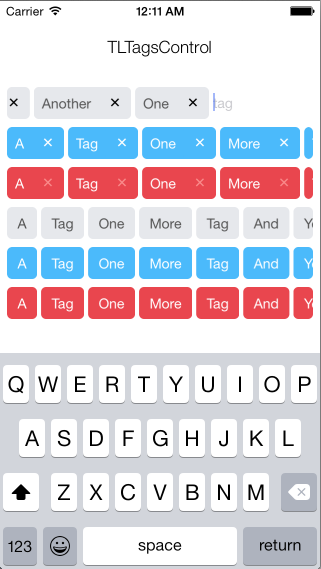
[翻译] TLTagsControl的更多相关文章
- 《Django By Example》第五章 中文 翻译 (个人学习,渣翻)
书籍出处:https://www.packtpub.com/web-development/django-example 原作者:Antonio Melé (译者@ucag注:大家好,我是新来的翻译, ...
- 《Django By Example》第四章 中文 翻译 (个人学习,渣翻)
书籍出处:https://www.packtpub.com/web-development/django-example 原作者:Antonio Melé (译者注:祝大家新年快乐,这次带来<D ...
- [翻译]开发文档:android Bitmap的高效使用
内容概述 本文内容来自开发文档"Traning > Displaying Bitmaps Efficiently",包括大尺寸Bitmap的高效加载,图片的异步加载和数据缓存 ...
- 【探索】机器指令翻译成 JavaScript
前言 前些时候研究脚本混淆时,打算先学一些「程序流程」相关的概念.为了不因太枯燥而放弃,决定想一个有趣的案例,可以边探索边学. 于是想了一个话题:尝试将机器指令 1:1 翻译 成 JavaScript ...
- 《Django By Example》第三章 中文 翻译 (个人学习,渣翻)
书籍出处:https://www.packtpub.com/web-development/django-example 原作者:Antonio Melé (译者注:第三章滚烫出炉,大家请不要吐槽文中 ...
- 《Django By Example》第二章 中文 翻译 (个人学习,渣翻)
书籍出处:https://www.packtpub.com/web-development/django-example 原作者:Antonio Melé (译者注:翻译完第一章后,发现翻译第二章的速 ...
- 《Django By Example》第一章 中文 翻译 (个人学习,渣翻)
书籍出处:https://www.packtpub.com/web-development/django-example 原作者:Antonio Melé (译者注:本人目前在杭州某家互联网公司工作, ...
- 【翻译】Awesome R资源大全中文版来了,全球最火的R工具包一网打尽,超过300+工具,还在等什么?
0.前言 虽然很早就知道R被微软收购,也很早知道R在统计分析处理方面很强大,开始一直没有行动过...直到 直到12月初在微软技术大会,看到我软的工程师演示R的使用,我就震惊了,然后最近在网上到处了解和 ...
- ASP.NET MVC with Entity Framework and CSS一书翻译系列文章之第一章:创建基本的MVC Web站点
在这一章中,我们将学习如何使用基架快速搭建和运行一个简单的Microsoft ASP.NET MVC Web站点.在我们马上投入学习和编码之前,我们首先了解一些有关ASP.NET MVC和Entity ...
随机推荐
- Git学习系列之Git基本操作克隆项目(图文详解)
不多说,直接上干货! 想必,能进来看我写的这篇博文的朋友,肯定是了解过. 比如SVN的操作吧,最常见的是 检出(Check out ...), 更新 (Update ...), 以及 提交(Commi ...
- eclipse中提示js或者JQuery代码
当你在eclipse中的JSP中写JavaScript或者JQuery代码的时候,eclipse是不会自动提示的,所以你需要在eclipse中安装一下插件,该插件的名字叫:Spket IDE,它可以作 ...
- canvas猜数游戏
<!DOCTYPE html> <html lang="en"> <head> <meta charset="UTF-8&quo ...
- CentOS6.4安装OpenSSL
1.下载 wget https://www.openssl.org/source/openssl-1.0.2h.tar.gz 2.解压 tar zxf openssl-1.0.2h.tar.gz cd ...
- [作业] Python入门基础--用户登陆
让用户输入用户名密码 认证成功后显示欢迎信息 输错三次后锁定登陆 #__author:Mifen #date: 2018/11/28 import time #自定义本地用户名和密码 user_nam ...
- FocusBI: 微软商业智能教程目录介绍(原创)
关注微信公众号:FocusBI 查看更多文章:加QQ群:808774277 获取学习资料和一起探讨问题. <商业智能教程>pdf下载地址 链接:https://pan.baidu.com/ ...
- Shell 编程-常见的文件处理命令
touch 命令 touch命令用于创建空文件,例如有时应用程序希望在它们写入数据之前,某个日志文件就已经存在.这时可用touch命令创建一个空文件:touch test1:touch命令还可以用来改 ...
- webstorm中sass编译时目录或内容包含中文字符报错
ruby版本:ruby 2.3.1p112 (2016-04-26 revision 54768) [x64-mingw32] sass版本:Sass 3.4.22 (Selective Steve) ...
- 转【js & jquery】遮罩层实现禁止a、span、button等元素的鼠标事件
/*遮罩层代码 作用:通过遮罩层的方式防止表单提交次数过多 */ function MaskIt(obj){ var hoverdiv = '<div class="divMask&q ...
- Kinect1驱动 PCL OpenCV ROS 安装
1. OpenCV安装 1)在终端安装依赖项sudo apt-get install build-essential libgtk2.0-dev libjpeg-dev libtiff4-dev li ...